
Fundamentals of Database Systems
Learn the Basics of Database Systems

What is Data?
Representation of facts, concepts, or instructions in a formalized manner that should be suitable for communication, interpretation, or processing by a human or electronic machine.
What is Information?
Data is organized, classified, or presented to make them meaningful or useful value for the receiver.
# Information to be meaningful the processed data must qualify for the following characters.
- Timely - information should be available when required.
- Accuracy -information should be accurate.
- Completeness -information should be complete.
# Information is;
- Contextualized: We know for what purpose the data was gathered.
- Categorized: We know the units of analysis of key components of data.
- Calculated: The data may have been analyzed mathematically or statistically.
- Corrected: Errors have been removed from the data.
- Condensed: The data may have been summarized in a more concise form.
What is a Database?
A database is a collection of information that is organized so that it can be easily accessed, managed, and updated.
- end-user data-raw facts of interests to the end-user
- meta data-data about data
Database Properties
- Represents some aspects of the real world. (mini world or the universe of discourse)
- A database is a logically coherent collection of data with some inherent meaning.
- A database is designed, built, and populated with data for a specific purpose.
DBMS-Data Base Management System
DBMS is a collection of programs that enables users to create and maintain a database. It provides an environment that is both convenient and efficient to use.
Database + DBMS = Database System
# DBMS facilitates the process of,
Defining- A database involves specifying the data types, structures, and constraints for the data to be stored in the database.
Constructing- The database is the process of storing the data itself on some storage, medium that is controlled by the DBMS.
Manipulating- A database includes such as querying the database to retrieve specific data, updating the database to reflect changes in the mini-world, and generating reports from the data.
Applications of DBMS
- Banking- All transactions
- Airlines- Reservations, schedules
- Universities- Registrations, grades
- Sales- Customers, products, purchase
- Manufacturing- Production, inventory, orders, supply chain
Purpose of Database System
In early days database applications were built on top of the file systems.
# Drawbacks of using file systems to store data,
- Data redundancy and inconsistency — multiple file-formats, duplication of information in different files.
- Difficulty in accessing data — need to re-write programs to carry out new tasks.
- Data isolation
- Integrity problems — hard to add or change constraints.
- Atomicity of updates — failures may leave the database in an inconsistent state with partial updates carried out.
- Concurrent access from multiple users.
- Security problems.
Benefits of the database approach
- Potential for enforcing standards — defined for names and formats of data elements, display formats, report structure, terminology, etc.
- Reduced application development time — development time using a DBMS is estimated to be one-sixth to one-fourth of that for a traditional file system.
- Flexibility — easy to change the structure of a database as requirements change.
- Availability of up to date information.
When not to use DBMS.
- When there are overhead costs of using DBMS
- High initial investments in hardware, software, and training
- The overhead for providing security, concurrency control, recovery, and integrity functions.
- When there are additional costs
- If database designers and database administrators do not properly design the database.
- If database systems applications are not implemented properly.
Use regular files under the following circumstances.
- The database and application are simple, well defined, and do not expect to change.
- There are stringent real-time requirements for some programs that may not be met because of DBMS overhead.
- Multiple users' access to data is not required.
Data Dictionary
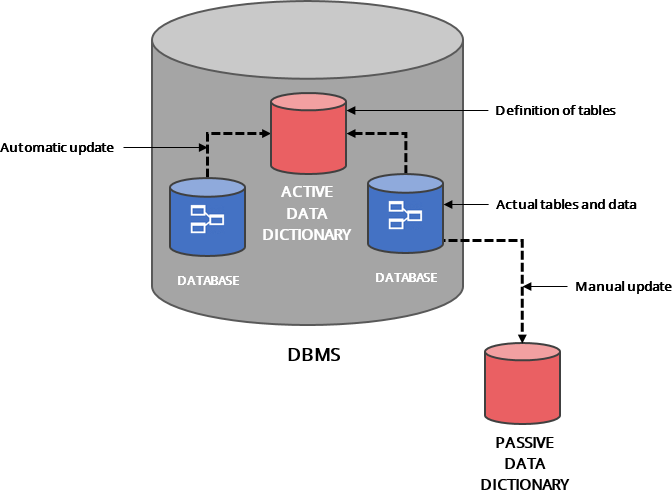
A data dictionary contains metadata i.e data about the database. All well-designed database will include a data dictionary.
DBMS checks the data dictionary every time the database is accessed.
There are two types of data dictionaries.
- ACTIVE (integrated data dictionary)
- PASSIVE(non-integrated data dictionary)
Advantages of Data Dictionary
- A database can be clearly defined with the name of data elements, their descriptions, and data structures.
- When a new user is introduced to the system, identifying table structure and types become simple.
Levels of Abstraction
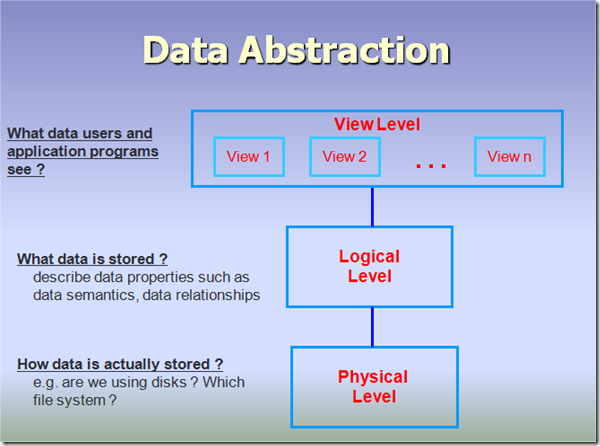
- View Level — Application programs hide details of data types.
- Logical Level — Describes data stored in the database and relationships among the data.
- Physical Level — Describes how a recorded stored.
Data Independence
Data independence is the ability to make changes to data characteristics without having to make changes to the programs that access the data. It’s important because of the savings in time and potential errors caused by reducing modifications to data access software.
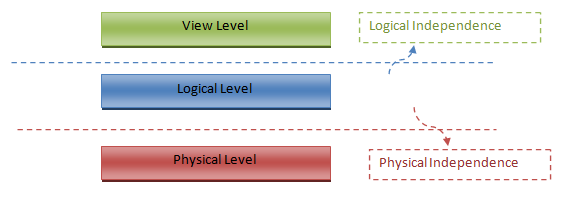
- Logical Data Independence - Protection from changes in the logical structure of data
- Physical Data Independence - Protection from changes in the physical structure of data