
Fundamental Analysis of Stocks using Python
Technical analysis and fundamental analysis are the two main techniques to analyse any financial market. Technical analysis looks at the trends and patterns in the past data whereas the fundamental analysis looks at the economic and financial factors of a company.
In this article we shall be performing the fundamental analysis of some of the stocks programmatically. To check out on the technical analysis, refer to this blog: Beginners Guide to Technical Analysis in Python for Algorithmic Trading
Before jumping into the Python code let us first touch upon the basics of fundamental analysis and web scraping.
WHAT IS FUNDAMENTAL ANALYSIS?
Fundamental analysis guides us in reaching a decision point on whether a particular company’s stock is worth buying or not and if its stock price has the right valuation. To perform this analysis it uses the company level factors such as the company’s market capitalization, balance sheet, profit/loss statement, shareholder pattern, cash flow etc
Most of the information required for the fundamental analysis is directly available on various websites. In this article, we will be picking one such webpage from where this information shall be scraped and used to perform the fundamental analysis.
WEB SCRAPING
Copying the data manually from the website is a cumbersome task. Web scraping is a technique that automates this process by extracting data from a website or an online source. Once the required data is pulled from the website it can then be used to perform any kind of data analysis or data manipulation activity.
In this article we will be using ‘Beautiful Soup’ which is a Python package for pulling data from HTML and XML files. It creates a parse tree of the complex HTML document which is then used to read the data.
Refer to this page to get an overview of Beautiful Soup.
Steps involved in web scraping
STEP 1: Identify the url to pull the data
STEP 2: Inspect the page to understand its HTML structure
STEP 3: Write the code to pull the required data from the HTML
Scraping data from other websites
A note of caution on using other websites for web scraping. Please ensure that only publicly available data is scraped.
In order to control the traffic, some websites define the robots.txt file. This gives an indication on the urls that should not be used for web scraping from that particular website. For more details on robots.txt, refer here.
LET’S SCRAPE IT!!
With most of the data required for fundamental analysis directly available on the web, it is easer to scrape this information and use it for further analysis.
In this article we will be considering stocks from the NSE and using the webpage from screener.in to extract the fundamental details of a particular stock. Same logic can be applied for any of the other webpages as well. The code might require minor changes to align with the html structure of that webpage.
The intention of this article is to provide the starter code for someone to quickly get onboard with their own analysis strategy. Hence the scope is limited to fetching some of the basic information and on applying a simple BUY/WAIT strategy.
FETCHING THE FUNDAMENTAL DATA
For this analysis we will be considering the following IT stocks from the National Stock Exchange (NSE): INFY, HCLTECH, LTI, TCS, LTTS, WIPRO
Infosys — Fetch the market cap using web scraping
As an example let us try to extract the market cap for the Infosys stock from the screener webpage using the 3 steps outlined earlier.
STEP 1: Identify the url to pull the data
URL: https://www.screener.in/company/INFY
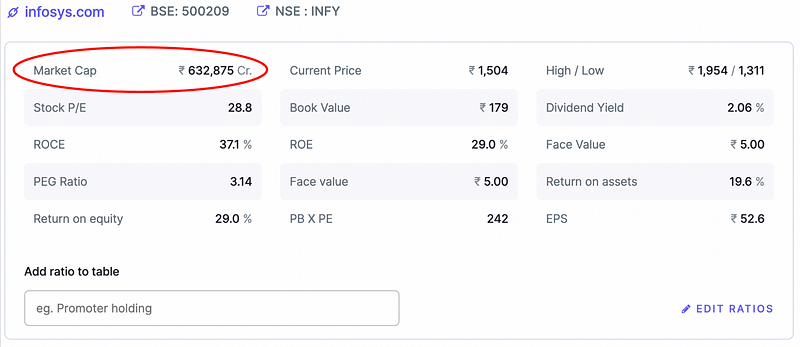
STEP 2: Inspect the page to understand its HTML structure
Using the browser inspect the page (right click on the page and choose inspect option). The HTML structure of the page can be studied here.
For this example, the HTML page looks like below.
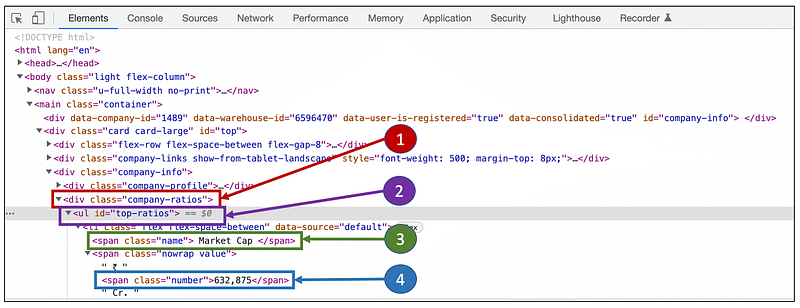
As seen in the HTML structure, the market cap is present within the div class “company-ratios”. Inside this class, it is inside an ul-element (Unordered List Element) with id “top-ratios”. Inside this the market cap is available as a simple span element.
STEP 3: Write the code to pull the required data from the HTML
Using the beautiful soup package, the contents of the given url can be read into a tree object. It can then be traversed till we reach the required data.
Using the below code, the market cap of the Infy stock can be extracted from screener’s webpage.
Output:

Fetching other fundamental details of stocks
The other parameters of the stock can also be fetched with a similar approach. This can be repeated for any number of stocks. Here we have fetched the data for 6 different IT stocks.
Adding the complete code here will make the article too verbose. Please refer to the repository mentioned at the end of the article to get the access to the complete code.
Below table is a summary of the fundamental data extracted for the 6 IT stocks.
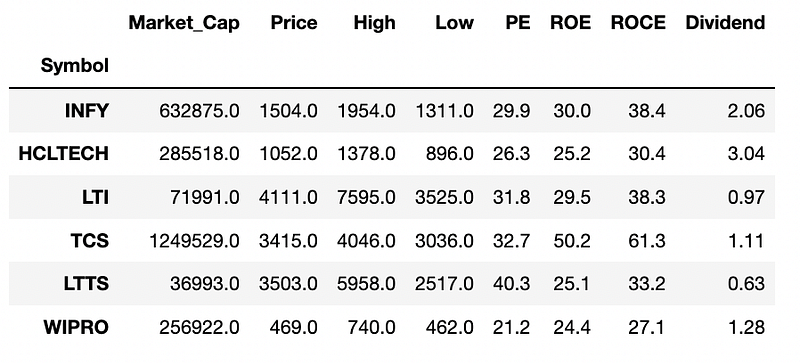
Here is a quick guide on the extracted data:
- Market_Cap — the total market value of the company’s outstanding shares
- Price — the current market price of the share
- High — 52-week high of the share
- Low — 52-week low of the share
- PE — Price to Earnings ratio
- ROE — Return on Equity
- ROCE — Return on Capital Employed
- Dividend — Dividend yield of the company
ANALYSING THE STOCKS
Once the data is fetched, it is time to explore the data.
As an example, the market capitalization of the different IT stocks are compared.
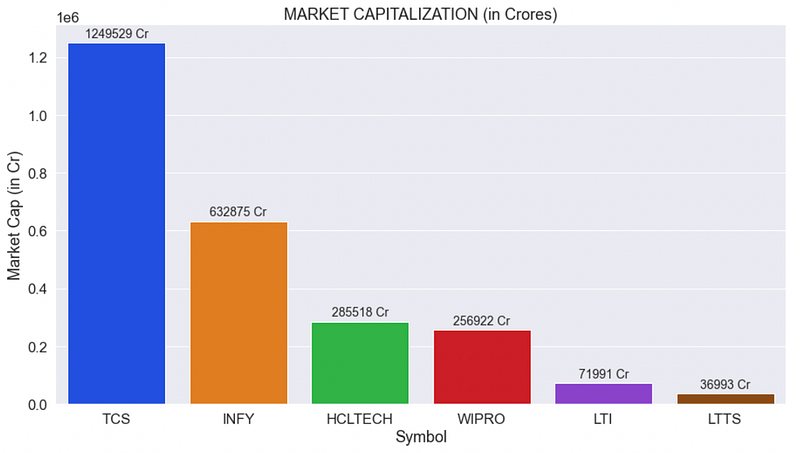
The market cap of Infy is almost half of TCS. L&T Technology Services (LTTS) has the lowest market cap amongst the 6 stocks under consideration.
COMPARING STOCKS OF THE SAME SECTOR
Fundamental analysis is normally used to compare the stocks of the same sector. The PE ratio, ROE and ROCE are some of the common parameters used for comparison.
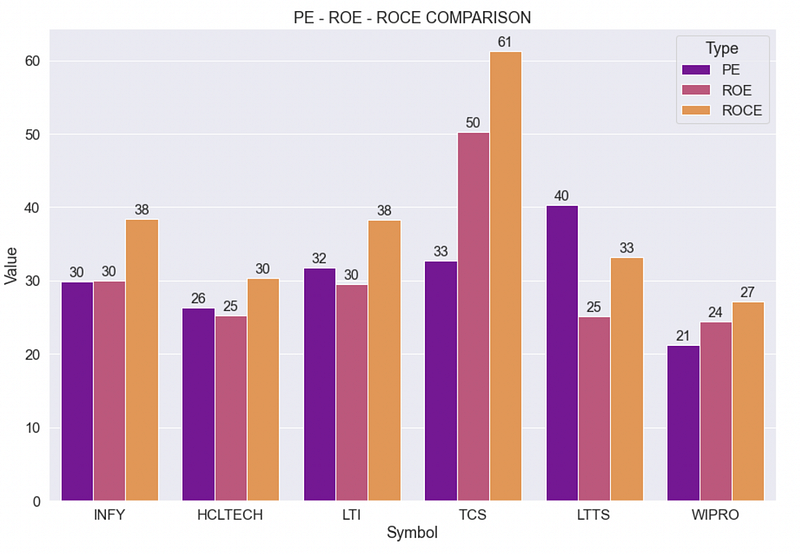
PE — Price-to-Earnings Ratio: It measures the current share price relative to its earnings per share
ROE — Return on Equity: It is the ratio of net income to the shareholder equity.
ROCE — Return on Capital Employment: ROCE is the ratio of the operating profits of a company to its total capital employed.
PE + ROE + ROCE:
- PE ratio is normally not used in isolation. It is either compared with other companies from the same industry (Eg: PE of INFY is compared with the PE of HCL, LTI, TCS etc) or compared with the industry PE (PE of Infy is compared with PE of IT sector)
- Higher PE indicates that the stock is priced highly. Lower PE indicates a good investment opportunity (provided the other fundamentals of the company is good)
- High ROE indicates that the company is good in converting its earnings into profits.
- A higher ROCE indicates that the company is generating higher returns for the debt holders than for the equity holders. The higher the value of the ROCE ratio, the better are the chances of profits.
- ROE considers the returns from equity shareholder’s point of view only whereas ROCE considers the debt and other liabilities as well. This provides a better indication of financial performance for companies with significant debt.
- If the ROCE value is higher than the ROE value, it implies that the company is efficiently using its debts to reduce the cost of capital.
- Mr. Warren Buffet, one of the most successful investors of the 20th century, prefers companies where the ROE and ROCE values are almost close to each other and both are above 20%
CREATING CUSTOM-MADE STRATEGIES
It is also possible to apply our own strategies on the fundamental data to decide whether to buy a stock or not.
Profit-Loss Strategy
This is one of the strategies in which the profit/loss data from the past ‘n’ years of a company’s is used along with its current market price to check whether it is a worthy stock to buy now or not. This is how the strategy works
BUY if:
- Net profit for the company has been increasing consistently in the last few years
- Current market price is atleast 10% below the 52-week high (stock is not trading around its all time high)
Applying this strategy by considering the net profit in the last 3 years gives the below recommendations for the 6 IT stocks under consideration.
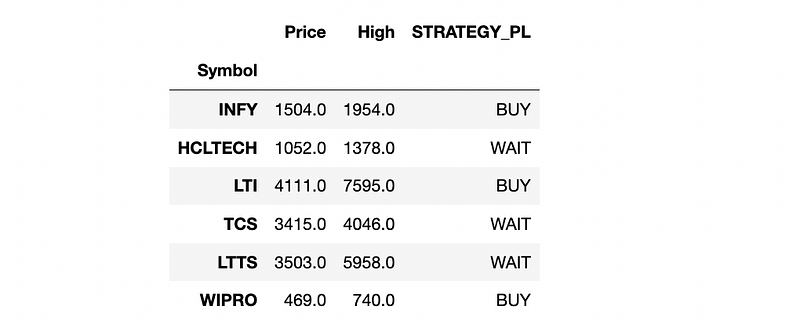
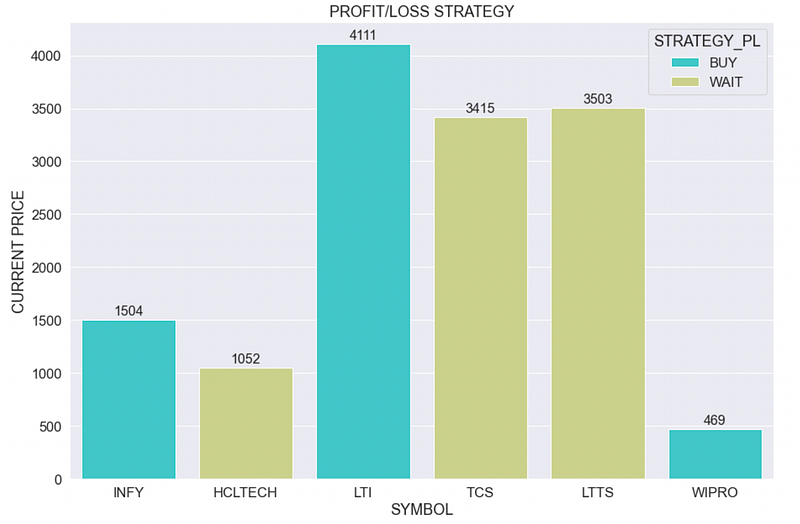
Below are the details of the net profit in the last 3 years along with the stock’s current price and 52-week high for INFY and HCLTECH
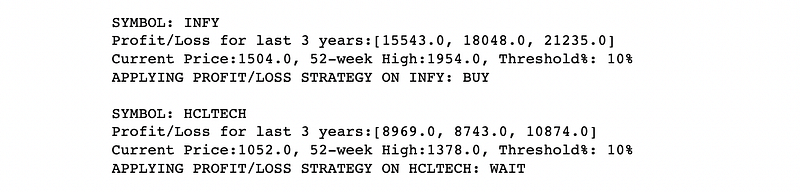
By applying this strategy, there is a buy recommendation for Infy, LTI and Wipro stocks, which implies that they have shown a consistent raise in their net profits in the last 3 years.
PUTTING THEM TOGETHER
Refer to the following github repo to get access to the complete code used to scrape the web and perform the fundamental analysis, : Fundamental Analyzer
This is only the starter code to help you get on-board quickly. Use it at your own discretion to experiment with other stocks, to fetch more data and apply your own strategies on them.
Final Words….
In this article, we covered only one strategy to make the BUY/WAIT recommendation. Similarly other strategies (fundamental or technical) can be implemented for a particular stock. The consolidated results from all the strategies can be used to make the final BUY/WAIT/SELL decision.
Hope this article helped you in getting a basic understanding on performing the fundamental analysis of a stock and to implement it in Python. Do try it out with other stocks and other strategies.
Happy Learning & Happy Trading!!
IF “PYTHON+TRADING” FASCINATES YOU THEN CHECK THESE OUT…
- Beginner’s Guide to Technical Analysis in Python for Algorithmic Trading
- Building a Basic Crypto Trading Bot in Python
- Automated Triangular Arbitrage of Cryptos in 4 steps
- Identifying Trading Patterns — Behavioural Analysis of Traders
- Fundamental Analysis of Stocks using Python [you are here]
- Crypto & Stock: Daily Price Prediction using ML algorithms


