avatarZhimin Zhan

Free AI web copilot to create summaries, insights and extended knowledge, download it at here

3409

Abstract

he test</li></ul><p id="4135"><b>Refactoring Steps in TestWise</b></p><ol><li>Choose the function (by moving the caret to its definition)</li><li>Invoke refactoring (and preview)</li><li>Confirm to apply the refactoring</li></ol><p id="cf68"><b>Expected Result</b></p><ul><li>The function definition is now moved to the shared test helper file</li></ul><p id="ccfb">After a function is moved to the helper, you may use it in other tests.</p><p id="deb3"><b>Confirmation Dialog</b></p><figure id="274b"><img src="https://cdn-images-1.readmedium.com/v2/resize:fit:800/1*t52drWg2wwQvxzfNv3kr1w.png"><figcaption>Move to Helper dialog</figcaption></figure><p id="a629"><b>Sample Tests (after)</b></p><p id="86d9">The <code>login</code> functions in TestScript#10 and TestScript#20 are deleted. A new function is added to the test helper.</p><div id="0b6d"><pre><span class="hljs-meta"># test_helper</span></pre></div><div id="f7df"><pre><span class="hljs-keyword">def</span> <span class="hljs-title function_">login</span>(<span class="hljs-params">user_name, password</span>) <span class="hljs-comment"># ...</span> <span class="hljs-keyword">end</span></pre></div><p id="403b"><b>Demonstration (animated GIF) </b>The test script file in the sample project: <code>spec/login_spec.rb</code></p><ol><li>Move a function (from a test) to the test helper Firstly, move the caret to the function name, then apply this refactoring.</li></ol><figure id="e53d"><img src="https://cdn-images-1.readmedium.com/v2/resize:fit:800/1*RIk_OkXLDge1mK7U1qULMg.gif"><figcaption></figcaption></figure><p id="76ff">2. Use an already-defined function in the test helper</p><figure id="03e7"><img src="https://cdn-images-1.readmedium.com/v2/resize:fit:800/1*xwb7Zx6TKsK4eruV7UULcA.gif"><figcaption></figcaption></figure><p id="a8ee">3. You can quickly navigate to the definition of a function from tests, press “Ctrl+B” (or Cmd +B on macOS) on the function name.</p><figure id="6f51"><img src="https://cdn-images-1.readmedium.com/v2/resize:fit:800/1*Fgs4QUZ6DssHuAJwEs9hFw.gif"><figcaption></figcaption></figure><p id="e60c"><b>Demonstration (Video)</b></p><ol><li>Move functions to the shared test helper</li></ol> <figure id="85c5"> <div> <div> <img class="ratio" src="http://placehold.it/16x9"> <iframe class="" src="https://cdn.embedly.com/widgets/media.html?src=https%3A%2F%2Fwww.youtube.com%2Fembed%2FOEN1bSw32T8%3Ffeature%3Doembed&amp;display_name=YouTube&amp;url=https%3A%2F%2Fwww.youtube.com%2Fwatch%3Fv%3DOEN1bSw32T8&amp;image=https%3A%2F%2Fi.ytimg.com%2Fvi%2FOEN1bSw32T8%2Fhqdefault.jpg&amp;key=a19fcc184b9711e1b4764040d3dc5c07&amp;type=text%2Fhtml&amp;schema=youtube" allowfullscreen="" frameborder="0" height="480" width="640"> </div> </div> </figure></iframe></div></div></figure><p id="3166">2. Use the functions in the shared test helper</p> <figure id="9c8b"> <div> <div> <img class="ratio" src="http://placehold.it/16x9"> <iframe class="" src="https://cdn.embedly.com/widgets/media.html?src=https%3A%2F%2Fwww.youtube.com%2Fembed%2FEw8GonY3U0U%3Ffeature%3Doembed&amp;display_name=YouTube&amp;url=https%3A%2F%2Fwww.youtube.com%2Fwatch%3Fv%3DEw8GonY3U0U&amp;image=https%3A%2F%2Fi.ytimg.com%2Fvi%2FEw8GonY3U0U%2Fhqdefault.jpg&amp;key=a19fcc184b9711e1b47640

Options

40d3dc5c07&type=text%2Fhtml&schema=youtube" allowfullscreen="" frameborder="0" height="480" width="640"> </div> </div> </figure></iframe></div></div></figure><p id="4c6d">3. Navigate to the function definition from tests.</p> <figure id="9e87"> <div> <div> <img class="ratio" src="http://placehold.it/16x9"> <iframe class="" src="https://cdn.embedly.com/widgets/media.html?src=https%3A%2F%2Fwww.youtube.com%2Fembed%2FZj17M2cEC0Q%3Ffeature%3Doembed&amp;display_name=YouTube&amp;url=https%3A%2F%2Fwww.youtube.com%2Fwatch%3Fv%3DZj17M2cEC0Q&amp;image=https%3A%2F%2Fi.ytimg.com%2Fvi%2FZj17M2cEC0Q%2Fhqdefault.jpg&amp;key=a19fcc184b9711e1b4764040d3dc5c07&amp;type=text%2Fhtml&amp;schema=youtube" allowfullscreen="" frameborder="0" height="480" width="640"> </div> </div> </figure></iframe></div></div></figure><p id="d04a"><b>Benefits</b></p><ul><li><b>Reusable</b> A function in the shared test helper is usable in all test scripts</li><li><b>DRY</b> (Don’t Repeat Yourself) The definition of a test operation (e.g. login, logout) only exists at one place, i.e. the shared test helper.</li><li><b>Auto-completable </b> The functions in the test helper are available to all test scripts. In a functional testing IDE, these reusable functions maybe auto-completable, like below.</li></ul><figure id="d091"><img src="https://cdn-images-1.readmedium.com/v2/resize:fit:800/1*8xUppFma6OYEMgee7lGhMw.png"><figcaption></figcaption></figure><p id="9097"><i>This will not only increase efficiency but also reduce duplications (other testers might create similar methods).</i></p><p id="2046"><b>Q & A</b></p><ul><li>How to make the functions defined in <code>test_helper.rb</code> automatically available to all test scripts?</li></ul><p id="00af">All test scripts (based on the test template) load the test helper, at the first line.</p><div id="ed67"><pre>load File.<span class="hljs-built_in">dirname</span>(FILE) + <span class="hljs-string">'/../test_helper.rb'</span></pre></div><div id="1fa5"><pre>describe <span class="hljs-string">"Passenger"</span> <span class="hljs-keyword">do</span> <span class="hljs-keyword">include</span> <span class="hljs-title class_">TestHelper</span></pre></div><div id="55b9"><pre> <span class="hljs-meta"># ...</span></pre></div><div id="278c"><pre><span class="hljs-keyword">end</span></pre></div><p id="6033"><b>Exercises</b></p><p id="9c0f"><i>Prerequisite</i>: two functions <code>login</code> and <code>logoff</code> exist in login_spec.rb, created by Extract to Function refactoring.</p><ul><li>Move <code>login</code> function in <b>login_spec.rb</b> to the helper, via the Refactoring menu item</li><li>Move <code>logoff</code> function in <b>login_spec.rb</b>, via keyboard shortcut</li><li>Inspect these two functions in <b>test_helper.rb</b></li><li>Use <code>login</code> function in another test script file, using auto-complete: type <code>lo</code> then press Ctrl+Space key.</li><li>Navigate to the definition of a function quickly. Move the caret of the function name in a test script, then press Ctrl + B key.</li></ul><p id="833d"><b>Related Refactorings</b></p><ul><li><a href="https://zhiminzhan.medium.com/functional-test-refactoring-extract-function-5572554c0677">Extract Function</a></li></ul></article></body>

Functional Test Refactoring: Move to Helper

Make a helper function available to all test scripts
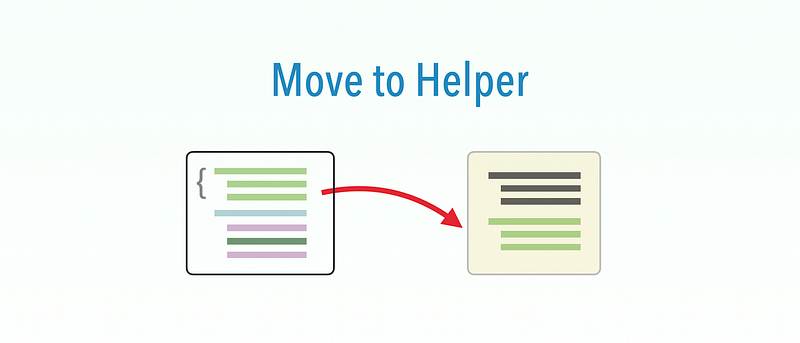
This is one of the 6 Functional Test Refactorings (see the introduction here):

The structure of this article is the same as “Extract Function” (see detail there). The same test project that helps you do refactoring exercises quickly:

> cd my-working-dir
> git clone https://github.com/testwisely/agiletravel-ui-tests

The test project is at my-working-dir/agiletravel-ui-tests/pre-refactoring .

Motivation

You use the same functions defined in separate test script files.

As a common practice, all test scripts in a project share a common helper. By moving a function to the helper, it is made available to all test cases.

Sample Tests (before) A login function created by Tester#1 in TestScript#10

def login(user, pass)
  # ...
end

Another login function created by Tester#2 in TestScript#20

def login(user_name, password)
  # ...
end

Issues with the tests

  • Violates DRY (Don’t Repeat Yourself) There are several cases of the same function (which might be named differently) that do the same thing.

Action

Move the function to the shared test helper, delete similar ones and use the one in the test helper.

Prerequisite

The test project follows the Maintainable Automated Test Design, has a shared test helper.

Mechanics

  • Identify a function
  • Move to the helper
  • Rerun the test

Refactoring Steps in TestWise

  1. Choose the function (by moving the caret to its definition)
  2. Invoke refactoring (and preview)
  3. Confirm to apply the refactoring

Expected Result

  • The function definition is now moved to the shared test helper file

After a function is moved to the helper, you may use it in other tests.

Confirmation Dialog
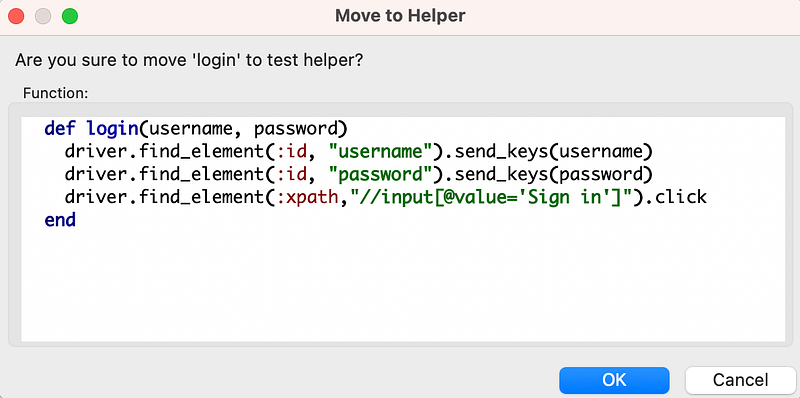
Move to Helper dialog

Sample Tests (after)

The login functions in TestScript#10 and TestScript#20 are deleted. A new function is added to the test helper.

# test_helper
def login(user_name, password)
  # ...
end

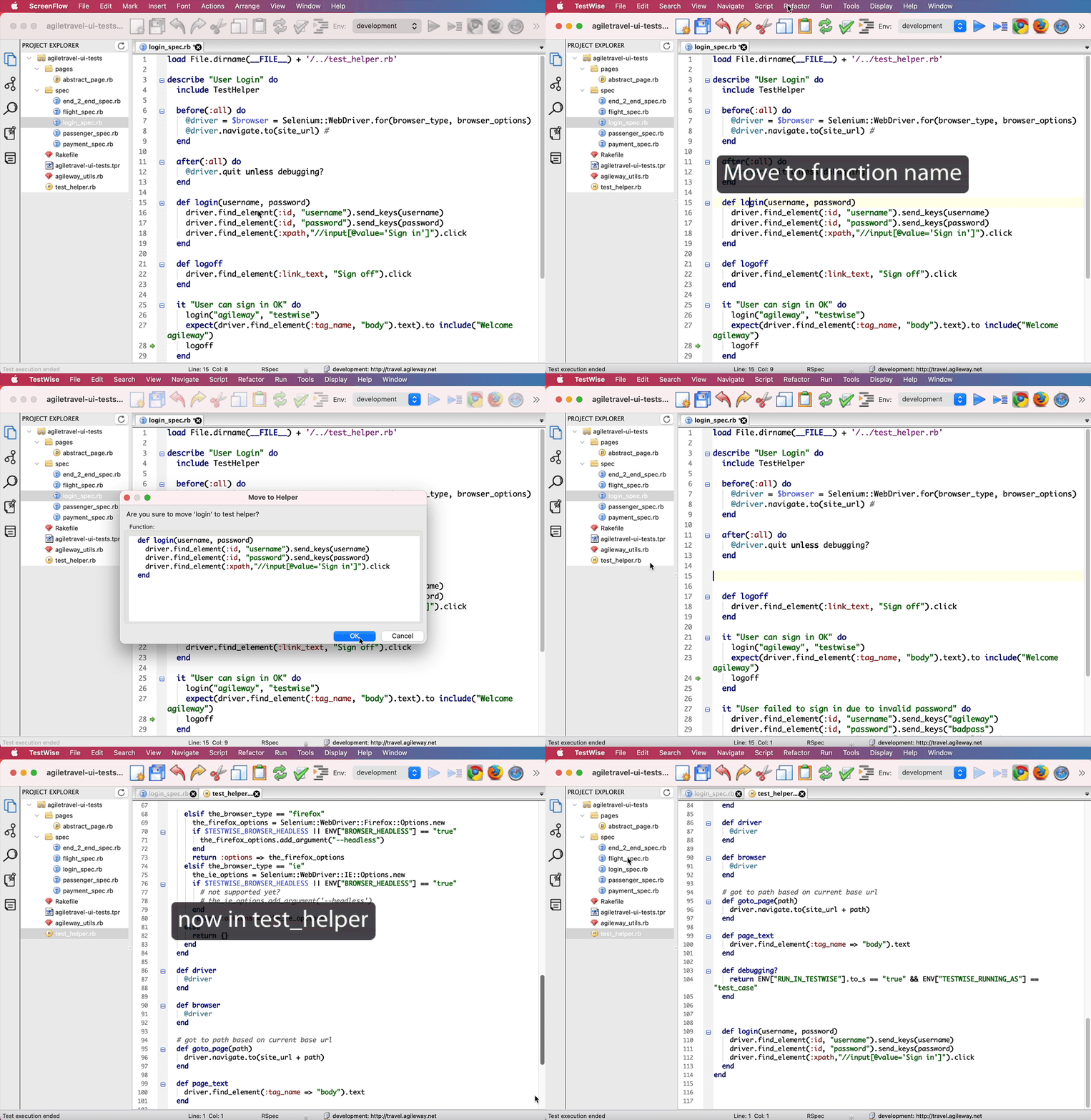
Demonstration (animated GIF) The test script file in the sample project: spec/login_spec.rb

  1. Move a function (from a test) to the test helper Firstly, move the caret to the function name, then apply this refactoring.
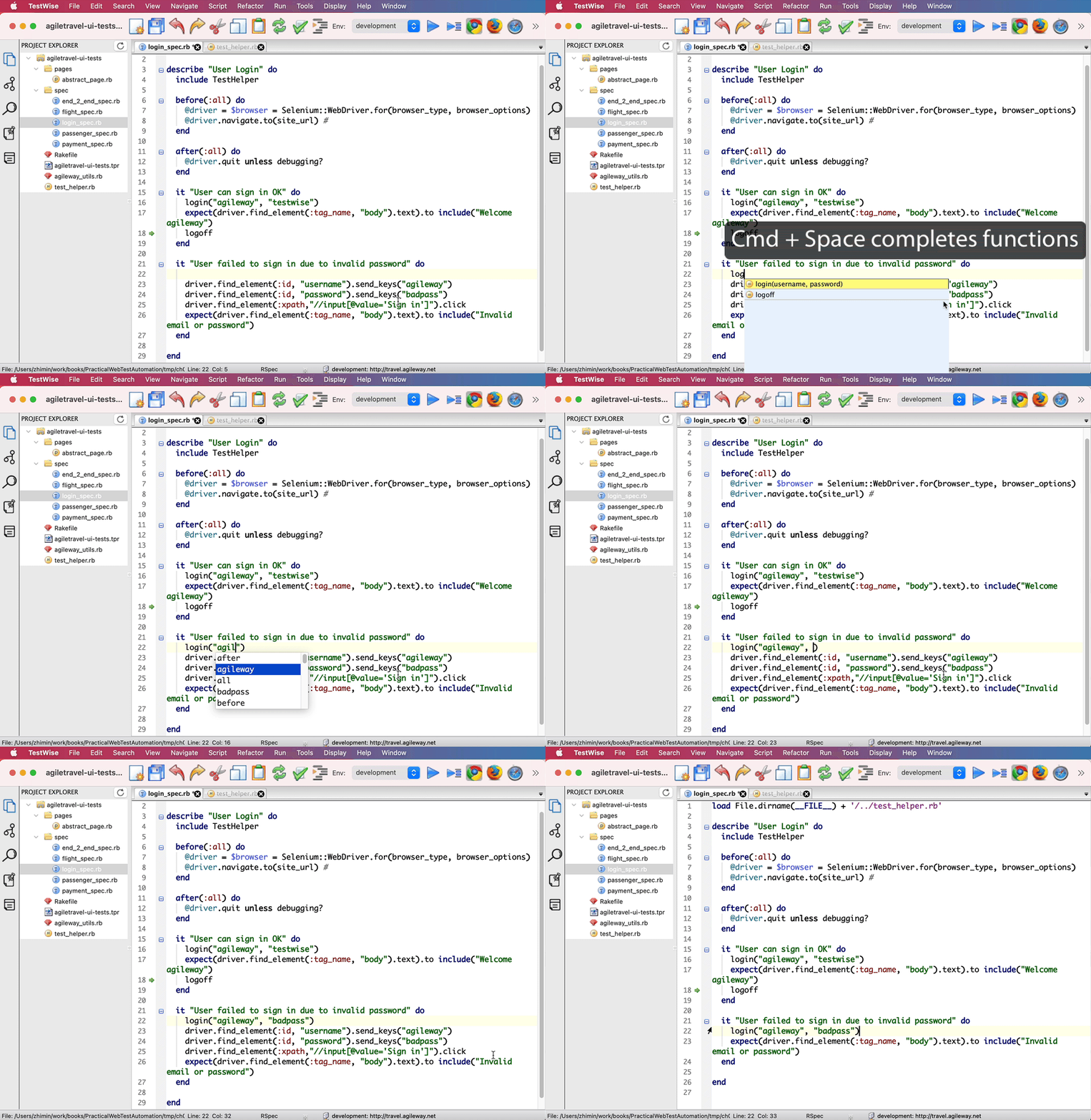
2. Use an already-defined function in the test helper
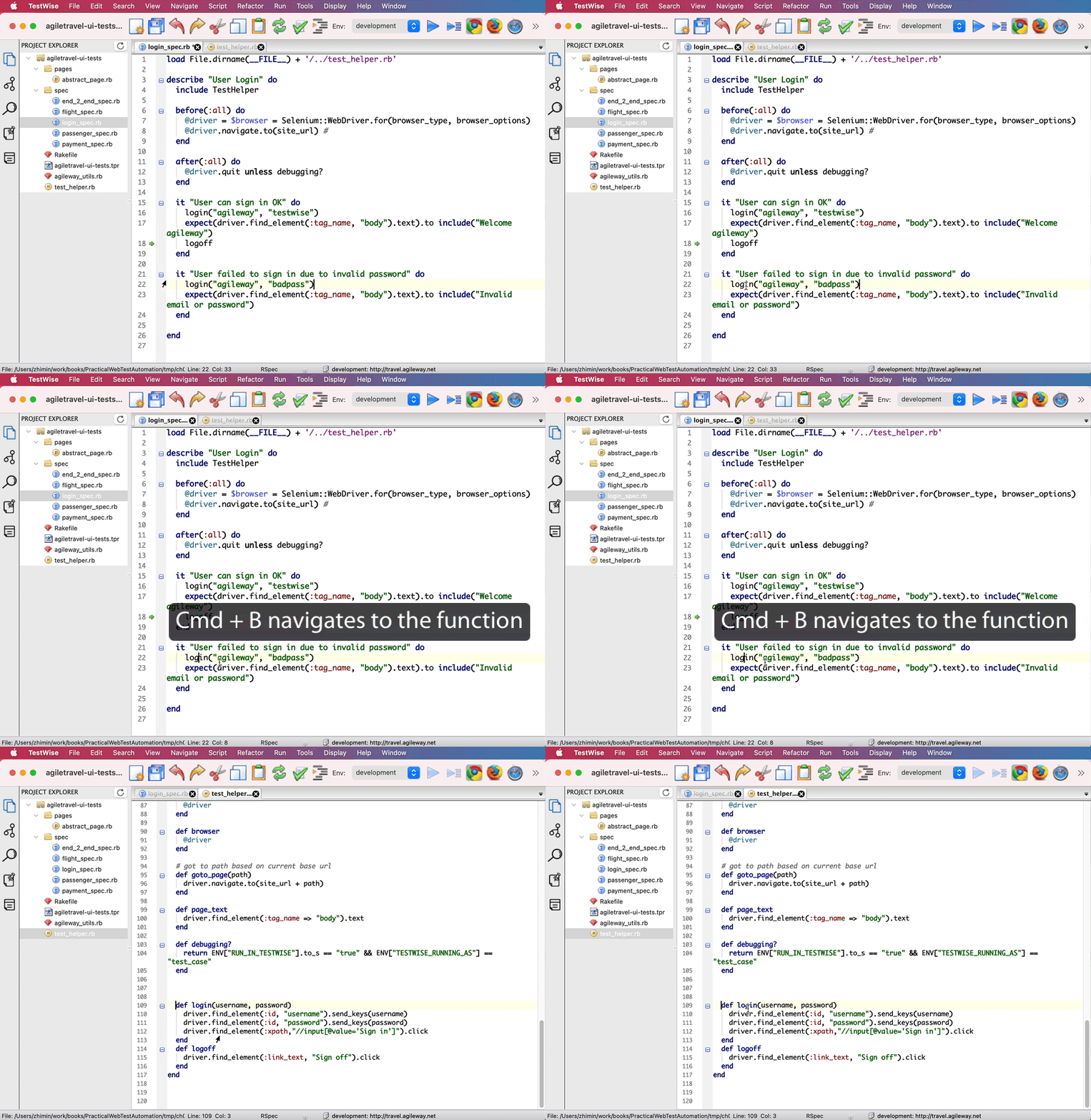
3. You can quickly navigate to the definition of a function from tests, press “Ctrl+B” (or Cmd +B on macOS) on the function name.
Demonstration (Video)

  1. Move functions to the shared test helper

2. Use the functions in the shared test helper

3. Navigate to the function definition from tests.

Benefits

  • Reusable A function in the shared test helper is usable in all test scripts
  • DRY (Don’t Repeat Yourself) The definition of a test operation (e.g. login, logout) only exists at one place, i.e. the shared test helper.
  • Auto-completable The functions in the test helper are available to all test scripts. In a functional testing IDE, these reusable functions maybe auto-completable, like below.

This will not only increase efficiency but also reduce duplications (other testers might create similar methods).

Q & A

  • How to make the functions defined in test_helper.rb automatically available to all test scripts?

All test scripts (based on the test template) load the test helper, at the first line.

load File.dirname(__FILE__) + '/../test_helper.rb'
describe "Passenger" do
  include TestHelper
  # ...
end

Exercises

Prerequisite: two functions login and logoff exist in login_spec.rb, created by Extract to Function refactoring.

  • Move login function in login_spec.rb to the helper, via the Refactoring menu item
  • Move logoff function in login_spec.rb, via keyboard shortcut
  • Inspect these two functions in test_helper.rb
  • Use login function in another test script file, using auto-complete: type lo then press Ctrl+Space key.
  • Navigate to the definition of a function quickly. Move the caret of the function name in a test script, then press Ctrl + B key.

Related Refactorings

Test Automation
Refactoring
Selenium
Agile Testing
Automated Testing
Recommended from ReadMedium