
From NGINX to Traefik (with Docker on DigitalOcean)
Load balancing microservices and wildcard SSL certificate
This post will show how to configure NGINX as a reverse proxy with SSL support, then how (and why) I have migrated to Traefik.
The article has four sections:
- Introduction of the project where the migration took place
- Deployment with NGINX and Certbot
- Moving to Traefik and its benefits
- Configuring Traefik with a wildcard SSL certificate
Intro
NGINX is an extremely popular Web Server: it is fast, free and simple to start with. It was my immediate choice when developing one of my personal projects:
CryptoLastMinute provides a detailed view of the price changes in the last 60 minutes for 500+ cryptocurrencies. It displays the prices in multiple currencies (EUR, USD, Yuan, Ruble) and allows saving your favourite coins.
The architecture comprises a (React) website and 2 (Python) services, Docker containers and a remote database storage.
Running with NGINX
The initial needs at the outset of the project were: manage the incoming HTTP traffic, forward requests to the backend services and ensuring HTTPS.
I opted for NGINX for various reasons: I had already some experience with it and the setup (with Docker) was pretty simple.
With this approach I had to consider the following:
- provide the
docker-compose - define the
nginx.conf - use Certbot to create and renew the SSL certificate
The docker-compose includes the configuration of the components involved in the runtime of the website: NGINX and the services.
There are few aspects worth noticing in the docker-compose above:
- the NGINX container supports standard HTTP (port 80) and SSL (port 443)
- there are 2 services behind the NGINX reverse proxy
- SSL certificates are stored in the
/etc/letsencryptfolder
The NGINX configuration (nginx.conf) is straightforward: notice the ssl_certificate section that defines where to find the SSL certificates and the associated private keys (i.e. /etc/letsencrypt).
The management of the SSL certificates is performed using the Certbot CLI (on Ubuntu in my case): it is possible to create and renew single host and wildcard certificates, then store them in the letsencrypt folder which (see above) is mounted as volume inside the Docker container.
Highlights
Simple setup, 2 configuration files, manual management of SSL certificates.
On to Traefik!
Traefik is an open-source HTTP reverse proxy and load balancer particularly suitable for dynamic environments: it supports service discovery, SSL management, metrics and powerful integration with, amongst others, Docker and Kubernetes.
Traefik is one of the leading solutions for microservices deployment and management in the cloud thanks to features like canary deployment and load balancing.
Benefits of migrating to Traefik
The main drive behind the migration was to simplify the management of the website.
In the NGIX-based version I had to provide 2 configuration files (docker-compose and nginx.conf) and use the Certbot command line to manually create and renew the SSL certificates (admittedly I could automate the renewal but I did not like the Ubuntu cronjob approach, so I decided to wait for a better way).
I solved all the above when migrating to Traefik:
- one single
docker-composeto configure everything: the reverse proxy, SSL settings and my services - out-of-the-box Let’s Encrypt support
Traefik Configuration: SSL with 2 Hosts
The docker-compose now includes everything we need
The Traefik static configuration (read at startup) defines the SSL configuration, specifically the certificateresolver (responsible for generating the certificates based on the routers) and type of ACME challenge (TLS in this case) implemented to validate the ownership of the domain name.
The Traefik dynamic configuration (can be changed anytime and hot reloaded) is expressed using labels associated with each container: these are the routers (see Host and PathPrefix) that will delegate incoming requests to the relevant service.
Highlights
Only docker-compose is required, automatic management of SSL, verification through TLS challenge, website with 2 hostnames.
Traefik Configuration: SSL with wildcard
The creation of a wildcard certificate requires a different approach: the TLS challenge used previously must be replaced with the DNS challenge. Luckily the configuration still relies on a single docker-compose file which needs to be updated. Let’s have a look.
DNS-01 Challenge
The DNS-01 challenge proves that you own the domain you are requesting the certificate for. The Traefik provider automates the DNS validation, therefore you only need to define your supported provider (i.e. DigitalOcean) and add the necessary validation (i.e. access token).
The Dynamic Configuration (routers) must also be updated to define the main domain and any SANs (alternative domains).
Access Token (DO_AUTH_TOKEN)
The DNS validation requires an access token defined as an environment variable: this varies from provider to provider (see provider list), in the case of DigitalOcean it is necessary to create a Personal Access Token.
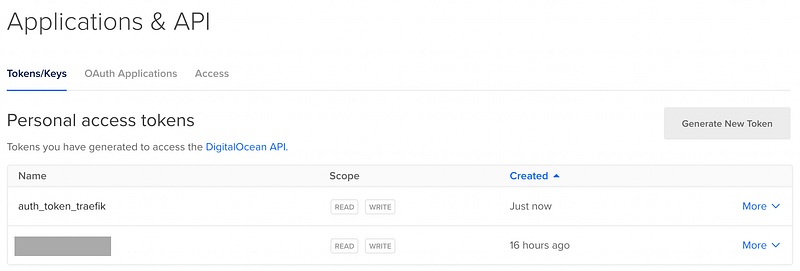
The token value must be then set in the docker-compose (DO_AUTH_TOKEN env variable).
Highlights
Only docker-compose is required, automatic management of SSL, wildcard SSL certificate, DNS challenge.
Conclusion
The article has shown how Traefik can simplify enormously the management of the website and the SSL certificates. It does indeed offer a lot more features which I will be exploring in other posts.
I hope it was a useful and enjoyable reading. Catch me on GitHub and Twitter for more. Laterrrrr.


