From Heroku to Deta to Host Python Project for Free
Heroku announced plans to eliminate free plans and this is what I did

In August 2022, Heroku announced plans to eliminate free services and pushing users to paid plans.
I have a FastAPI website demo using a Heroku free plan. I looked around and found that Deta, Porter and Render offer a free plan. I tried Deta Micro and it works well for my needs. In this article, you will find how to get started with Deta Micros.
Why is Deta Cloud free for ever? We want anyone, at any age from anywhere in the world to experiment and build their ideas without worrying about limits of credit cards.
One of the resources, Deta Micros deploy scalable Node & Python apps. Other resources are Deta Base (Database with a feature-rich API) and Deta Drive (Upload, host and serve images and files with the storage limit of 10GB).
Preparation
Deta uses python 3.7, 3.8, 3.9. When you run deta new command, it will use Python3.9 by default. Since my project uses 3.8, I needed to upgrade my local version to Python to 3.9 to test it.
pyenv install 3.9.13
pyenv global 3.9.13
Getting started
First thing I did was to install deta cli:
curl -fsSL https://get.deta.dev/cli.sh | shNext you need to login to Deta from your terminal:
deta loginCreate a new Python project.
deta new --python fastapi-webstarter-demoI copied my repo content to this directory.
Remove app folder
My repo uses an app directory and uvicorn main:app --reload --port 8080 to launch a website. Deta runs Python from the root directory, so I needed to move all files in the app directory to the root directory. This requires to updating paths for some files.
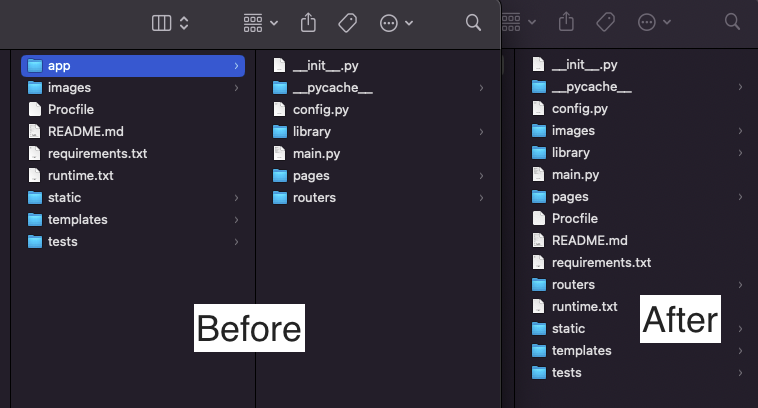
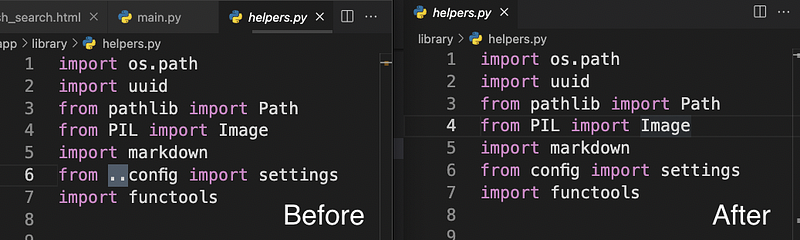
Requirements.txt
Deta installs all dependencies from your requirements.txt. Some packages are not necessary with Deta. For example, uvicorn and dotenv are already provided. Also crontab won’t work in a server-less environment. (Deta Micros provides cron job.)
Environment variables
I use the .env file to store all my environment variables. You can use the following command to update your environment variables:
deta update -e .envAlias name
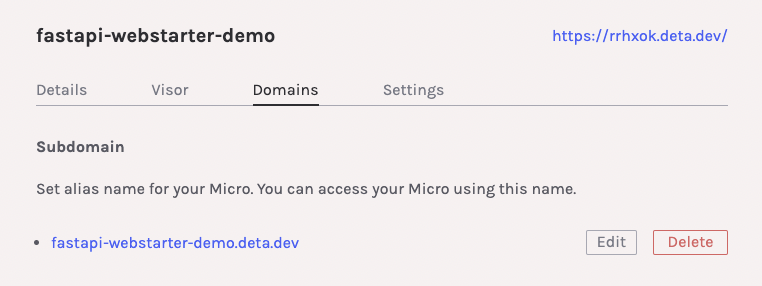
Rather than using a default URL, you can add a subdomain.
Source code and dependencies size
Each Micro has to fit in the total upload size of 250 MB including source code, dependencies, and assets. You can’t use Deta with a big library such as Numpy or Scipy, etc.
Conclusion
Deta is a perfect fit for a Python/Node demonstration project. You can’t use more than 250 MB, but it provides easy start, cron, custom domain, environment variables and more.
Since Deta requires you to have a main.py in the root directory, you need to update your paths accordingly when you move files from the directory.
There are some limitations to Deta. It is suitable for a simple demo site or a small app.
References
Get full access to every story on Medium by becoming a member.