
Four Mac Applications that Simplify My Life Everyday
“Simplicity is the ultimate sophistication.” — Leonardo da Vinci
As a writer, I write blogs, stories, and poems on various platforms and have a youtube channel named — Nextgen Digital.
As an entrepreneur, I provide strategy consulting on cloud tech, revenue generation, and digital transformation.
To summarize, I’m on my Mac mostly and creating content in some form. I must stay productive, remain stress-free, and find ways to accelerate my goals using a few tools.
Listed below are the most used tools/apps I use daily, which work well with my workflow system.
1. Alfred App (Only for Mac, iOS, iPad)
Alfred is a replacement for ‘spotlight’ on Mac but comes with many advanced features. I want to call this ‘Spotlight on Steroids.’
This is my absolute favorite productivity tool that I use every day. However, I do credit a lot of my productivity to using Alfred.
One of the things built into Alfred that we don’t have in the spotlight is a clipboard manager. I use this probably hundreds of times a day. But that’s not it! I use Alfred to perform any web search, look for my bookmarks and text snippets, look for usernames and passwords, and the list goes on and on.
A few of the use cases are:
- Despite not being a dedicated clipboard manager, Alfred meets my needs. Double-tapping CMD can access my clipboard history. For example, adding items 1 to 9 to the primary clipboard can be done by pressing CMD+1–9.
- Alfred can trigger a host of system commands. I won’t list them here, but I’ll include a picture. My most used ones are empty trash, eject, and eject all.
- Alfred assists some in performing web searches directly from websites like Google Chrome, Amazon, youtube, Medium, etc. An excellent productivity hack for me.
- I search all my documents directly from Alfred by hitting the space bar and entering the file name.
- Alfred can also extend it further with custom workflows. Again, they have their website for this; you can access it here.
2. Dashlane — Password Manager (Mac, iOS, iPad, Windows)
I never had to remember my hundreds of passwords since I started using Dashlane.
Dashlane is a dedicated password manager that will store your passwords in an encrypted form. This helps you generate secure random passwords, offers a more robust interface, and allows you to easily access your passwords across all the different computers, smartphones, and tablets you use.
The set-up is effortless but secure. For example, if I am not using my Alfred utility, I login into any of my websites via Dashlane. I do not have to enter any of my credentials — it’s fast, secure, and works seamlessly.
My favorite feature about Dashlane is that this provides me with security alerts to either change the passwords to a more secure one or suggest the best password, and I prefer this way.
Read more about Dashlane here if you are looking for a password manager.
Dashlane is one of the most popular password managers, with a long list of free and paid features.
3. Evernote (Cross-platform).
How can I miss this one?
I have mentioned this many times — Evernote is my life. It’s my second brain and is the grandfather of all productivity apps.
I do not see any need to talk more about Evernote, considering that they have 225 million users around the globe.
I use Evernote for my journal writing, video writing ideas, blog writing thoughts, and subjects. All my receipts, tax documents, and recipes go here.
Since Evernote revamped its platform, there are many exciting features, but my most sought-after is ‘Evernote Home.’ So here is a video for all visual folks.
4. Text Expander (Mac, iOS).
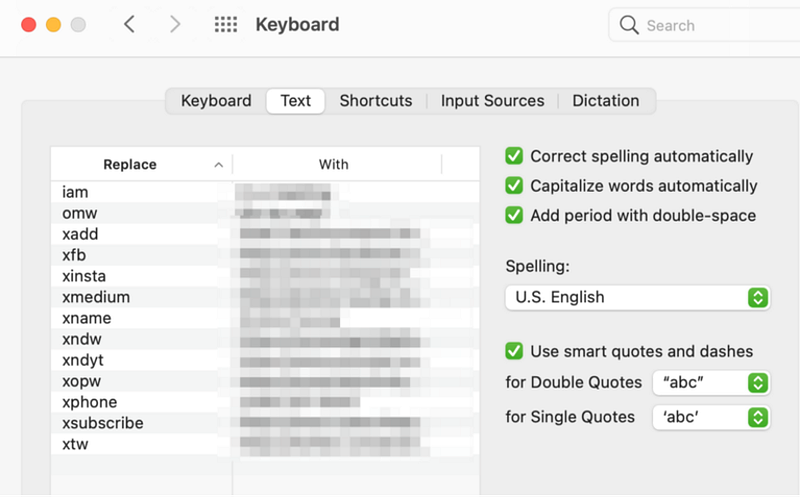
As a Mac user, you will be familiar with several text expander tools but numerous third-party apps available for Windows.
TextExpander is a productivity app that uses keyboard shortcuts to automatically insert longer blocks of frequently used text called snippets. For repetitive tasks that require entering the same information over and over again, it is an invaluable tool that can save a surprising amount of time.
You can find a text expander by going to your Mac’s system preferences> keyboard>use the text tab on the tab. Text Expander is one tool that has supercharged my productivity, and I use it all the time to type long forms of text.
You may check out a quick video on this also.
If you are a Windows user, here is an article that you might want to check out for more options on text expander tools. Try it, and you will never go back to long-form typing.
Final Thoughts.
I am sure many of your favorite apps that you use every day make you more efficient. However, let me know if any of your productivity apps did not make my list in this story.
- You may hit me on Twitter or leave a comment here also.
- Feel free to become a member for full access to my content — and the entire Medium library! In addition, I’ll earn a small commission if you sign up through my link. Thank you for supporting my work!


