
Forget Grammarly, Just Learn to Spot These 7 Mistakes in Your Writing
The ultimate checklist to replace Grammarly

If you are venturing into the domain of writing, Grammarly is your must-have arrow in the quiver.
Or is it not?
What if I tell you that Grammarly is like an unskilled detective going through the motions, following a mundane-robotic approach in each case? I have been using this tool for the past two months, and I found that its algorithm has eyes for only a particular set of errors. If you can spot them by yourself, you might as well save yourself a few bucks.
What are those common mistakes Grammarly is keen to pick up on? Let’s find out.
The money you save
Grammarly’s monthly premium subscription comes at 29.95 dollars (that’s what Google tells me). From my part of the world, that’s enough to get you 20 Zinger burgers from KFC. The rates get more lucrative if you are paying them for a longer duration, but hey, it’s still some money.
Now, this article isn’t a scheme to prove that we are smarter than the artificial intelligence powering Grammarly.
This is just a no-nonsense approach to deciphering the pattern of Grammarly so that the subscription money can be put to better places; like paying for Medium!
But if Grammarly is offering something worthwhile for free, there is no need to show off and deny them. As it turns out, the free Grammarly extension gets hold of basic spelling mistakes and punctuation errors, something that MS Word does equally well. I suggest you use these no-cost features to give your article that initial dose of correction.
It doesn’t matter how smart we are; a few typos always slip past our eyes.
Days before Grammarly
The very first article I wrote on Medium was a very casual Everybody is Raving About Money Heist, Here are 6 Reasons Why I am Not Impressed by the Show. Not taking Medium seriously back then, I didn’t edit it appropriately, did not put it through Grammarly, and my eyes were not good enough to spot the mistakes. I recently let it pass through the iron test of Grammarly to see how it performed.
It fetched a score of 81 with almost 30 alerts, including the spelling mistakes and punctuations. Once I edited them out for both, the score swelled to 91. Grammarly also said that my article is ‘engaging’ and ‘mostly clear’ while pointing out that the delivery is ‘slightly off’. Looking back, I feel stupid for posting this article with no proper editing done on it. The naivety might have already cost me a shot at curation.
But, with all the mistakes in it, this article is the best candidate to show you how Grammarly works.
The seven types of mistakes Grammarly spots
1. Grammarly hates the word ‘very’.
And so should you. Using ‘very’ in your sentences is very amateurish and obsolete! It’s an intensifier that screams about the levels of sophistication you need to achieve in your language.
So Grammarly would gladly ask you to replace the whole intensifier-adjective combo with a more suitable adjective.
In this case, Grammarly told me to replace ‘very serious’ with ‘dire’.
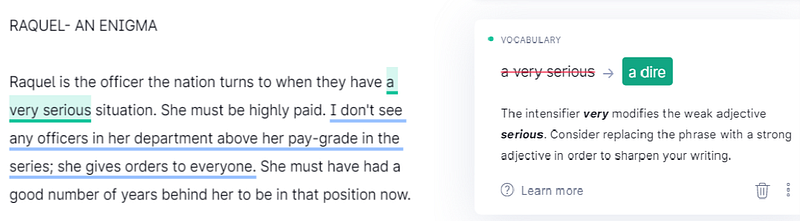
If you are a serious writer, I bet you already know this trick. I have seen a ton of articles helping with finding perfect adjectives.
How to avoid this mistake?
You should use your find option (Ctrl + F) in your MS Word to spot the ‘very’ and consider replacing it with a sharper adjective. There are plenty of websites that help you with perfect replacements for using an intensifier in your sentence. Google them now.
2. The complicated sentences
If you are writing a serious academic thesis where your language needs to be top-notch, Grammarly is perhaps not the right counselor. Grammarly often stresses clarity and straightforwardness, traits that academicians deliberately forget(at least sometimes they do).
I have seen many writers constructing complex sentences to elevate the class of their writing; to put it in the league of elites. Grammarly doesn’t quite like it, and neither do I. I am always an advocate of directness.
So, Grammarly, to keep up with its policy of simplicity, sometimes tells you that our sentence is hard or unclear to follow.
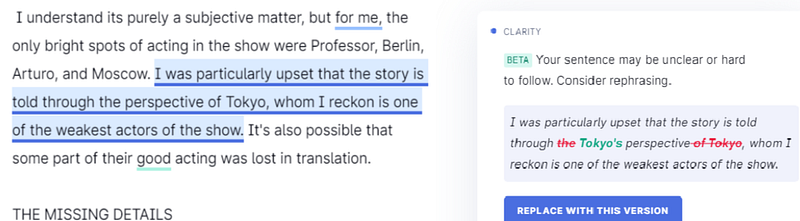
But if you observe fine, it would often be a single construction that it wasn’t impressed with. In the below example, it discarded an entire sentence. Watch closely, and you will know that the only issue it had was with passive construction.
Instead of writing ‘the perspective of Tokyo’, it wanted me to write ‘Tokyo’s perspective’.
How to avoid this mistake?
Always understand that Grammarly is a fan of using active voices. Usually, we do active voices when we want to draw the attention of readers to the ‘action’ and passive voices when we want people to look at the doer.
I know the difference between ‘perspective of Tokyo’ and ‘Tokyo’s perspective’ is not the perfect example for chalking out the difference between passive and active voices.
But the point I want to make is, sometimes we are a better judge of choosing between the two. If you are writing fiction, often passive voices sound better. Grammarly prefers active voices because it’s more concise and uses fewer words.
Why use ten words when five could do the job.
Besides, if you are unskilled at using passive voices, you could unleash a whole lot of mistakes; make your essay clunky and needlessly wordy.
So pick them wisely.
3. Needlessly wordy
Like we already saw, Grammarly believes in brevity and is an advocate of the economy of expression. So if it recognizes an opportunity to cut one word, it will make its move.
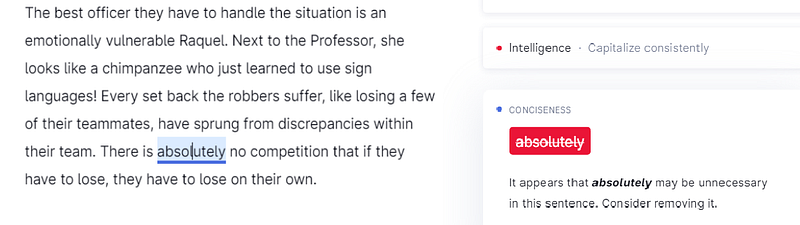
Here, you can see that I had used the word ‘absolutely’ to reinforce the idea I wanted to convey.
Still, Grammarly is all frugal and acts as if it costs to put in an extra word.
How to avoid this mistake?
The issue is, do you want to avoid it? I am absolutely not removing ‘absolutely’ from that sentence. It is there for a reason, and I want it to stay. Once again, I believe you are a better judge here.
4. Avoiding overused words
Grammarly has an array of words they consider quite common. So when one word from this list pops in an article, it prompts you to replace it with a better word.
In the screenshot, you can see that it picked up two words: interesting and stronger, to be replaced with ‘exciting’ and ‘more reliable’.
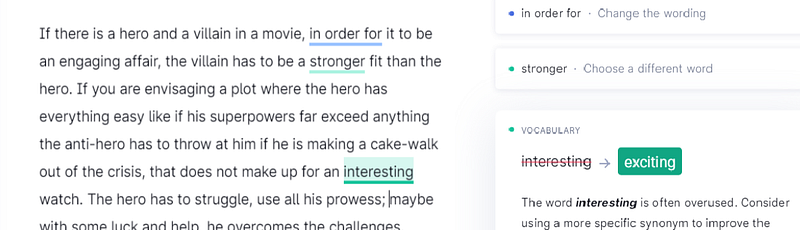
Now, Grammarly has no clue what I’m trying to expound and ‘more reliable’ is a stupid adjective to describe a villain.
How to avoid this mistake?
Have your own collection of common-place words you want to avoid in your article. Make sure you are not adding any of them to your writing.
5. Avoiding repetition
I am a big fan of this feature in Grammarly.
The idea is quite self-explanatory. You are not making a good impression on your readers if some of the words are appearing at multiple points in your piece. Good writers have this habit of spotting them while writing itself, but it’s quite handy when Grammarly knit picks them.
Here, it is found that the word ‘right’ is appearing more than one time. If I put this current article(the one you are reading now)into Grammarly, it would also tell me that the word ‘appearing’ is repeatedly appearing!
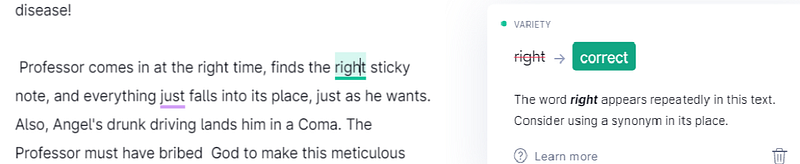
Am not impressed by the choice it put forward though. ‘Correct’ for ‘right’ doesn’t feel good enough.
How to avoid this mistake?
I know most of you know this: Finding a suitable replacement for repeated words is a lot about the strength of your vocabulary. Read more and develop a repertoire of words, so that you always have go-to options. A preliminary Google search will provide you with instant alternatives too.
Once you are equipped with options, peruse through your complete articles to spot the repeated words. Replace it with your new option.
6. Sounding diplomatic
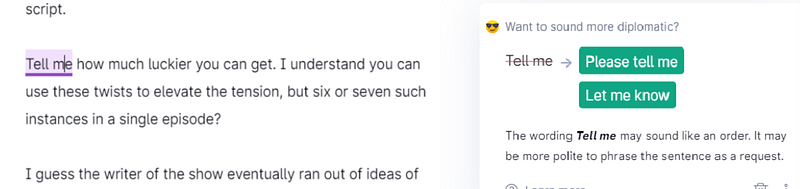
When you make your sentences sound like a command, Grammarly intervenes to soften things up. It’s the quintessential good boy who wants to sound pleasing and polite. Check out the screen capture below. Grammarly provides two choices to make ‘Tell me’ sound more diplomatic.
How to avoid this mistake?
Honestly, I wouldn’t even call it a mistake; it’s more like a literary fashion choice. Sometimes being a little direct and rude helps to get the point across. But yeah, if you are hell-bent on avoiding it, rephrasing it using ‘please’ and ‘let me know’ would help.
7. Avoiding long sentences
If you construct long sentences, with commas in between, the chances are good that Grammarly would recommend you to split them into smaller pieces. So here is a sentence that Grammarly found hard to live with: “He is touted to be a super-intelligent man, who can anticipate every movement from his opponents, but he fails to see that when you let men and women of a similar age group live together, relationships are bound to grow”.
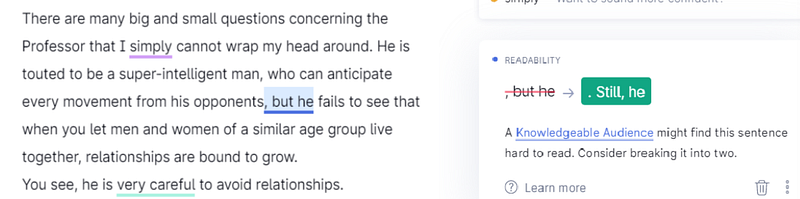
Grammarly has a simple solution to the long sentence problem: to split the sentence at the note of the second comma. Start the new one with ‘Still he’, instead of ‘but he’.
How to avoid this mistake?
Grammarly’s prompt that a knowledgeable audience might find this sentence hard to read is a bit of an overstatement. Still, it makes it easier to comprehend when ideas are served in smaller chunks. So consider splitting them into tiny pieces using appropriate words.
The mistakes I would rather not change
Not every mistake picked by Grammarly warrants a correction. Here are a few I would pass.
Sophisticated words
If you use a sophisticated word in your article, Grammarly would recommend it to be changed because it thinks even knowledgeable audiences would find it a tough nut to crack.
I would rather keep one or two such words in an article so that our piece is a little educating as well. It would help if the meaning of such words can be surmised from the context.
‘This’ should change
Sometimes when you start a sentence with words like ‘this’, Grammarly would alert you that the audience would be confused about what you are referring to by ‘this’. I bet it’s only Grammarly that’s having this trouble.
Ending a sentence with a preposition
Yes, it’s not the recommended practice, especially if you are doing some formal work. Ideally, you would want your sentence to not end with words like for, with, about, etc. But on most days, I would not mind that. It’s not a deal-breaker.
Tautology
Tautology is considered to be a fault of style. It is a phrase or expression in which the same thing is conveyed using different words. I have already made a tautology in this article. Can you find it?
It’s “having your own collection of” under the caption Avoiding Overused Words. Using ‘your’ and ‘own’ in the same sentence is a needless exercise. But again, I like it for some reason.
What you should know before putting it to practice
I have so far had hundreds of articles checked by Grammarly and I haven’t spotted any other major mistakes it can identify. Having earned an excellent sense to skim through my words and pick up on the above errors, even when I place paragraphs in Grammarly, it returns with mostly very few errors these days.
But it’s also possible that with my writing habits, I never made a specific type of mistake and Grammarly never had to point them out. Ergo, I am unaware it exists in the skill set possessed by its AI.
Am not claiming to be invincible and I am very much a work in progress. But if any of you are looking to save the money spent on Grammarly, you can follow my steps to generate useful quality articles, totally error-free.
If you are a novice, or someone who would rather let the AI do its job, or don’t mind spending close to 30 dollars, by all means, go ahead and continue with Grammarly. It’s probably the best out there.
Like Arnold from Terminator 2: Judgement Day, it’s a learning computer and will get better with each passing day.