
Forget about SQLite, Use DuckDB Instead — And Thank Me Later
Introduction to DuckDB and its Python integration

We, programmers, tend to default to SQLite when we want to work on local environments with an embedded database. While that works fine most of the time, it’s like using a bicycle to travel 100 km away: probably not the best option.
Introducing DuckDB.
I first learned about DuckDB in September 2022, while in PyCon Spain at Granada. Now, after 6 months of using it, I can’t live without it. And I want to contribute to the community by providing my fellow programmers and data-related professionals an intro to this fantastic analytical database system.
In this post, I’ll go over the next main points:
- Intro to DuckDB: what it is, why should you use it and when.
- DuckDB integration into Python.
Get ready!
If you can’t see the whole story, consider using my referral link to have unlimited access to all Medium’s stories: https://medium.com/@polmarin/membership
What is DuckDB?
If you check DuckDB’s website[1], this is the first thing you see on their home page: DuckDB is an in-process SQL OLAP database management system.
Let’s try to decipher this sentence because it contains relevant info there.
- In-process SQL means that DuckDB’s features run in your application, not an external process to which your application connects. In other words: there is no client sending instructions nor a server to read and process them. SQLite works the same way, while PostgreSQL, MySQL…, do not.
- OLAP stands for OnLine Analytical Processing, and Microsoft defines it as a technology that organizes large business databases and supports complex analysis. It can be used to perform complex analytical queries without negatively affecting transactional systems[2]. Another example of an OLAP database management system is Teradata.
So basically, DuckDB is a great option if you’re looking for a serverless data analytics database management system. I highly suggest you check the fantastic peer-reviewed paper from Dr. Mark Raasveldt and Dr. Hannes Mühleisen [3]— the two most important DuckDB developers—to see the gap DuckDB is trying to fill.
Additionally, it’s a relational database management system (DBMS) that supports SQL. That’s why we’re comparing it with other DBMSs that share the same characteristics like SQLite or PostgreSQL.
Why DuckDB?
We now know DuckDB’s role in the database industry. But why should we choose it above many other options we might have for a given project?
A one-size-fits-all doesn’t exist when it comes to database management systems and DuckDB is no exception. We’ll go over some of its features to help you decide when it’s a good idea for you to use it or not.
Long story short, it’s a high-performance tool. As shown on their GitHub page[4]: “It is designed to be fast, reliable, and easy to use.” Getting into more detail…
- It’s created to support analytical query workloads (OLAP). The way they do it is by vectorizing query executions (columnar-oriented), while other DBMSs mentioned previously (SQLite, PostgreSQL…) process each row sequentially. This is why its performance increases.
- DuckDB adopts SQLite’s best feature: simplicity. Simplicity in installation, and embedded in-process operation is what DuckDB developers chose for this DBMS after seeing SQLite’s success because of those features. Furthermore, DuckDB has no external dependencies, or server software to install, update, or maintain. As said, it’s completely embedded and this has the additional advantage of high-speed data transfer to and from the database.
- Skilled creators. They are a research group that created it to create a stable and mature database system. This is done through intensive and thorough testing, with a test suit that currently contains millions of queries, adapted from test suites of SQLite, PostgreSQL, and MonetDB.
- It’s complete. It supports complex queries in SQL, it provides transactional guarantees (the ACID properties you’ve surely heard of), it supports secondary indexes to speed up queries… And, what’s more important, it is deeply integrated into Python and R for efficient interactive data analysis. It also provides APIs for C, C++, Java…
- Free and Open Source. It can’t get better than that.
These are the official advantages.
But there are more, and I want to highlight one more: DuckDB doesn’t have to be a Pandas substitute. They can work hand in hand and, if you are a Pandas fan like me, you can make efficient SQL on Pandas with DuckDB.
This is amazing.
You can find more complete explanations on DuckDB’s website[1].
When to use DuckDB?
It really will depend on your preferences but let’s go back to the paper its co-founders released [3] (I highly recommend you read it, it’s only 4 pages long and it’s pure gold).
They explain that there is a clear need for embeddable analytical data management. SQLite is embedded but it’s too slow if we want to use it for exhaustive data analysis. They keep on with “this needs stems from two main sources: Interactive data analysis and “edge” computing.”
So these are the top-2 use cases for DuckDB:
- Interactive data analysis. Most data professionals now use R or Python libraries like dplyr or Pandas in their local environments to work with the data they retrieve from a database. DuckDB offers the possibility of using SQL efficiency for our local development without risking performance. And you can reap these benefits without having to give up your favorite coding language (more on that later).
- Edge computing. Using Wikipedia's definition “Edge computing is a distributed computing paradigm that brings computation and data storage closer to the sources of data.” [5] Using an embedded DBMS, it can’t get much closer than that!
DuckDB can be installed and used in different environments: Python, R, Java, node.js, Julia, C++… Here, we’ll focus on Python and you’ll shortly see how easy it is to use.
Using DuckDB with Python (an intro)
Open your terminal and navigate to the desired directory, because we’re about to start. Create a new virtual environment — or not — and install DuckDB:
pip install duckdb==0.7.1
Remove or update the version if you want another one.
Onto the cool stuff now. To make things more interesting, I’ll be using real data I found on Kaggle about Spotify’s most streamed songs of all time[6]. And I’ll work on a typical Jupyter Notebook.
Licensing: CC0: Public Domain
As the data we’ve obtained comes as two CSV files — Features.csv and Streams.csv — , we need to create a new database and load them in:
import duckdb

# Create DB (embedded DBMS)
conn = duckdb.connect('spotiStats.duckdb')
c = conn.cursor()

# Create tables by importing the content from the CSVs
c.execute(
  "CREATE TABLE features AS SELECT * FROM read_csv_auto('Features.csv');"
)
c.execute(
  "CREATE TABLE streams AS SELECT * FROM read_csv_auto('Streams.csv');"
)
Just like that, we’ve created a brand new database, added two new tables, and filled them with all the data. All with 4 simple lines of code (5 if we take the import into account). Cool huh?
Let’s show the content from the streams table:
c.sql("SELECT * FROM streams")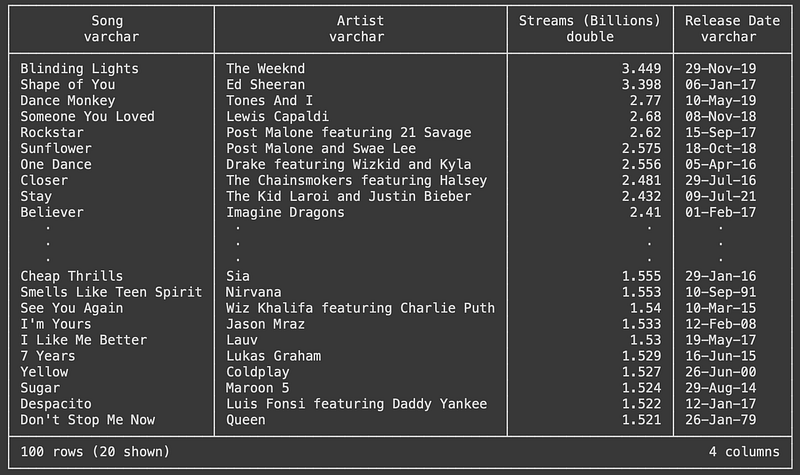
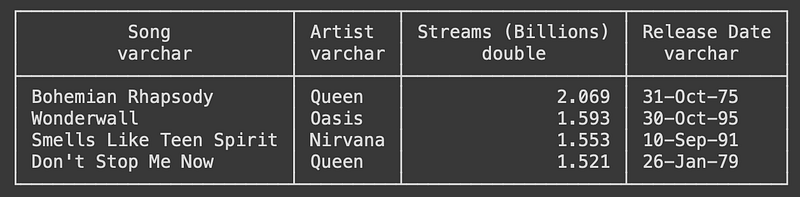
Let’s start doing some analytics tasks. For example, I want to know how many songs are there in the top 100 that are pre-2000. Here’s one way to do it:
c.sql('''
SELECT *
FROM streams
WHERE regexp_extract("Release Date", '\d{2}$') > '23'
''')
I mentioned before how easy it is to work with DuckDB and Pandas at the same time. Here’s a way to do the same but using Pandas:
df = c.sql('SELECT * FROM streams').df()
df[df['Release Date'].apply(lambda x: x[-2:] > '23')]
All I’m doing is converting into a DataFrame the initial query and then applying the filter the Pandas way. The result is the same, but what about their performance?
>>> %timeit df[df['Release Date'].apply(lambda x: x[-2:] > '23')]
434 µs ± 25.6 µs per loop (mean ± std. dev. of 7 runs, 1000 loops each)

>>> %timeit c.sql('SELECT * FROM streams WHERE regexp_extract("Release Date", \'\d{2}$\') > \'23\'')
112 µs ± 25.3 µs per loop (mean ± std. dev. of 7 runs, 10000 loops each)
Can you see that? The operation was rather easy: we were applying a simple filter to a 100-row table. But the execution time using Pandas is almost 4 times as much if we compare it with the DuckDB implementation.
Imagine if we had tried a more exhaustive analytical operation… The improvement could be huge.
I think it doesn’t make much more sense to put more examples because this introduction to DuckDB would then be transformed into an SQL intro. And this is not what I want.
But feel free to play with any dataset you might have and start using SQL on your DuckDB database. You’ll quickly see its benefits.
To finish with this brief intro, let’s export the last result (pre-2000 songs) as a parquet file — because they are always a better alternative to traditional CSVs. Again, this will be extremely simple:
c.execute('''
COPY (
    SELECT
        *
    FROM
        streams
    WHERE
      regexp_extract("Release Date", '\d{2}$') > '23'
)
TO 'old_songs.parquet' (FORMAT PARQUET);
''')
All I’ve done is put the previous query within the brackets and DuckDB just copies the query’s result to the old_songs.parquet file.
Et voilà.
Conclusion
DuckDB has been a life changer for me and I think it could also be for many people out there.
I hope this post was entertaining and informative. It wasn’t meant to be a tutorial or guide so that’s why I haven’t gotten a lot into code examples, but I believe there’s enough to understand the main points.
                        Thanks for reading the post!
            I really hope you enjoyed it and found it insightful.

          Follow me for more content like this one, it helps a lot!
                                  @polmarin
If you’d like to support me further, consider subscribing to Medium’s Membership through the link you find below: it won’t cost you any extra penny but it’ll help me through this process. Thanks a lot!
Resources
[1] DuckDB
[2] Online analytical processing (OLAP) — Azure Architecture Center
[3] Mark Raasveldt and Hannes Mühleisen. 2019. DuckDB: an Embeddable Analytical Database. In 2019 International Conference on Management of Data (SIGMOD ’19), June 30-July 5, 2019, Amsterdam, Netherlands. ACM, New York, NY, USA, 4 pages. https://doi.org/10.1145/3299869.3320212
[4] DuckDB — GitHub


