avatarAnmol Tomar

Free AI web copilot to create summaries, insights and extended knowledge, download it at here

3675

Abstract

ilt_in">print</span>(end - start)

<span class="hljs-comment">### Time taken: 666 seconds</span></pre></div><p id="e757">The iterrows() function takes 666 seconds (<b>~11 minutes) </b>to implement the operations on 5 Million rows.</p><h2 id="1435">Option 2: Itertuples()</h2><p id="b387">Itertuples is another alternative to iterate through a pandas DataFrame. It iterates over DataFrame rows as named tuples.</p><p id="06d9">The following code shows how to access the element using itertuples. The row object has the first field as an index and the following fields as columns.</p><div id="3660"><pre><span class="hljs-keyword">for</span> row <span class="hljs-keyword">in</span> df[:<span class="hljs-number">1</span>].itertuples(): <span class="hljs-built_in">print</span>(row) <span class="hljs-built_in">print</span>(row.Index) <span class="hljs-built_in">print</span>(row.a)</pre></div><figure id="95c9"><img src="https://cdn-images-1.readmedium.com/v2/resize:fit:800/0*XKd9OYHFJep2lJQx.png"><figcaption>Output</figcaption></figure><p id="0a03">Using the following code, we can apply the operation on our DataFrame df.</p><div id="d8c6"><pre>start = time.time() <span class="hljs-comment"># Iterating through namedtuples</span> <span class="hljs-keyword">for</span> row <span class="hljs-keyword">in</span> df.itertuples(): <span class="hljs-keyword">if</span> row.a == <span class="hljs-number">0</span>: df.at[row.Index,<span class="hljs-string">'e'</span>] = row.d

<span class="hljs-keyword">elif</span> (row.a &lt;= <span class="hljs-number">25</span>) &amp; (row.a &gt; <span class="hljs-number">0</span>):
    df.at[row.Index,<span class="hljs-string">'e'</span>] = (row.b)-(row.c)    
<span class="hljs-keyword">else</span>:
    df.at[row.Index,<span class="hljs-string">'e'</span>] = row.b + row.c 
    

end = time.time() <span class="hljs-built_in">print</span>(end - start)

<span class="hljs-comment">## Time taken: 81 seconds</span></pre></div><p id="cdaf">The itertuples() function <b>takes ~81 seconds, which is 8X faster </b>than the iterrows() function, to perform the required operations on the DataFrame.</p><h2 id="e561">Option 3: Dictionary</h2><p id="934e">We can also iterate through the rows of the DataFrame by converting the DataFrame into the dictionary (which is a light inbuilt datatype), iterating through the dictionary to perform the operations, and then converting the updated dictionary back to the DataFrame.</p><p id="bc86">We can convert a DataFrame into a dictionary using the ‘to_dict()’ function.</p><div id="b458"><pre>start = time.time() <span class="hljs-comment"># converting the DataFrame to a dictionary</span> df_dict = df.to_dict(<span class="hljs-string">'records'</span>)
<span class="hljs-comment"># Iterating through the dictionary </span> <span class="hljs-keyword">for</span> row <span class="hljs-keyword">in</span> df_dict[:]: <span class="hljs-keyword">if</span> row[<span class="hljs-string">'a'</span>] == <span class="hljs-number">0</span>: row[<span class="hljs-string">'e'</span>] = row[<span class="hljs-string">'d'</span>]

<span class="hljs-keyword">elif</span> row[<span class="hljs-string">'a'</span>] &lt;= <span class="hljs-number">25</span> &amp; row[<span class="hljs-string">'a'</span>] &gt; <span class="hljs-number">0</span>:
    row[<span class="hljs-string">'e'</span>] = row[<span class="hljs-string">'b'</span>]-row[<span class="hljs-string">'c'</span>]    <span class="hljs-keyword">else</span>:
    row[<span class="hljs-string">'e'</span>] = row[<span class="hljs-string">'b'</span>] + row[<span class="hljs-st

Options

ring">'c'</span>] <span class="hljs-comment"># converting back to DataFrame</span> df4 = pd.DataFrame(df_dict) end = time.time() <span class="hljs-built_in">print</span>(end - start) <span class="hljs-comment">## Time taken: 25 seconds</span></pre></div><p id="48a1">The dictionary method takes <b>~25 seconds</b>, which is ~3X faster than the time taken by the itertuples() function.</p><h2 id="4f3e">Option 4: Array/List</h2><p id="1ed1">This method is similar to the dictionary method, where we will be converting the DataFrame into an array, iterating through the array to operate on each row (which is saved in a list), and then the list is converted to the DataFrame.</p><div id="d6f0"><pre>start = time.time() <span class="hljs-comment"># create an empty dictionary</span> list2 = [] <span class="hljs-comment"># intialize column having 0s. </span> df[<span class="hljs-string">'e'</span>] = <span class="hljs-number">0</span> <span class="hljs-comment"># iterate through a NumPy array </span> <span class="hljs-keyword">for</span> row <span class="hljs-keyword">in</span> df.values: <span class="hljs-keyword">if</span> row[<span class="hljs-number">0</span>] == <span class="hljs-number">0</span>: row[<span class="hljs-number">4</span>] = row[<span class="hljs-number">3</span>]

<span class="hljs-keyword">elif</span> row[<span class="hljs-number">0</span>] &lt;= <span class="hljs-number">25</span> &amp; row[<span class="hljs-number">0</span>] &gt; <span class="hljs-number">0</span>:
    row[<span class="hljs-number">4</span>] = row[<span class="hljs-number">1</span>]-row[<span class="hljs-number">2</span>]

<span class="hljs-keyword">else</span>:
    row[<span class="hljs-number">4</span>] = row[<span class="hljs-number">1</span>] + row[<span class="hljs-number">2</span>]

<span class="hljs-comment">## append values to a list</span> list2.append(row)

<span class="hljs-comment">## convert the list to a dataframe </span> df2 = pd.DataFrame(list2, columns=[<span class="hljs-string">'a'</span>, <span class="hljs-string">'b'</span>, <span class="hljs-string">'c'</span>, <span class="hljs-string">'d'</span>,<span class="hljs-string">'e'</span>]) end = time.time() <span class="hljs-built_in">print</span>(end - start) <span class="hljs-comment">#Time Taken: 21 seconds</span></pre></div><p id="d6f4">The time taken by this method is <b>~21seconds </b>(31X faster than iterrows), which is very close to the time taken by iterating through the dictionary.</p><figure id="c388"><img src="https://cdn-images-1.readmedium.com/v2/resize:fit:800/0*TFwDcBLN4mk-Pxt4.png"><figcaption>Comparison of execution time (Image by Author)</figcaption></figure><blockquote id="8543"><p>Dictionary and arrays are the inbuilt light data structure and thus take the least time to iterate through the DataFrame.</p></blockquote><p id="2cc8"><i>Whenever working with large datasets, the best practice is to vectorize your python code. It will run at lightening fast speed. Vectorizing the above code reduces the execution time to 0.29 seconds (~72X faster than iterating through an array). We will learn about Vectorization in my upcoming post.</i></p><h2 id="286b">Conclusion</h2><p id="65cf">We looked at the 4 different ways of iterating through a DataFrame using the loops.</p><ul><li>The Iterrows function takes the maximum time to iterate through the DataFrame.</li><li>Using the itertuples function, we can iterate over a DataFrame 8X faster than the iterrows function.</li><li>Iterating over the Dictionary and Array takes the least time and is the best method to manipulate your data using the loops.</li></ul></article></body>

Follow This Approach to run 31x FASTER loops in Python!

Learn about the most efficient method of looping over pandas DataFrame

Pic Credits: Unsplash

Introduction

Loops come very naturally to us. When we learn any programming language, loops are an integral part of the important concepts and also loops are very easy to interpret. So, in Python too, whenever we have to iterate through the rows of the dataset, intuitively, we start thinking about implementing loops.

But, when the dataset is too big, loops take a lot of time to iterate through the DataFrame. So, shall we not use loops at all or can we follow some hacks to overcome this challenge?

Fortunately, there are some hacks!

In this blog, we will look at different ways of iterating(and the associated run time) through a large pandas DataFrame using the different looping methods in pandas. By the end of this blog, you will know which looping techniques will work best for the bigger datasets.

Create our Dataset

We will be using a DataFrame df, having 5 Million rows and 4 columns. Each column is assigned a random integer between 0 and 50.

import numpy as np
import pandas as pd
df = pd.DataFrame(np.random.randint(0, 50, size=(5000000, 4)), columns=('a','b','c','d'))
df.shape
# (5000000, 5)

df.head()
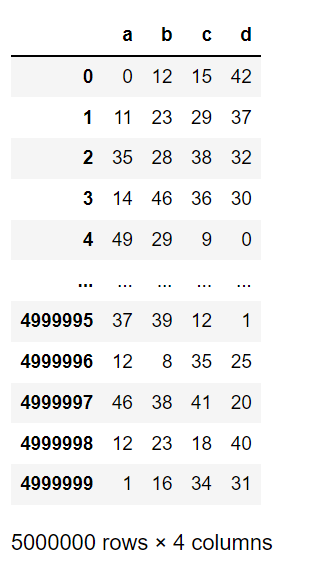
Dataframe having 5 Million rows and 4 columns

Option 1: Iterrows

Imagine, we want to add a column ‘e’ to the dataframe df, based on the following conditions:

  1. If ‘a’ is equal to 0, then ‘e’ is equal to the value of ‘d’.
  2. If ‘a’ is less than or equal to 25 and greater than 0, then ‘e’ is equal to ‘b’ — ‘c’.
  3. If the above conditions are not satisfied, then ‘e’ is equal to ‘b’ + ‘c’.

To implement the above conditions, we will be iterating through the rows of the dataframe df, using the pandas iterrows() function.

Iterrows() function iterates over dataframe rows as (index, Series) pairs.

import time 
start = time.time()
# Iterating through DataFrame using iterrows
for idx, row in df.iterrows():
    if row.a == 0:
        df.at[idx,'e'] = row.d
    elif (row.a <= 25) & (row.a > 0):
        df.at[idx,'e'] = (row.b)-(row.c)   
    else:
        df.at[idx,'e'] = row.b + row.c
end = time.time()
print(end - start)

### Time taken: 666 seconds

The iterrows() function takes 666 seconds (~11 minutes) to implement the operations on 5 Million rows.

Option 2: Itertuples()

Itertuples is another alternative to iterate through a pandas DataFrame. It iterates over DataFrame rows as named tuples.

The following code shows how to access the element using itertuples. The row object has the first field as an index and the following fields as columns.

for row in df[:1].itertuples():
    print(row)
    print(row.Index)
    print(row.a)

Output

Using the following code, we can apply the operation on our DataFrame df.

start = time.time()
# Iterating through namedtuples
for row in df.itertuples():
    if row.a == 0:
        df.at[row.Index,'e'] = row.d
    
    elif (row.a <= 25) & (row.a > 0):
        df.at[row.Index,'e'] = (row.b)-(row.c)    
    else:
        df.at[row.Index,'e'] = row.b + row.c 
        
end = time.time()
print(end - start)

## Time taken: 81 seconds

The itertuples() function takes ~81 seconds, which is 8X faster than the iterrows() function, to perform the required operations on the DataFrame.

Option 3: Dictionary

We can also iterate through the rows of the DataFrame by converting the DataFrame into the dictionary (which is a light inbuilt datatype), iterating through the dictionary to perform the operations, and then converting the updated dictionary back to the DataFrame.

We can convert a DataFrame into a dictionary using the ‘to_dict()’ function.

start = time.time()
# converting the DataFrame to a dictionary
df_dict = df.to_dict('records')  
# Iterating through the dictionary 
for row in df_dict[:]:
    if row['a'] == 0:
        row['e'] = row['d']
    
    elif row['a'] <= 25 & row['a'] > 0:
        row['e'] = row['b']-row['c']    else:
        row['e'] = row['b'] + row['c']
# converting back to DataFrame
df4 = pd.DataFrame(df_dict)
end = time.time()
print(end - start)
## Time taken: 25 seconds

The dictionary method takes ~25 seconds, which is ~3X faster than the time taken by the itertuples() function.

Option 4: Array/List

This method is similar to the dictionary method, where we will be converting the DataFrame into an array, iterating through the array to operate on each row (which is saved in a list), and then the list is converted to the DataFrame.

start = time.time()
# create an empty dictionary
list2 = []
# intialize column having 0s. 
df['e'] = 0
# iterate through a NumPy array 
for row in df.values:
    if row[0] == 0:
        row[4] = row[3]
    
    elif row[0] <= 25 & row[0] > 0:
        row[4] = row[1]-row[2]
   
    else:
        row[4] = row[1] + row[2]
## append values to a list
    list2.append(row)

## convert the list to a dataframe  
df2 = pd.DataFrame(list2, columns=['a', 'b', 'c', 'd','e'])
end = time.time()
print(end - start)
#Time Taken: 21 seconds

The time taken by this method is ~21seconds (31X faster than iterrows), which is very close to the time taken by iterating through the dictionary.
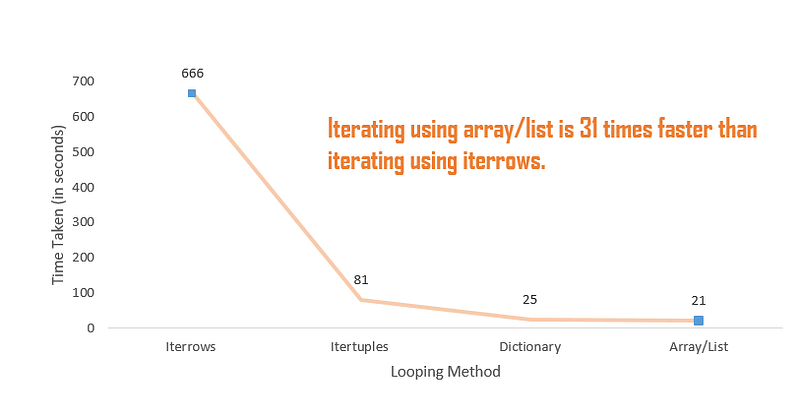
Comparison of execution time (Image by Author)

Dictionary and arrays are the inbuilt light data structure and thus take the least time to iterate through the DataFrame.

Whenever working with large datasets, the best practice is to vectorize your python code. It will run at lightening fast speed. Vectorizing the above code reduces the execution time to 0.29 seconds (~72X faster than iterating through an array). We will learn about Vectorization in my upcoming post.

Conclusion

We looked at the 4 different ways of iterating through a DataFrame using the loops.

  • The Iterrows function takes the maximum time to iterate through the DataFrame.
  • Using the itertuples function, we can iterate over a DataFrame 8X faster than the iterrows function.
  • Iterating over the Dictionary and Array takes the least time and is the best method to manipulate your data using the loops.
Python
Data Analysis
Data Science
Programming
Recommended from ReadMedium