avatarConstantin Stan

Free AI web copilot to create summaries, insights and extended knowledge, download it at here

6547

Abstract

n></figure><p id="f3ce">Let’s go through each of the above:</p><figure id="4861"><img src="https://cdn-images-1.readmedium.com/v2/resize:fit:800/1*Igf4PDQbHwiRDpR5ql1xKg.jpeg"><figcaption>Useful in published packages for usage demonstration.</figcaption></figure><figure id="9d0e"><img src="https://cdn-images-1.readmedium.com/v2/resize:fit:800/1*USIh_EXBdqSBbASoomnOvw.jpeg"><figcaption>These are folders where the source code lives.</figcaption></figure><figure id="ff45"><img src="https://cdn-images-1.readmedium.com/v2/resize:fit:800/1*u7H-qFtaRiyW6jDBXnz62Q.jpeg"><figcaption>This, usually, has the same name as the package. It can be used to <b>export</b> the local <b>src</b> libraries.</figcaption></figure><figure id="a72b"><img src="https://cdn-images-1.readmedium.com/v2/resize:fit:800/1*5nBuF5UCf_sD0Hz0jXzBWw.jpeg"><figcaption>Unit tests and benchmark analysis will be placed inside this folder.</figcaption></figure><figure id="2207"><img src="https://cdn-images-1.readmedium.com/v2/resize:fit:800/1*-aemp4Zx0h3zm0gmR2WftA.png"><figcaption>Declares the files that are going to be excluded from Git.</figcaption></figure><figure id="c8cd"><img src="https://cdn-images-1.readmedium.com/v2/resize:fit:800/1*7-xVTq942nrgh-3YQ23Tsg.jpeg"><figcaption>Maps the dependencies in the local system’s pub cache.</figcaption></figure><figure id="4f79"><img src="https://cdn-images-1.readmedium.com/v2/resize:fit:800/1*Wv_XSFq0-yjwHhiYQ14_sg.jpeg"><figcaption>Useful to customize the lint checks, style analysis, and other precompile checks.</figcaption></figure><figure id="a830"><img src="https://cdn-images-1.readmedium.com/v2/resize:fit:800/1*7GE7rQe6YbBN5MwoWoAyzw.jpeg"><figcaption>Markdown file that provides the change log info.</figcaption></figure><figure id="e95a"><img src="https://cdn-images-1.readmedium.com/v2/resize:fit:800/1*mBIyPB3L2ZnZq-4R5sFUHw.jpeg"><figcaption>Locked package compatible dependencies.</figcaption></figure><figure id="d91a"><img src="https://cdn-images-1.readmedium.com/v2/resize:fit:800/1*YlZVw-g6yTuTzlAdJW_QwQ.jpeg"><figcaption>Fundamental package file that describes it to the pub repository.</figcaption></figure><figure id="35e4"><img src="https://cdn-images-1.readmedium.com/v2/resize:fit:800/1*kw9Ho8nbP7OUJMSSAb73tw.jpeg"><figcaption>Markdown file that provides general info about the package.</figcaption></figure><p id="cf04">As we’ll see in the future, a Flutter project structure is similar to that of a Dart package.</p><h2 id="2cdc">The pubspec.yaml file</h2><p id="74f9">This is the core of a Dart package. Understanding this file structure is crucial for describing a package.</p><p id="183d">The file is using the <a href="https://en.wikipedia.org/wiki/YAML"><code>Y</code>AML</a> syntax. This format is usually used for configuration files and has a readable structure.</p><div id="7d18"><pre><span class="hljs-symbol">name:</span> fluttering_dart <span class="hljs-symbol">description:</span> A starting point for Dart libraries or applications. <span class="hljs-symbol">version:</span> <span class="hljs-number">1.0</span><span class="hljs-number">.0</span> <span class="hljs-symbol">homepage:</span> https:<span class="hljs-comment">//www.constanting.com</span> <span class="hljs-symbol">author:</span> Constantin Stan <span class="hljs-params"><[email protected]></span></pre></div><div id="0475"><pre><span class="hljs-attribute">environment</span>: <span class="hljs-attribute">sdk</span>: '>=<span class="hljs-number">2</span>.<span class="hljs-number">7</span>.<span class="hljs-number">0</span> <<span class="hljs-number">3</span>.<span class="hljs-number">0</span>.<span class="hljs-number">0</span>'</pre></div><div id="41c8"><pre><span class="hljs-attribute">dependencies</span>: <span class="hljs-attribute">path</span>: ^<span class="hljs-number">1</span>.<span class="hljs-number">6</span>.<span class="hljs-number">0</span></pre></div><div id="8bb4"><pre><span class="hljs-attribute">dev_dependencies</span>: <span class="hljs-attribute">pedantic</span>: ^<span class="hljs-number">1</span>.<span class="hljs-number">8</span>.<span class="hljs-number">0</span> <span class="hljs-attribute">test</span>: ^<span class="hljs-number">1</span>.<span class="hljs-number">6</span>.<span class="hljs-number">0</span></pre></div><p id="31dd">This file provides the package metadata info, useful when we want to publish the package, defines third party dependencies and Dart <a href="https://en.wikipedia.org/wiki/Software_development_kit">SDK</a> version.</p><p id="942c">Let’s examine the <code>pubspec</code> components:</p><ul><li><code>name</code> — the identifier of the package which is <b>required</b> and should contain only lowercase letters, digits, and the <code>_</code> char; it also should be a valid Dart identifier (doesn’t start with digits and is not a <a href="https://dart.dev/guides/language/language-tour#keywords">reserved word</a>)</li><li><code>description</code> — an optional component (required only if publishing the package) used to describe the purpose of the package</li><li><code>version</code> — also optional if not publishing to the <code>pub</code> repository and useful to track the current package version</li><li><code>homepage</code> — optional, but important, as it will be linked on package’s page once published</li><li><code>author</code> — also optional, but important for providing contact info; if there’s more than 1 author, then the <code>authors</code> should be provided using the <a href="https://en.wikipedia.org/wiki/YAML#Syntax">YAML list syntax</a></li><li><code>environment</code> — specifies the main dependency of any Dart package, and that is the Dart SDK; using this we mention the target and the supported SDK versions</li><li><code>dependencies</code> and <code>dev_dependencies</code> — these define the required third-party packages for usage and development of the library</li></ul><p id="7801">The above components are the most common found in a <code>pubspec</code> file. For a complete overview and other components, you can read further <a href="https://dart.dev/tools/pub/pubspec">here</a>.</p><h2 id="a312">Dependencies</h2><p id="d498">The most important role of the <code>pubspec.yaml</code> file is that of adding dependencies.</p><p id="b3a1">After starting our project, using a generator tool like Stagehand or manually, running the <code>pub get</code> command is the first thing to do.</p><p id="c8f3">Let’s consider the following <code>pubspec</code> :</p><div id="98be"

Options

<pre><span class="hljs-symbol">name:</span> fluttering_dart</pre></div><p id="afa9">Running the <code>pub get</code> command against it will provide us with the following output:</p><div id="d58e"><pre><span class="hljs-function"><span class="hljs-title">Resolving</span></span> dependencies...

Got dependencies!</pre></div><p id="45af">It will also generate 2 new files:</p><ul><li><code>.packages</code> — as mentioned previously, this maps the dependencies in the system’s pub cache; after packages are mapped, they can be imported and used in our Dart code; the file should be excluded from code management systems like Git</li><li><code>pubspec.lock</code> — this file contains all dependency graphs of the package (all direct and transitive dependencies and their exact versions and extra metadata); this file should be included in the versioning systems, as it helps to replicate the exact environment</li></ul><p id="eade">The above files are generated automatically by the pub tool and it is not advised to edit them manually.</p><p id="4881">In the <code>pubspec.yaml</code> example we’ve added the <a href="https://pub.dev/packages/path"><code>p</code>ath</a> package dependency.</p><p id="049d">We specify dependencies using the <code>dependencies</code> from the <code>pubspec</code> file. The syntax for doing that is:</p><div id="7451"><pre><span class="hljs-tag"><<span class="hljs-name">package</span>></span>: <span class="hljs-tag"><<span class="hljs-name">constraints</span>></span></pre></div><p id="e963">The dependency should be specified using the <b>package</b> name and <b>constraints</b> (version and source). If no constraints are provided, then any available version of the package will be used (the latest one) and the default source will be <a href="https://pub.dartlang.org"><b>pub.dartlang.org</b></a> (which redirects to <a href="https://pub.dev"><b>pub.dev</b></a>)</p><p id="a625">The <b>version</b> constraint has multiple ways in which it can be mentioned:</p><ul><li><b>any/empty</b><code>path:</code> or <code>path: any</code></li><li><b>concrete version</b><code>path: 1.6.0</code></li><li><b>minimal bound</b><code>path: '>1.6.0'</code> or <code>path: '>=1.6.0'</code></li><li><b>maximal bound</b><code>path: '<1.6.0'</code> or <code>path: '<=1.6.0'</code></li><li><b>range</b><code>path: '>=1.6.0 <=1.6.4'</code></li><li><b>semantic range</b><code>path: ^1.6.0</code> which is similar to <code>path: '>=1.6.0 <2.0.0'</code> (minimal specified version to an no-longer compatible version)</li></ul><p id="90e1">The <b>source</b> constraint also has multiple ways to be specified:</p><ul><li>the <b>hosted</b> source:</li></ul><div id="c100"><pre><span class="hljs-symbol">dependencies:</span> <span class="hljs-symbol"> path:</span> <span class="hljs-symbol"> hosted:</span> <span class="hljs-symbol"> name:</span> path <span class="hljs-symbol"> url:</span> https:<span class="hljs-comment">//private-pub-api-compliant-server.com</span></pre></div><ul><li>the <b>path</b> source (this will get a bit confusing because of our example package name):</li></ul><div id="c6b2"><pre><span class="hljs-symbol">dependencies:</span> <span class="hljs-symbol"> path:</span> <span class="hljs-meta"># package is on this line </span> <span class="hljs-symbol"> path:</span> <span class="hljs-keyword">/some/</span>path<span class="hljs-keyword">/to/</span>path</pre></div><ul><li>the <b>Git</b> source (specify a package from a Git repository):</li></ul><div id="7eed"><pre><span class="hljs-symbol">dependencies:</span> <span class="hljs-symbol"> path:</span> <span class="hljs-symbol"> git:</span> <span class="hljs-symbol"> url:</span> git:<span class="hljs-comment">//github.com/dart-lang/path.git</span> <span class="hljs-symbol"> path:</span> / <span class="hljs-symbol"> ref:</span> master</pre></div><ul><li>the <b>SDK</b> source:</li></ul><div id="666a"><pre><span class="hljs-symbol">dependencies:</span> <span class="hljs-symbol"> flutter_driver:</span> <span class="hljs-symbol"> sdk:</span> flutter <span class="hljs-symbol"> version:</span> ^<span class="hljs-number">0.0</span><span class="hljs-number">.1</span></pre></div><p id="cd7c">The last method is only used for Flutter SDK dependencies.</p><p id="ab65">Third-party dependencies are crucial when it comes to increasing productivity.</p><p id="ab8b"><a href="https://flutter.dev">Flutter</a> projects can use both platform-specific and cross-platform code. The latter is written in <a href="https://dart.dev">Dart</a>, and, for building Flutter apps, some basic knowledge of Dart is required.</p><p id="1013"><a href="https://medium.com/tag/fluttering-dart/archive"><b>Fluttering Dart</b></a>’s goal is to explore fundamental knowledge and unveil tips & tricks of the powerful programming language that brings Flutter to life.</p><p id="aff5">In the previous parts of the series, we went through the Dart <a href="/@constanting/fluttering-dart-9a3e74b0d9c5"><b>built-in data types</b></a><b>, <a href="/@constanting/fluttering-dart-b37110f4d1bf">functions</a>, <a href="/@constanting/fluttering-dart-ee493f4b0440">operators</a>,</b> <a href="/@constanting/fluttering-dart-the-flow-7be2080763ad"><b>control flow statements</b></a><b>, <a href="/@constanting/fluttering-dart-oop-8b92cd89a7f0">object-orientated programming</a> (classes, objects and more), and <a href="https://readmedium.com/fluttering-dart-futures-and-isolates-6b4bce6d804b">asynchronous programming</a></b>.</p><p id="7fbf">In this part, we took a deep dive into Dart libraries and packages.</p><p id="147e">In the next part of the <a href="https://medium.com/tag/fluttering-dart/archive"><b>Fluttering Dart</b></a> series, we’ll delve into <a href="https://readmedium.com/fluttering-dart-unit-testing-f58dae6bc1f">unit testing</a>.</p><div id="58e1" class="link-block"> <a href="https://readmedium.com/fluttering-dart-unit-testing-f58dae6bc1f"> <div> <div> <h2>Fluttering Dart: Unit Testing</h2> <div><h3>How to write modular, efficient and bug-free code</h3></div> <div><p>medium.com</p></div> </div> <div> <div style="background-image: url(https://miro.readmedium.com/v2/resize:fit:320/1*fbwVX5zsq9bl55LC07L-Ew.jpeg)"></div> </div> </div> </a> </div><p id="f25e">Tha(nk|t’)s all!</p></article></body>

Fluttering Dart

Fluttering Dart: Libraries and Packages

How to use, build, reuse and share your code

Photo by Haydn Golden on Unsplash

If you’ll ever need to structure your project based on modularity, libraries will come to rescue.

They allow you to split some piece of code or module into multiple files and share with fellow developers.

Another benefit of libraries, next to code structuring, is that they allow for library encapsulation (determining what is visible or not to other libraries).

Dart libraries

To define a library, all that’s needed is to create a Dart file with some code inside of it.

To import it, we can add the import path_to_your_library; statement at the beginning of the file.

When importing, we can use the show and hide keywords for importing only some identifiers that we will use in our code, or respectively, excluding the ones we are sure we don’t want to import.

For example, to use only the Point class from the Dart math core library we’ll write:

import 'dart:math' show Point;

Or to use all other classes except the Point class we’ll write:

import 'dart:math' hide Point;

We also have to use the as keyword when we want to import libraries that define identical identifiers. This way we avoid potential conflicts.

import 'dart:math' as Math;

That’s all!

Ways of importing libraries

To import libraries we have multiple options:

  • relative path to file — used when the libraries are in the same folder
  • absolute path to file — by adding file:// URI prefix we can reference a library file that is on the computer
  • a web URL — the same thing as in the case of the absolute path, but using the http:// protocol
  • a package — this is the most popular and the recommended option to import libraries; we specify the path from the package root to the library file

Creating libraries

Dart libraries can be composed of a single file (most common and the recommended way) or multiple files.

We get, as expected, the optional library keyword to define a library. This is useful when creating libraries spread into multiple files or for creating documentation for libraries before publishing them.

Small libraries consist of a single file. The library definition can be split into multiple files but is not advised if not necessary. Splitting has implications on encapsulation and the way the library itself will be imported and used.

In Dart, everything is, by default, public. To mark something private we use the _ (underscore) character. We can also use the @protected annotation provided by the meta Dart package. When added to a class member, it indicates the member should be used only inside the class or its subtypes.

Both ways (either _ or @protected) set the marked member as private and being private prevents its outside access.

When defining single file libraries we just write all code inside one file and that’s all.

When defining multiple-files libraries, we can make use of the combined part, part of, and library statements:

  • part— allows a library to mention the library parts it is composed of
  • part of — used in the library part to mention which library it’s part of
  • library — precedes the part statements, to link the parts to the main part of a library

A better approach is to avoid altogether using the above statements for composition and just split the library into small individual libraries. After that use the export statement to create the composition inside the main of the library. This way the library users need to import a single file and all the smaller libraries exported inside it will also be available.

Dart packages

Every Dart project has a corresponding Dart package.

The main benefit of working with packages is that the code inside them can be reused and shared. Sending and pulling dependencies to the pub.dartlang.org website and repository is done using the pub tool.

Using a library package in our project makes that package and immediate dependency. This dependency may have its own dependencies and those are called transitive dependencies.

In Dart there are 2 types of packages:

  • application packages
  • library packages

Applications are themselves packages. These packages are not meant to be dependencies in other packages.

Library packages are the packages meant to be reused and shared. These can be used as dependencies.

The recommended structure of these types of packages is almost the same. Usage and purpose are what differ.
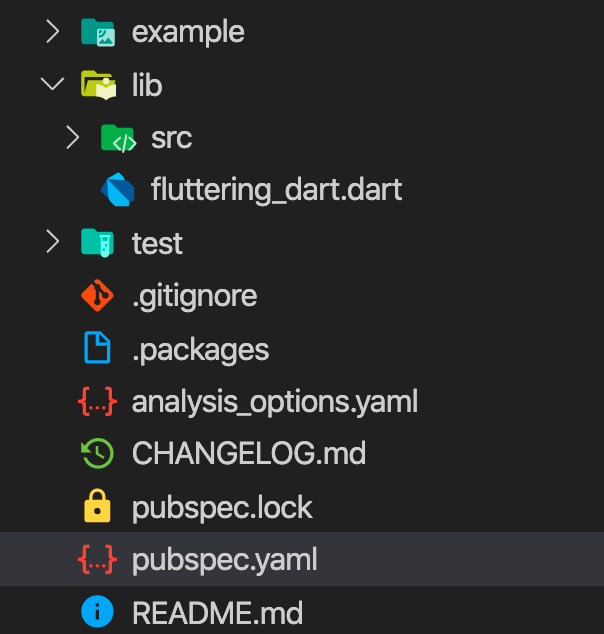
Dart package tool

Let’s go through each of the above:

Useful in published packages for usage demonstration.
These are folders where the source code lives.
This, usually, has the same name as the package. It can be used to export the local src libraries.
Unit tests and benchmark analysis will be placed inside this folder.
Declares the files that are going to be excluded from Git.
Maps the dependencies in the local system’s pub cache.
Useful to customize the lint checks, style analysis, and other precompile checks.
Markdown file that provides the change log info.
Locked package compatible dependencies.
Fundamental package file that describes it to the pub repository.
Markdown file that provides general info about the package.

As we’ll see in the future, a Flutter project structure is similar to that of a Dart package.

The pubspec.yaml file

This is the core of a Dart package. Understanding this file structure is crucial for describing a package.

The file is using the YAML syntax. This format is usually used for configuration files and has a readable structure.

name: fluttering_dart
description: A starting point for Dart libraries or applications.
version: 1.0.0
homepage: https://www.constanting.com
author: Constantin Stan <[email protected]>
environment:
  sdk: '>=2.7.0 <3.0.0'
dependencies:
  path: ^1.6.0
dev_dependencies:
  pedantic: ^1.8.0
  test: ^1.6.0

This file provides the package metadata info, useful when we want to publish the package, defines third party dependencies and Dart SDK version.

Let’s examine the pubspec components:

  • name — the identifier of the package which is required and should contain only lowercase letters, digits, and the _ char; it also should be a valid Dart identifier (doesn’t start with digits and is not a reserved word)
  • description — an optional component (required only if publishing the package) used to describe the purpose of the package
  • version — also optional if not publishing to the pub repository and useful to track the current package version
  • homepage — optional, but important, as it will be linked on package’s page once published
  • author — also optional, but important for providing contact info; if there’s more than 1 author, then the authors should be provided using the YAML list syntax
  • environment — specifies the main dependency of any Dart package, and that is the Dart SDK; using this we mention the target and the supported SDK versions
  • dependencies and dev_dependencies — these define the required third-party packages for usage and development of the library

The above components are the most common found in a pubspec file. For a complete overview and other components, you can read further here.

Dependencies

The most important role of the pubspec.yaml file is that of adding dependencies.

After starting our project, using a generator tool like Stagehand or manually, running the pub get command is the first thing to do.

Let’s consider the following pubspec :

name: fluttering_dart

Running the pub get command against it will provide us with the following output:

Resolving dependencies...
Got dependencies!

It will also generate 2 new files:

  • .packages — as mentioned previously, this maps the dependencies in the system’s pub cache; after packages are mapped, they can be imported and used in our Dart code; the file should be excluded from code management systems like Git
  • pubspec.lock — this file contains all dependency graphs of the package (all direct and transitive dependencies and their exact versions and extra metadata); this file should be included in the versioning systems, as it helps to replicate the exact environment

The above files are generated automatically by the pub tool and it is not advised to edit them manually.

In the pubspec.yaml example we’ve added the path package dependency.

We specify dependencies using the dependencies from the pubspec file. The syntax for doing that is:

<package>: <constraints>

The dependency should be specified using the package name and constraints (version and source). If no constraints are provided, then any available version of the package will be used (the latest one) and the default source will be pub.dartlang.org (which redirects to pub.dev)

The version constraint has multiple ways in which it can be mentioned:

  • any/emptypath: or path: any
  • concrete versionpath: 1.6.0
  • minimal boundpath: '>1.6.0' or path: '>=1.6.0'
  • maximal boundpath: '<1.6.0' or path: '<=1.6.0'
  • rangepath: '>=1.6.0 <=1.6.4'
  • semantic rangepath: ^1.6.0 which is similar to path: '>=1.6.0 <2.0.0' (minimal specified version to an no-longer compatible version)

The source constraint also has multiple ways to be specified:

  • the hosted source:
dependencies:
  path:
    hosted:
      name: path
      url: https://private-pub-api-compliant-server.com
  • the path source (this will get a bit confusing because of our example package name):
dependencies:
  path: # package is on this line 
    path: /some/path/to/path
  • the Git source (specify a package from a Git repository):
dependencies:
  path:
    git:
      url: git://github.com/dart-lang/path.git
      path: /
      ref: master
  • the SDK source:
dependencies:
  flutter_driver:
    sdk: flutter
    version: ^0.0.1

The last method is only used for Flutter SDK dependencies.

Third-party dependencies are crucial when it comes to increasing productivity.

Flutter projects can use both platform-specific and cross-platform code. The latter is written in Dart, and, for building Flutter apps, some basic knowledge of Dart is required.

Fluttering Dart’s goal is to explore fundamental knowledge and unveil tips & tricks of the powerful programming language that brings Flutter to life.

In the previous parts of the series, we went through the Dart built-in data types, functions, operators, control flow statements, object-orientated programming (classes, objects and more), and asynchronous programming.

In this part, we took a deep dive into Dart libraries and packages.

In the next part of the Fluttering Dart series, we’ll delve into unit testing.

Tha(nk|t’)s all!

Dart
Flutter
Programming
Fluttering Dart
Recommended from ReadMedium