
Fliki Review: Features, Benefits, Pricing, Pros & Cons
If you are looking for a way to create engaging and professional videos without spending hours on editing or hiring expensive voice-over artists, you might want to check out Fliki.ai, a new AI-powered video creation platform that promises to make video creation 10x simpler and faster.

Fliki.ai is a text-to-video tool that lets you transform your ideas, blogs, tweets, powerpoints, products, and more into stunning videos with lifelike AI voices. You can choose from over 2000 realistic text-to-speech voices across 75+ languages, and access millions of rich stock media for all your creative needs.
In this review, I will show you how Fliki.ai works, what are its features and benefits, and how you can use it to create amazing videos for your business, education, or personal projects.
How Fliki.ai Works
Fliki.ai is a web-based platform that works on any device and browser. You don’t need to download or install anything to use it. To get started, you need to sign up for a free account on their website.
Once you log in, you will see the dashboard where you can create new projects, manage your existing projects, and access your account settings. To create a new project, you can either start from scratch or use one of the templates provided by Fliki.ai.
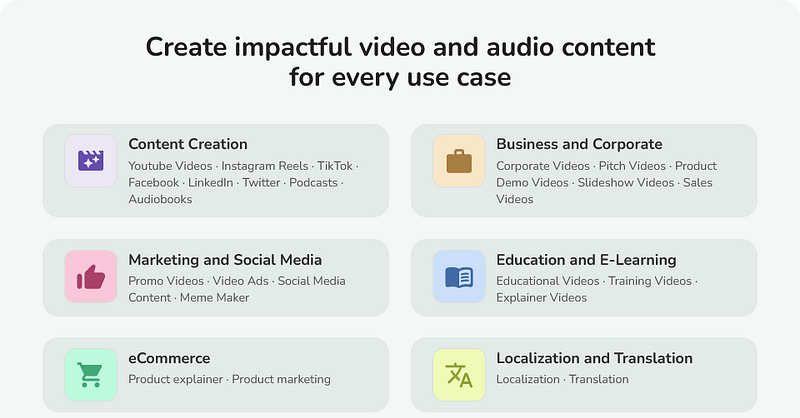
The templates are divided into different categories, such as Idea to Video, Blog to Video, PPT to Video, Tweet to Video, Avatar Video, and Product to Video. Each template has a different purpose and format, and you can customize them according to your needs.
For example, if you want to create a video from your blog article, you can use the Blog to Video template. You just need to paste the URL of your blog post or upload a text file, and Fliki.ai will automatically generate a video script based on the content of your article.
You can then edit the script as you like, add or remove slides, change the order of the slides, and adjust the duration of each slide. You can also choose and personalize the AI voice that will narrate your video. You can preview the voice before selecting it, and adjust the speed, pitch, and volume of the voice.
Next, you can select the media that will accompany your script. You can either choose from the millions of stock images and videos provided by Fliki.ai, or upload your own media files. You can also let the AI select the best media for each slide based on the keywords in your script.
Finally, you can preview your video instantly and make any changes if needed. You can also add transitions, effects, captions, logos, watermarks, and more to enhance your video. Once you are happy with your video, you can download it in HD quality or share it directly to social media platforms like YouTube, Facebook, Twitter, Instagram, etc.

Fliki.ai Features and Benefits
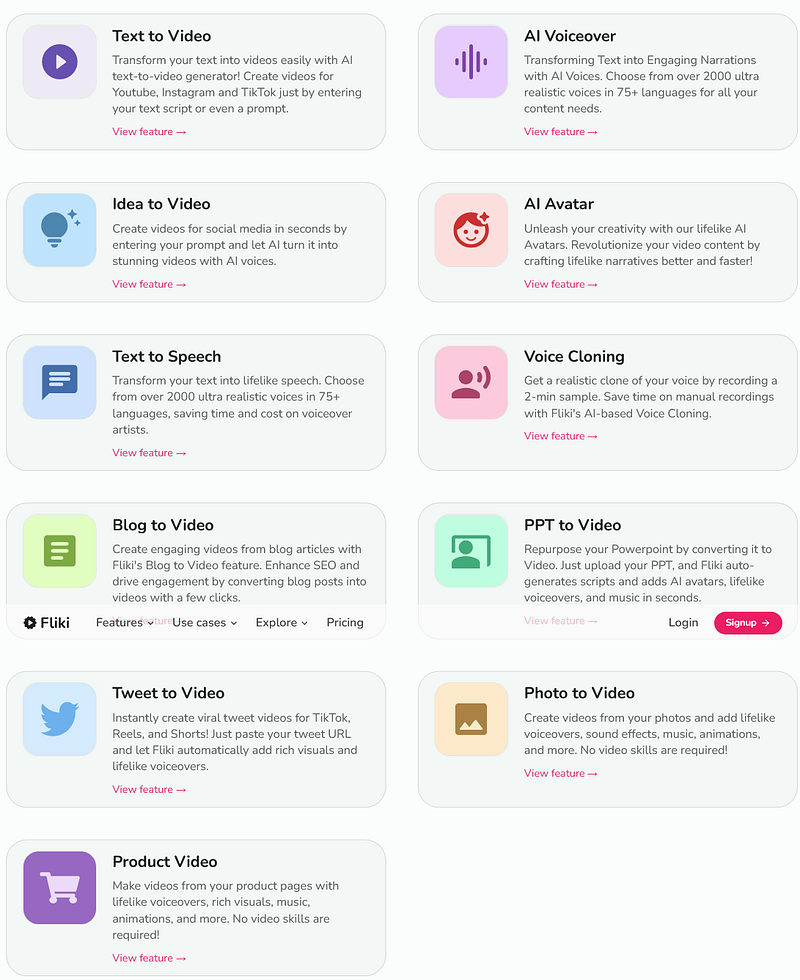
Fliki.ai is not just another video creation tool. It is a powerful platform that leverages artificial intelligence to make video creation easy and fast for anyone. Here are some of the features and benefits that make Fliki.ai stand out from other tools:
- Simple editor: Fliki.ai makes creating videos as simple as writing an email with its script-based editor. You don’t need any technical skills or experience to use it. You just need to write or paste your text and let the AI do the rest.
- Fast creation: Fliki.ai lets you create videos with lifelike voiceovers in minutes using AI. You don’t need to wait for hours or days for your videos to render or process. You can preview your videos instantly and download them in HD quality.
- Cost-effective: Fliki.ai lets you create high-quality content at scale at a fraction of the cost of traditional video production methods. You don’t need to hire expensive voice-over artists or buy expensive equipment or software. You can create unlimited videos with Fliki.ai for a low monthly fee.
- Extensive stock library: Fliki.ai gives you access to millions of rich stock media for all your creative needs. You can choose from images, videos, sound effects, icons, stickers, backgrounds, and more to enhance your videos.
- Realistic text-to-speech voices: Fliki.ai offers over 2000 realistic text-to-speech voices across 75+ languages. You can choose from different accents, genders, ages, emotions, and styles to match your brand and audience. You can also customize the voice parameters such as speed, pitch and volume.
Multiple templates
Fliki.ai provides multiple templates for different purposes and formats. You can create videos from ideas, blogs, tweets, powerpoints, products and more. You can also create avatar videos with animated characters and backgrounds.
Flexible customization
Fliki.ai allows you to customize every aspect of your video. You can edit the script, change the media, add transitions, effects, captions, logos, watermarks, and more. You can also adjust the resolution, aspect ratio, frame rate, and quality of your video.
Easy sharing
Fliki.ai lets you share your videos directly to social media platforms like YouTube, Facebook, Twitter, Instagram, etc. You can also download your videos in HD quality or embed them on your website or blog.
Fliki.ai Pricing and Plans
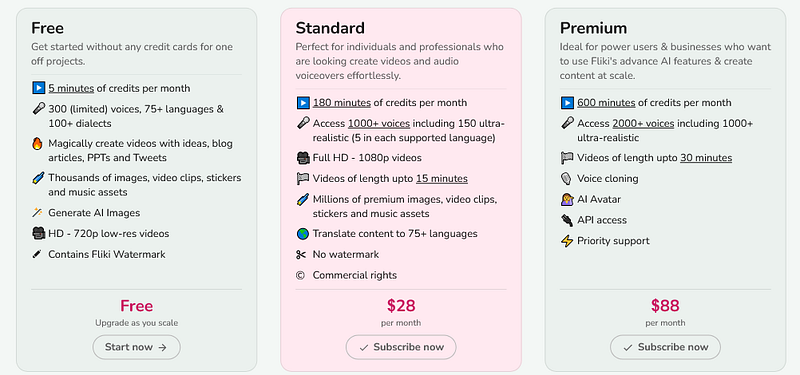
Fliki.ai offers three pricing plans for different needs and budgets. You can choose from the following plans:
Free plan:
This plan lets you create up to 5 videos per month with a maximum duration of 2 minutes each. You can access 100+ text-to-speech voices and 1 million+ stock media. You can also use the Idea to Video and Blog to Video templates. However, your videos will have a Fliki.ai watermark and you cannot download them in HD quality.
Standard plan:
This plan costs $28 per month or $252 per year. It lets you create up to 50 videos per month with a maximum duration of 15 minutes each. You can access 1000+ text-to-speech voices and 5 million+ stock media. You can also use all the templates and features available on Fliki.ai. Your videos will not have a Fliki.ai watermark and you can download them in HD quality.
Premium plan:
This plan is for businesses and agencies that need custom solutions and support. You can contact Fliki.ai for a quote and get access to unlimited videos, 30 minutes duration, unlimited text-to-speech voices, unlimited stock media, custom branding, dedicated account manager, priority support, and more.
Fliki.ai Pros and Cons
Fliki.ai is a great tool for anyone who wants to create engaging and professional videos with AI. However, like any tool, it has its pros and cons. Here are some of them:
Pros:
- Easy and fast to use - High-quality output - Cost-effective solution - Extensive stock library - Realistic text-to-speech voices - Multiple templates - Flexible customization - Easy sharing
Cons:
- Limited free plan - Requires internet connection - May not suit every niche or style
Fliki.ai Review: Conclusion
Fliki.ai is a AI-powered video creation platform that promises to make video creation 10x simpler and faster. It lets you transform your ideas, blogs, tweets, powerpoints, products, and more into stunning videos with lifelike AI voices.
You can choose from over 2000 realistic text-to-speech voices across 75+ languages, and access millions of rich stock media for all your creative needs. You can also customize every aspect of your video with transitions, effects, captions, logos, watermarks, and more.
Fliki.ai is a great tool for anyone who wants to create engaging and professional videos without spending hours on editing or hiring expensive voice-over artists. You can create unlimited videos with Fliki.ai for a low monthly fee.
If you are interested in trying out Fliki.ai, you can sign up for a free account on their website and get started right away.
I hope this Fliki.ai review was helpful for you. If you have any questions or comments about Fliki.ai or this review, feel free to leave them below.
FAQs
Is Fliki free to use?
Yes, Fliki.ai offers a free plan that allows you to create up to 5 videos per month with a maximum duration of 2 minutes each. However, videos created on the free plan will have a Fliki.ai watermark, and you cannot download them in HD quality.
What are the benefits of Fliki.ai?
Fliki.ai offers several benefits, including a simple and fast video creation process, cost-effectiveness, access to an extensive stock library with millions of media assets, realistic text-to-speech voices in over 2000 options across 75+ languages, multiple templates for various purposes, flexible customization options, and easy sharing to social media platforms.
How does Fliki.ai work?
Fliki.ai is a web-based platform accessible on any device or browser. Users can sign up for a free account, choose templates for different purposes, input text or content, customize the script, select AI voices, add media, and enhance the video with various features. The platform operates on a text-to-video mechanism powered by AI.
How do I export my Fliki.ai?
Once you’re satisfied with your video on Fliki.ai, you can export it by selecting the download option. This allows you to save your video in HD quality. After downloading, you can further share it on social media platforms or use it as needed.
Can I use AI voice for YouTube videos?
Yes, you can use AI-generated voices for YouTube videos. Fliki.ai, mentioned in the article, offers over 2000 realistic text-to-speech voices across various languages that can be used to narrate your video content.
How do you make a video on Fliki.ai?
To make a video on Fliki.ai, sign up for a free account, choose a template based on your content type, input or paste your text, customize the script, select an AI voice, add media, preview the video, make any necessary adjustments, and then download the final video in HD quality.
How can I add AI voice to video for free?
Fliki.ai offers a free plan that allows you to add AI-generated voices to your videos. Sign up for a free account, follow the steps to create a project, and utilize the provided text-to-speech voices without incurring additional costs.
How do I make a video with AI voice for free?
To make a video with AI voice for free using Fliki.ai, sign up for a free account, choose a suitable template, input your text, customize the script, select an AI voice, add media, and then download your video. The free plan has limitations, so consider your project’s requirements.
How do you make money with Fliki.ai?
Fliki.ai seems more geared towards helping users create engaging videos. To explore potential monetization strategies, you may need to consider how the videos you create can be leveraged for your business or content monetization on platforms like YouTube.
What is the best text-to-video AI?
The article highlights Fliki.ai as a text-to-video AI platform with features like realistic text-to-speech voices, customization options, and templates. However, determining the “best” text-to-video AI depends on individual preferences and project requirements. Explore different platforms to find the one that suits your needs.
How do I convert text-to-video AI?
To convert text to video using Fliki.ai or a similar platform, sign up, choose a template, input or paste your text, customize the script, select an AI voice, add media, preview and make adjustments, and then download the final video in your desired format.
What is the AI that converts text-to-video?
Fliki.ai is mentioned in the article as an AI-powered platform that converts text to video. Additionally, there are other AI-driven platforms designed for text-to-video conversion. Explore available options to find the one that aligns with your preferences and needs.
Disclaimer — This article includes affiliate links which means that if you make a purchase through these links, I may earn a commission at no additional cost to you. Your support mean a lot!