
Flattening Your SQL Tables — Not As Easy As It Sounds
How to expose deeply nested SQL fields — and why you need to be careful when handling complex raw data.

Reshape And Declutter Your SQL Tables
Unlike practice datasets, much of the data you work with on the job as a data engineer, data scientist or data analyst will be quite messy.
Aside from containing NA values, duplicate values and other data eye sores, there is a good possibility your data could be structurally complex as well.
In fact, my very first pipeline I built professionally involved ingesting a data source that returned nested JSON objects.
In the nearly two years since that assignment I’ve worked with and created countless nested data sources for end users.
For individuals that deal with data upstream like data engineers, nesting data makes a ton of sense.
Nested data is neatly stored and, when ingested correctly, avoids creating duplicate records.
The issue is that this data is not always easy or practical to work with for downstream users.
For instance, if a data analyst needs to incorporate your table in a complex query with multiple joins or WITH blocks, then having to UNNEST() values becomes an additional hassle.
Therefore, to avoid passing the UNNEST baton further downstream, you may be tasked with creating a flattened version of your source table.
Although the SQL for this is just an extension of SELECT col FROM table, the unnest queries can become complex.
To illustrate the concept of flattening a SQL table I’ll use the BigQuery public dataset the_met, focusing on the vision_api_data table.
On the Record with The RECORD Type
Unlike my previous writing on the topic of complex data types in SQL which dealt solely with nested records, in this walkthrough we’ll understand how to integrate nested values with their un-nested counterparts to create a more legible, user-friendly table.
Which is why the vision_api data table is a perfect example to work with, as you can see from its schema:
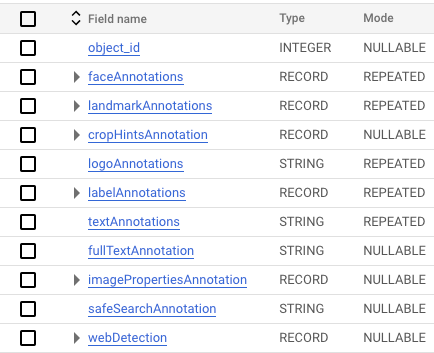
If you’ve read my work about handling complex data types then you’ll recognize the RECORD type.
As a reminder: RECORD signals a nested column and can contain columns of the same type, as seen with the faceAnnotations field:
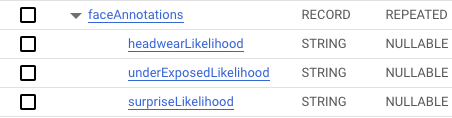
Or a RECORD field can include different data types, including other RECORD fields (referred to as nested records):

These RECORD types can become quite layered, which might become obvious as you can see by checking the schema for imagePropertiesAnnotation:

It’s incredibly important to understand exactly how the data is stored before you can transform it, as you’ll see below.
UNNEST. And Then UNNEST Again.
By the end of this walkthrough you’ll be tired of seeing UNNEST().
But if we want to access nested columns this is the best (and possibly only) way to do so.
To begin, let’s tackle a column with the least number of nested records.
I’ll be looking at labelAnnotations, a RECORD of REPEATED mode.
Note that when we use the UNNEST() function, we can alias the column, just like we would a table being used in a JOIN.
Additionally, it is very important to remember the comma between your referenced table and the table you will be using UNNEST() on.
The comma signals a CROSS JOIN between the source table and the newly flattened column.
SELECT
  l_a.properties,
  l_a.locations,
  l_a.boundingPoly,
  l_a.topicality,
  l_a.confidence,
  l_a.score,
  l_a.description,
  l_a.locale,
  l_a.mid
FROM
  `bigquery-public-data.the_met.vision_api_data`,
  UNNEST(labelAnnotations) l_a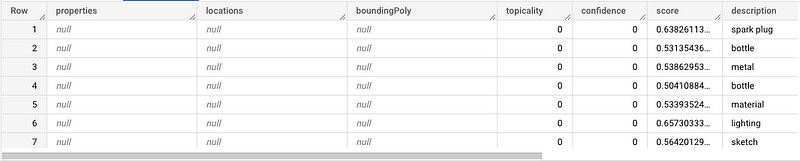
Like any other type, we can use functions to manipulate un-nested columns. For instance, I can use ROUND() on the score column to clean the output.
SELECT
  l_a.properties,
  l_a.locations,
  l_a.boundingPoly,
  l_a.topicality,
  l_a.confidence,
  ROUND(l_a.score, 2) AS score,
  l_a.description,
  l_a.locale,
  l_a.mid
FROM
  `bigquery-public-data.the_met.vision_api_data`,
  UNNEST(labelAnnotations) l_a
Now that we’ve un-nested the labelAnnotations column, let’s add an un-nested column to start to flatten this table.
SELECT
  object_id,
  logoAnnotations,
  l_a.properties,
  l_a.locations,
  l_a.boundingPoly,
  l_a.topicality,
  l_a.confidence,
  ROUND(l_a.score, 2) AS score,
  l_a.description,
  l_a.locale,
  l_a.mid
FROM
  `bigquery-public-data.the_met.vision_api_data`,
  UNNEST(labelAnnotations) l_a
We’ll try a more nested column for the next flattening operation.
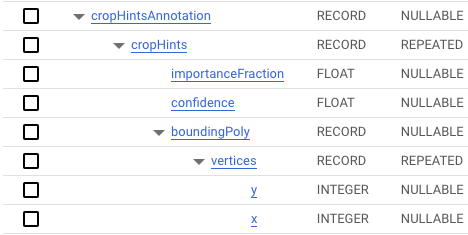
cropHintsAnnotation has 4 layers of nesting.
And, because it contains ARRAY types within STRUCT types, we can’t just un-nest each record. We have to use a mixture of the un-nest function and dot notation to access these nested records.
Like the operations we used to un-nest labelAnnotations, we can alias the column following the un-nest process; I’ll use “ch” to refer to fields within this RECORD (see the last line in the code snippet).
SELECT
  object_id,
  logoAnnotations,
  l_a.properties,
  l_a.locations,
  l_a.boundingPoly,
  l_a.topicality,
  l_a.confidence AS label_confidence,
  ROUND(l_a.score, 2) AS score,
  l_a.description,
  l_a.locale,
  l_a.mid,
  ch.importanceFraction,
  ch.confidence,
FROM
  `bigquery-public-data.the_met.vision_api_data`,
  UNNEST(labelAnnotations) l_a,
  UNNEST(cropHintsAnnotation.cropHints) ch
See how I have to do more than simply un-nest cropHintsAnnotation? Since “importanceFraction” and “confidence” are contained within cropHints, which is an array within cropHintsAnnotation, I need to access that array as part of the un-nest step.

Now, let’s access the last part of the cropHints object, boundingPoly, which contains vertices variables “x” and “y.”
SELECT
  object_id,
  logoAnnotations,
  l_a.properties,
  l_a.locations,
  l_a.boundingPoly,
  l_a.topicality,
  l_a.confidence AS label_confidence,
  ROUND(l_a.score, 2) AS score,
  l_a.description,
  l_a.locale,
  l_a.mid,
  ch.importanceFraction,
  ch.confidence,
  b_v.x,
  b_v.y
FROM
  `bigquery-public-data.the_met.vision_api_data`,
  UNNEST(labelAnnotations) l_a,
  UNNEST(cropHintsAnnotation.cropHints) ch,
  UNNEST(ch.boundingPoly.vertices) b_v
Creating The Final Flattened Table
Although these query operations are helpful for conducting un-nest operations, we want to package the result as something a data consumer could access.
There are three main forms an un-nested table could be packaged for an end user, as a:
- View
- Table
- Dashboard
To conclude this walkthrough, I’ll convert this query to a view that anyone in our hypothetical organization could access, provided they are BigQuery users in the same project.
After I create a view (using the BigQuery UI), it will appear like this:

Once created, we can access the view like any other table.
Note how the schema now contains no nested values:

-- Access the view

SELECT * FROM `***********.sample_dataset.vision_api_flattened`
A Final Warning
Although flattening a table might make accessing its contents easier, there are some risks you must weigh before conducting such an operation.
When you unnest a RECORD type you’re not just popping a value out of a container, you’re actually altering the shape of your data.
In the process this can create duplicates and other excess data that isn’t necessarily helpful in analysis.
Flattening a table will almost certainly add rows to your tables, which we can see by running this query:
WITH un_nested AS (

SELECT
  object_id,
  logoAnnotations,
  l_a.properties,
  l_a.locations,
  l_a.boundingPoly,
  l_a.topicality,
  l_a.confidence AS label_confidence,
  ROUND(l_a.score, 2) AS score,
  l_a.description,
  l_a.locale,
  l_a.mid,
  ch.importanceFraction,
  ch.confidence,
  b_v.x,
  b_v.y
FROM
  `bigquery-public-data.the_met.vision_api_data`,
  UNNEST(labelAnnotations) l_a,
  UNNEST(cropHintsAnnotation.cropHints) ch,
  UNNEST(ch.boundingPoly.vertices) b_v

),
nested AS (
SELECT
  object_id,
  logoAnnotations,
  NULL AS properties,
  NULL AS locations,
  NULL AS boundingPoly,
  NULL AS topicality,
  NULL AS confidence,
  NULL AS score,
  NULL AS description,
  NULL AS locale,
  NULL AS mid,
  NULL AS importanceFraction,
  NULL AS confidence,
  NULL AS x,
  NULL AS y
FROM
  `bigquery-public-data.the_met.vision_api_data`
)

SELECT COUNT(1) AS count, "un_nested" AS table
FROM un_nested
UNION ALL
SELECT COUNT(1) AS count, "nested" AS table
FROM nested
Note that I need to use NULL values to ensure each CTE has the same amount of fields so the final UNION operation will work.
This way I can calculate a true count of the rows in the query I want to convert to the flattened table and the original query.
Alternatively, I could have mapped this to the new flattened view we created.
Either way, you can see that there is a significant difference in row count:

The un-nested table adds over 2 million rows!
This is something you’ll want to take into account as you consider long-term durability and access of your table.
Despite potential downsides, being able to provide a flattened table can be very helpful when servicing data consumers that aren’t as comfortable with nested data.
In any case, being able to properly understand nested data and having the ability to flatten a SQL table is a skill that must be part of your SQL arsenal.
Go from SELECT * to interview-worthy project. Get our free 5-page guide.


