Fine Tuning of OpenAI-Based LLMs: An End-to-End Exploration
Fine-tuning of a LLM is a process that involves continuing the training of an existing pre-trained model on a new dataset, often with a different task or a narrower domain than the original training task. The goal of fine-tuning is to adapt the broad language understanding learned by the base-model to a specific task or to improve performance on specific types of input. This technique is particularly useful because it allows the transfer of general language understanding from the broad pre-training task to the specific fine-tuning task.
In this artilce, I will provide a comprehensive step-by-step guide to fine-tuning one of the OpenAI-based models, specifically the gpt-3.5-turbo (also known as gpt-3.5-turbo-0613). Additionally, I will demonstrate how to create a customized chatbot using this fine-tuned model. Notably, OpenAI has recently launched a user interface (UI) for fine-tuning, and I will cover both the program-based and GUI method for fine-tuning OpenAI-based LLMs.
The Dataset: To fine-tune the gpg-3.5-turbo-0613 model effectively, it’s crucial that our input adheres to a specific format detailed here. For this tutorial, I quickly compiled information regarding the 2023 Nobel Prize in Science and Nobel laureates in plain text format. I utilized the gpt-3.5-turbo model to structure these questions and answers accordingly. It’s important to note that this dataset is relatively small and was created solely for the purpose of this tutorial. You can access this dataset in my GitHub repository.
The reason behind selecting this particular dataset for this article is that the gpt-3.5-turbo model has not been exposed to this specific data during its training. Consequently, the base model lacks substantial prior knowledge about this information. However, it’s possible that some fragments of this data may have been indirectly encountered during the training of the base model. This scenario mirrors situations involving private datasets. The standard input format is illustrated below, and for each training example, we need to specify three distinct roles: system, user, and assistant (for chat models).

There is a maximum token limit of 4096 for each training example, and if it surpasses this limit, the portion exceeding it will be omitted from the training data. It’s crucial to be aware of the pricing associated with fine-tuning large language models (LLMs) from OpenAI, which can be found in the provided price information link. Currently, not all OpenAI models are eligible for fine-tuning; only three models, specifically gpt-3.5-turbo-0.613, babbage-002, and davinci-002, are available for this purpose at the moment.
Fine-Tuning: Prior to commencing the fine-tuning process, it’s imperative to ensure that the necessary information and files are correctly situated. Begin by downloading the training data from the provided GitHub link, which is available in JSONL (JSON Lines) format. Additionally, create an .env file within the directory where you intend to execute your code. In this .env file, define your OpenAI API key as follows: OPENAI_API_KEY = “sk-……………..”. Alternatively, we can also provide our API key through other means.
import json
import openai
import time
import os
from langchain.chat_models import ChatOpenAI
from dotenv import load_dotenv, find_dotenv
load_dotenv(find_dotenv(), override=True)
openai.api_key = os.getenv('OPENAI_API_KEY')
The initial step in this process involves uploading the training dataset to OpenAI’s server. This can be accomplished using the openai.File.create method. This method generates an id that corresponds to this dataset, and it is essential to use this id whenever you intend to utilize this dataset for subsequent steps.
train = openai.File.create(
  file=open("train.jsonl", "rb"),
  purpose='fine-tune'
)

train_id = train['id']

print(openai.File.list())

# This is how the output look like:
<File file id=file-wFX0tNod6A6s4MV2ZCzBtRJF at 0x1406c121490> JSON: {
  "object": "file",
  "id": "file-wFX0tNod6A6s4MV2ZCzBtRJF",
  "purpose": "fine-tune",
  "filename": "file",
  "bytes": 58111,
  "created_at": 1696853345,
  "status": "uploaded",
  "status_details": null
}
We can use the openai.File.list()function to view a list of all the files that have been uploaded to our OpenAI account. If we have validation data available, it is advisable to follow the same process for uploading the validation data to OpenAI’s server as well. This ensures that we have a consistent and comprehensive dataset for fine-tuning and evaluating your model’s performance. Once our data are successfully uploaded to the server, the fine-tuning step becomes straightforward.
response = openai.FineTuningJob.create(
    training_file=train_id,
    model="gpt-3.5-turbo"
    )
During the fine-tuning process, we have the option to provide additional parameters beyond just the “model” and “train_id.” We can explore all the possible parameters in the OpenAI API documentation, which can be found here. Additionally, we can specify the number of epochs using the “hyper-parameters” argument.
In our case, where the training dataset size is 110, the fine-tuning process typically takes approximately 10/15 minutes to complete. After fine-tuning is finished, we will receive an email notification. To check the status of a running job, you can find the corresponding job id and use it to monitor the progress as shown below:
job_id = response['id']

# Retrieve the state of a fine-tune
response = openai.FineTuningJob.retrieve(job_id)
print(response)

## check the status of training
print(response['status'])
After the fine-tuning process is finished, we will obtain a model_id. This model has now been fine-tuned and is accessible for us to utilize at any time through the OpenAI API.
response = openai.FineTuningJob.retrieve(job_id)
model_id = response["fine_tuned_model"]

print(model_id)

'ft:gpt-3.5-turbo-0613:personal::87jbtXcG'
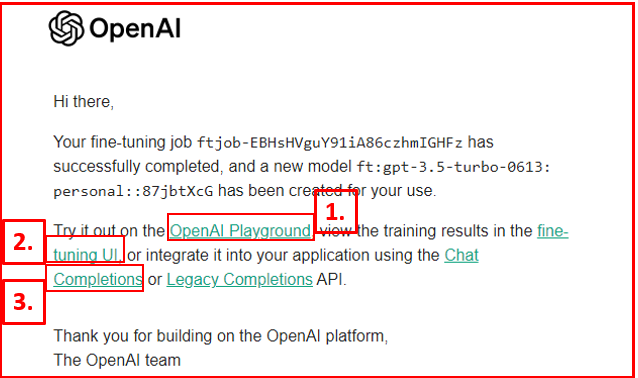
The confirmation email provides us with the following information:
1. A hyperlink to the OpenAI Playground, where we can directly evaluate the fine-tuned model. 2. A link to the fine-tuning user interface (UI), allowing us to initiate a new fine-tuning process or access information about the variables and parameters used during fine-tuning. 3. A hyperlink to Chat Completions/Legacy Completions API, offering guidance on how to integrate and utilize the fine-tuned model in our application. Notably, the email also includes the crucial model id for the recently fine-tuned large language model.
Chat Completions API: In this context, we employ the openai.ChatCompletion.create() method, which is designed for generating model-based responses in response to a sequence of conversation messages. In a straightforward scenario, we are required to input both the model (referred to as model id in this case, as we are utilizing a fine-tuned model) and the message into this function.
question="Who won the nobel prize this year in chemistry?"

test_message=[{'role': 'system',
  'content': "As a dedicated journalist closely monitoring latest development in science and technology, you provide us with accurate and factual information regarding  the nobel prize 2023."},
 {'role': 'user', 'content': f'{question}'}]

completion = openai.ChatCompletion.create(
  model=model_id,
  messages=test_message

print(completion['choices'][0].message['content'])


# We appreciate your curiosity regarding the Nobel Prize! Kari N. Aam, Stefan W. Hell, and Eric Betzig won the Nobel Prize in Chemistry. #Chemistry
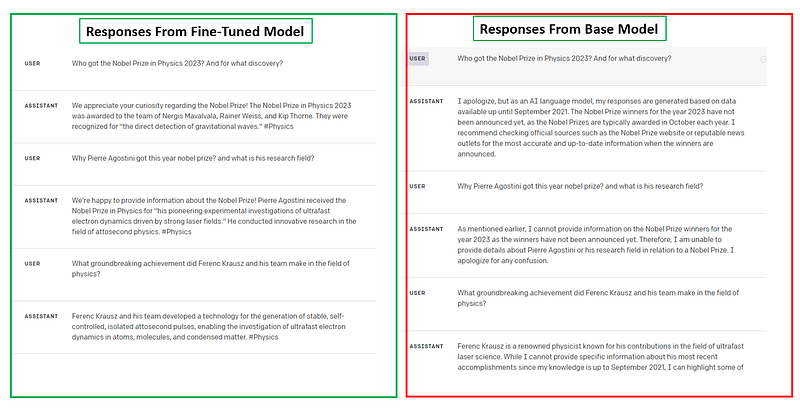
Now, let’s pose the identical question to the base model, which is gpt-3.5-turbo. Given that this information regarding the 2023 Nobel Prize was not part of the base model’s training data, obtaining an accurate response from the base model may prove challenging.
llm = ChatOpenAI(model='gpt-3.5-turbo', temperature=1)

print(llm.predict(question))

# here is the response

'As an AI, I cannot provide real-time information. The Nobel Prize in Chemistry for any given year is announced on October 6th of that year. Therefore, I am unable to specify the recent Nobel Prize winner in Chemistry. Please check authoritative sources or news outlets for the most up-to-date information.'
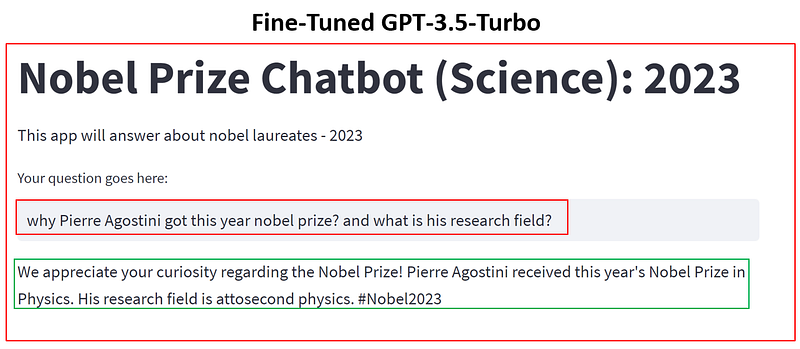
Streamlit App: We will now develop a Streamlit application utilizing this fine-tuned model. The complete source code is presented below. To execute this application, you should initially save the following code to your local directory, naming it, for instance, nobleprize23.py. Then, run the subsequent command directly from your Python environment as “streamlit run nobleprize23.py”. Please ensure that Streamlit is installed within your Python environment, and that you have correctly provided the OpenAI API key.
import streamlit as st
from langchain.chat_models import ChatOpenAI
import openai
import os
from dotenv import load_dotenv, find_dotenv
load_dotenv(find_dotenv(), override=True)

OPENAI_API_KEY=os.getenv('OPENAI_API_KEY')
openai.api_key=OPENAI_API_KEY

print(openai.api_key)

model_id='ft:gpt-3.5-turbo-0613:personal::87jbtXcG'

st.title('Nobel Prize Chatbot (Science): 2023')
st.write('This app will answer about nobel laureates - 2023')

#st.write("**Your question goes here:**")

question = st.text_input("Your question goes here:", key="input")

if question:
    test_message=[{'role': 'system',
    'content': "As a dedicated journalist closely monitoring latest development in science and technology, you provide us with accurate and factual information regarding  the nobel prize 2023."},
    {'role': 'user', 'content': f'{question}'}]

    completion = openai.ChatCompletion.create(model=model_id,messages=test_message)

    answer = completion['choices'][0].message['content']

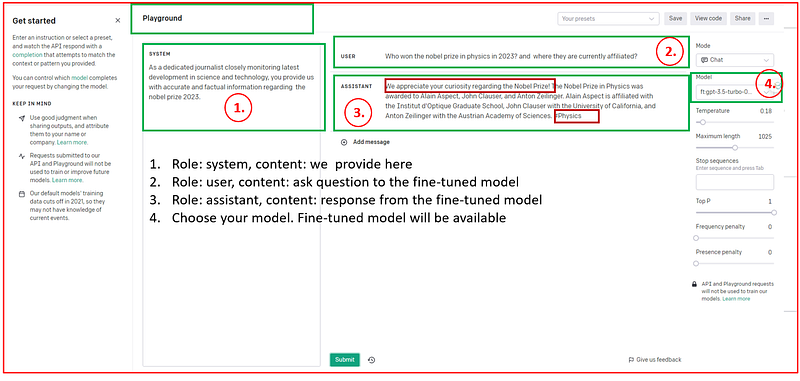
st.write(answer)Playground: The email will also contain a link to the playground (https://platform.openai.com/playground). Within this interface, there are four important options: (1) System, (2) User, (3) Assistant, and (4) Model. All the available modes, including the fine-tuned models accessible to our account, can be found under the Model option. Once we select the model and input the system and user data, we will promptly receive the response.
We have the option to contrast the responses generated by both the base and fine-tuned models when posed with the same set of questions related to our documents. Undoubtedly, we will observe variations in the responses produced by these two models.
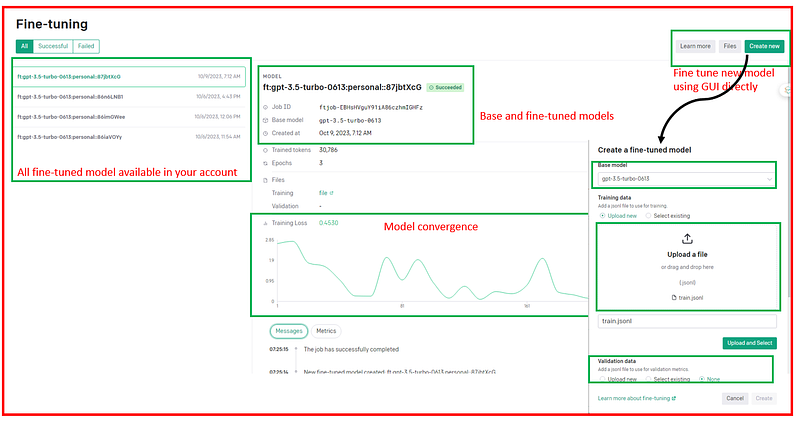
Fine-Tune UI: This is a recently introduced platform (https://platform.openai.com/finetune), and it proves to be highly efficient. Without requiring any coding skills, we can fine-tune the available base models effortlessly. To fine-tune a model using this platform, all that’s needed is to upload the training and validation datasets and select the base model. The process is remarkably straightforward.
Furthermore, this interface provides us with the capability to monitor the model’s status and various variables associated with the fine-tuning process. These variables include the files used, the success or failure of the fine-tuning process, the base model selected, and the convergence steps involved in the fine-tuning process.
In summary, fine-tuning LLMs is a way of leveraging the knowledge gained from broad language modeling to solve specific tasks or improve performance in specific domains. It involves continuing the training of a pre-trained model with new data, often with specific tasks or in a narrower domain. Fine-tuning OpenAI-based models is relatively straightforward and accessible. There are two approaches to fine-tuning these models: programmatically and through a user-friendly interface, both of which have been detailed and demonstrated earlier.
I hope you have found this article helpful. Thank you for taking the time to read it!
If there are any questions and would like to discuss, please don’t hesitate to get in touch with me via LinkedIn.


