
Fine-Tuning LayoutLM v2 For Invoice Recognition
From annotation to training and inference
Introduction
Since writing my last article on “Fine-Tuning Transformer Model for Invoice Recognition” which leveraged layoutLM transformer models for invoice recognition, Microsoft has released a new layoutLM v2 transformer model with a significant improvement in performance compared to the first LayoutLM model. In this tutorial, I will demonstrate step by step how to fine-tune layoutLM V2 on invoices starting from data annotation to model training and inference.
Training and inference scripts are available on Google Colab.
Training Script:
Inference Script:
LayoutLM V2 Model
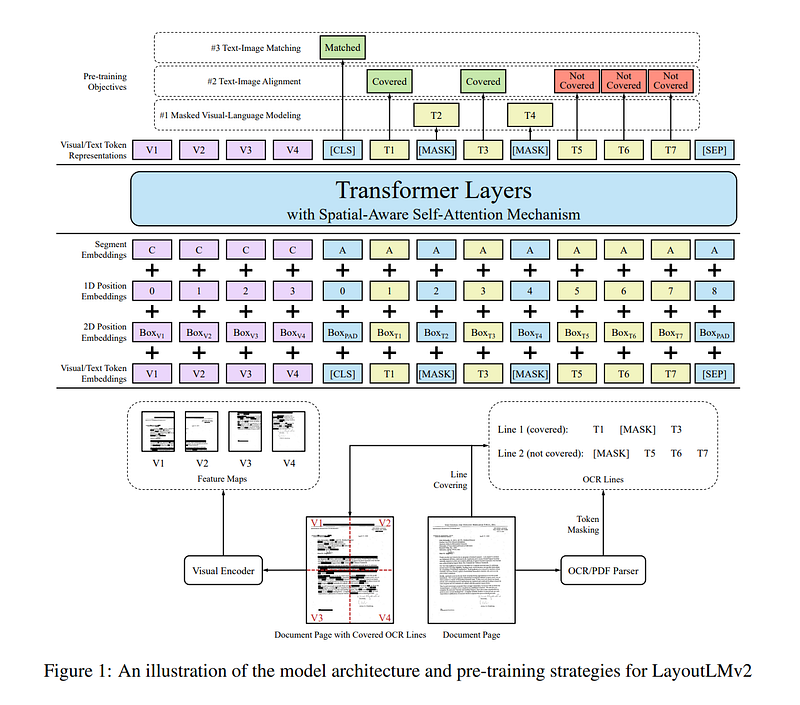
Unlike the first layoutLM version, layoutLM v2 integrates the visual features, text and positional embedding, in the first input layer of the Transformer architecture as shown below. This enables the model to learn cross modality interaction between visual and textual information, the interaction among text, layout, and image in a single multi-modal framework. Here is a snippet from the abstract: “Experiment results show that LayoutLMv2 outperforms LayoutLM by a large margin and achieves new state-of-the-art results on a wide variety of downstream visually-rich document understanding tasks, including FUNSD (0.7895 → 0.8420), CORD (0.9493 → 0.9601), SROIE (0.9524 → 0.9781), Kleister-NDA (0.8340 → 0.8520), RVL-CDIP (0.9443 → 0.9564), and DocVQA (0.7295 → 0.8672)”.
For more information, please refer to the original paper.
Annotation
For this tutorial, we have annotated a total of 220 invoices using UBIAI Text Annotation Tool. UBIAI OCR Annotation allows annotation directly on native PDFs, scanned documents, or images PNG and JPG in a regular or handwritten form. We have recently added support for over 20 languages including Arabic and Hebrew, etc.
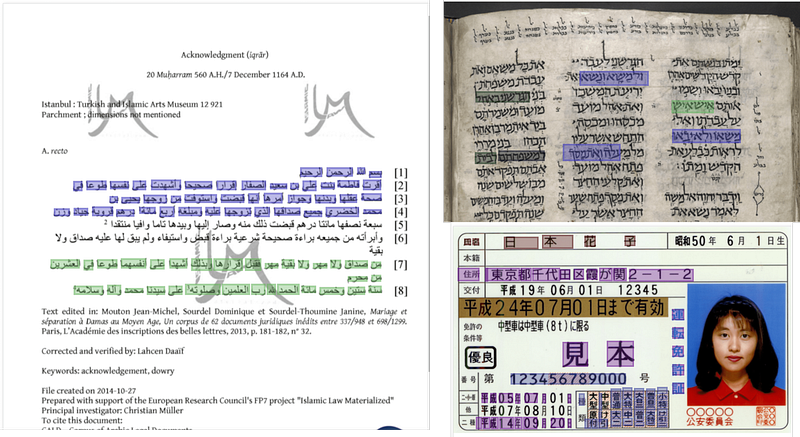
Here is an excellent overview on how to use the tool to annotate PDFs and images:
In addition to the labeled text offsets and bounding boxes, we will need to export the image of each annotated document. This can be done easily with UBIAI since it exports all the annotations along with the images of each document in one ZIP file.
Data Pre-processing:
After exporting the ZIP file from UBIAI, we upload the file to a google drive folder. We will use google colab for model training and inference.
- First step is to open a google colab, connect your google drive and install the transfromers and detectron2 packages:
from google.colab import drivedrive.mount('/content/drive')!pip install -q git+https://github.com/huggingface/transformers.git!pip install -q datasets seqeval!python -m pip install -q 'git+https://github.com/facebookresearch/detectron2.git'- To simplify the data pre-process and model training steps, we have created preprocess.py and train.py files that contain all the code required to launch the training. Clone the file from github:
! rm -r layoutlmv2_fine_tuning! git clone -b main https://github.com/walidamamou/layoutlmV2.git- Next, we need to unzip our exported dataset and place all the files in a folder:
IOB_DATA_PATH = "/content/drive/MyDrive/LayoutLM_data/Invoice_Project_XhDtcXH.zip"! cd /content/! rm -r data! mkdir data! cp "$IOB_DATA_PATH" data/dataset.zip! cd data && unzip -q dataset && rm dataset.zip! cd ..Fine-Tuning LayoutLM v2 Model:
We are almost ready to launch the training, we just need to specify a few hyper-parameters to configure our model and the path of the model output. You can of course play around with these variables to get the best result. For this tutorial we are using a test size of 33%, batch size = 4, learning rate = 5e-5 and 50 epochs.
#!/bin/bash#preprocessing argsTEST_SIZE = 0.333DATA_OUTPUT_PATH = "/content/"#training argsPROCESSED_DATA_PATH = DATA_OUTPUT_PATHMODEL_OUTPUT_PATH = "/content/layoutlmv2-finetuned"TRAIN_BATCH_SIZE = 4VALID_BATCH_SIZE = 2LEARNING_RATE = 5e-5EPOCHS = 50We are now ready to launch the model, simply run:
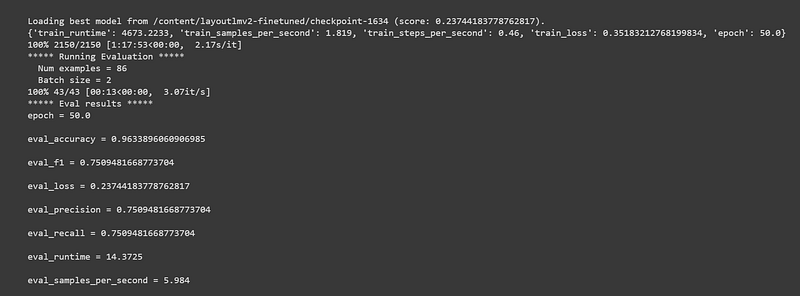
! python3 layoutlmv2_fine_tuning/train.py --epochs $EPOCHS \--train_batch_size $TRAIN_BATCH_SIZE \--eval_batch_size $VALID_BATCH_SIZE \--learning_rate $LEARNING_RATE \--output_dir $MODEL_OUTPUT_PATH \--data_dir $PROCESSED_DATA_PATHAfter the training is done, precision, recall and F1 score will be displayed as shown below. We obtain an F1 score of 0.75 and accuracy of 0.96 which is a decent score for annotating 220 invoices.
Inference with layoutLM V2:
We are now ready to test our newly trained model on a new unseen invoice. For this step we will use Google’s Tesseract to OCR the document and layoutLM V2 to extract entities from the invoice.
Let’s install pytesseract library:
## install tesseract OCR Engine! sudo apt install tesseract-ocr! sudo apt install libtesseract-dev## install pytesseract , please click restart runtime button in the cell output and move forward in the notebook! pip install pytesseract## install model requirements
!pip install -q git+https://github.com/huggingface/transformers.git!pip install -q torch==1.8.0+cu101 torchvision==0.9.0+cu101 -f https://download.pytorch.org/whl/torch_stable.html!python -m pip install -q 'git+https://github.com/facebookresearch/detectron2.git'Next, we will use the file layoutlmv2Inference.py (cloned previously) which will process the OCRd invoice and apply the model to get the predictions.
Finally, specify your model path, image path, output path and run the inference script as shown below:
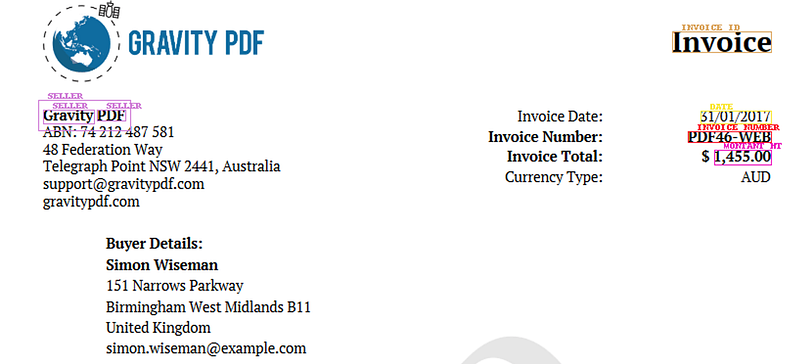
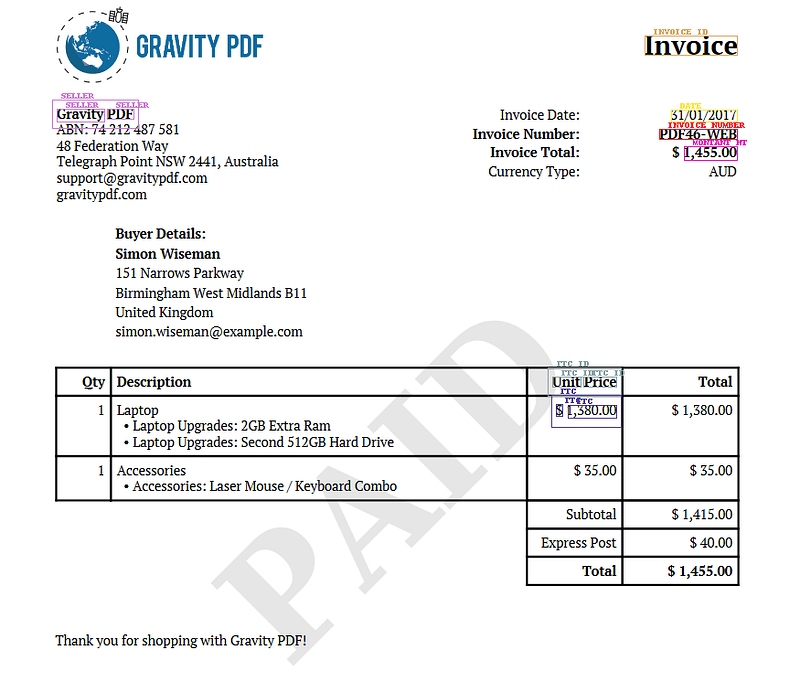
model_path = "/content/drive/MyDrive/LayoutLM v2 Model/layoutlmv2-finetuned.pth"imag_path = "/content/invoice_eng.PNG"output_path = "/content/Inference_output2"! python3 layoutlmv2Inference.py "$model_path" "$imag_path" "$output_path"Once the inference is done, you will find the overlayed predictions on the image as well as a JSON file containing all the label, text and offsets in the inference) output2 folder. Let’s look at the model prediction:
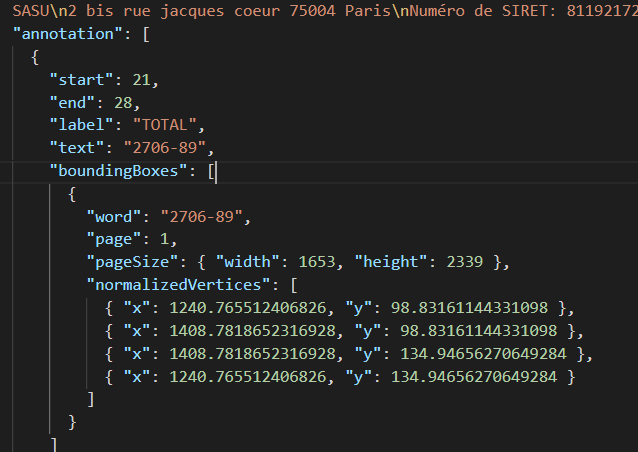
Here is a sample of the JSON file:
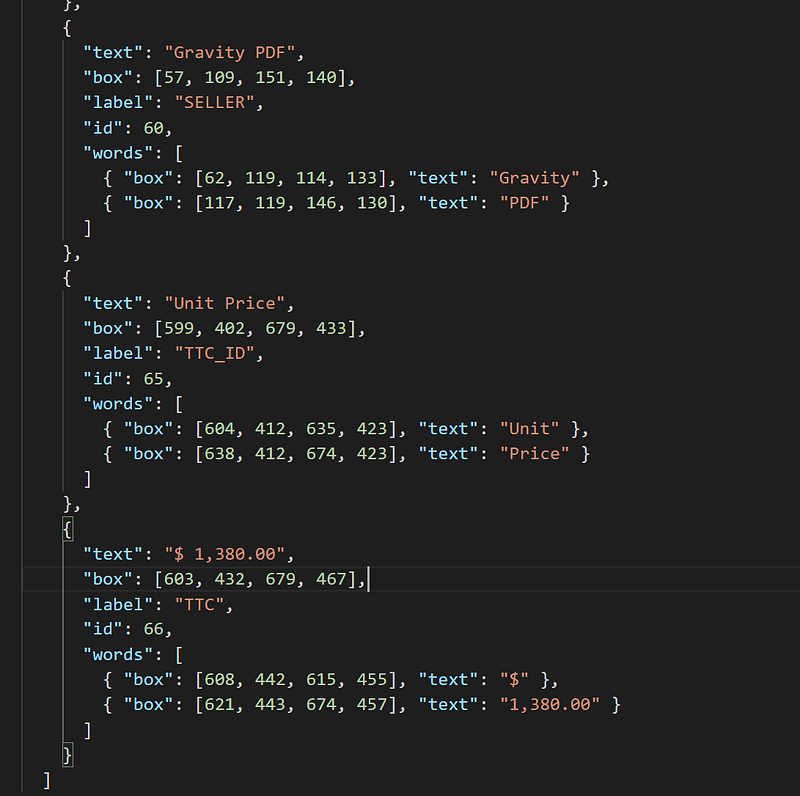
The model was able to predict most of the entities such as Seller, Date, Invoice number and Total but erroneously predicted “unit price” as TTC_ID. This suggests we need to annotate more types of invoices so our model learns to generalize.
Conclusion
In conclusion, we have shown a step by step tutorial on how to fine-tune layoutLM V2 on invoices starting from annotation to training and inference. The model can be fine-tuned on any other semi-structured documents such as driver licences, contracts, government documents, financial documents, etc.
If you would like to try out UBIAI’s OCR annotation feature, simply signup for free and start annotating.
Follow us on Twitter @UBIAI5 or subscribe here!
P.S: After writing this article, a new tutorial on training layoutlmV3 has been published, if you want to learn more follow this link.


