
Fine-tuning GPT-3 for Helpdesk Automation: A Step-by-Step Guide
Learn how to train GPT-3 on your internal database of helpdesk requests and answers using Python and the OpenAI API

While using GPT-3, I asked myself “How I can use it to create a Helpdesk 2.0?” The idea is to have a human-like chatbot based on GPT-3 but with the knowledge of the institute. The knowledge of the institute consists of Q&A related to the business, such as:
- How can I change my email address?
- How can I create a new bank account?
- How do I make a transfer to an EU account?
- How can I change the address of a package after I ordered it?
OpenAI’s GPT-3 [1], or Generative Pre-trained Transformer 3, is an advanced language model. It can generate human-like text and has been used in applications such as language translation, question answering, and text summarization.
These two highlighted functions (Q&A and text summary) are the most important in our case. Language translation would also be a significant advantage if we would live in a multilingual country. But let’s keep it simple for now and focus only on these two.
Context of GPT-3
Before we get into the details of the question “How can GPT-3 be tailored to your needs?” We will go over three important points to differentiate and understand in relation to GPT-3.
- Pre-training
- Fine-tuning vs retraining
- Limitations of GPT-3
Pre-training
GPT-3 has been pre-trained on a large text dataset to understand the nuances of human speech and produce highly coherent and contextually appropriate text.
This pre-training has provided GPT-3 with a strong foundation in language comprehension, allowing the model to produce highly coherent texts with minimal fine-tuning. One of GPT-3’s most significant advantages is its ability to generate human-like text with minimal training data.
However, one of the major disadvantages of GPT-3 is that it necessitates a large amount of data and computational resources, both of which are costly and difficult for some users to obtain.
Fine-tuning vs retraining
It is necessary to distinguish between fine-tuning and re-training a language model.
Retraining is the process of training a model from scratch with new data, whereas fine-tuning is the process of adjusting the parameters of a previously trained model to new data.
Fine-tuning GPT-3 for specific tasks is much faster and more efficient than completely re-training a model.
This is a significant benefit of GPT-3 because it enables the user to quickly and easily tune the model to their specific needs. However, fine-tuning has some drawbacks, such as the risk of over-fitting and the fact that the best results are not always obtained.
Limitations of GPT-3
GPT-3 is a powerful program, but it does have some limitations. For example, it may generate biased or offensive text on occasion, so it is critical to be aware of this and take steps to mitigate it.
Furthermore, GPT-3 has a tendency to over-fit, so it is critical to monitor the performance of your fine-tuned model and make adjustments as needed.
It should also be noted that GPT-3 is not a general AI model; rather, it can only perform specific tasks based on its training.
How to fine-tune GPT-3 for your needs?
GPT-3’s ability to be fine-tuned with a small amount of labeled data for specific tasks is one of its key features. Users can train the model on their own data to perform e.g. sentiment analysis or text classification tasks.
You must have access to the model via the OpenAI API or purchase a license to fine-tune GPT-3 on your own data. Once you have access, you can train the model on your data using the fine-tuning API. For your convenience, I searched for you the link to the pricing [2].
The amount of data required to fine-tune GPT-3 will vary depending on the task and the quality of the data. However, for fine-tuning to be effective, at least a few hundred examples of labeled data are recommended. For example, if you’re fine-tuning a text classification model, you’ll need labeled text data.
It’s worth noting that fine-tuning GPT-3 on your own data can be computationally expensive, so a powerful machine is recommended.
Perhaps you’re wondering how much information you really need to tailor your GPT-3 to your specific requirements. That is dependent on the situation. Unfortunately, no number can be given for this, so you will have to experiment. So start with a few hundred to 1000 labeled data points.
A part that is equally important as quantity is QUALITY!
The higher the quality and diversity of your data, the better your model will work. A diverse set of examples is needed to ensure that the model can generalize well to new examples. A good mix of positive and negative examples is also needed to ensure that the model can handle a variety of inputs.
6 Steps to have a fine-tuned GPT-3 model for a Helpdesk 2.0
After purchasing the GPT-3 license, you can begin creating your fine-tuning model by following these six main steps. I’ve included some Python code below to demonstrate the general overview of the fine-tuning process for your convenience.
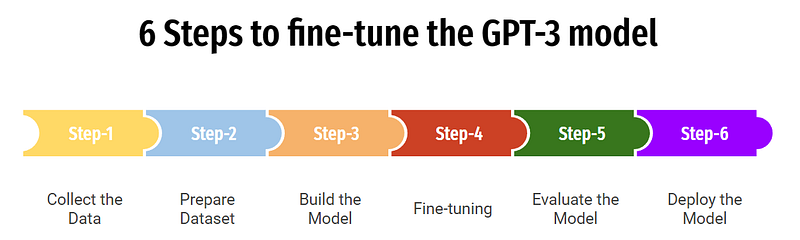
- Collect your data: Capture your internal database of helpdesk requests and responses and format them into a record that can be used for fine-tuning. This usually means splitting the requests and responses into separate text fields and possibly adding additional fields such as labels or tags.
- Prepare your dataset: You will need to pre-process your dataset by cleaning it, tokenizing it, and creating a vocabulary. This will ensure that your dataset is properly formatted for fine-tuning with GPT-3.
- Build the model: Once your dataset is ready, you can train GPT-3 on it using the fine-tuning API. Typically, you will need to specify the model architecture, the dataset, and other parameters such as the number of training trials.
- Fine-tuning: After training the model, you can fine-tune it by adjusting the parameters and training it again with your data set. This enables the model to learn and improve its performance by discovering patterns in your data.
- Evaluate the model: After fine-tuning, it is critical to evaluate your model’s performance by testing it on a verified dataset or monitoring its performance on real-world tasks.
- Deploy the model: Once you’re happy with the performance of your model, you can integrate it into your application.
Note that the following code only shows the general process of fine-tuning GPT-3 to your internal database of helpdesk requests and using GPT-3 to respond to those requests. For privacy reasons, I am not allowed to publish the actual code.
import openai_secret_manager

# Authenticate to the OpenAI API
secrets = openai_secret_manager.get_secrets("openai")
print(secrets)

# Use the `DALL-E` endpoint for fine-tuning
api_key = secrets["api_key"]
endpoint = "https://api.openai.com/v1/engines/davinci-codex/completions"

# Prepare the fine-tuning data
prompt = (f"Fine-tune GPT-3 on helpdesk requests and answers"
          f"Examples: request: how do I reset my password? answer: To reset your password please click on the link sent to your email.")

# Specify the fine-tuning parameters
completions = openai.Completion.create(
    engine="davinci-codex",
    prompt=prompt,
    max_tokens=1024,
    n=1,
    stop=None,
    temperature=0.7,
)

# Print the generated text
message = completions.choices[0].text
print(message)
The prompt variable is where you would insert your dataset. This example, it's just an illustration of how the data should look like.
The completions variable is used to specify the fine-tuning parameters. The engine parameter specifies which version of GPT-3 to use, the prompt parameter specifies the fine-tuning data, the max_tokens parameter specifies the maximum number of tokens to generate, the n parameter specifies the number of completions to generate, and the temperature parameter controls the level of randomness in the generated text.
More information about the fine-tuning process of GPT-3 can be found under the following link [3].
Conclusion
GPT-3 is a powerful tool for natural language processing tasks, and fine-tuning it with a small amount of labeled data can improve the performance of your current NLP model.
It is important to remember that fine-tuning GPT-3 requires a significant amount of data and computational resources, so it is not always the best option. Furthermore, the better your model will perform, the higher the quality and diversity of your data have to be.
Future expectations: GPT-3 has set a new standard for NLP models and future advances in the field will be influenced by this model. In the future, more advanced models should be developed with larger pre-training datasets, better fine-tuning capabilities, and improved performance. This will open up new possibilities for NLP tasks and applications, making it even more important for researchers and practitioners to keep abreast of the latest advances in the field.
Remember, an AI is never an all-around solution or silver bullet. It has to be processed and tuned for a specific need!
My most-recent posts:
- Explainable AI (XAI) brings knowledge and builds trust
- Leveraging AI to Drive Environmental, Social, and Governance Initiatives
- Ethics of AI: What can go wrong?
If you enjoy reading stories like these and want to support me as a writer, consider signing up to become a Medium member. It’s $5 a month, giving you unlimited access to stories on Medium. If you sign up using my link, I’ll earn a small commission.
References
[2] https://openai.com/api/pricing/
[3] https://beta.openai.com/docs/guides/fine-tuning
Subscribe to DDIntel Here.
Visit our website here: https://www.datadriveninvestor.com
Join our network here: https://datadriveninvestor.com/collaborate


