
Fine-Tuning BERT for Text Classification
A step-by-step tutorial in Python

Table of contents
1. Introduction
BERT¹ (Bidirectional Encoder Representations from Transformers) is a Machine Learning model based on transformers², i.e. attention components able to learn contextual relations between words.
The Natural Language Processing (NLP) community can leverage powerful tools like BERT in (at least) two ways:
- Feature-based approach 1.1 Download a pre-trained BERT model. 1.2 Use BERT to turn natural language sentences into a vector representation. 1.3 Feed the pre-trained vector representations into a model for a downstream task (such as text classification).
- Perform fine-tuning 2.1 Download a pre-trained BERT model. 2.2 Update the model weights on the downstream task.
In this post, we will follow the fine-tuning approach on binary text classification example. We will share code snippets that can be easily copied and executed on Google Colab³.
2. Environment setup
Although it is not essential, the training procedure would benefit from the availability of GPU. In Colab, we can enable GPU by selecting Runtime > Change runtime type.
Then, we install the Hugging Face⁴ transformers library as follows:
!pip install transformersWe import the needed dependencies:
3. Dataset
We use the public SMS Spam Collection Data Set⁵ from the UCI Machine Learning Repository⁶. The data consists of a text file with a set of SMS messages labeled as either spam or ham. From the Colab notebook:
- Download the dataset as a zip folder:
!wget 'https://archive.ics.uci.edu/ml/machine-learning-databases/00228/smsspamcollection.zip'- Unpack the folder:
!unzip -o smsspamcollection.zip- Inspect the first rows of the data file:
!head -10 SMSSpamCollection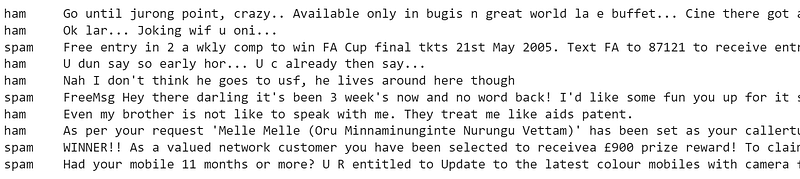
- For each line, the label is followed by a tab space and the raw text message. We choose to process the file to get a
pandas.DataFrameobject, as it is a common starting point in Data Science experiments:
file_path = '/content/SMSSpamCollection'
df = pd.DataFrame({'label':int(), 'text':str()}, index = [])
with open(file_path) as f:
  for line in f.readlines():
    split = line.split('\t')
    df = df.append({'label': 1 if split[0] == 'spam' else 0,
                    'text': split[1]},
                    ignore_index = True)
df.head()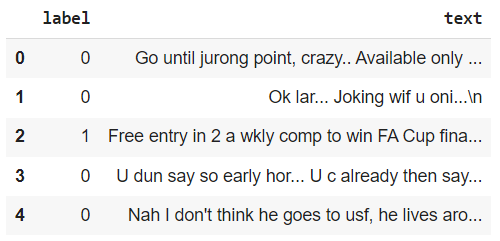
- We extract text and label values:
text = df.text.values
labels = df.label.values
4. Preprocessing
We need to preprocess the text source before feeding it to BERT. To do so, we download the BertTokenizer:
tokenizer = BertTokenizer.from_pretrained(
    'bert-base-uncased',
    do_lower_case = True
    )
Let us observe how the tokenizer can split a random sentence into word-level tokens and map them to their respective IDs in the BERT vocabulary:
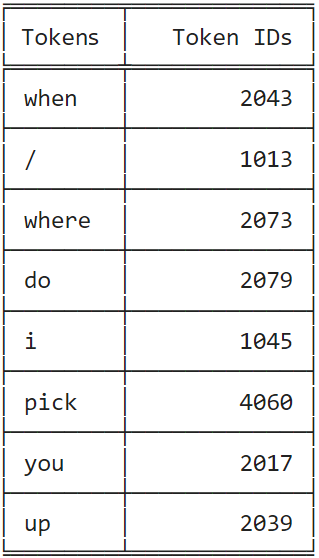
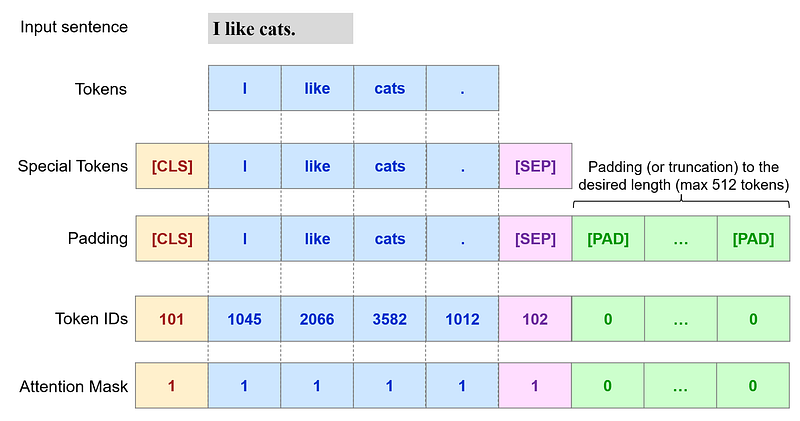
BERT requires the following preprocessing steps:
- Add special tokens:
-
[CLS]: at the beginning of each sentence (ID101) -[SEP]: at the end of each sentence (ID102) - Make sentences of the same length:
- This is achieved by padding, i.e. adding values of convenience to shorter sequences to match the desired length. Longer sequences are truncated.
- The padding (
[PAD]) tokens have ID0. - The maximum sequence length allowed is of 512 tokens¹. - Create an attention mask:
- List of 0/1 indicating whether the model should consider the tokens or not when learning their contextual representation. We expect
[PAD]tokens to have value0.
The process can be represented as follows:
We can perform all the needed steps by using the tokenizer.encode_plus⁷ method. When called, it returns a transformers.tokenization.tokenization-utils_base.BatchEncoding object with the following fields:
input_ids: list of token IDs.token_type_ids: list of token type IDs.attention_mask: list of 0/1 indicating which tokens should be considered by the model (return_attention_mask = True).
As we choose max_length = 32, longer sentences will be truncated, while shorter sentences will be populated with [PAD] tokens (id: 0) until they reach the desired length.
Note: the idea of using the tokenizer.encode_plus method (plus the code for it) was borrowed from this post: BERT Fine-Tuning Tutorial with PyTorch⁸ by Chris McCormick and Nick Ryan.
We can observe the token IDs for a text sample and recognize the presence of the special tokens [CLS] and [SEP], as well as the padding [PAD] up to the desired max_length:
token_id[6]
We can also verify the output of tokenizer.encode_plus by inspecting tokens, their IDs and the attention mask for random text samples as follows:
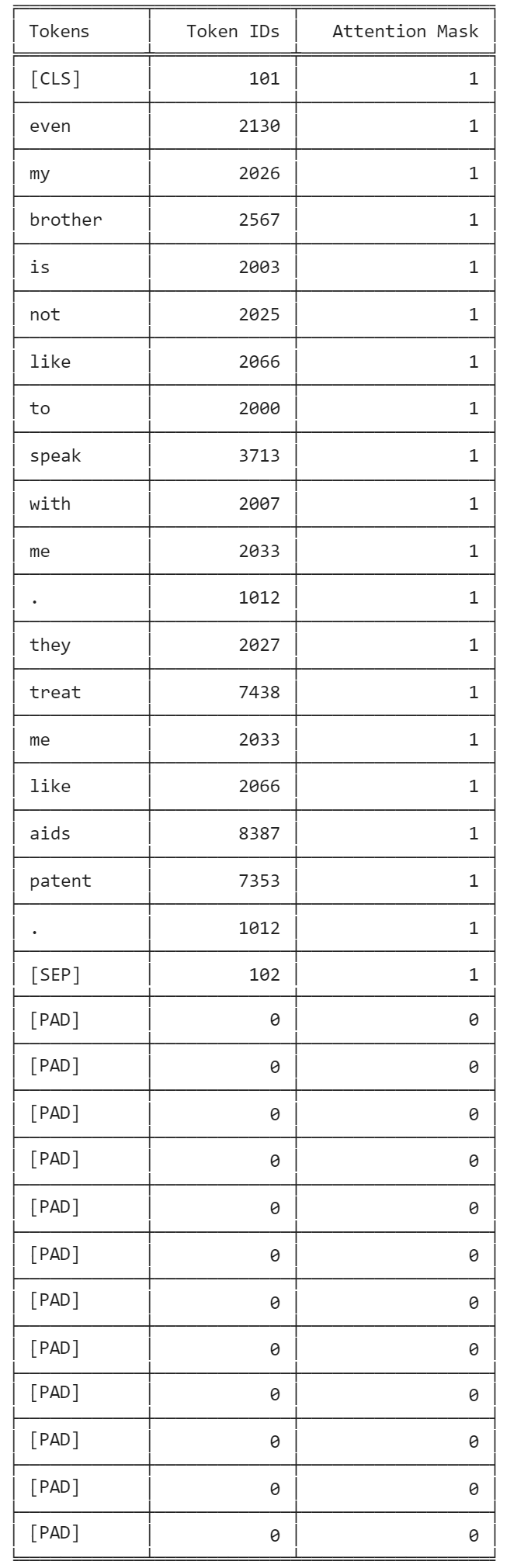
Note: BERT is a model with absolute position embeddings, so it is usually advised to pad the inputs on the right (end of the sequence) rather than the left (beginning of the sequence). In our case, tokenizer.encode_plus takes care of the needed preprocessing.
5. Data split
We split the dataset into train (80%) and validation (20%) sets, and wrap them around a torch.utils.data.DataLoader object. With its intuitive syntax, DataLoader provides an iterable over the given dataset.
More information on DataLoader can be found here:
- Datasets & DataLoader — Pytorch Tutorials⁹
- DataLoader Documentation¹⁰
6. Train
It is time for the fine-tuning task:
- Select hyperparameters based on the recommendations from the BERT paper¹:
The optimal hyperparameter values are task-specific, but we found the following range of possible values to work well across all tasks:
- Batch size: 16, 32
- Learning rate (Adam): 5e-5, 3e-5, 2e-5
- Number of epochs: 2, 3, 4
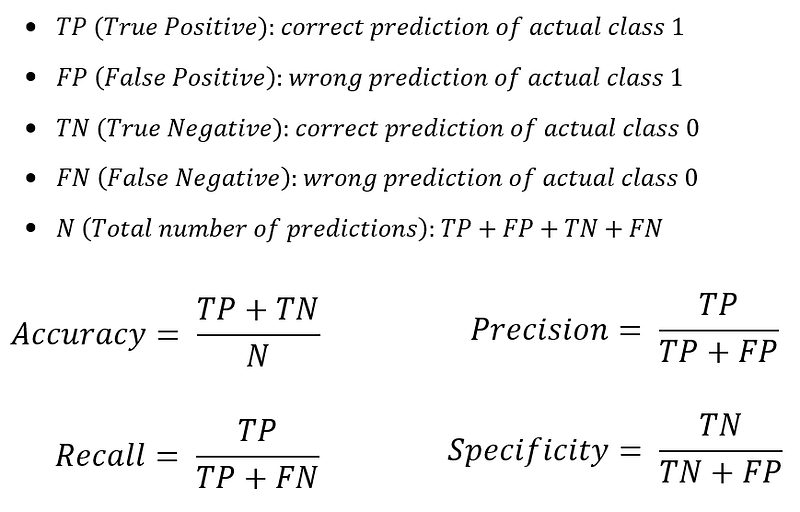
- Define some functions to assess validation metrics (accuracy, precision, recall and specificity) during the training process:
- Download
transformers.BertForSequenceClassification¹¹, which is a BERT model with a linear layer for sentence classification (or regression) on top of the pooled output:
Note: it is preferable to run this notebook in the presence of GPU. In order to execute it on CPU, we should comment model.cuda() in the above snippet to avoid a runtime error.
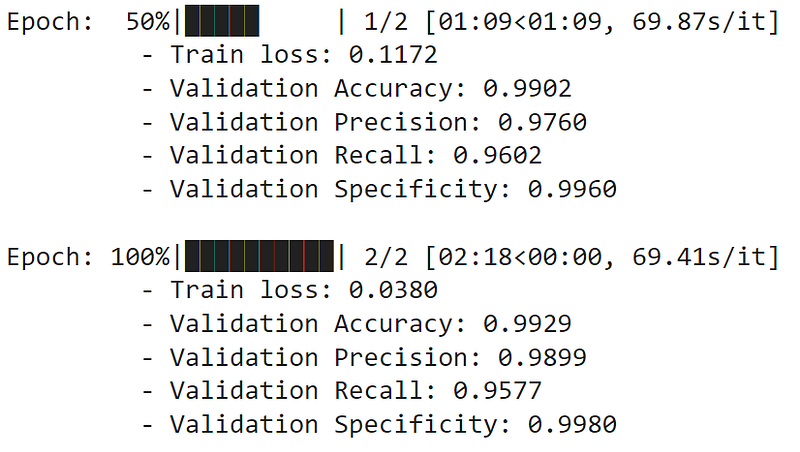
- Perform the training procedure:
7. Predict
After a training procedure, it is a good practice to assess the model’s performances on a test set. For the purpose of this example, we simply predict the class (ham vs. spam) of a new text sample:

8. Conclusions
In this post, we performed the fine-tuning of BERT for a classification task. We shared code snippets that can be easily copied and executed on Google Colab (or other environments).
Deep Learning frameworks are already equipped with implementations of popular NLP transformers like BERT. TensorFlow and PyTorch provide a set of pre-trained models as well as intuitive APIs to ease their adoption and perform fine-tuning tasks. Moreover, AI communities like Hugging Face⁴ make possible to access large model hubs and straightforward interfaces to work with.
We conclude by sharing useful resources where to find more examples and information related to the topic:
- TensorFlow Tutorial: Fine-Tuning a BERT model¹²
- BERT models on TensorFlow Hub¹³
- PyTorch Transformers¹⁴
- Hugging Face: Transformers Notebooks¹⁵
- Hugging Face: Model Hub¹⁶
- BERT Fine-Tuning Tutorial with PyTorch⁸: the use of
tokenizer.encode_pluswas borrowed from this post. - A Visual Guide to Using BERT for the First Time¹⁷ by Jay Alammar.
In a previous post¹⁸, we also used BERT in a multi-class text classification task with TensorFlow.
9. References
[1] Devlin, Jacob; Chang, Ming-Wei; Lee, Kenton; Toutanova, Kristina, “BERT: Pre-training of Deep Bidirectional Transformers for Language Understanding”, 2018, arXiv:1810.04805v2
[2] Ashish Vaswani, Noam Shazeer, Niki Parmar, Jakob Uszkoreit, Llion Jones, Aidan N. Gomez, Lukasz Kaiser, Illia Polosukhin, “Attention Is All You Need”, 2017, arXiv:1706.03762
[3] https://colab.research.google.com/
[5] https://archive.ics.uci.edu/ml/datasets/sms+spam+collection
[6] https://archive.ics.uci.edu/ml/index.php
[8] Chris McCormick and Nick Ryan. (2019, July 22). BERT Fine-Tuning Tutorial with PyTorch. Retrieved from http://www.mccormickml.com.
[10] https://pytorch.org/docs/stable/data.html#torch.utils.data.DataLoader
[11] https://huggingface.co/transformers/v3.0.2/model_doc/bert.html#bertforsequenceclassification
[12] https://www.tensorflow.org/text/tutorials/classify_text_with_bert
[13] https://tfhub.dev/s?q=bert
[14] https://pytorch.org/hub/huggingface_pytorch-transformers/
[15] https://huggingface.co/docs/transformers/notebooks
[16] https://huggingface.co/models
[17] https://jalammar.github.io/a-visual-guide-to-using-bert-for-the-first-time/


