Figma is making you a bad designer
If you jump straight into a design tool you’re not using it, it’s using you and it’s sucking your creativity dry.
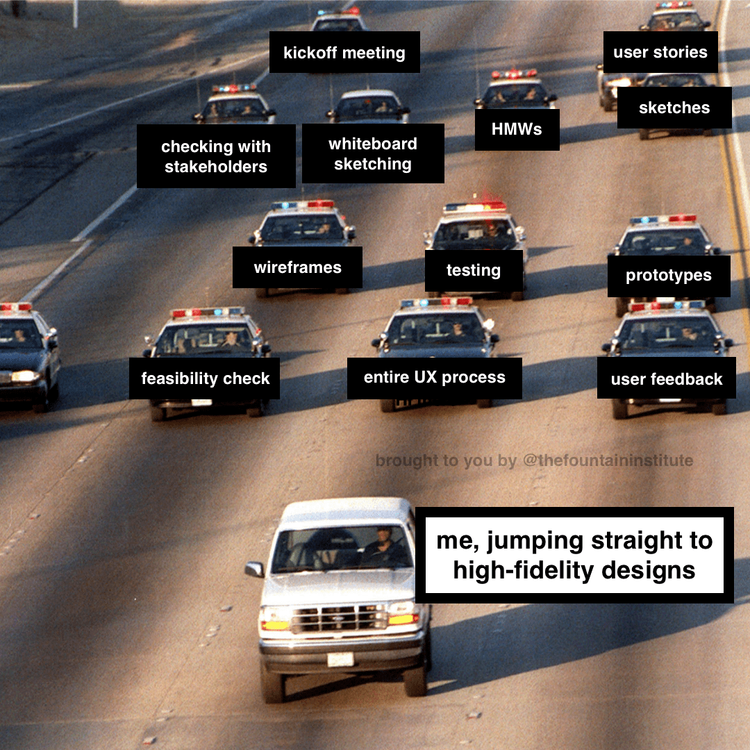
I was a bit panicked about getting a job out of school. After 2 awesome years of learning about HCI and doing engaging student projects I had totally fallen head over heels in love with design (and my now husband). I had big dreams, great process, strong collaboration skills, and an academic basis for how to think about and communicate design. What I hadn’t learned was a thing about visual design or engineering, which at the time seemed like truly marketable skills. UX designer roles (at least in name) were newer to the industry and few and far between. My professors assured me that it wasn’t going to matter. That my foundational education was going to be the thing that mattered to landing a great job. Being an anxious person by nature, I listened, but I didn’t really hear them. Instead, I began to prepare myself for my job hunt by developing a few scrappy ways of making wireframes and mockups with Powerpoint, the early version of Balsamiq, hobbling along in Illustrator, doing my best to study up on the newest tools.
As predictable as sunrise, my little panic streak was all for nought. Just as my lovely professors has said, knowing how to wireframe or mockup in a particular tool 100% did not matter. In fact, all the projects I had done in those tools I didn’t particularly like. Despite all my effort, they ended up looking templated with little new or interesting thinking. I didn’t even use them in my interviews. I had spent a lot of time wrangling the tools to bend to my will and while doing that, sucking up my time for letting my imagination run wild, to play, explore, and make new and in the end, I didn’t find the “me” in any of them. That’s when I decided that if I couldn’t do my job with pen and paper (or whiteboard and marker), then I wasn’t a very good designer. To this day, I find the sentiment to be at my advantage.
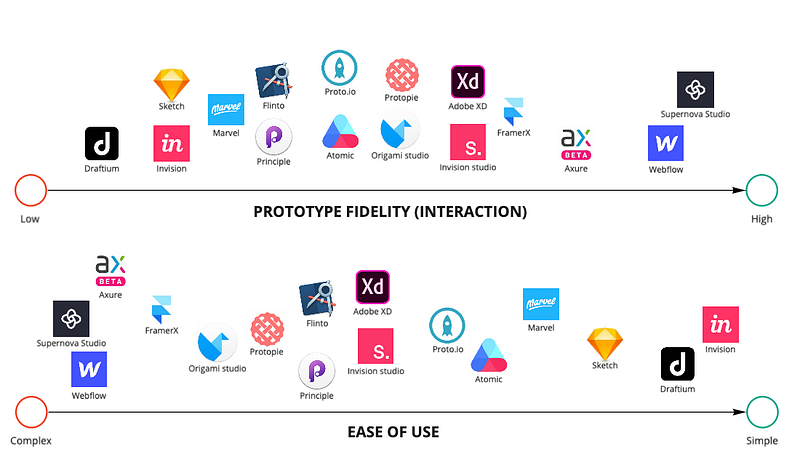
Since then, I swear design tools have come and gone out fashion as quickly as clothing trends: Photoshop, Omnigraffle, Axure, Invision, Sketch, AdobeXD, Figma, etc. etc. I mean, here’s a prototyping tool comparison video from just a few years ago that doesn’t even include Figma, which according to the Design Tool Database was the most used tool in 2021. But, as much as the top dog varies, most have also gotten so much more robust and honed for UX work! Take Figma and Sketch, for example. They have both built libraries into their tools so that designers don’t have to copy/paste and hope that the component is the right and/or most up-to-date one. A whole team of designers can work off of a source of truth to keep designs consistent across many files. Prototyping has become easier with integrated or built in capabilities. They’ve even gone so far as to develop collaboration tools and digital white-boarding. It really is awesome. With those robust capabilities comes a very strong gravitational pull for designers to work solely in those tools and that’s a big problem.
Creative atrophy
If you sit down to build something with a box of Legos, you’re likely going to take your inspiration from the Legos in front of you and build with what you have. Doing this over and over again, you’ll get really good at building things with those particular blocks, though they will all look pretty similar.
If, however, you draw a couple of pictures of what you might like to build first, when you sit down with the Legos you might find that you have some of what you need, but you also need a few new blocks to accomplish your creative goals. Doing this over and over again, you will build up your Lego stash and get comfortable playing with all kinds of Legos, even perhaps incorporating materials outside of Lego. Being no stranger to defining your own materials, you’ll be much more comfortable saying “I don’t think we have what we need here,” and articulating what it is you do need.
Now apply this to the design practice. If you are creating something new to solve a particular problem, do you want to: A. Start with the Legos and do the best with what you have? B. Start by imagining what’s best for the people you’re creating for and use the Legos where appropriate?
Believe it or not, B is a creative muscle that is important to flex regularly. It becomes atrophied quickly when it is not used, which puts a huge limitation on your ability to innovate and create impact when you inevitably find the whitespace or the demand to do so.
According to research from the National Center of Biotechnology Information, drawing enables the ability to think in a different manner, encouraging open-ended thought and creativity… These traits enable critical thinking skills, which can produce new insights and creative thoughts. — Invaluable
One of the best possible things you can do to keep your creative muscles trained is to work sketching into your work. It doesn’t need to be a huge time commitment or reserved for a bigger reimagining of experiences. Ground yourself in the experience you’re trying to create and the problem you’re trying to solve, then challenge yourself to come up with a handful of ideas quickly. Let some use the building blocks, and force yourself to step away from them on a few others to see what you discover.
Inciting panic

Have you ever shown a group of people a high-fidelity mockup of an idea that’s been casually rolling around in the back of your head? More often than not regardless of how much you say it’s just a high-level partially baked idea, I have found it does the following things to a team:
- Puts them on defense — “we can’t build this, it’s a huge effort”
- Makes them worry about your priorities — “how much time did you spend on this?”
- Distract from what you really want to discuss — “how does this [detail] work?”
While your team members may say a very polite filtered version of these things out loud, if the underlying discomfort is there it will quickly lead to present and future dismissal of the idea if for no other reason than to avoid the panicky feeling they experienced when trying to process what they’re looking at. You’ve just shown your team something that looks just like a final mock up, and despite your words their brains made the leap to “you want us to make what?”
First ideas win over the best ideas

Ok so instead of articulating an idea rolling in the back of your head, let’s say you’re working with your team on the next problem space. You pull up Figma (or your design tool of choice) and the current screens. With your library and a very short conversation, you make a mockup of a solution there in front of everyone’s eyes. The clarity feels good to everyone. Unfortunately a few things have just happened:
- The creative solution space has been eliminated. The wide open space where the team could think of a bunch of possibilities has now been replaced with a specific picture. To offer an alternate idea, team members need to work uphill against the picture in front of everyone.
- The team has experienced design as solely the creation of mockups. This is a concerning predisposition designers are still constantly working against. Unfortunately, quick off the cuff, polished ideas feed into the confirmation bias that design = assets.
- There’s an obvious, nearly done path forward that isn’t all that thoughtful. For teams where progress over perfection is the mantra of the game, this is really dangerous. Too many of these off the cuff ideas make their way right into production and pretty soon, the product is filled with mediocrity ending in an overall poor user experience. There are way more bad products out there than there are good ones. Being thoughtful and curious even for small things is important!
Honestly, Figma isn’t the problem, you are. 🙃
“Yeah, but…”
Now at this point, your mind is probably filling with, what we lovingly call in my family, “yeah-buts,” and I don’t blame you. There are many intrinsic and extrinsic pressures on designers that make it feel like you need to work hi-fidelity and quickly. Perhaps you have engineers who need to start work on it ASAP, maybe there’s a leader who wants to circulate the latest thinking, you might even feel like if you don’t hurry up the design decisions will be made by a team member who’s quickly filling in the gaps. Intrinsically, you might feel like the high fidelity thing is the way you add the most value to your team. It’s not. I bet you’re lovely and wonderful with a unique skill set and great ideas that elevate the thinking of everyone around you.
If you’re worried about speed, remember lo-fi to hi-fi can move very quickly. Scale the amount of time you spend in lo-fi explorations to the project constraints. I’ve always found that team alignment at lo-fi means a whole lot less time making time sucking minor adjustments to hi-fi assets because at least you’ve already narrowed on the direction.
If you’re worried about consistency, by all means worry about consistency, just make sure you’re worrying about it at the right time in the right place. If you’re working on an onboarding flow for example, consider sketching first as a way to be curious about what the best experience could be. Perhaps you decide in that flow there’s a moment where the user might want to filter a list for which you have an established pattern. If the filter pattern works for your use case, don’t change it! Use your Legos. If it feels like you need to break your filter pattern for it to work, it’s time to work in more detail to flesh out if you need some new or improved Legos.
If you’re worried about scope, keep it in mind, but don’t make that your primary concern. Your focus should be to make something helpful for the user that solves a problem and/or adds value to their experience. It’s much easier to edit back a big idea to a differentiating minimum loveable product (MLP) when you have an idea of where you want to go than it is for a bunch of first and fast ideas to magically exceed user expectations. Plus, sometimes there isn’t a MLP that fits within all your constraints. Having many explorations in your back pocket that fall short of demonstrating what you’re seeing and why timeline or effort expectations need to change only supports your case to get your team onboard to make the tradeoff.
It’s time for a design tool detox…
if you:
- jump into a design tool immediately,
- completely skip hand sketching or lo-fi wireframes,
- feel paralyzed when a library is right in front of you,
- never contribute new ideas to the design system,
- go with the first idea that pops into your head more often than not,
- and/or only communicate your ideas through polished mockups.
The detox is simple; go back to the basics.
- Before jumping in, ideate different solutions with your team. Get a lot of ideas on the table, resisting the urge to mock things up until you have some solid directions on the table.
- Use pen and paper for early explorations. Get yourself a nice sketchbook, some nice writing utensils or use a tablet and stylus with a simple drawing app. Stick with a “fat marker” style that prevents you from getting too detailed too early or frustrated with your sketching limitations. You might be tempted to work lo-fi in your design tool. DON’T! It’s far too easy to slip up or go too detailed too quickly.
- Remember to play. At least for me, this is absolutely the most fun part of design so don’t be afraid to let get a playful with your sketching approach. When you’re sketching, draw the weirdest solution you can think of, ask yourself a lot of questions, and draw out some anti-patterns. Sketch in narrative, drawings or clip art. Make a storyboard. See how many ideas you can come up with in 10 minutes. All of these things help strengthen your creative muscles so you can do work you’re really proud of and take others along for the ride.
- Share the mess. It’s so tempting to present your work as pretty and polished all the time. After all, we’re designers who care about polish a whole lot. However, showing your teammates the messy part shows what design really is. Plus, your vulnerability and openness invite them in to share their ideas that may not be perfect yet, too leading to an overall more genuine and high-functioning team.
Of course, you’ll get to the point where you need to dive into your design tools to take the project to the finish line. Resist the urge until you’re sure it makes sense to be there and keep up the habit. If you find yourself jumping in too soon, reflect on the reason it happened to start forming self-awareness. Work through the pressures in yourself and within your team so you have the proper space to do your best work, not your fastest to fancy work.