
Fetch Crypto data with Vue.js and Tailwind (Part 1)

Crypto is all the rage thus I figured why not create a project where you can search and display the coins real time value, rank and so forth.
This article will be split into two parts:
- Default
App.vueand the main template inviews/Home.vueand fetch nomics API crypto data(you can choose other crypto API providers like Coinmarketcap, CoinGecko, etc) - Create CryptoCoin, CryptoSelect components that will search for a particular coin. Once selected or searched the coin will be displayed after data has been loaded.
For a YouTube video guide press here.
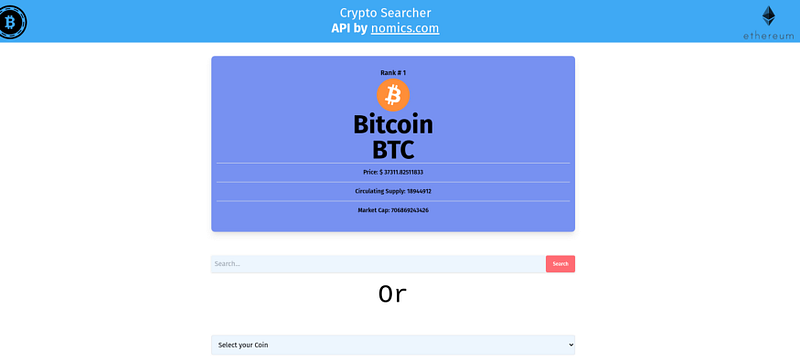
With the help of Tailwind CSS, I am beyond satisfied with the way it turned out 🤩
Note: I will not cover how to setup Tailwind CSS, if you have not done it yet please follow this link or do the classic Google search. 🔍
Introducing App
You may be expecting most of the code or instances to be built in App.vue but it's not!
Watching some other tutorial I saw the main functionality being build on views/Home.vue and passed to <router-view />
In my case I could of build on
App.vuebut if I would like to expand the project or use routing it’s better to have them in views directory.
Header
As the above code is child’s play for you, thought could throw in the Header component only thing that takes understanding is Tailwinds CSS.🖌️
Home 🏠
Here the fun begins with fetching the data from nomics API and using the two components that will be in Part 2.
As we will use the API call and there are A LOT of coins out there we will have two main tags first one if the data is no longer loading second when data has been loaded. Continuing on getting the CryptoCoin component and binding the selected coin that was specified in CryptoSelect.
The get-crypto=”getCryptoData” gets the selected crypto that was emitted from the component. The v-bind:cryptodata=”cryptodata” binds all the crypto that was fetched.
Bear with me it all will make sense soon!
In the data, we will hold five properties.
Loading — Set default to True as every time we fetch a particular coin it will be set to True ones loaded will be False so you could see coins stats.
Name — As well default to Bitcoin and it will mutate based on CryptoSelect components passed in value.
Crypto data — Will store the whole data fetched from nomics API
Crypto coin — Will check the Cryptodata fetched data and the Name will be passed in to find the ₿, ⟠ you want to check out.
Loading Image — Just a choose video clip ones you select a coin to load.
When running ⌛👇
Fetch Data
If you worked with APIs before this will be quite simple, the main takeaway is that it has to be asynchronous to the fetchCryptoData method. Why so?
Synchronous requests block the execution of code which causes “freezing” on the screen and an unresponsive user experience.
The method block is nothing fancy but an additional side note. If you decide to use nomics.api please follow this link. I have chosen Nomics due to the good build API(and having images a lot of other APIs don’t have images included!)
Coin Fetch
When we call the next method we set loading to true(so that Majin Buu waits until results appear…) next this.name set value to crypto which will be emited from the CryptoSelect component.
this.cryptocoin = this.cryptodata.find(coin => coin.name === this.name)The line ☝️ finds the coin that we are looking for coin.name is defined in the API and it has to equal to this.name. Lastly we set an interval so the loading will be set to false in 3 seconds(as wanted the loading screen to after selection not just at the beginning).
Created?
Hold up you may be thinking why created and what is it?
created () : it will executed after creating the component for render. And created is more useful when we are dealing with servers and fetching data from backend API.
Awaiting fetchCryptoData comes first then after passing it to this.cryptodata. Why this.cryptocoin reapers? Because on default the passed in name will be Bitcoin afterward set this.loading to False so the coin can be seen 👀.
Hoped you liked it bellow you can find the link for Part 2!


