
Featurewiz: Fast way to select the best features in a data
A new improved and fast way to select the best features in a dataset

Feature variable plays an important role in creating predictive models whether it is Regression or Classification Model. Having a large number of features is not good because it may lead to overfitting, which will make our model specifically fit the data on which it is trained. Also having a large number of features will cause the curse of dimensionality i.e. the features will increase the dimensions of search space for the problem.
Feature Importance is a technique that provides us with a relevant score for every feature variable which we can use to decide which features are most important and which features are least important for predicting the target variable.
Featurewiz
Featurewiz is an open-source python library that is an efficient and fast way to find out important variables from a dataset with respect to the target variable. It works on two different techniques which collectively helps in finding out the best features, these techniques are:
a. SULOV:
Searching for the uncorrelated list of variables, this method finds out the pair of variables that are crossing a correlation threshold externally passed and thus are called highly correlated. After finding the pairs it calculates their MIS(Mutual Information Score) which is a quantity that measures the amount of information one can obtain from one random variable given another.
After that, it takes into consideration the pair of variables that have the least correlation and highest MIS scores. Which are further processed.
b. Recursive XGBoost
The variables selected from SULOV are recursively passed through XGboost which helps in determining the best features according to the target variable bypassing the data into smaller datasets that are generated from the whole dataset.
In this way, it selects the best feature variables from the dataset and that too in few lines of code only.
Let us see how we can use it in our dataset to find out the most important variables. For this, we will see how to install featurewiz and how to import it.
Installing Featurewiz
Like any other python library, we will install featurewiz using the below command.
pip install featurewizImporting required libraries
We will import pandas to load our dataset and featurewiz to apply feature selection.
import pandas as pd
from featurewiz import featurewiz
Loading the Dataset
In this article, we will use the Boston dataset which can be easily downloaded from Kaggle. This dataset contains different feature variables and a target variable. We will import this dataset into our jupyter notebook to perform feature selection on it.
df = pd.read_csv("boston.csv")
df.head()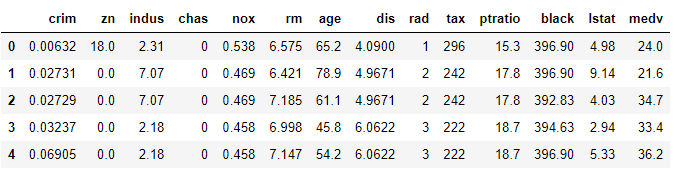
Using Featurewiz
Now we just need to call featurewiz which will find out the important variables in our dataset automatically.
features = featurewiz(df, target='medv', corr_limit=0.70,
                                verbose=2)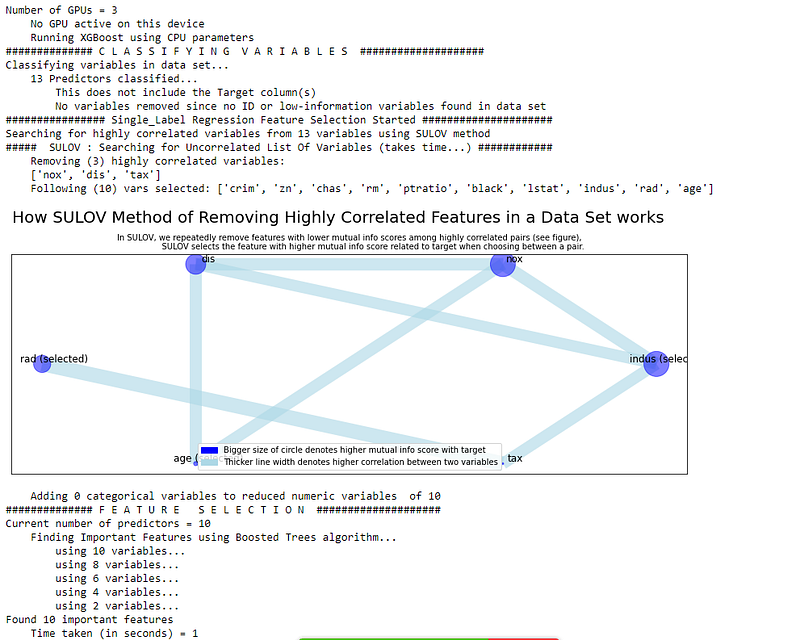
In the above output, we can clearly see how featurewiz clearly maps different variables with MIS scores and correlation with different feature variables. It is blazingly fast and easy to use. For our dataset, it only took 1 second to generate the output.
Go ahead try featurewiz on different datasets and share your experiences in the response section. You can check out the in-depth detail of featurewiz here.
Before You Go
Thanks for reading! If you want to get in touch with me, feel free to reach me on [email protected] or my LinkedIn Profile. You can view my Github profile for different data science projects and packages tutorials. Also, feel free to explore my profile and read different articles I have written related to Data Science.


