avatarHubert Liang📊🚀🐶

Free AI web copilot to create summaries, insights and extended knowledge, download it at here

1347

Abstract

idgets?view=sql-server-ver16</a></figcaption></figure><p id="9140"><a href="https://docs.microsoft.com/en-us/sql/azure-data-studio/server-groups?view=sql-server-ver16"><b>Server Groups</b></a></p><p id="de58">Group and class your server environments together, for easier administration and oversight.</p><p id="51ae"><a href="https://docs.microsoft.com/en-us/sql/azure-data-studio/keyboard-shortcuts?view=sql-server-ver16"><b>Keyboard Shortcuts</b></a></p><p id="baaa">For those familiar with Visual Studio Code, you are going to love this. Customize your day-to-day functionalities on the keyboard, and drive up your productivity.</p><figure id="c966"><img src="https://cdn-images-1.readmedium.com/v2/resize:fit:800/1*b31hiO4ynbDLRrXWEFF4aQ.png"><figcaption><a href="https://docs.microsoft.com/en-us/sql/azure-data-studio/keyboard-shortcuts?view=sql-server-ver16">https://docs.microsoft.com/en-us/sql/azure-data-studio/keyboard-shortcuts?view=sql-server-ver16</a></figcaption></figure><p id="f679"><a href="https://docs.microsoft.com/en-us/sql/azure-data-studio/integrated-terminal?view=sql-server-ver16"><b>Inbuilt Terminal</b></a></p><p id="badb">Writing Bash or Powershell could all be done in the App, just like Visual Studio Code.</p><p id="8863"><a href="https://docs.microsoft.com/en-us/sql/azure-data-studio/notebooks/notebooks-guidance?v

Options

iew=sql-server-ver16"><b>Notebooks</b></a></p><p id="6b9b">Just like the modular scripting you do in Visual Studio Code, we can write in four languages and with Markdown of course!</p><ol><li>SQL</li><li>PySpark</li><li>Spark — Writing in Scala or R</li><li>Python</li></ol><figure id="c33a"><img src="https://cdn-images-1.readmedium.com/v2/resize:fit:800/0*Zgw4oTTA1volZgvZ"><figcaption><a href="https://docs.microsoft.com/en-us/sql/azure-data-studio/notebooks/notebooks-guidance?view=sql-server-ver16">https://docs.microsoft.com/en-us/sql/azure-data-studio/notebooks/notebooks-guidance?view=sql-server-ver16</a></figcaption></figure><h2 id="b2eb">Summary</h2><p id="7fd2">Highly recommend downloading and having a play around, of course, there are some features such as limited SQL agent controls, but it is still nonetheless becoming a powerful tool!</p><figure id="717a"><img src="https://cdn-images-1.readmedium.com/v2/resize:fit:800/0*5DALCRDdTqO73XI5.jpeg"><figcaption></figcaption></figure><p id="5354"><a href="https://medium.com/@hubert.liang78"><i>Hubert Liang📊🚀🐶</i></a></p><p id="6ef1"><i>Principal Data Engineer 🚀| 5+ Experience with Azure | Technical Writer | Pharmacist | Schnauzer companion | <a href="https://linkedin.com/in/hubert-liang-850539134/">https://linkedin.com/in/hubert-liang-850539134/</a></i></p></article></body>

Features of Azure Data Studio Data Professionals Going to Love

Awesome Features

Microsoft Azure launched its lighter version of database administration and solutions as a seeming replacement to SQL Server Management Studio in January 2019.

https://mobile.twitter.com/azuredatastudio

This tool has undergone in my opinion, tremendous functionality uplift and its powerful extensibility are making it an option for more and more data professionals.

Widgets

Allows you to build in some really neat system, query or performance overview of servers and databases. Enabling you to have a faster insight into the performance of your servers.
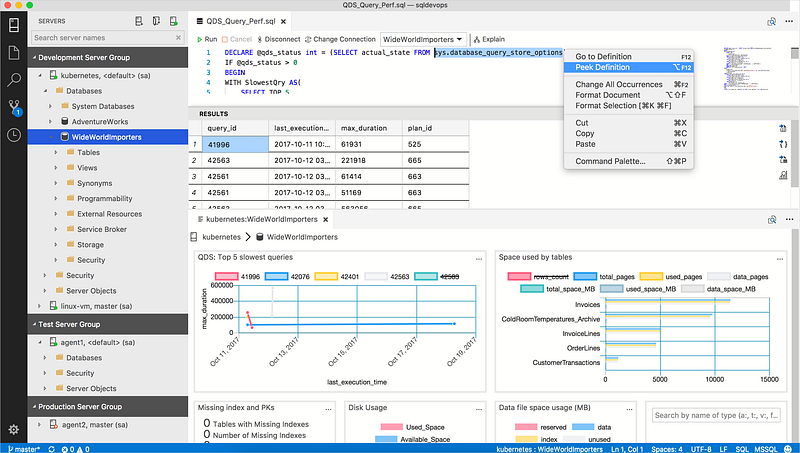
https://docs.microsoft.com/en-us/sql/azure-data-studio/insight-widgets?view=sql-server-ver16

Server Groups

Group and class your server environments together, for easier administration and oversight.

Keyboard Shortcuts

For those familiar with Visual Studio Code, you are going to love this. Customize your day-to-day functionalities on the keyboard, and drive up your productivity.

https://docs.microsoft.com/en-us/sql/azure-data-studio/keyboard-shortcuts?view=sql-server-ver16

Inbuilt Terminal

Writing Bash or Powershell could all be done in the App, just like Visual Studio Code.

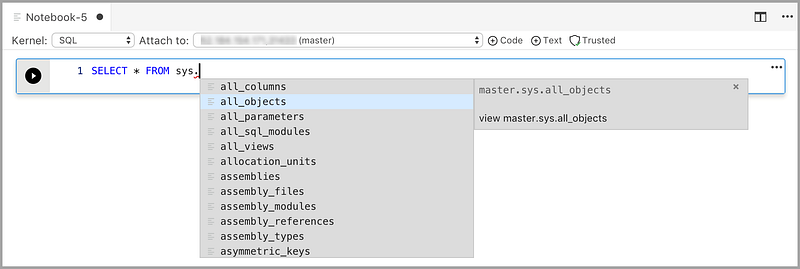
Notebooks

Just like the modular scripting you do in Visual Studio Code, we can write in four languages and with Markdown of course!

  1. SQL
  2. PySpark
  3. Spark — Writing in Scala or R
  4. Python
https://docs.microsoft.com/en-us/sql/azure-data-studio/notebooks/notebooks-guidance?view=sql-server-ver16

Summary

Highly recommend downloading and having a play around, of course, there are some features such as limited SQL agent controls, but it is still nonetheless becoming a powerful tool!

Hubert Liang📊🚀🐶

Principal Data Engineer 🚀| 5+ Experience with Azure | Technical Writer | Pharmacist | Schnauzer companion | https://linkedin.com/in/hubert-liang-850539134/

Azure Data Studio
Azure
Dev
Sql
Visual Studio Code
Recommended from ReadMedium