avatarDr. Jason Fung

Free AI web copilot to create summaries, insights and extended knowledge, download it at here

10455

Abstract

Mobile App </b>and <b>Web API</b>.</p><div id="9ff9"><pre>webapp -> webapi <span class="hljs-string">"Get Tasks\nAdd Task\nUpdate Task\nDelete Task\nMark Task as Done"</span> mobileapp -> webapi <span class="hljs-string">"Get Tasks\nAdd Task\nUpdate Task\nDelete Task\nMark Task as Done"</span></pre></div><p id="b7b7">They are exactly the same, however, because they are essentially duplicated as plain text in code, it would be very easy, especially on a much larger scale to call them different names or simply miss-type them etc. If that happened, then from a Architecture Model perspectives, especially if it was used in some kind of automation, they would be seen as different operations.</p><h2 id="df93">Interfaces</h2><p id="ce74">If we were to implement these relationships in code, then this is how it may have looked.</p><div id="6040"><pre><span class="hljs-keyword">public</span> <span class="hljs-keyword">interface</span> <span class="hljs-title">IWebAPI</span> { <span class="hljs-function">IEnumerable<Task> <span class="hljs-title">GetTasks</span>()</span>; <span class="hljs-function"><span class="hljs-keyword">void</span> <span class="hljs-title">AddTask</span>(<span class="hljs-params">Task task</span>)</span>; <span class="hljs-function"><span class="hljs-keyword">void</span> <span class="hljs-title">UpdateTask</span>(<span class="hljs-params">Task task</span>)</span>; <span class="hljs-function"><span class="hljs-keyword">void</span> <span class="hljs-title">DeleteTask</span>(<span class="hljs-params"><span class="hljs-built_in">int</span> taskId</span>)</span>; <span class="hljs-function"><span class="hljs-keyword">void</span> <span class="hljs-title">MarkTaskAsDone</span>(<span class="hljs-params"><span class="hljs-built_in">int</span> taskId</span>)</span>; }

<span class="hljs-keyword">public</span> <span class="hljs-keyword">class</span> <span class="hljs-title">WebApp</span> { <span class="hljs-keyword">private</span> IWebAPI _webapi;

<span class="hljs-function"><span class="hljs-keyword">public</span> <span class="hljs-title">WebApp</span>(<span class="hljs-params">IWebAPI webapi</span>)</span> { _webapi = webapi; }

<span class="hljs-function"><span class="hljs-keyword">public</span> <span class="hljs-keyword">void</span> <span class="hljs-title">ViewTasks</span>()</span> { <span class="hljs-keyword">var</span> tasks = _webapi.GetTasks(); ... }

<span class="hljs-function"><span class="hljs-keyword">public</span> <span class="hljs-keyword">void</span> <span class="hljs-title">AddTask</span>(<span class="hljs-params">Task task</span>)</span> { _webapi.AddTask(task); }

<span class="hljs-function"><span class="hljs-keyword">public</span> <span class="hljs-keyword">void</span> <span class="hljs-title">UpdateTask</span>(<span class="hljs-params">Task task</span>)</span> { _webapi.UpdateTask(task); }

<span class="hljs-function"><span class="hljs-keyword">public</span> <span class="hljs-keyword">void</span> <span class="hljs-title">DeleteTask</span>(<span class="hljs-params"><span class="hljs-built_in">int</span> taskId</span>)</span> { _webapi.DeleteTask(taskId); }

<span class="hljs-function"><span class="hljs-keyword">public</span> <span class="hljs-keyword">void</span> <span class="hljs-title">MarkTaskAsDone</span>(<span class="hljs-params"><span class="hljs-built_in">int</span> taskId</span>)</span> { _webapi.MarkTaskAsDone(taskId); } }</pre></div><p id="b617">Notice how all operations of <b>IWebAPI</b> are defined explicitly and only once, and then they can be used by <b>Web App </b>and in theory by <b>Mobile App</b>.</p><p id="48aa">So, I started thinking, it would be great if Architecture Model allowed expressing the relationships between structures much like we do it in code that implements those relationships.</p><p id="85af">Imagine if Structurizr supported code like this</p><div id="1fca"><pre>workspace { model { toDoApp = softwareSystem <span class="hljs-string">"To Do App"</span> { database = container <span class="hljs-string">"Database"</span> { selecttasks = <span class="hljs-keyword">interface</span> <span class="hljs-string">"Select Tasks"</span> inserttask = <span class="hljs-keyword">interface</span> <span class="hljs-string">"Insert Task"</span> updatetask = <span class="hljs-keyword">interface</span> <span class="hljs-string">"Update Task"</span> deletetask = <span class="hljs-keyword">interface</span> <span class="hljs-string">"Delete Task"</span> } webapi = container <span class="hljs-string">"Web API"</span> { gettasks = <span class="hljs-keyword">interface</span> <span class="hljs-string">"Get Tasks"</span> { <span class="hljs-keyword">this</span> -> database.selecttasks } addtask = <span class="hljs-keyword">interface</span> <span class="hljs-string">"Add Task"</span> { <span class="hljs-keyword">this</span> -> database.inserttask } updatetask = <span class="hljs-keyword">interface</span> <span class="hljs-string">"Update Task"</span> { <span class="hljs-keyword">this</span> -> database.updatetask } deletetask = <span class="hljs-keyword">interface</span> <span class="hljs-string">"Delete Task"</span> { <span class="hljs-keyword">this</span> -> database.deletetask } marktaskasdone = <span class="hljs-keyword">interface</span> <span class="hljs-string">"Mark Task as Done"</span> { <span class="hljs-keyword">this</span> -> database.updatetask } } mobileapp = container <span class="hljs-string">"Mobile App"</span> { wiewtasks = <span class="hljs-keyword">interface</span> <span class="hljs-string">"View Tasks"</span> { <span class="hljs-keyword">this</span> -> webapi.gettasks } addtask = <span class="hljs-keyword">interface</span> <span class="hljs-string">"Add Task"</span> { <span class="hljs-keyword">this</span> -> webapi.addtask } updatetask = <span class="hljs-keyword">interface</span> <span class="hljs-string">"Update Task"</span> { <span class="hljs-keyword">this</span> -> webapi.updatetask } deletetask = <span class="hljs-keyword">interface</span> <span class="hljs-string">"Delete Task"</span> { <span class="hljs-keyword">this</span> -> webapi.deletetask } marktaskasdone = <span class="hljs-keyword">interface</span> <span class="hljs-string">"Mark Task as Done"</span> { <span class="hljs-keyword">this</span> -> webapi.marktaskasdone } } webapp = container <span class="hljs-string">"Web App"</span> { wiewtasks = <span class="hljs-keyword">interface</span> <span class="hljs-string">"View Tasks"</span> { <span class="hljs-keyword">this</span> -> webapi.gettasks } addtask = <span class="hljs-keyword">interface</span> <span class="hljs-string">"Add Task"</span> { <span class="hljs-keyword">this</span> -> webapi.addtask } updatetask = <span class="hljs-keyword">interface</span> <span class="hljs-string">"Update Task"</span> { <span class="hljs-keyword">this</span> -> webapi.updatetask } deletetask = <span class="hljs-keyword">interface</span> <span class="hljs-string">"Delete Task"</span> { <span class="hljs-keyword">this</span> -> webapi.deletetask } marktaskasdone = <span class="hljs-keyword">interface</span> <span class="hljs-string">"Mark Task as Done"</span> { <span class="hljs-keyword">this</span> -> webapi.marktaskasdone } } } }

views {
    container toDoApp {
        include *
        autolayout lr
    }
    theme default
}

}</pre></div><p id="cacd">This code has explicit definitions of all Interfaces in all Containers. It also expresses Relationships by showing which other interfaces are being used by each interface. This is very close to the actual code that would implement these relationships.</p><h2 id="e69b">Flows</h2><p id="5705">Going back to the code example, it’s very likely that the implementation of any given method would end up using multiple interfaces, and possibly have some logic/control flow, like the code example below.</p><div id="8e49"><pre><span class="hljs-function"><span class="hljs-keyword">public</span> <span class="hljs-keyword">void</span> <span class="hljs-title">AddTask</span>(<span class="hljs-params">Task task</span>)</span> { <span class="hljs-keyword">var</span> tasks = _webapi.GetTasks(); <span class="hljs-keyword">if</span> (!tasks.Any(x => x.Id == task.Id)) { _webapi.AddTask(task); } }</pre></div><p id="9fb7">So, how do we represent this in the Architecture Model? What if Structurizr supported the following code</p><div id="4a6b"><pre>addtask = <span class="hljs-keyword">interface</span> <span class="hljs-string">"Add Task"</span> { flows { flow { <span class="hljs-keyword">type</span> Use expression <span class="hljs-string">"webapi.gettasks"</span> } flow { <span class="hljs-keyword">type</span> If expression <span class="hljs-string">"Task does not exist"</span> flows { flow { <span class="hljs-keyword">type</span> Use expression <span class="hljs-string">"webapi.addtask"</span> } } } } }</pre></div><p id="4229">This would not only still allow to render C4 Model Diagrams, it would also allow to render Sequence Diagrams with alternative flows, which would make it very valuable, as now the logic behind each of the interfaces can be visualised.</p><p id="a5a6">However, Structurizr does not support any of the above, nor do any of the other Architecture as Code projects I looked at:</p><ul><li><a href="https:

Options

//github.com/lonely-lockley/archinsight">Archinsight</a></li><li><a href="https://github.com/finos-labs/architecture-as-code/tree/main/calm">FINOS Labs Common Architecture Language Model (CALM)</a></li><li><a href="https://github.com/dwmkerr/architecture-as-code">https://github.com/dwmkerr/architecture-as-code</a></li><li><a href="https://github.com/jsoconno/architectures">https://github.com/jsoconno/architectures</a> etc.</li></ul><h2 id="086a">C4InterFlow was born</h2><p id="ddec">So, I’ve decided to build my own — <b>C4InterFlow </b>(<b>C4 Inter</b>faces and <b>Flow</b>s).</p><p id="b74a">The core Vision for C4InterFlow is to <i>“Transform the landscape of <b>Application Architecture</b> by bridging the <b>gap </b>between <b>Architecture Model</b> and <b>Code</b>.”</i></p><p id="7c22">That is why C4InterFlow started as a framework focused on generating <b>Architecture as Code</b> (AaC) in C# from the <b>actual Software System’s </b>C#<b> source code</b>, and then using AaC to generate Diagrams for different viewpoints.</p><p id="5402">As the C4InterFlow Architecture as Code <b>C# DSL </b>matured, I’ve started thinking about adding support for other more widely adopted languages and notations for expressing Architecture as Code like <b>YAML </b>and <b>JSON</b>.</p><p id="abef">Here is how the ToDo App could be described using <b>C4InterFlow YAML DSL</b>.</p><div id="4673"><pre><span class="hljs-attr">ToDoAppExample:</span> <span class="hljs-attr">SoftwareSystems:</span> <span class="hljs-attr">ToDoApp:</span> <span class="hljs-attr">Containers:</span> <span class="hljs-attr">Database:</span> <span class="hljs-attr">Interfaces:</span> <span class="hljs-attr">SelectTasks:</span> {} <span class="hljs-attr">InsertTask:</span> {} <span class="hljs-attr">UpdateTask:</span> {} <span class="hljs-attr">DeleteTask:</span> {} <span class="hljs-attr">WebApi:</span> <span class="hljs-attr">Interfaces:</span> <span class="hljs-attr">GetTasks:</span> <span class="hljs-attr">Flows:</span> <span class="hljs-bullet">-</span> <span class="hljs-attr">Type:</span> <span class="hljs-string">Use</span> <span class="hljs-attr">Expression:</span> <span class="hljs-string">Database.Interfaces.SelectTasks</span> <span class="hljs-attr">AddTask:</span> <span class="hljs-attr">Flows:</span> <span class="hljs-bullet">-</span> <span class="hljs-attr">Type:</span> <span class="hljs-string">Use</span> <span class="hljs-attr">Expression:</span> <span class="hljs-string">Database.Interfaces.InsertTask</span> <span class="hljs-attr">UpdateTask:</span> <span class="hljs-attr">Flows:</span> <span class="hljs-bullet">-</span> <span class="hljs-attr">Type:</span> <span class="hljs-string">Use</span> <span class="hljs-attr">Expression:</span> <span class="hljs-string">Database.Interfaces.UpdateTask</span> <span class="hljs-attr">DeleteTask:</span> <span class="hljs-attr">Flows:</span> <span class="hljs-bullet">-</span> <span class="hljs-attr">Type:</span> <span class="hljs-string">Use</span> <span class="hljs-attr">Expression:</span> <span class="hljs-string">Database.Interfaces.DeleteTask</span> <span class="hljs-attr">MarkTaskAsDone:</span> <span class="hljs-attr">Flows:</span> <span class="hljs-bullet">-</span> <span class="hljs-attr">Type:</span> <span class="hljs-string">Use</span> <span class="hljs-attr">Expression:</span> <span class="hljs-string">Database.Interfaces.UpdateTask</span> <span class="hljs-attr">MobileApp:</span> <span class="hljs-attr">Interfaces:</span> <span class="hljs-attr">ViewTasks:</span> <span class="hljs-attr">Flows:</span> <span class="hljs-bullet">-</span> <span class="hljs-attr">Type:</span> <span class="hljs-string">Use</span> <span class="hljs-attr">Expression:</span> <span class="hljs-string">WebApi.Interfaces.GetTasks</span> <span class="hljs-attr">AddTask:</span> <span class="hljs-attr">Flows:</span> <span class="hljs-bullet">-</span> <span class="hljs-attr">Type:</span> <span class="hljs-string">Use</span> <span class="hljs-attr">Expression:</span> <span class="hljs-string">WebApi.Interfaces.AddTask</span> <span class="hljs-attr">UpdateTask:</span> <span class="hljs-attr">Flows:</span> <span class="hljs-bullet">-</span> <span class="hljs-attr">Type:</span> <span class="hljs-string">Use</span> <span class="hljs-attr">Expression:</span> <span class="hljs-string">WebApi.Interfaces.UpdateTask</span> <span class="hljs-attr">DeleteTask:</span> <span class="hljs-attr">Flows:</span> <span class="hljs-bullet">-</span> <span class="hljs-attr">Type:</span> <span class="hljs-string">Use</span> <span class="hljs-attr">Expression:</span> <span class="hljs-string">WebApi.Interfaces.DeleteTask</span> <span class="hljs-attr">MarkTaskAsDone:</span> <span class="hljs-attr">Flows:</span> <span class="hljs-bullet">-</span> <span class="hljs-attr">Type:</span> <span class="hljs-string">Use</span> <span class="hljs-attr">Expression:</span> <span class="hljs-string">WebApi.Interfaces.MarkTaskAsDone</span> <span class="hljs-attr">WebApp:</span> <span class="hljs-attr">Interfaces:</span> <span class="hljs-attr">ViewTasks:</span> <span class="hljs-attr">Flows:</span> <span class="hljs-bullet">-</span> <span class="hljs-attr">Type:</span> <span class="hljs-string">Use</span> <span class="hljs-attr">Expression:</span> <span class="hljs-string">WebApi.Interfaces.GetTasks</span> <span class="hljs-attr">AddTask:</span> <span class="hljs-attr">Flows:</span> <span class="hljs-bullet">-</span> <span class="hljs-attr">Type:</span> <span class="hljs-string">Use</span> <span class="hljs-attr">Expression:</span> <span class="hljs-string">WebApi.Interfaces.AddTask</span> <span class="hljs-attr">UpdateTask:</span> <span class="hljs-attr">Flows:</span> <span class="hljs-bullet">-</span> <span class="hljs-attr">Type:</span> <span class="hljs-string">Use</span> <span class="hljs-attr">Expression:</span> <span class="hljs-string">WebApi.Interfaces.UpdateTask</span> <span class="hljs-attr">DeleteTask:</span> <span class="hljs-attr">Flows:</span> <span class="hljs-bullet">-</span> <span class="hljs-attr">Type:</span> <span class="hljs-string">Use</span> <span class="hljs-attr">Expression:</span> <span class="hljs-string">WebApi.Interfaces.DeleteTask</span> <span class="hljs-attr">MarkTaskAsDone:</span> <span class="hljs-attr">Flows:</span> <span class="hljs-bullet">-</span> <span class="hljs-attr">Type:</span> <span class="hljs-string">Use</span> <span class="hljs-attr">Expression:</span> <span class="hljs-string">WebApi.Interfaces.MarkTaskAsDone</span></pre></div><p id="e90e">This is how the C4 Model Container level diagram would look when rendered using <a href="https://github.com/SlavaVedernikov/C4InterFlow/wiki/Command-Line-Interface-(CLI)">C4InterFlow CLI</a> based on the above AaC</p><figure id="9241"><img src="https://cdn-images-1.readmedium.com/v2/resize:fit:800/1*NzbUfjjsvBe3SSuth1aljg.png"><figcaption></figcaption></figure><p id="edef">And here is how the Sequence diagram for <b>Mobile App</b>’s <b>Add Task</b> Interface would look (notice the alternative flow).</p><figure id="1710"><img src="https://cdn-images-1.readmedium.com/v2/resize:fit:800/1*vw55vTuDUJxveqGv7jjD3w.png"><figcaption></figcaption></figure><p id="0add">In fact, just by executing a single CLI command below we can get C4InterFlow to generate 174 diagrams of different <b>Types</b>, <b>Scopes </b>and <b>Levels of Details </b>covering a large number of Application Architecture Viewpoints.</p><div id="4db4"><pre>C4InterFlow.Cli draw-diagrams --interfaces <span class="hljs-string">"ToDoAppExample.SoftwareSystems..Containers..Interfaces.*"</span> --levels-of-details context container --aac-reader-strategy <span class="hljs-string">"C4InterFlow.Automation.Readers.YamlAaCReaderStrategy,C4InterFlow.Automation"</span> --aac-input-paths <span class="hljs-string">".\Diagrams"</span> --output-dir <span class="hljs-string">".\Architecture"</span> --formats png svg</pre></div><p id="9707">Have a look as the complete <a href="https://github.com/SlavaVedernikov/C4InterFlow/tree/master/Samples/ToDoApp">ToDo App Sample</a> where you can explore all the Diagrams.</p><h2 id="84ef">Conclusion</h2><p id="f506">Event though I’ve been working on <a href="https://github.com/SlavaVedernikov/C4InterFlow">C4InterFlow</a> for around 1.5 years, and despite the fact that it is already full of very powerful and in some cases unprecedented features, I still feel that I’m just at the very beginning of my journey to fully unleashing the power of Architecture Model as Code.</p><p id="8159">There are opportunities to connect <b>Application </b>Architecture with</p><ul><li><b>Business</b> Architecture (already partially supported by C4InterFlow with <b>Actors </b>and <b>Business Processes</b>)</li><li><b>Data </b>Architecture (also partially supported by C4InterFlow with <b>Entities</b>)</li><li><b>Infrastructure</b> Architecture with C4 Model <b>Deployment </b>Diagrams.</li></ul><p id="1676">Because Architecture as Code is essentially just text, it can be used to fine-tune LLMs and build AI-Powered Chatbots — <b>Enterprise Architecture Assistants</b> unique for every organisation. Imagine how empowered and productive everyone in your organisation can be with a tool that can answer any questions about your Systems, Business Processes, Data etc.</p><p id="b40f">What do you think..? Can this be a future of Enterprise Architecture?</p></article></body>

Fasting, Longevity and the Mitochondrial Connection

Fasting, autophagy and mitochondial health are all connected

To understand a disease properly, you need to focus on finding the right level. This is a ‘forest for the trees’ problem. Think about Google Maps. If you zoom in too closely, you will miss what you are looking for. If you look at a map of your neighborhood, you can’t see where Greenland is. Similarly, if you zoom out too far, the same problem exists. Suppose I am looking for my house, but I look at a map of the world. Good idea. But where’s my city? Where is my street? Where is my house? It’s impossible to tell, because we are not looking at the right scale or level.

Where’s my house?

The same problem exists in medicine, as human diseases occur at different levels. For example, if we are examining a gun shot wound and zoom in too closely to look at the genetic makeup of the victim, we will miss the sucking chest wound that is obviously killing our patient. By the same token, if we are dealing with a genetic disease such as Fabry’s disease, looking at the chest wall will not give us much clue as to what is going on. We must zoom in to the genetic level in order to get a clue.

There are diseases involving the entire body, e.g. hemorrhage, sepsis. There are diseases specific to the level of individual organs — heart failure, strokes, kidney failure, blindness. There are diseases at the cellular level — myeloma, leukemia etc. There are diseases at the genetic level — Duchenne muscular dystrophy, Fabry’s disease. In all cases, finding the right ‘level’ to zoom in is vital to finding the ultimate cause of disease. But there is one level that has been virtually ignored, until recently — the sub cellular level that exists between the cellular and genetic levels.
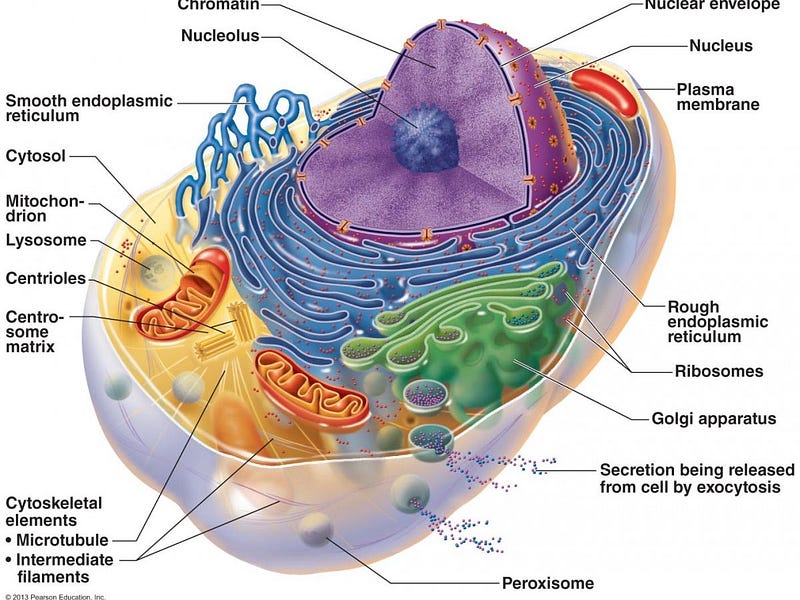
Different Levels of Human Disease:

  • Whole Body
  • Individual Organs
  • Individual Cells of each organ
  • Subcellular (Organelles)
  • Genes

Our body is composed of multiple organs and other connective tissue. Each organ is composed of different cells. Within the cells there are organelles (mini-organs) such as the mitochondrion and endoplasmic reticulum. These sub-cellular mini organs do various functions for the cell such as generate energy (mitochondrion) and remove waste products (lysosomes) and make proteins (endoplasmic reticulum). Within the nucleus of the cell lies the genetic material including chromosomes and DNA.

We have defined diseases for every level except the sub-cellular, organelle level. Is it possible that organelles never become diseased? That hardly seems possible. At every level, things can go wrong, and the organelles are no different. Increasing attention is being paid to mitochondrial dysfunction as a contributor to many chronic diseases because these organelles lie at the cross roads of sensing and integrating cues from the environment to trigger adaptive and compensatory cellular responses. That is, they serve a key role in sensing the outside environment and optimizing the cell’s appropriate response. Mitochondrial disease seems to be linked to many of the diseases of excessive growth, including Alzheimer’s disease and cancer. This makes sense because mitochondria are the power producers of the cell.

Consider an engine, your car’s power producer. What part of the car breaks down the most often? Usually it is the part that has the most moving parts, is the most complex and does the most work. So, the engine requires constant maintenance in order to run acceptably. By contrast, a part of the car that is not complex, gets no usage and has no moving parts like the back seat cushion requires little maintenance and almost never breaks down. You change the oil every few months, but don’t worry about the back seat cushion much. Mitochondria are your cell’s little engines and are just as prone to breakdown as other body part. Keeping mitochondria functioning well may be a hidden key to good health.

So let’s talk mitochondria.

Mitochondrial Dynamics

The most well recognized role of mitochondrion is as the cell’s powerhouse, or energy producer. It generates energy in the form of ATP using oxidative phosphorylation (OxPhos). Organs (heart is #1, and kidney is #2 in terms of ATP usage) that use a lot of oxygen, or have high energy demands are particularly rich in mitochondria. These organelles are constantly changing in size and number by the processes of fission (breaking apart) or fusion (putting together). This is called mitochondrial dynamics. A mitochondrion may divide into two daughter organelles, or two mitochondria may fuse into a single larger one.
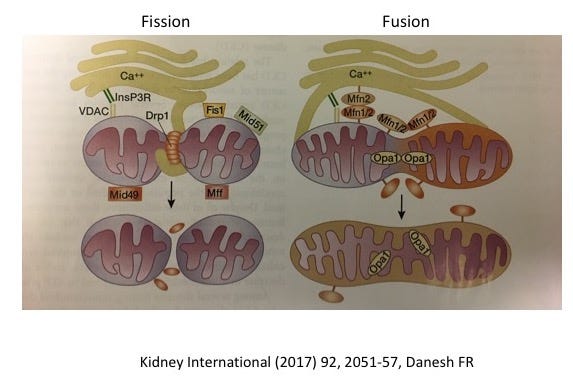
Both processes are necessary for mitochondria to stay healthy. Too much fission and there is fragmentation. Too much fusion is called mitochodrial hypertabulation. As in life, the proper balance is necessary (good and bad, feeding and fasting, yin and yang, resting and activity). The molecular machinery of mitochondrial dynamics was first described in yeast and then the corresponding pathways found in mammals and humans. Defective mitochondrial dynamics have been implicated in cancer, cardiovascular disease, neurodegenerative diseases, diabetes and chronic kidney disease. In kidney disease, specifically, too much fragmentation seems to be the issue.
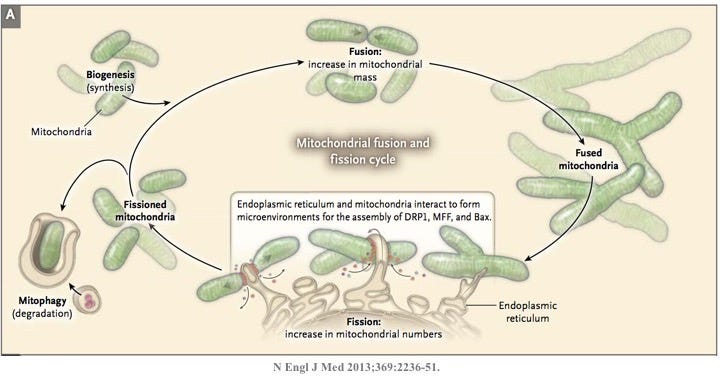
Mitochondrion were first described as ‘bioblasts’ by Altmann and in 1898, Benda observed that these organelles had various shapes, sometimes long, like a thread, and sometime round, like a ball. Hence the name mitochondrion is derived from the Greek words mitos (thread) and chondrion (granule). Lewis, in 1914 observed that “Any one type of mitochondria such as a granule, rod or thread may at times change into any other type” through the processes now known as mitochondrial dynamics.

The numbers of mitochondria are regulated by biogenesis to meet the energy needs of the organ. Just as they are ‘born’, they can also be culled through the process of mitophagy, which also maintains quality control. This mitophagy process is closely related to autophagy which we have discussed previously.

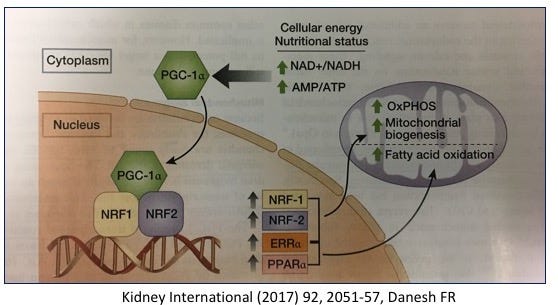
The sirtuins (SIRT1–7) (previously discussed here) yet another type of cellular nutrient sensor also regulates several aspects of mitochondrial biogenesis. Increased AMPK (low cellular energy status) also acts through several intermediaries to increase mitochondria.
Fission and fusion imbalances of mitochondria result in reduced function. Mitochonria, other than just being the powerhouse of the cell, also play an integral role in programmed cell death or apoptosis. When the body decides that a cell is no longer necessary, the cell does not simply die. If that happened, then the cellular contents would spill out, causing all kinds of inflammation and damage. It’s just like when you decide that you no longer need an old can of paint. You don’t simply pour the paint out wherever you happened to store it. You would get paint all over your dining room, and then your wife/husband would kill you. Nice. No, instead, you need to carefully dispose of its contents.

The same is true for cells. When the cell is damaged or no longer necessary, it undergoes an orderly disposal of its cellular contents, which are reabsorbed and its components may be reused for other purposes. This process is called apoptosis and is a major mechanism for the precise regulation of cell numbers. It is also a major defence strategy for the removal of unwanted or potentially dangerous cells (hello — cancer). So, if the process of apoptosis (a sort of cellular clean-up crew) is impaired, then the result is too much growth.

There are two main pathways for the activation of apoptosis — the extrinsic and intrinsic. The intrinsic pathway responds to cellular stress. The cell, for some reason, is not working well, and should really be eliminated like that excess can of paint. The other name for the intrinsic? The mitochondrial pathway. So, all of these diseases of excessive growth — atherosclerosis (causing heart attacks and stroke), cancer, Alzheimer’s disease, where lack of a cellular clean up crew may play a role, all link back to mitochondrial functioning.
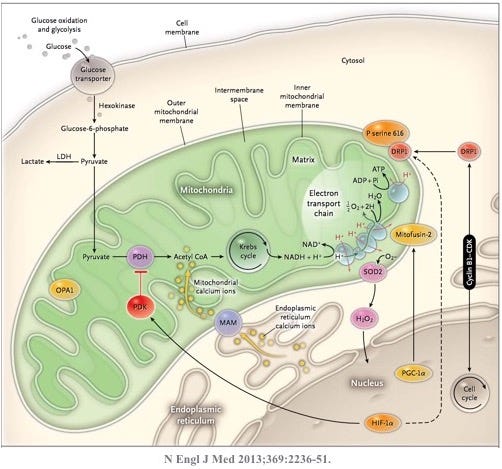
So how to keep the mitochondria healthy? The key is AMPK, a sort of reverse fuel gauge of the cell. When energy stores are low, AMPK goes up. AMPK is a phylogenetically ancient sensor triggered by high cellular energy demands. If energy demand is high and energy stores are low, then AMPK goes up and stimulates new mitochondrial growth. As mentioned in our last post, AMPK goes up with decreased nutrient sensing, which is tightly correlated to longevity. Certain drugs (hello — metformin) can also activate AMPK which explains how metformin may have some role in cancer prevention. It also explains its popularity in wellness circles. But you can do better.

Fasting also stimulates autophagy and mitophagy, the process of culling the old, dysfunctional mitochondria. So the ancient wellness practice of intermittent fasting essentially gets rid of the old mitochondria and at the same time stimulates new growth. This process of renewing your mitochondria may play a huge role in the prevention of many of the diseases we currently have no acceptable treatment — diseases of excess growth. While metformin may stimulate AMPK, it does not reduce the other nutrient sensors (insulin, mTOR), and does not stimulate mitophagy.

So, instead of taking a prescription medication off label with its bothersome side effect of diarrhea (don’t wear white pants), you can simply fast for free, and get double the effect. Intermittent fasting. Boom.

Dr. Jason Fung

For more, check out my YouTube channel, online community and coaching programs at TheFastingMethod.com and my books

Health
Cancer
Wellness
Longevity
Fasting
Recommended from ReadMedium