
Faster training and inference using the Azure Container for PyTorch in Azure ML

If you’ve ever wished that you could speed up the training of a large PyTorch model, then this post is for you! The Azure ML team has recently released the public preview of a new curated environment that enables PyTorch users to optimize training and inference for large models. In this post, I’ll cover the basics of this new environment, and I’ll show you how you can use it within your Azure ML project.
Azure Container for PyTorch (ACPT)
The new curated environment, called the Azure Container for PyTorch (ACPT), consists of a Docker image containing the latest compatible versions of Ubuntu, CUDA, Python, and PyTorch, as well as various state-of-the-art technologies that optimize training and inference of large models. Among other technologies, it uses the ONNX Runtime to represent the machine learning models, DeepSpeed to improve large scale training, and FairScale to optimize distributed training.
Benefits of the ACPT
If you’re working with a large PyTorch model, you’ll experience significantly faster training and inference when using the ACPT. The graph below compares the time it takes to train several HuggingFace PyTorch models, using three different methods: PyTorch on its own (white), PyTorch + ONNX runtime (orange), and PyTorch + ONNX runtime + DeepSpeed Stage 1 (blue). As you can see, the addition of just two of the technologies included in the ACPT results in speed improvements from 54% (for bert-large-cased) to 163% (for gpt2-large). Pretty impressive!
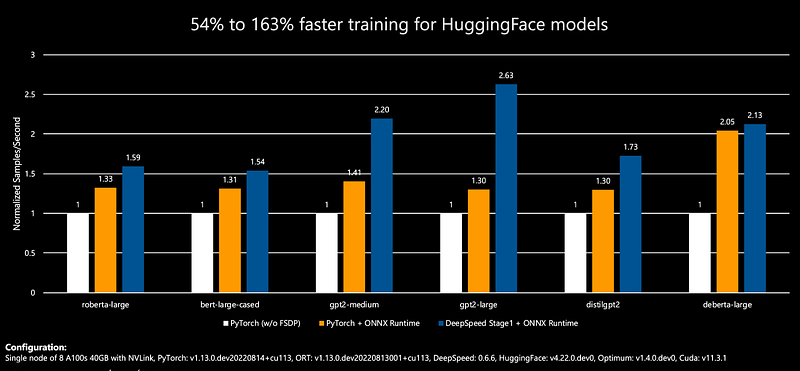
You could install all of these performance-boosting technologies on your own, but having the latest compatible versions thoroughly tested and bundled together makes it so much easier to use them.
How to use the ACPT to train a model within Azure ML
You can use the ACPT as a DSVM (data science virtual machine) outside of Azure ML, or as a curated environment within Azure ML. In this post, I’ll demonstrate how you can use it to train a model within Azure ML.
My post on training and deploying a PyTorch model using Azure ML shows how you can use the Azure ML SDK v2 to train and deploy a PyTorch model in the cloud. In that post, I discuss all the Azure ML entities that need to be created in order to train in the cloud. One of those entities is an “environment,” which specifies all the software you want installed on the virtual machine where your code will run. You can create an environment by specifying a base docker image (containing just Ubuntu and optionally CUDA), and a conda file where you add all the packages your project needs (such as Python, PyTorch, and so on). Here’s the code I showed in my blog post:
CONDA_PATH = Path(Path(__file__).parent, "conda.yml")
    ...
    # Create the environment.
    environment = Environment(image="mcr.microsoft.com/azureml/" +
                              "openmpi4.1.0-ubuntu20.04:latest",
                              conda_file=CONDA_PATH)

    # Create the job.
    job = command(
        ...
        environment=environment,
        ...
    )
  ...
Alternatively, you can specify a “curated environment,” which is a container provided by Microsoft that includes a set of commonly used packages (in addition to Ubuntu and CUDA). Azure ML has several curated environments available — you can see the full list by going to the Azure ML Studio, clicking on “Environments,” and then on “Curated environments:”
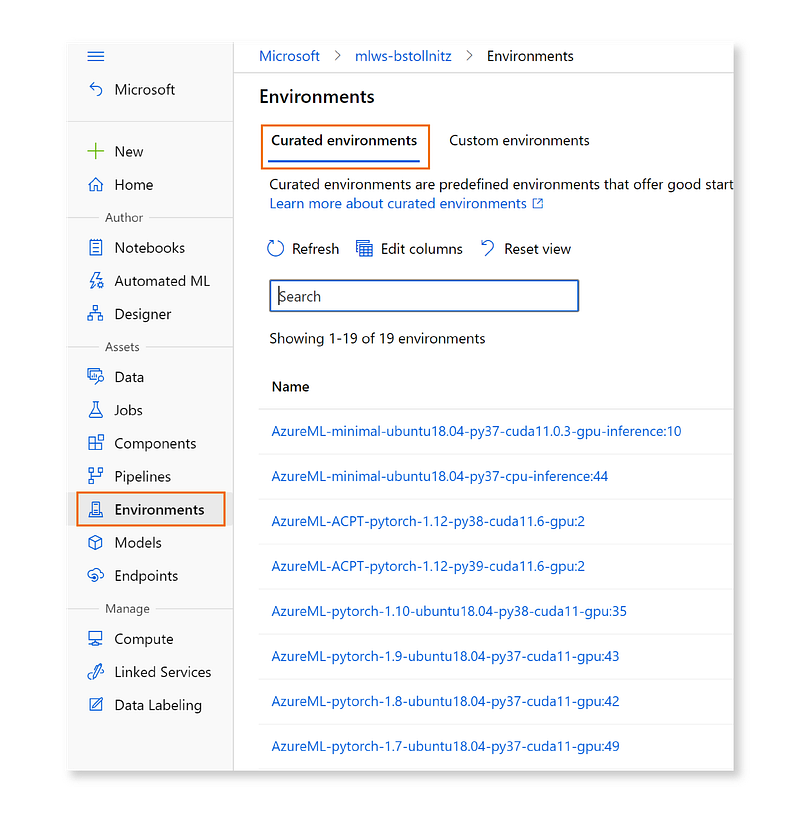
The ACPT ships from within Azure ML as a set of four curated environments with different package version combinations. You can see these by typing “acpt” in the search box:
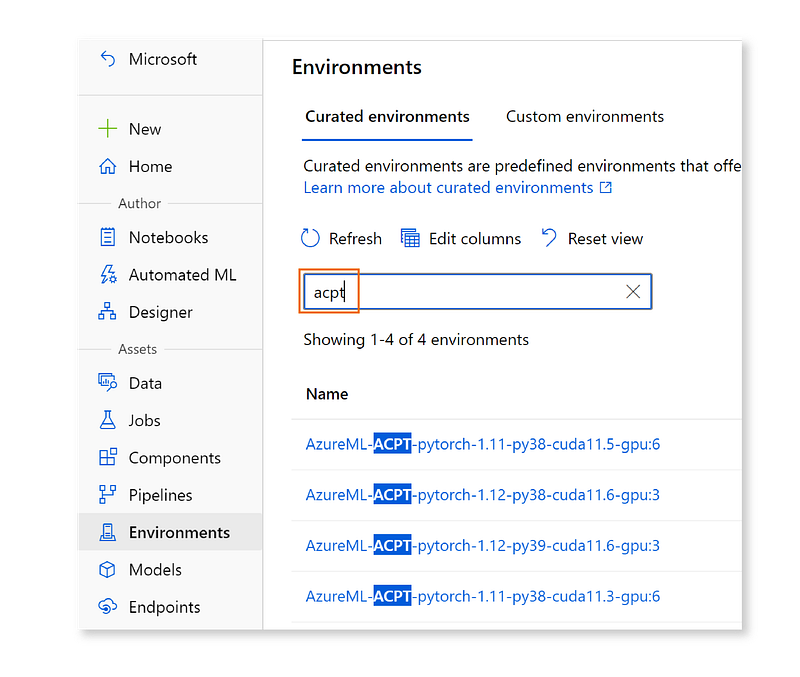
Once you’ve chosen a version combination of PyTorch, Python and CUDA, you can simply set your environment in code to the name of the curated environment you selected. For example, if I wanted to use PyTorch 1.12, Python 3.9 and CUDA 11.6, I would write the following code:
  environment = "AzureML-ACPT-pytorch-1.12-py39-cuda11.6-gpu@latest"

  job = command(
      ...
      environment=environment,
      ...
  )
Notice that adding “@latest” to the environment name specifies that I want the latest available version. If I wanted a specific version, I could instead add a colon followed by the version number. For example, if I wanted version 3, I would write the following code:
environment = "AzureML-ACPT-pytorch-1.12-py39-cuda11.6-gpu:3"

job = command(
    ...
    environment=environment,
    ...
)
You can try this feature by simply changing the environment of the project from my earlier blog post according to what you learned in this section. However, please keep in mind that the benefits of this curated environment will be most apparent with very large models. Also, note that the environment was specifically designed to be used with GPU VMs (for example, “Standard_NC6s_v3” for a small cluster).
With this new environment, PyTorch and Azure ML provide us with the best possible combination of deep learning framework and cloud platform. If you’re training large models, you will be so much more productive in your work. I can’t wait to see what you’ll do with it!
To learn more about Azure ML and other AI/ML topics, check out my machine learning blog.


