
FastAPI — authentication revisited: Enabling API key authentication
Intro
So, in my last article, I wrote about adding Basic Authentication to the example tutorial app, which is based on the excellent work of Sebastián Ramírez of the FastAPI framework.
Now I am exploring a new type of authentication, API key-based authentication. This is authentication in the form of an arbitrary string with an arbitrary length, which gives access to an API.
For the API it would be great if it supports API key validation by:
- Checking for a query parameter containing the API key
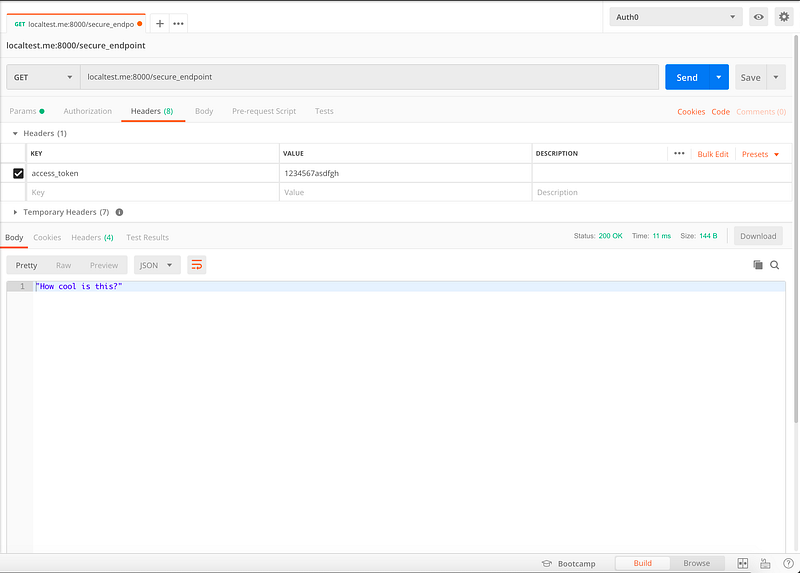
- Checking for a header containing the API key
- Checking for a cookie containing the API key
The reason behind this order is that to me, it is great if you can override an API key by supplying a query parameter to the API call. If you want to call the endpoint multiple times, but do not want to use the API key as a query parameter, you can put the API key in the header and make calls with this header. Finally, if you want to explore the API as a user, a cookie is a great way to persist the API key and use it for subsequent calls.
We will create a very simple API, just to show how this can be built.
Steps
First, we start with the needed import to support API key checking:
The import line for this example is:
from fastapi.security.api_key import APIKeyQuery, APIKeyCookie, APIKeyHeader, APIKeyThis imports the needed dependencies to resolve the API key from the request.
Now we define settings which will be used in the rest of the API. Furthermore, we create the instances which are able to check for the API key in the query, header or cookie. Note the use of :
auto_error=FalseThis enables the usage of multiple authentication strategies without the API denying authentication when a key is not present. This could be the case if you have the API key in a cookie and not as a query parameter for example.
Now we create a function, which checks the API key in the following order (as described in my introduction):
- Query parameter
- Header value
- Cookie
This is just a simple example, so if you want to extend this you could check if an API key is contained in a list/set or check if a certain user has an API key.
Now we create the base and documentation endpoint:
The /documentation and /openapi.json endpoint are both protected by the get_api_key dependency. Furthermore, if you access the /documentation endpoint with a valid API key, a cookie with the API key will be set. This enables the usage of the full documentation when using a browser (which could be useful if you are testing out endpoints). A /logout endpoint is provided to clear the cookie and its contents.
Finally, we create a secure endpoint which only works if you have a valid API key:
Take it for a spin!
WARNING: For this post, I make use of a public DNS record, called localtest.me which redirects to 127.0.0.1. Only use this for testing purposes and don’t supply production secrets when using this. In my own environment, I make use of my own validated domain.
With everything set-up, we now take it for a spin, going to http://localtest.me:8000 :

Now we try to access the /secure_endpoint and /documentation:


Now we try adding an API key in the form of a Query parameter defined as access_token, like this:
http://localtest.me:8000/documentation?access_token=1234567asdfgh
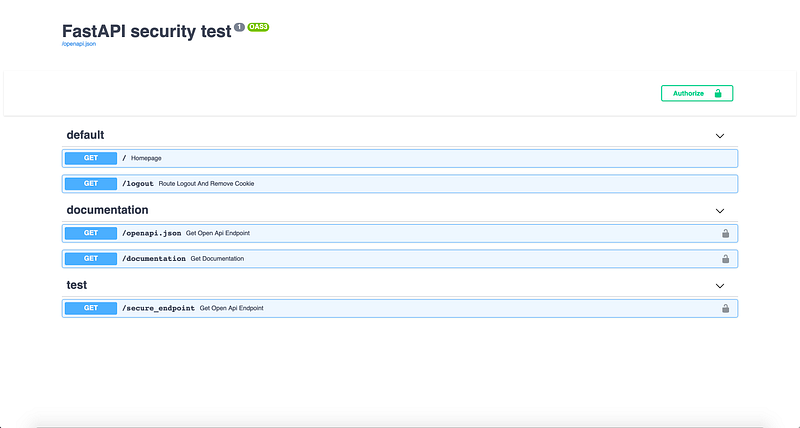
After this step, you should have a local cookie containing the API key. Now we can call the /secure_endpoint, without supplying the API key as a query parameter:

If we want to clear the cookie, we go to:
http://localtest.me:8000/logout

If we go to the /secure_endpoint again, we cannot access it anymore (this is exactly what we want):
Finally, we make a test which makes use of a header. For this, we use Postman:
Final words
So, with this article, I showed how to create a simple API endpoint containing API key authentication. This example can off-course be extended and expanded to include more elaborate schemes or mixes with full OAuth endpoints.
Many thanks go out to Sebastián Ramírez again as he has put me in the right direction to create this set-up.
The full gist can be found here:
BVI Data Rebels is a company by BVI. Together we unleash the power of data-informed people!


