avatarJared A. Brock

Free AI web copilot to create summaries, insights and extended knowledge, download it at here

3949

Abstract

lux</b></a>, which “makes the color of your computer’s display adapt to the time of day; warm at night and like sunlight during the day.”</p><p id="5218">Either of these options will drastically reduce the amount of blue diodes that are being beamed at your eyes each day.</p><h1 id="9e98">4. Use a Larger Screen</h1><p id="ff4e">Bigger really is better. Instead of tunnel-visioning toward your tiny cell phone screen, transition as many activities as possible to your laptop or desktop with a larger screen surface. It’ll help your posture, too.</p><h1 id="79ab">5. Turn the Brightness Way Down</h1><p id="6fd3">To stare at a screen is to effectively stare at a lightbulb. So dim the switch. (I rarely keep screen brightness above 50%.) Just be careful not to go too dark, otherwise you’ll cause another form of eye strain! Test and see what works for you.</p><h1 id="ef75">6. Check Your Workspace</h1><p id="8fc3">Sometimes your screen isn’t the problem. Ofter our workspaces are too dark or bright. In either case, the key is to experiment until your eyes love it.</p><h2 id="0e89">Too bright?</h2><p id="ad8e">Turn off or dim harsh lights. Reposition your desk away from windows, skylights, lamps, and mirrors. Check your walls: Darker-color matte-finish paints are preferable to highly-reflective light surfaces. (If your boss or co-working space won’t let you re-decorate, buy a good <a href="https://www.amazon.com/s?k=anti-glare+screen&amp;ref=nb_sb_noss">anti-glare screen</a>.)</p><h2 id="3f09">Too dark?</h2><p id="a4a1">My office is quite dim, so I collected five different lamps and experimented with positioning until my eyes simply stopped straining. I can literally feel my eyes tense, like a flexed bicep, when I turn two or more lights off.</p><h1 id="eeab">7. Consider Screen Positioning</h1><p id="62eb">Height and depth matter just as much as size and brightness. Be sure to properly position your monitor to keep yourself from straining or going cross-eyed all day. According to WebMD, “the best position for your monitor is slightly below eye level, about 20 to 28 inches away from your face.”</p><h1 id="85e1">8. Big-Up the Font</h1><p id="757d">If someone stole my laptop, they’d think I was a ninety-year-old granny with macular degeneration — the text is huge! Rather than jutting your neck forward and straining your eyes to read small online fonts, click <b>View -> Zoom In</b> and adjust the font sizes on all your favorite browsers, apps, and programs.</p><h1 id="215c">9. Don’t Forget to Blink</h1><p id="b9ee">A reminder to blink might seem like a silly thing to mention, but it’s not: <a href="https://uihc.org/health-topics/computer-vision-syndrome">We blink 66% less often while staring at screens</a>. One of the biggest causes of eye strain is that screens dry out our eyes. Set a digital egg-timer to go off every half hour and take a five-minute break to stare into the distance, ideally at something that’s far away, non-digital, and moving. (IE: clouds, trees, water, people.) It’s great for creativity, too.</p><h1 id="8a93">10. Ditch Your Screen(s)</h1><p id="6d8d">At the end of the day, the best thing to do is just stop staring at screens altogether. While many of us work online, there are still plenty of hours each day that we could re-allocate to non-lightbox activities:</p><h2 id="b30a">A. Try No Screens After Supper</h2><p id="471c">It’s so easy to lose the whole evening staring at screens. Instead of watching shows all night, my wife and I try to save cinema for the weekend as a special treat. Instead, we try to give our eyes a screen-break after 6 PM, reading physical books by the fire before going on a nightly 45-minute walk under the stars.</p><p id="7e84">There’s a big side-benefit to going screen-free-after-supper: Blue diodes wake us up. The sun radiates the most blue diodes in the mornings, which is why scrolling after supper or watching a movie before bed makes it far hard

Options

er to sleep. Saying no to screens = saying hello to sleep.</p><h2 id="a1ea">B. Take a Weekly Digital Sabbath</h2><p id="2bb1">Pick one day per week — likely on the weekend — set an auto-response on your phone, and sign off as many screens as possible. Instead, do your favorite offline activities: read a whole book, cook a great meal, play sports, or go on a hefty hike.</p><h2 id="b6b1">C. Take a Screencation</h2><p id="dbd0">Try taking a long weekend each quarter, or a full week each year, and ditch all your devices completely. Use the off-screen time to have an old-school, analog, embodied adventure. Not only will it boost your creativity, but your friends and family will <b>love</b> you for it.</p><p id="2f8e">And so will your eyes.</p><h1 id="5cf6">New articles by Jared you might like:</h1><div id="0d3d" class="link-block"> <a href="https://readmedium.com/the-life-changing-magic-of-tidying-up-your-bum-98e27f9de1f0"> <div> <div> <h2>The Life-Changing Magic of Tidying Up Your Bum</h2> <div><h3>5 steps to getting your (literal) hit together</h3></div> <div><p>medium.com</p></div> </div> <div> <div style="background-image: url(https://miro.readmedium.com/v2/resize:fit:320/1*DqjZAMEOgvneDT5j4cGTkA.jpeg)"></div> </div> </div> </a> </div><div id="567b" class="link-block"> <a href="https://readmedium.com/if-sleep-isnt-one-of-your-top-three-life-priorities-you-re-doing-it-wrong-e4e0a474f126"> <div> <div> <h2>If Sleep Isn’t One of Your Top Three Life Priorities, You’re Doing It Wrong</h2> <div><h3>New rule: If you’re too busy for sleep, you’re too busy.</h3></div> <div><p>medium.com</p></div> </div> <div> <div style="background-image: url(https://miro.readmedium.com/v2/resize:fit:320/1*YsE8HtrzsiVpfbhpLCMeAg.png)"></div> </div> </div> </a> </div><div id="ee75" class="link-block"> <a href="https://readmedium.com/facebook-is-dead-it-just-doesnt-know-it-yet-614e723e9f72"> <div> <div> <h2>Facebook Is Dead (It Just Doesn’t Know It Yet)</h2> <div><h3>The 750+ billion company still has options, but none end well.</h3></div> <div><p>medium.com</p></div> </div> <div> <div style="background-image: url(https://miro.readmedium.com/v2/resize:fit:320/1*Unb5YuPLH6wrWYlYT2IJWQ.jpeg)"></div> </div> </div> </a> </div><div id="5eaf" class="link-block"> <a href="https://jaredabrock.medium.com/level-up-50-rules-and-tools-for-a-healthier-wealthier-wiser-life-7e06a6a56564"> <div> <div> <h2>Level Up! 50 Rules and Tools for a Healthier, Wealthier, Wiser Life</h2> <div><h3>My new ebook is available now for free.</h3></div> <div><p>jaredabrock.medium.com</p></div> </div> <div> <div style="background-image: url(https://miro.readmedium.com/v2/resize:fit:320/1*7o4ZMxcKOGvKt9iOm1LmrQ.png)"></div> </div> </div> </a> </div><figure id="7532"><img src="https://cdn-images-1.readmedium.com/v2/resize:fit:800/0*e1qme49VVMJwTgxy.jpeg"><figcaption></figcaption></figure><p id="76f4"><b>You just read another post from In Fitness And In Health:</b> a health and fitness community dedicated to sharing knowledge, lessons, and suggestions to living happier, healthier lives.</p><p id="2e8e">If you’d like to join our newsletter and receive more stories like this one, <a href="https://scottmayer.substack.com/"><b>tap here</b></a><b>.</b></p></article></body>

Eye Strain is the New Carpal Tunnel

10 ways to protect yourself from being blinded by the bright
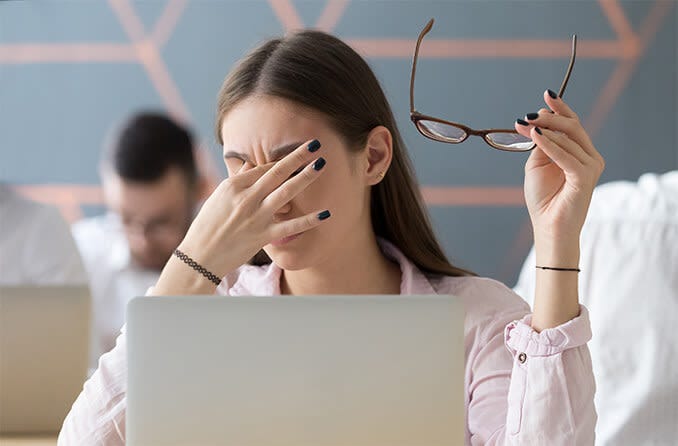
Photo by AllAboutVision

Let’s face it — we spend far too much time staring at screens. Eye drop sales are on the rise. Rates of myopia have doubled in a single generation. There’s even a new diagnosis for all our screen-staring: Computer Vision Syndrome. They’re calling it “carpal tunnel of the eyes,” and as many as 90% of all computer users have at least one symptom.

As a full-time digital entrepreneur, I spend 60+ hours per week on screens for work, and earlier this year, my eye strain got so bad I had to take two weeks offline to recover.

Since then, I’ve made a lot of changes to my screen-life. As the digital world continues to take a huge toll on our collective eyesight, I hope these ideas are helpful for protecting your personal vision.

1. Get Glasses

Screens emit blue diodes that radiate your eyes. I’d known this fact for several years, but was shocked to see it in action recently:
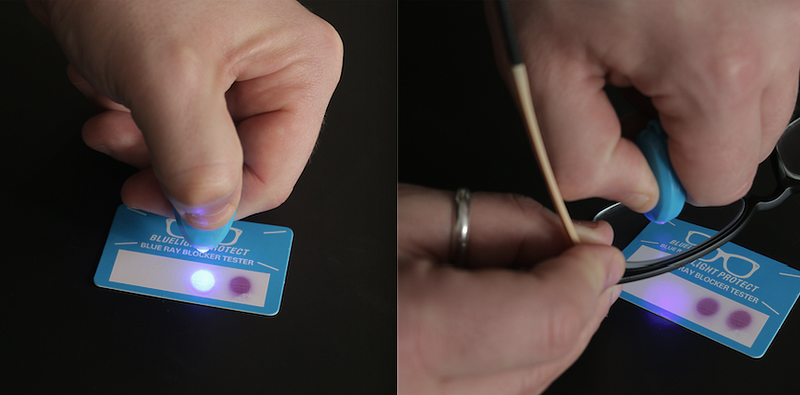
While unprotected light radiates the paper, blue diodes beamed through a pair of blue-blocking glasses leave no residual mark.

Having seen this, I can’t believe that hundreds of millions of people stare at a $1,000 light box all day long, but won’t invest twenty bucks on a pair of blue diode-blocking glasses with an anti-reflective coating. It’s the smartest eye money you can spend. (And you can maximize your investment by leaving the glasses beside your workspace as a visual cue to put them on as soon as you sit down.)

2. Embrace the Dark Side

Remember that white = more light, so we want to kill as much whitespace on the web as possible. Web designers should do us all a favor and dim the entire Internet, but in the meantime:

Use a black startup screen. Use a black desktop background. Use Google dark mode. Use Gmail dark mode. Use Facebook dark mode. Use Wikipedia dark mode. Get DarkReader for Medium. Enable dark mode on all major apps. Purchase NightEye to turn the entire Internet black.

3. Install Free Eye-Protection Apps

Eye-protection software is super-handy for filtering out blue diode light at its source.

I’m a big fan of Iris, which promises to “prevent eye strain, reduce eye pain, and improve sleep.” I’ve set it to manual so that it’s on 24/7.

Another great option for Macs is Flux, which “makes the color of your computer’s display adapt to the time of day; warm at night and like sunlight during the day.”

Either of these options will drastically reduce the amount of blue diodes that are being beamed at your eyes each day.

4. Use a Larger Screen

Bigger really is better. Instead of tunnel-visioning toward your tiny cell phone screen, transition as many activities as possible to your laptop or desktop with a larger screen surface. It’ll help your posture, too.

5. Turn the Brightness Way Down

To stare at a screen is to effectively stare at a lightbulb. So dim the switch. (I rarely keep screen brightness above 50%.) Just be careful not to go too dark, otherwise you’ll cause another form of eye strain! Test and see what works for you.

6. Check Your Workspace

Sometimes your screen isn’t the problem. Ofter our workspaces are too dark or bright. In either case, the key is to experiment until your eyes love it.

Too bright?

Turn off or dim harsh lights. Reposition your desk away from windows, skylights, lamps, and mirrors. Check your walls: Darker-color matte-finish paints are preferable to highly-reflective light surfaces. (If your boss or co-working space won’t let you re-decorate, buy a good anti-glare screen.)

Too dark?

My office is quite dim, so I collected five different lamps and experimented with positioning until my eyes simply stopped straining. I can literally feel my eyes tense, like a flexed bicep, when I turn two or more lights off.

7. Consider Screen Positioning

Height and depth matter just as much as size and brightness. Be sure to properly position your monitor to keep yourself from straining or going cross-eyed all day. According to WebMD, “the best position for your monitor is slightly below eye level, about 20 to 28 inches away from your face.”

8. Big-Up the Font

If someone stole my laptop, they’d think I was a ninety-year-old granny with macular degeneration — the text is huge! Rather than jutting your neck forward and straining your eyes to read small online fonts, click View -> Zoom In and adjust the font sizes on all your favorite browsers, apps, and programs.

9. Don’t Forget to Blink

A reminder to blink might seem like a silly thing to mention, but it’s not: We blink 66% less often while staring at screens. One of the biggest causes of eye strain is that screens dry out our eyes. Set a digital egg-timer to go off every half hour and take a five-minute break to stare into the distance, ideally at something that’s far away, non-digital, and moving. (IE: clouds, trees, water, people.) It’s great for creativity, too.

10. Ditch Your Screen(s)

At the end of the day, the best thing to do is just stop staring at screens altogether. While many of us work online, there are still plenty of hours each day that we could re-allocate to non-lightbox activities:

A. Try No Screens After Supper

It’s so easy to lose the whole evening staring at screens. Instead of watching shows all night, my wife and I try to save cinema for the weekend as a special treat. Instead, we try to give our eyes a screen-break after 6 PM, reading physical books by the fire before going on a nightly 45-minute walk under the stars.

There’s a big side-benefit to going screen-free-after-supper: Blue diodes wake us up. The sun radiates the most blue diodes in the mornings, which is why scrolling after supper or watching a movie before bed makes it far harder to sleep. Saying no to screens = saying hello to sleep.

B. Take a Weekly Digital Sabbath

Pick one day per week — likely on the weekend — set an auto-response on your phone, and sign off as many screens as possible. Instead, do your favorite offline activities: read a whole book, cook a great meal, play sports, or go on a hefty hike.

C. Take a Screencation

Try taking a long weekend each quarter, or a full week each year, and ditch all your devices completely. Use the off-screen time to have an old-school, analog, embodied adventure. Not only will it boost your creativity, but your friends and family will love you for it.

And so will your eyes.

New articles by Jared you might like:

You just read another post from In Fitness And In Health: a health and fitness community dedicated to sharing knowledge, lessons, and suggestions to living happier, healthier lives.

If you’d like to join our newsletter and receive more stories like this one, tap here.

Eyecare
Computer Vision Syndrome
Productivity
Lifehacks
Health
Recommended from ReadMedium