
Extraction of Frames from Multiple Videos
We know that computer vision applications are increasing rapidly in real-life problems i.e., traffic monitoring using CCTV cameras, person identification for security purposes, disease detection and classification, and many others.
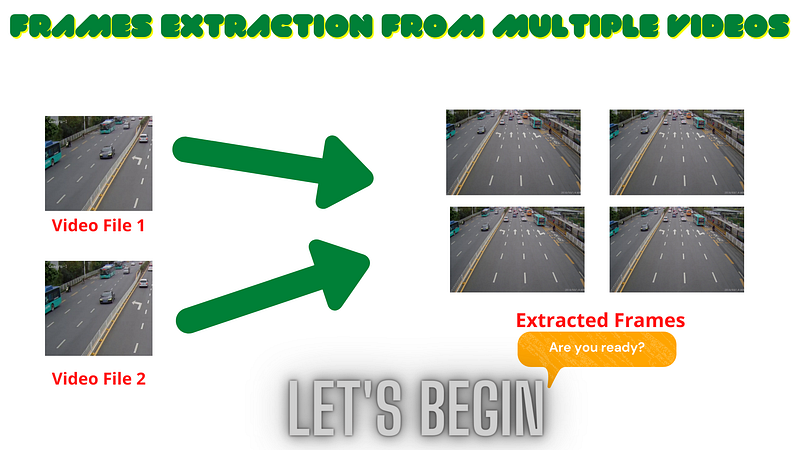
We know that for any computer vision application development we will need a dataset, on which we train our model. Sometimes customers will give you a dataset but in many cases, customers ask you to collect or find a dataset so in that case, so here you will need to find a dataset, but what happens if you search for data and nothing found? so here real-time data collection will be a good approach to solve this problem, Now in this article, we will make a dataset from videos and from real-time.
Note: We will work on Google Colab, but the same steps can be followed for Jupyter-Notebook users because in Google Colab we will use videos stored in Google Drive, so here we will first need to mount Google Drive while in Jupyter Notebook you will directly set path of video from the system folder. All other steps will be the same for the implementation of the Jupyter-notebook and Google-Colab implementation.
Let us start implementation step by step. If you will follow the below steps so at the end you will able to extract frames from live video or stored videos.
Step-1
We will start with importing libraries that will help us to achieve the solution to our problem. Jupyter Notebook users don't need to import the Google Colab module.

Step-2
Now we need to mount Google Drive to access the videos from which we will extract frames. Jupyter-notebook users can skip this step.

Step-3
Now we will read all videos from the folder. The videos I used can be found here. For real-time, you can skip this step.

Step-4
Now, we will run for loop on the folder that will append items in the video list which ends with (.mp4).

Step-5
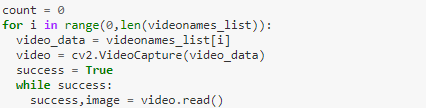
Now, we will use a for loop for reading every video by index, and then we will use a while loop for frame extraction. Also, the read function will be used for each frame extraction from the captured video and this read function will return two things,
- success, which will return a boolean value (True/False). Where the True value will indicate the frame successfully extracted. while the False value will indicate frame is not extracted.
- image, which will give an extracted frame if success is true.
- Note: The count variable will be used for counting the total extracted frames.
Step-6
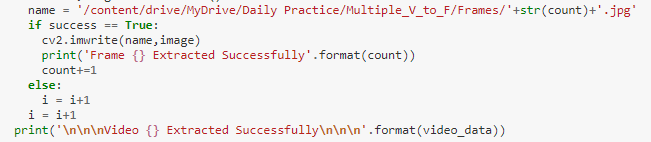
Now we will store extracted frames in a folder, For this to be done you will need to make a folder inside Google Drive while notebook users can create a folder at any location but keep in mind the path of storing frames will need to be correct.

Step-7
Now we will need to save extracted frames, for this to be done we will use the if-else condition in a specific way.
- if the frame is extracted then success will be true so then we will store frames, while if success is false so next video will be read with the help of a for loop (by indexing in video_list).
Step-8
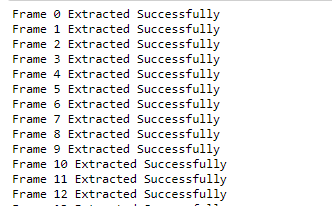
If the above code runs successfully, then you will be able to see the frames extracted in the output like below.
That’s all about the extraction of frames from videos or real-time, you can try on your own videos.
Project Github : link
Testing Videos: link
Jupyter Notebook : link
About Me
- Muhammad Rizwan Munawar is a highly experienced professional with more than three years of work experience in Computer Vision and Software Development. He is working as a Computer Vision Engineer and has knowledge and expertise in different computer vision techniques including Object Detection, Object Tracking, Pose Estimation, Object Segmentation, Segment Anything, Python, and Sofware Development, Embedded Systems, Nvidia Embedded Devices. In his free time, he likes to play online games and enjoys his time sharing knowledge with the community through writing articles on Medium.
Please feel free to comment if you have any questions 🙂, If you like the article, Let’s connect on LinkedIn :) 👇


