Extract table data from any document using Amazon Textract in Node.js🫡

Amazon Textract is a sophisticated service that automatically extracts text and data from scanned documents. Beyond simple optical character recognition (OCR), it can identify the contents of fields in forms and information stored in tables.
This functionality is particularly valuable in scenarios where data extraction from tables is necessary. Leveraging machine learning, Amazon Textract can significantly reduce the need for manual data entry, providing a more accurate and efficient alternative to hard-coded form reading rules.
A real world scenario: Our target is to read an document with table and extract all the data in a meaningful way, here’s an example pdf:
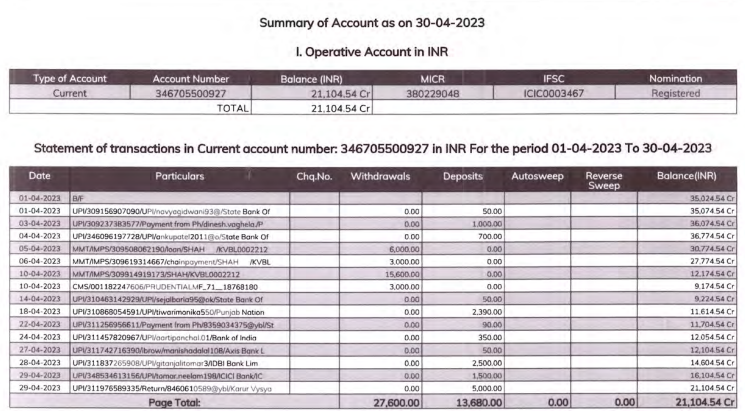
An ideal output would be:
Extracted Tables: [
    [
    //Table 1
      [
        "Type of Account",
        "Account Number",
        "Balance (INR)",
        "MICR",
        "IFSC",
        "Nomination"
      ],
      [
        "Current",
        "346705500927",
        "21,104.54 Cr",
        "380229048",
        "ICIC0003467",
        "Registered"
      ],
      [
        "",
        "TOTAL",
        "21,104.54 Cr",
        "",
        "",
        ""
      ]
    ],
    //Table 2
    [
      [
        "Date",
        "Particulars",
        "Chq.No.",
        "Withdrawals",
        "Deposits",
        "Autosweep",
        "Reverse Sweep",
        "Balance(INR)"
      ],
      [
        "01-04-2023",
        "B/F",
        "",
        "",
        "",
        "",
        "",
        "35,024.54 Cr"
      ],
      [
        "01-04-2023",
        "UPI/309156907090/UPl/navyagidwani93@/State Bank Of",
        "",
        "0.00",
        "50.00",
        "",
        "",
        "35,074.54 Cr"
      ],
      [
        "03-04-2023",
        "JPI/309237383577/Payment from Ph/dinesh.vaghela./P",
        "",
        "0.00",
        "1,000.00",
        "",
        "",
        "36,074.54 Cr"
      ],
      [
        "04-04-2023",
        "UPI/346096197728/UPl/ankupatel2011@o/State Bank Of",
        "",
        "0.00",
        "700.00",
        "",
        "",
        "36,774.54 Cr"
      ],
      [
        "05-04-2023",
        "MMTAMPS/309508062190/loan/SHAH /KVBL0002212",
        "",
        "6,000.00",
        "0.00",
        "",
        "",
        "30,774.54 Cr"
      ],
      [
        "06-04-2023",
        "MMT/IMPS/309619314667/chainpayment/SHAH /KVBL",
        "",
        "3,000.00",
        "0.00",
        "",
        "",
        "27,774.54 Cr"
      ],
      [
        "10-04-2023",
        "MMT/IMPS/309914919173/SHAH/KVBL0002212",
        "",
        "15,600.00",
        "0.00",
        "",
        "",
        "12,174.54 Cr"
      ],
      [
        "10-04-2023",
        "EMS/001182247606/PRUDENTIALMF_71__187681801",
        "",
        "3,000.00",
        "0.00",
        "",
        "",
        "9,174.54 Cr"
      ],
      [
        "14-04-2023",
        "UPI310463142929/UPl/sejalbaria95@ok/State Bank Of",
        "",
        "0.00",
        "50.00",
        "",
        "",
        "9,224.54 Cr"
      ],
      [
        "18-04-2023",
        "UPI/310868054591/UPI/tiwarimonika550/Punjab Nation",
        "",
        "0.00",
        "2,390.00",
        "",
        "",
        "11,614.54 Cr"
      ],
      [
        "22-04-2023",
        "UPI/311256956611/Paymentfrom Ph/8359034375@ybl/St",
        "",
        "0.00",
        "90.00",
        "",
        "",
        "11,704.54 Cr"
      ],
      [
        "24-04-2023",
        "UPI/311457820967/UPl/aartipanchal.01/Bank of India",
        "",
        "0.00",
        "350.00",
        "",
        "",
        "12,054.54 Cr"
      ],
      [
        "27-04-2023",
        "UPI/311742716390/ibrow/manishadalgl108/Axis Bank L",
        "",
        "0.00",
        "50.00",
        "",
        "",
        "12,104.54 Cr"
      ],
      [
        "28-04-2023",
        "UPI/311837265908/UPl/gitanjalitomar3/IDBI Bank Lim",
        "",
        "0.00",
        "2,500.00",
        "",
        "",
        "14,604.54 Cr"
      ],
      [
        "29-04-2023",
        "UPI/348534613156/UPI/tomar.neelam198/CICI Bank/IC",
        "",
        "0.00",
        "1,500.00",
        "",
        "",
        "16,104.54 Cr"
      ],
      [
        "29-04-2023",
        "UPI/311976589335/Return/8460610589@ybl/Karur Vysyo",
        "",
        "0.00",
        "5,000.00",
        "",
        "",
        "21,104.54 Cr"
      ],
      [
        "",
        "Page Total:",
        "",
        "27,600.00",
        "13,680.00",
        "0.00",
        "0.00",
        "21,104.54 Cr"
      ]
    ]
  ]
With traditional OCR solutions, keys and values are extracted as simple text,which makes it tricky to map with hard-coded rules and to maintain that for each update.
Let us start step by step:
1. Command line app
Let’s create a small command line app that scans a file and outputs a JSON result.
$ mkdir textract-lab
$ cd textract-lab && yarn init
$ touch index.js
$ yarn add commander aws-sdk lodash
We have created a directory and initialized our node.js app, created an entry file index.js , added our command line helper commander plus the sdk of Amazon web services (aws-sdk), and lodash.
Next open up index.js and paste the following code:
const program = require("commander");
program.version("0.0.1").description("Textract Lab");
program
.command("scan <filePath>")
.alias("s")
.description("scans a file")
.action(filePath => {
console.log(filePath);
});
program.parse(process.argv);
We have added a new command to our system that accepts a single argument: the filePath of the file we want to scan. Currently, this command simply logs the filePath that has been passed. Try to execute it:
$ node index.js scan HelloFromNode
It should log HelloFromNode.
2. Setting Up Your Amazon Account
To use AWS Textract, you’ll need to set up an AWS account and create an IAM user. Follow these steps to get started:
First, create an AWS account by visiting the AWS Management Console. Click on “Create a new AWS account” and follow the on-screen instructions to complete the registration process.
Next, create and configure an IAM user by following the official AWS Textract guide. Ensure the IAM user has the necessary permissions to use Textract.
By setting up your AWS account and configuring an IAM user, you’ll be ready to utilize the features of AWS Textract.
3. AWS Config
Create a config file that contains your aws configuration:
$ touch config.jsOpen config.js and paste the following (insert your keys plus the region)
module.exports = {
awsAccesskeyID: "",
awsSecretAccessKey: "",
awsRegion: ""
};
4. Doc Scanner
Create a new file textUtils.js
const _ = require("lodash");
const aws = require("aws-sdk");
const config = require("./config");

aws.config.update({
  accessKeyId: config.awsAccesskeyID,
  secretAccessKey: config.awsSecretAccessKey,
  region: config.awsRegion
});

const textract = new aws.Textract();

// Function to get text from result using blocksMap
const getText = (result, blocksMap) => {
  let text = "";

  if (_.has(result, "Relationships")) {
    result.Relationships.forEach(relationship => {
      if (relationship.Type === "CHILD") {
        relationship.Ids.forEach(childId => {
          const word = blocksMap[childId];
          if (word.BlockType === "WORD") {
            text += `${word.Text} `;
          }
          if (word.BlockType === "SELECTION_ELEMENT") {
            if (word.SelectionStatus === "SELECTED") {
              text += `X `;
            }
          }
        });
      }
    });
  }

  return text.trim();
};

// Function to extract table data
const extractTables = blocks => {
  const blocksMap = {};
  const tableBlocks = [];

  blocks.forEach(block => {
    blocksMap[block.Id] = block;
    if (block.BlockType === "TABLE") {
      tableBlocks.push(block);
    }
  });

  const tables = [];

  tableBlocks.forEach(tableBlock => {
    const table = [];
    if (tableBlock.Relationships) {
      tableBlock.Relationships.forEach(relationship => {
        if (relationship.Type === "CHILD") {
          relationship.Ids.forEach(childId => {
            const cell = blocksMap[childId];
            if (cell.BlockType === "CELL") {
              const rowIndex = cell.RowIndex - 1;
              const colIndex = cell.ColumnIndex - 1;
              const text = getText(cell, blocksMap);

              if (!table[rowIndex]) {
                table[rowIndex] = [];
              }
              table[rowIndex][colIndex] = text;
            }
          });
        }
      });
    }
    tables.push(table);
  });

  return tables;
};

module.exports = async buffer => {
  const params = {
    Document: {
      Bytes: buffer
    },
    FeatureTypes: ["TABLES"]
  };

  const request = textract.analyzeDocument(params);
  const data = await request.promise();

  if (data && data.Blocks) {
    const tables = extractTables(data.Blocks);
    return tables;
  }
  return undefined;
};
Now edit your index.js
const { Command } = require("commander");
const fs = require("fs");
const textractScan = require("./textractUtils");

const program = new Command();

program
  .version("0.0.1")
  .description("Textract Lab");

program
  .command("scan <filePath>")
  .alias("s")
  .description("scans a file")
  .action(async (filePath) => {
    try {
      const data = fs.readFileSync(filePath);
      const results = await textractScan(data);
      console.log("Extracted Tables:", JSON.stringify(results, null, 2));
    } catch (error) {
      console.error("Error reading file or scanning:", error);
    }
  });

program.parse(process.argv);
5. Testing
Execute the following:
$ node index.js scan /path-to-your-file/form-example.pdf
You should see the expected output.
Conclusion
Amazon Textract offers a powerful, user-friendly solution for extracting data from images and PDFs, making it an invaluable tool for automating document processing tasks. Built on Amazon’s advanced, highly scalable deep-learning technology, Textract ensures reliable and efficient performance without requiring any machine-learning expertise. Its simple, easy-to-use APIs allow developers to integrate image and document analysis capabilities into their applications seamlessly. As Textract continuously learns from new data, it improves over time, providing increasingly accurate and efficient results. Whether you’re dealing with invoices, receipts, or other documents, Amazon Textract simplifies the process of extracting structured information, streamlining your workflows and enhancing productivity.
You can find the example project here.