
Express API with Secure JWT Access and Refresh Token
Build an API with Express and secure it with JSON Web Token authorization.
Express is considered one of the best frameworks to build backend and API services, in this tutorial we will use it to build a minimal but fully working REST API service, secured with JWT Authorization.
Prerequisites
To follow along you will need at least:
- Basic knowledge of HTTP requests works
- Basic knowledge of JavaScript
- Basic knowledge of authentication and authorization flows
- Basic knowledge of Node.js and Node Package Manager
You will also need Node.js and NPM installed, and a tool to make HTTP requests: you can use cURL, you can use REST client extension for Visual Studio Code (https://github.com/Huachao/vscode-restclient) or an online tool like Postman. You can also clone our repository with the full project at:
What we will code
We will build a REST API service that will allow client applications to request data from it (in our case a list of books); we will secure the endpoints using JWT, we will code an API login service to get the token and we also implement a refresh token workflow.
We will not focus on client development (since we are building an ‘unopinionated’ service), but we will provide specifications of our service so that anyone can build a client for it.
Setting up the project
Once you have installed Node.js and NPM on your system we start building the project, create a folder:
mkdir express-apienter the folder and initialize the project:
npm init -yThis will create a package.json file that we will edit in a few minutes, but before we install all the needed dependencies:
npm -i express dotenv bcrypt jsonwebtoken
npm -i nodemon --save-dev
We now create a .env file to store the secret keys that later will be used to generate tokens. Please remember that these keys should be kept secret and should be very random/hard to guess, you can use a 64bit to Hex string (you can create them from here https://www.browserling.com/tools/random-hex), do not use the one I provide!
Now we can modify package.json to edit the running scripts, we will use node for production and nodemom for development (it acts like hot reload, you don’t need to restart the server when you modify the code); change the script section as follow:
This way, we are indicating our starting script that our service entry point is server.js that we will now create with minimal functionality:
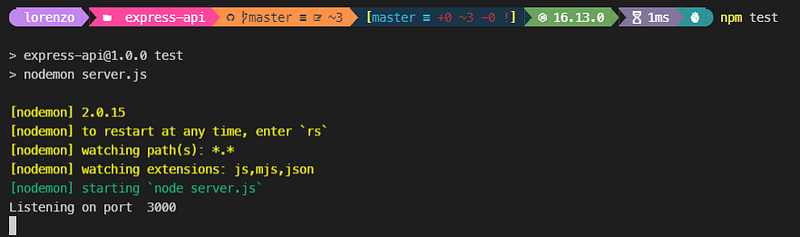
Start the dev server with npm testand it should log in to the console “Listening on port 3000” and wait for requests:
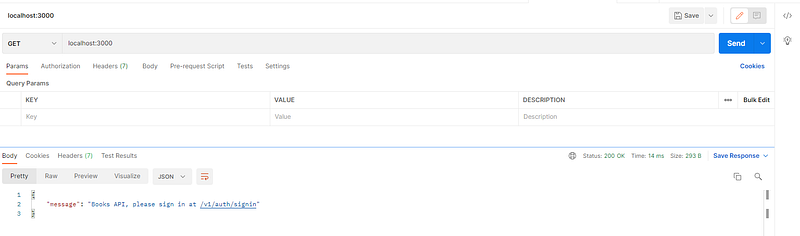
Request http://localhost:3000/ with your preferred tool (in this case you can also use a browser since we are doing a simple GET request):
The data
Since we are staying minimal we will not use any database or object storage for our data, we will simply keep the data in a file, the concept is the same, even if you use a local MongoDB or a remote Firebase or Fauna instance. We are getting the data from somewhere (a file in our case) and presenting them to the user in JSON format upon request.
In your project folder create adatafolder, and inside it two files, book.js where we keep our book database:
and users.js where our registered users are stored:
The password is encrypted with bcrypt (in plain it is password), usually, users that need access to the API register via a website (or grab their credential in a website), so we do not provide a registered endpoint (but I provide a generatepassword endpoint so you can easily generate encrypted password).
Authorization workflow
As mentioned before, some of our endpoints are not public so we need a way to authenticate and authorize users. For authentication we provide a login endpoint; for authorization, the protected endpoint requires an Authorization Header that needs to be validated, to be sent along with the request. This is how the workflow works in detail:
- The user requests the sign-in endpoint, posting username and password
- The server tries to authenticate the user, if the user is valid the server sends back a JWT (JSON Web Token) and a Refresh Token, the Refresh Token is also stored somewhere on the server (in a variable in our case, on Redis or some other storage in production)
- The client gets the tokens back and stores them (it’s the client responsibility on how/where to store them)
- The client requests a protected endpoint, sending the JWT in the Header
- The server receives the JWT, verify it, and if it is verified send back the data the client requested
- Once the JWT is expired or close to expiring, the client can request a new JWT without re-login, by sending the Refresh Token to a specific endpoint.
- The server receives the Refresh Token, verify it, and if the verification is positive issue a new JWT and Refresh Token and send them back to the client.
JWT and Refresh Token are in the same format, got almost the same information but uses two different keys (that we set up in .env ) and got two different expiration: a short one for JWT (since it is the most used token during a session, we make it expire soon, in case it is intercepted) and a long one for the Refresh Token. The duration of both depends on how secure you need to stay; usually, the JWT expires in less than an hour, and the Refresh Token can last month. If both tokens expire, the user needs to log in again.
Endpoints
Our service will provide the following endpoints:
POST v1/auth/generatepassword
A utility to generate encrypted passwords from plain passwords, I just included to simplify the manual creation of a user, probably it will not exist in real-world service, it accepts a password post parameter, it returns the encrypted password.
POST /v1/auth/signin
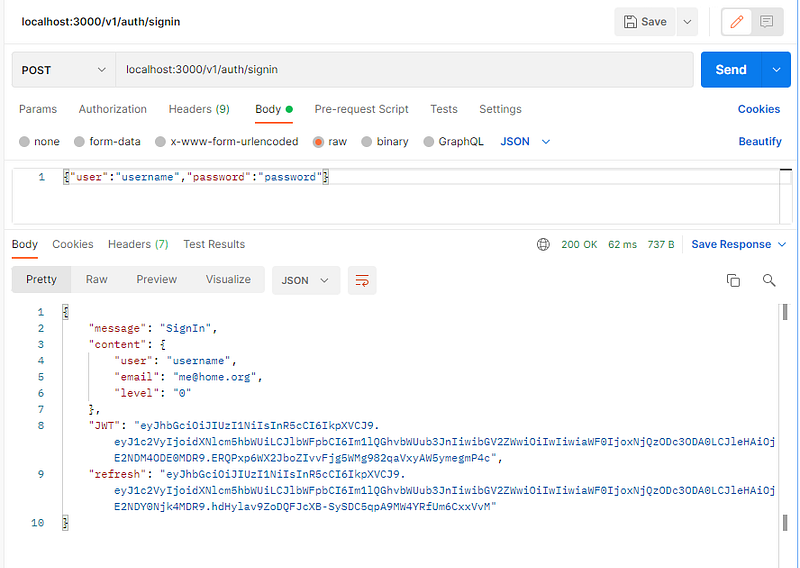
It login the user, need the username and password passed as a JSON object {“user":”username", “password": “password"}, it returns a JSON object with users information a JWT, and a Refresh Token.
GET /v1/books/ Return the list of books as a JSON object, it requires a valid JWT that is passed in the header with this format Authorization: Bearer eyJhbGciOiJIUzI1NiIsInR5cCI6IkpXVCJ9.eyJ1c2VyIjoidXNlcm5hbWUiLCJlbWFpbCI6Im1lQGhvbWUub3JnIiwibGV2ZWwiOiIwIiwiaWF0IjoxNjQzODc2MjY3LCJleHAiOjE2NDM4Nzk4Njd9.oprmV-xt3YaivhXcevkw3mriAokBhUCDEI0bnpKZT3I
GET /v1/books/get/$ID Return the book with id $ID, this one is publicly accessible (we kept this public so we can test logged in and anonymous access)
POST /v1/auth/refresh
Generate and return a new JWT, the Refresh Token should be passed as refreshToken parameter.
Coding the Routes
Once we identify the endpoints we need, we route them using Express Router, to keep things tidy we organize Routes in external files:
Create a routes folder and add book.js file (it will handle routes and endpoint related to books) and auth.js file (it will handle the login and all the user-related operations).
Add these routes to the server (in server.js file):
If everything is correct, the server should refresh and you can now access both books endpoint without authorization.
Before protecting the book's routes we need a way to authenticate the user; edit the auth.js route file as follow:
And add the routes to the server:
As you can see in auth.js the /signin request has a middleware function userLogin, a middleware function is executed before getting back the main router function. We placed the userLogin function in a file auth.js inside a middleware folder to keep things organized, since we will add more middleware functions as we go on. The userLogin function will authenticate the user, will generate the tokens and if everything is ok will go to the next middleware function (in our case will get back to the main function since we only have one middleware.
Let’s code userLogin.
The login process is straightforward (and probably need a bit more enforcing before going live), it basically checks if the passed user req.body.user exits and if the provided password req.body.password is valid for the user.
If everything goes right it generates the two tokens (storing in the user, email, and user-level with 1hour and 30days expiration), it also saves the token in refreshList an object that will be used later for token refreshing, keep in mind that refreshList is volatile, if you restart or refresh the server, it will be reset, in a production environment, you may want to keep this list somewhere more stable. A the end everything is sent back to the main function using next().
At this point you should be able to POST to signin endpoint, providing username and password, and get back a JWT that we will use in the next step to authorize the user:
For user authorization, we will use another middleware verifyToken that will be added to the books endpoint:
The verifyToken code will be in our auth.js middleware file
The verifyToken middleware expect an authorization header, if it is present and verified (with jwt.verify(token, process.env.SECRET_TOKEN) we can go back to the main function (and display the books), otherwise, error messages are generated and displayed:
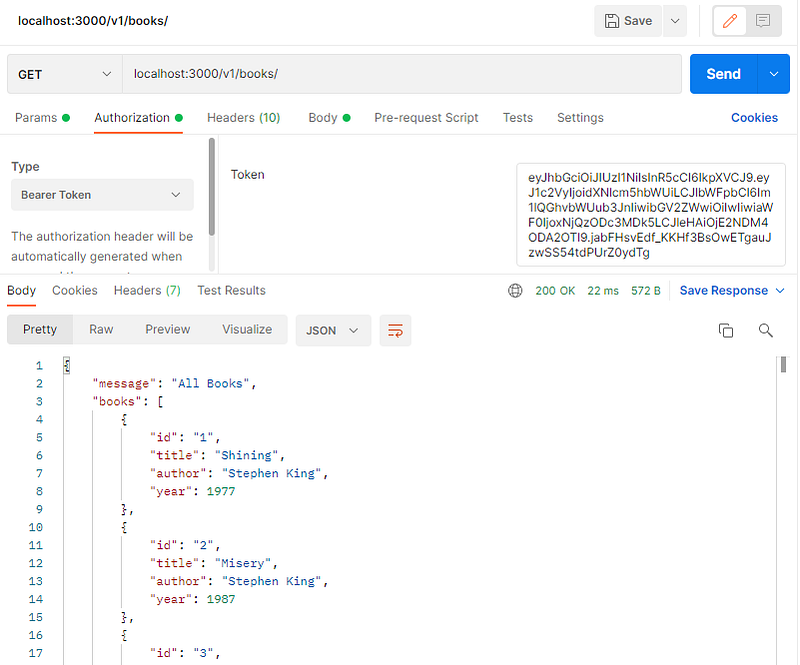
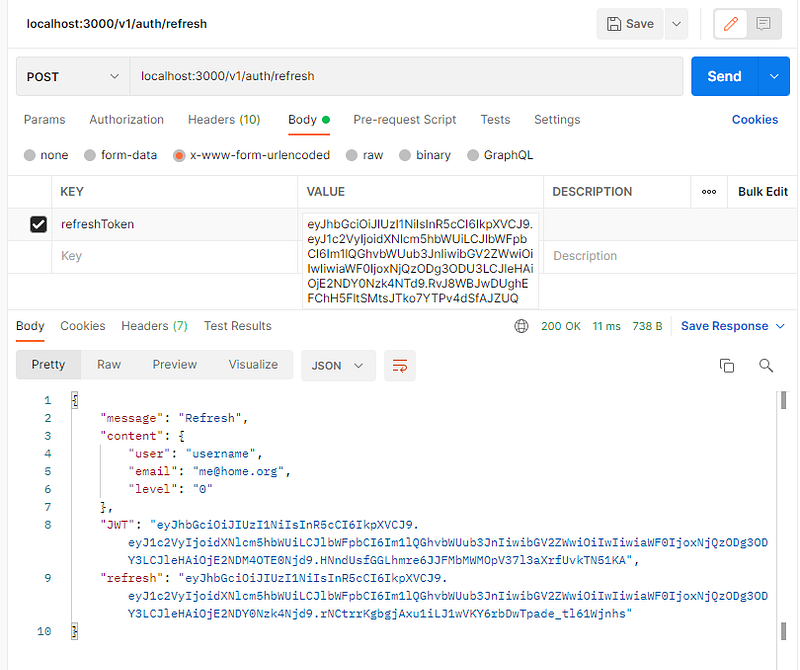
The last part is the token refresh procedure, let’s add a refresh endpoint with a tokenRefresh middleware:
And add tokenRefresh function to auth.js middleware file:
The tokenRefresh simply verify that token passed as POST parameter is in the refreshList, and it is valid, in case it is verified it generates a new JWT, Refresh Token, and send them back to the user (it also stores this new one in the refreshList):
Next Steps
Client perspective
As we said before, we just focused on the server part, this is the main scope of an API, it should be abstract, it’s not a website. The way the client requests the data (programming languages, libraries, and so on) is client developer choice, we provide a list of endpoints, what our endpoints are expecting, what our endpoints return to the client. All handling of the data, refresh delays, and so on are the client strategy.
What’s next
This is just a basic example of a workflow of a protected API. From here it can only be improved, try to source data from a local database or a remote service, improve login security storing user data on another server, check and validate the data the user send before all, add more endpoint, return data in GraphQL format, build a client for your API, limit access to a maximum number of calls per hour, use levels to limit access… extensions and improvement are endless!
Thank you for reading.
More content at plainenglish.io. Sign up for our free weekly newsletter. Get exclusive access to writing opportunities and advice in our community Discord.


