
Exposing Snowflake Data as a REST API: A Step-by-Step Guide
Why we need to expose the data as REST endpoint in first place?

Snowflake offers a RESTful SQL API that allows you to access and update data in a Snowflake database using standard SQL. This powerful tool can be used to build custom applications and integrations, and to automate tasks such as provisioning access, creating roles, and tables.
The Benefits of using SQL API
- Language Agnostic: The Snowflake SQL API is a RESTful API, which means that it can be used with any programming language or tool that supports RESTful APIs. This gives you a lot of flexibility in how you can use the API.
- Powerful: It allows you to access and update the data sitting in data warehouse using SQL.
- Security: All communication between the API and Snowflake is encrypted, and you can authenticate with any of the authentication method such as OAuth, Key-pair authentication.
Let us setup the environment first, before we see what we can do with the API. We are going to use RBAC (Role-Based Access Control) i.e. create the role , assign the required permission or privileges to that role, finally assign that role to the human user or service account or the group.
- Let’s first create the role
CREATE ROLE api_role COMMENT = 'role for API demo';2. Let’s grant the required privileges to the role, but we don’t have virtual warehouse yet for the compute and data required for exposing it in API.
so, let us create virtual warehouse first.
use role ACCOUNTADMIN;

CREATE OR REPLACE WAREHOUSE api_wh WITH WAREHOUSE_SIZE='XSMALL';
3. Get the data from Snowflake Market place.
Basically, It is a pointer to the data shared by the data provider not the actual copy of the data i.e. no physical copy of the data.
- Go to market place tab in Snow UI

2. Search for “Google Keywords search dataset — discover all searches on Google”

3. Provide the database name if you need to rename the database and click done to make the data available in your account.

4. Provide privileges to “api_role” so that it can use virtual warehouse for executing queries.
use role ACCOUNTADMIN;

GRANT USAGE ON WAREHOUSE api_wh TO ROLE api_role;
5. Provide data access to “api_role” .
GRANT IMPORTED PRIVILEGES ON DATABASE GOOGLE_KEYWORDS_SEARCH_DATASET TO api_role;6. Now, we have assigned necessary privileges to role and it is time for assigning this role to the user. But, we don’t have one yet , let us create user now.
CREATE USER api_user
PASSWORD = 'api_password'
DEFAULT_ROLE = api_role
MUST_CHANGE_PASSWORD = false;

/** DEFAULT_ROLE : It means whenever this user logs in,
this is the default role
assigned to this user. */

/** MUST_CHANGE_PASSWORD : when it is set to True user
has to change the password
when logs in for the first time. */
--
7. Let us login with “api_user” and see whether we were able to execute the queries in VWH and fetch the data from Google’s dataset that we brought to our account.


Congratulations! We are all set with Environment and data.
Now, let us explore how we can access this data using the user “api_user” and Snowflake REST API.
What you can do with snowflake REST API?
- SUBMIT: You can submit the SQL statements for execution.
- RETRIVE: You can check the status of SQL statements that have been submitted earlir and can retrieve result set of the SQL statement.
- CANCEL: Just in case if you want to cancel the SQL statement you can do.
It may sound super-simple but it is really powerful.
What you need to work with snowflake REST API?
To work with Snowflake SQL API, you need the “baseURL” of the API and the “token” for authenticating using OAUTH (Open Authentication).
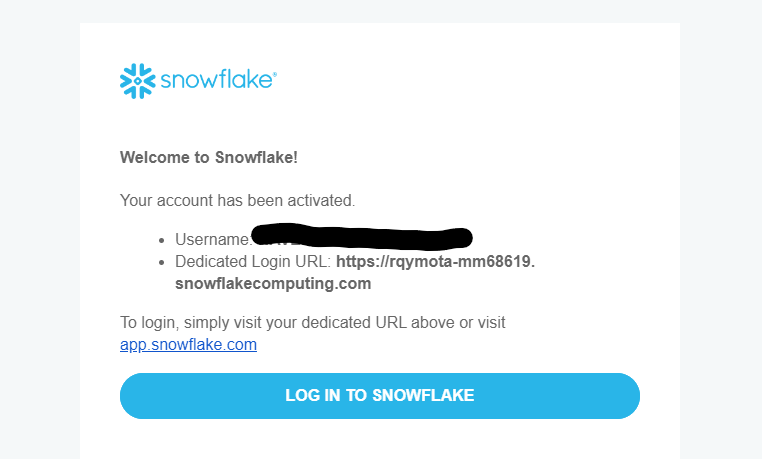
The baseURL: when you have created your account in snowflake, you would have got an email from snowflake with login credential and the link to login i.e. similar to the one below. Get the link from that email, that is your baseURL.
Access Token or Bearer token:
We are planning to access the REST API with the demo user that we created “api_user” hence we need to let the snowflake know that it should allow any one proved their identity to perform any operations based on the role they are assigned with.
What is OAUTH and Access token ?
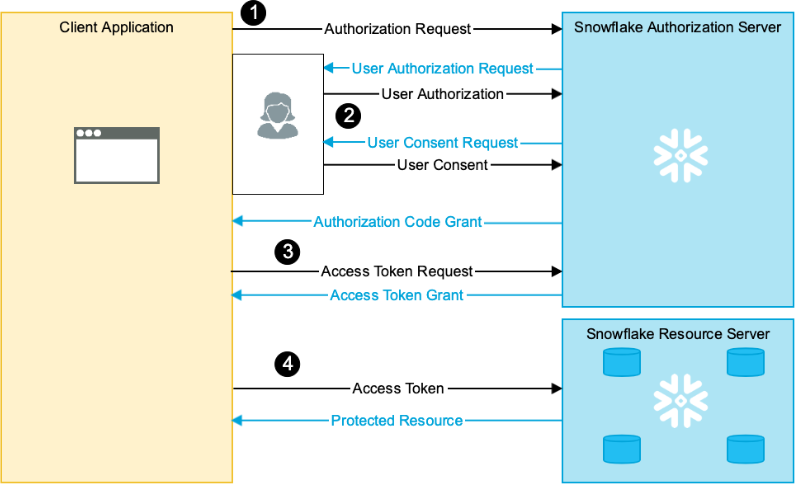
Let’s say you own a luxurious villa with many cosy amenities and services(Data assets stored in Snowflake), and have the key (i.e. user id and password to login to either snowflake UI or snowCLI, Snowpark API etc). Your friend want to stay in the luxurious apartment and access the luxurious services for a while or whenever required. But, you don’t want to give your key as it is personal and valuable(User Id or Password), but you are telling him to get a visitor badge from security (Snowflake Authorization server or any third party authorization server).
Then your friend goes to security and says I’m owners friend, please allow me in. Security calls to you (Security Integration ) and get your consent (you authenticate with your credential). Also, security gathers details like how long I need to allow him stay (duration of the token), what are the services he can enjoy in the villa (restricted by assigned role) from you.
Then security provides the visitor badge to your friend, and he shows the visitor badge (access token) and enjoys the services in the luxurious villa (Snowflake resources server offers access to data assets that are allowed as per role).
If you need to know more about Snowflake OAUTH, feel free to refer the wonderful official documentation here.
Okay enough theory, let us get into it.
- Create Security Integration (i.e. client registration
CREATE SECURITY INTEGRATION MY_CLIENT: This line initiates the creation of a security integration named "MY_CLIENT."
TYPE = OAUTH: Specifies that this security integration is for OAuth-based authentication.
ENABLED = TRUE: Indicates that the security integration is enabled and active.
OAUTH_CLIENT = CUSTOM: Specifies that you are defining a custom OAuth client configuration. In some cases, Snowflake may provide predefined OAuth clients, but in this example, you're creating a custom one.
OAUTH_CLIENT_TYPE = 'CONFIDENTIAL': Specifies that the OAuth client type is "CONFIDENTIAL." Confidential clients are typically used for applications that can securely store their client secrets.
OAUTH_REDIRECT_URI = 'https://localhost.com': Specifies the OAuth redirect URI, which is the URL where users are redirected after they authenticate with the OAuth provider. In this example, it's set to 'https://localhost.com,' but in a real-world scenario, this would be the actual URL of your application.
OAUTH_ISSUE_REFRESH_TOKENS = TRUE: Indicates that the OAuth integration should issue refresh tokens. Refresh tokens are used to obtain new access tokens without requiring the user to log in again.
OAUTH_REFRESH_TOKEN_VALIDITY = 86400: Specifies the validity period of the refresh tokens in seconds. In this case, it's set to 86,400 seconds, which is equivalent to 24 hours. Refresh tokens typically have an expiration to enhance security.
2. Execute the following SQL command to gather client details such as OAUTH_CLIENT_ID, OAUTH_REDIRECT_URI, OAUTH_AUTHORIZATION_ENDPOINT, OAUTH_TOKEN_ENDPOINT
2. Execute the following Sto gather client details such as OAUTH_CLIENT_ID, OAUTH_REDIRECT_URI, OAUTH_AUTHORIZATION_ENDPOINT, OAUTH_TOKEN_ENDPOINT
OAUTH_CLIENT_ID: Rrs+/v3gJIywtcnwlDtc8Pmmg1k=
OAUTH_REDIRECT_URI: https://localhost.com
OAUTH_AUTHORIZATION_ENDPOINT: https://ne42805.ap-southeast-2.snowflakecomputing.com/oauth/authorize
OAUTH_TOKEN_ENDPOINT: https://ne42805.ap-southeast-2.snowflakecomputing.com/oauth/token-request
3. Get the client secret
Note it provides two client secret (you can take any one out of two).
select SYSTEM$SHOW_OAUTH_CLIENT_SECRETS( 'MY_CLIENT' );
{
"OAUTH_CLIENT_SECRET_2":"ahv71YCwXVSeFrDs/HzBdezetuvbYfvObsMztx6TXoM=",
"OAUTH_CLIENT_SECRET":"NhQY0DH0titlKTDvC2BWNfqa4Y7qz6T/GHvF2zI8HsA=",
"OAUTH_CLIENT_ID":"Rrs+/v3gJIywtcnwlDtc8Pmmg1k="
}
4. Now call the authorization server endpoint (security ) and get the authorization code.
Use the details collected in step 2 and 3, and encode the value of both OAUTH_CLIENT_ID & OAUTH_REDIRECT_URI.
<OAUTH_AUTHORIZATION_ENDPOINT>?response_type=code&client_id=<encoded value of OAUTH_CLIENT_ID>&redirect_uri=<encoded value of OAUTH_REDIRECT_URI>What is URL Encoding?
Web browsers and Web servers will misinterpret the information when there is a special character( e.g. “/”), reserved character and non-ASCII in the URL or URI.
URL encoding replaces these special or reserved characters with a “%” symbol followed by two hexadecimal digits that represent the character’s ASCII code. For example:
- A space (“ “) is replaced with “%20”.
- A forward slash (“/”) is replaced with “%2F”.
- An exclamation mark (“!”) is replaced with “%21”.
- The percent symbol itself is represented as “%25”.
Let us use https://www.urlencoder.io/ for encoding.

After Encoding and replacing the endpoint, the authorization request looks like this.
https://ne42805.ap-southeast-2.snowflakecomputing.com/oauth/authorize?response_type=code&client_id=Rrs%2B%2Fv3gJIywtcnwlDtc8Pmmg1k%3D&redirect_uri=https%3A%2F%2Flocalhost.comUser Authorization request from Authorization server and user provides credential to the server.

User consent request from Authorization server and User provides consent to the server .

Authorization code from Authorization server

Authorization code : 931E094CA0FEA56E6DF45A446F1AF5F1B894AA78
By the way, you can get the authorization code from Server through cURL which is not covered in this blog post.
5. Now, use authorization code to get access token.
curl -X POST -H "Content-Type: application/x-www-form-urlencoded;charset=UTF-8" \
--user "<OAUTH_CLIENT_ID not encoded>:<OAUTH_CLIENT_SECRET>" \
--data-urlencode "grant_type=authorization_code" \
--data-urlencode "code=<Auth Code Grant from Step3>" \
--data-urlencode "redirect_uri=<OAUTH_REDIRECT_URI not encoded>" \
<OAUTH_TOKEN_ENDPOINT>
curl -X POST -H "Content-Type: application/x-www-form-urlencoded;charset=UTF-8" \
--user "Rrs+/v3gJIywtcnwlDtc8Pmmg1k=:ahv71YCwXVSeFrDs/HzBdezetuvbYfvObsMztx6TXoM=" \
--data-urlencode "grant_type=authorization_code" \
--data-urlencode "code=931E094CA0FEA56E6DF45A446F1AF5F1B894AA78" \
--data-urlencode "redirect_uri=https://localhost.com" \
https://ne42805.ap-southeast-2.snowflakecomputing.com/oauth/token-requestRun the above command in Git bash and get the access token and refresh token . Usually, access token short-lived for only 10 minutes and once the token expired you can get a new access token by calling authorization server with refresh token.

Response:
{
  "access_token" : "ver:1-hint:6196957193-ETMsDgAAAYqiXyOpABRBRVMvQ0JDL1BLQ1M1UGFkZGluZwEAABAAECOOYPj2EiXBDG0m4IaCVHgAAABQvqmVZWt/Y4x7yVdIh+c48c16Tx5JzF7+mAmWKc23Gs2kNQObixbt7ufDV5ZQMhz5BRgUdUtaj5ofxoPd9XzXLnQfQK75vwQXe8kvEGFWfdMAFO4F2XdfLsHuKv0AECx4msfvjnaw",
  "refresh_token" : "ver:2-hint:6196961285-did:1010-ETMsDgAAAYqiXyOjABRBRVMvQ0JDL1BLQ1M1UGFkZGluZwEAABAAEFieBU1ZiF6FfqiEH98xmYcAAADwi/NQF2LsIwYmQuWsZg2LoCz21nmFFvUPPpz+1H6bE5vkRixVapmcxzdPVHC5BGkUtVHSSmjtMvVGMw9aG2JSt0li+07L8ADdh+kxxHGgUJVCuEVeNEe2UMCkmpI5NMR/Vo527OrmQGuAhEBd0pzbVel4yN2K7yZLtC+WqNMYdMZ9nQJawgt2WVf6+ilylrP2iQ1l8n4Lv5+G5127cO2+3f7vFdQ78BfMR5DBBuH3Nh3g2Wev5YbkLlvRMHcR8OjYHPd+WSdU9v9ajDZXASllyv3v9Pk2MgPP/zfa2tPo59KwHwuZCWmFz6i3hXsOW6VhABR7Zi2Oh6p9T0NWyBpnDnjQHK72Cg==",
  "token_type" : "Bearer",
  "username" : "API_USER",
  "scope" : "refresh_token session:role:API_ROLE",
  "refresh_token_expires_in" : 86399,
  "expires_in" : 600,
  "idpInitiated" : false
}
Submitting a Request to Execute SQL Statements
POST {{baseUrl}}/api/v2/statements?requestId={{uuid}}&async=true&nullable=falseQuery Parameters
requestId : (Optional) Unique Id of the API request. It is optional parameter as snowflake can create one if you don’t supply one.
UUID used for request ID.
why it needs to be unique?
This can be useful for a number of reasons, including:
- Debugging: If a request fails, the unique request ID can be used to track down the source of the failure.
- Idempotency: The unique request ID can be used to ensure that a request is only executed once, even if it is submitted multiple times.
- Auditing: The unique request ID can be used to track who submitted a request and when it was submitted.
How can you generate one if you are on windows? you can use “uuidgen” in case of Linux like environment.

async:(boolean) :
If it is set to True, It means that the SQL statement can be submitted to the Snowflake SQL API and the API will return immediately with statementHandle, without waiting for the statement to finish executing. The user can then check the status of the statement at a later time using the statementHandle.
Asynchronous execution of SQL statements can be useful for a number of reasons, including:
- Performance: Asynchronous execution of SQL statements can improve the performance of applications that need to submit a large number of SQL statements. This is because the application does not have to wait for each statement to finish executing before submitting the next statement.
- Scalability: Asynchronous execution of SQL statements can help to scale applications that need to submit a large number of SQL statements concurrently. This is because the application does not have to block while waiting for each statement to finish executing.
- User experience: Asynchronous execution of SQL statements can improve the user experience of applications that need to submit a large number of SQL statements. This is because the user does not have to wait for each statement to finish executing before they can interact with the application.
- If it is set to false, if the execution of a SQL statement completed within 45 seconds, then the results returned to the client application, otherwise statementHandle returned.
nullable :Set to false to return a SQL NULL value as the string "null", rather than as the value null.
curl -i -X POST \
  -H "Content-Type: application/json" \
  -H "Accept: application/json" \
  -H "Authorization: Bearer ver:1-hint:6196957193-ETMsDgAAAYqiXyOpABRBRVMvQ0JDL1BLQ1M1UGFkZGluZwEAABAAECOOYPj2EiXBDG0m4IaCVHgAAABQvqmVZWt/Y4x7yVdIh+c48c16Tx5JzF7+mAmWKc23Gs2kNQObixbt7ufDV5ZQMhz5BRgUdUtaj5ofxoPd9XzXLnQfQK75vwQXe8kvEGFWfdMAFO4F2XdfLsHuKv0AECx4msfvjnaw" \
  -H "User-Agent: myApplicationName/1.0" \
  -H "X-Snowflake-Authorization-Token-Type: OAUTH" \
  -H "Snowflake-Account: NE42805" \
  -d "@request-body.json" \
"https://ne42805.ap-southeast-2.snowflakecomputing.com/api/statements"- Authorization: Bearer
: supply the token that you have obtained in above steps. - X-Snowflake-Authorization-Token-Type: OAUTH : Make sure to select the authentication type as OAUTH.
- Snowflake-Account : Please note that this account you need to get it from authentication endpoint “https://ne42805.ap-southeast-2.snowflakecomputing.com” not the one you login to snowflake. In my case, the account is “ne42805” and it is case sensitive. not the one appears in baseURL. Otherwise, you’ll encounter 401 unauthorized error.
request-body.json
{
    "statement": "select * from GOOGLE_KEYWORDS_SEARCH_DATASET.datafeeds.google_keywords limit 2",
    "timeout": "1000",
    "database": "GOOGLE_KEYWORDS_SEARCH_DATASET",
    "schema": "DATAFEEDS",
    "warehouse": "API_WH",
    "role": "API_ROLE",
    "bindings": {},
    "parameters": {}
}
Now, I have submitted the request but my token is expired as I have created this access token before 2 hours, and as I mentioned earlier access token is short-lived and it is valid for only 600 seconds. No worries, let us create new access token using refresh token. Please note that refresh token is valid between 0 to 90 days based on how you created in security integration.
We actually provided “OAUTH_REFRESH_TOKEN_VALIDITY = 86400” i.e. 24 hours / 1 day. so, we can use the refresh token.
{
  "code" : "390318",
  "message" : "OAuth access token expired. ...x4msfvjnaw"
}
creating the new access token with refresh token
curl -X POST -H "Content-Type: application/x-www-form-urlencoded;charset=UTF-8" \
    --user "Rrs+/v3gJIywtcnwlDtc8Pmmg1k=:ahv71YCwXVSeFrDs/HzBdezetuvbYfvObsMztx6TXoM=" \
    --data-urlencode "grant_type=refresh_token" \
    --data-urlencode "refresh_token=ver:2-hint:6196961285-did:1010-ETMsDgAAAYqiXyOjABRBRVMvQ0JDL1BLQ1M1UGFkZGluZwEAABAAEFieBU1ZiF6FfqiEH98xmYcAAADwi/NQF2LsIwYmQuWsZg2LoCz21nmFFvUPPpz+1H6bE5vkRixVapmcxzdPVHC5BGkUtVHSSmjtMvVGMw9aG2JSt0li+07L8ADdh+kxxHGgUJVCuEVeNEe2UMCkmpI5NMR/Vo527OrmQGuAhEBd0pzbVel4yN2K7yZLtC+WqNMYdMZ9nQJawgt2WVf6+ilylrP2iQ1l8n4Lv5+G5127cO2+3f7vFdQ78BfMR5DBBuH3Nh3g2Wev5YbkLlvRMHcR8OjYHPd+WSdU9v9ajDZXASllyv3v9Pk2MgPP/zfa2tPo59KwHwuZCWmFz6i3hXsOW6VhABR7Zi2Oh6p9T0NWyBpnDnjQHK72Cg==" \
    --data-urlencode "redirect_uri=https://localhost.com" \
    https://ne42805.ap-southeast-2.snowflakecomputing.com/oauth/token-request
After executing, it responded with new access token

{
  "access_token" : "ver:1-hint:6196957193-ETMsDgAAAYqizNHwABRBRVMvQ0JDL1BLQ1M1UGFkZGluZwEAABAAEMJdjVFqNkzB1hFKAOopXLIAAABQS9qIBpPLhgs7YInv16fLDGTx65EUvHIfNoljrse6PWiFEUf58sxrczQVu7bFr9He0QblpqsnH0s+g96lTKaCyYgf6mbhwGFHbiXA7kQosvsAFP7smqTBwf+84oGTgnMJcJzN9+PT",
  "token_type" : "Bearer",
  "idpInitiated" : false,
  "expires_in" : 600
}
Now, let us modify the submit request
curl -i -X POST \
  -H "Content-Type: application/json" \
  -H "Accept: application/json" \
  -H "Authorization: Bearer ver:1-hint:6196957193-ETMsDgAAAYqizNHwABRBRVMvQ0JDL1BLQ1M1UGFkZGluZwEAABAAEMJdjVFqNkzB1hFKAOopXLIAAABQS9qIBpPLhgs7YInv16fLDGTx65EUvHIfNoljrse6PWiFEUf58sxrczQVu7bFr9He0QblpqsnH0s+g96lTKaCyYgf6mbhwGFHbiXA7kQosvsAFP7smqTBwf+84oGTgnMJcJzN9+PT" \
  -H "User-Agent: myApplicationName/1.0" \
  -H "X-Snowflake-Authorization-Token-Type: OAUTH" \
  -H "Snowflake-Account: NE42805" \
  -d "@request-body.json" \
  "https://ne42805.ap-southeast-2.snowflakecomputing.com/api/v2/statements"
And, It was Successful and response below
{
  "resultSetMetaData" : {
    "numRows" : 2,
    "format" : "jsonv2",
    "partitionInfo" : [ {
      "rowCount" : 2,
      "uncompressedSize" : 335
    } ],
    "rowType" : [ {
      "name" : "COUNTRY",
      "database" : "GOOGLE_KEYWORDS_SEARCH_DATASET",
      "schema" : "DATAFEEDS",
      "table" : "GOOGLE_KEYWORDS",
      "nullable" : true,
      "scale" : 0,
      "collation" : null,
      "precision" : 38,
      "byteLength" : null,
      "type" : "fixed",
      "length" : null
    }, {
      "name" : "KEYWORD",
      "database" : "GOOGLE_KEYWORDS_SEARCH_DATASET",
      "schema" : "DATAFEEDS",
      "table" : "GOOGLE_KEYWORDS",
      "nullable" : true,
      "scale" : null,
      "collation" : null,
      "precision" : null,
      "byteLength" : 16777216,
      "type" : "text",
      "length" : 16777216
    }, {
      "name" : "SITE",
      "database" : "GOOGLE_KEYWORDS_SEARCH_DATASET",
      "schema" : "DATAFEEDS",
      "table" : "GOOGLE_KEYWORDS",
      "nullable" : true,
      "scale" : null,
      "collation" : null,
      "precision" : null,
      "byteLength" : 16777216,
      "type" : "text",
      "length" : 16777216
    }, {
      "name" : "YEAR",
      "database" : "GOOGLE_KEYWORDS_SEARCH_DATASET",
      "schema" : "DATAFEEDS",
      "table" : "GOOGLE_KEYWORDS",
      "nullable" : true,
      "scale" : null,
      "collation" : null,
      "precision" : null,
      "byteLength" : 16777216,
      "type" : "text",
      "length" : 16777216
    }, {
      "name" : "MONTH",
      "database" : "GOOGLE_KEYWORDS_SEARCH_DATASET",
      "schema" : "DATAFEEDS",
      "table" : "GOOGLE_KEYWORDS",
      "nullable" : true,
      "scale" : null,
      "collation" : null,
      "precision" : null,
      "byteLength" : 16777216,
      "type" : "text",
      "length" : 16777216
    }, {
      "name" : "DAY",
      "database" : "GOOGLE_KEYWORDS_SEARCH_DATASET",
      "schema" : "DATAFEEDS",
      "table" : "GOOGLE_KEYWORDS",
      "nullable" : true,
      "scale" : null,
      "collation" : null,
      "precision" : null,
      "byteLength" : 16777216,
      "type" : "text",
      "length" : 16777216
    }, {
      "name" : "PLATFORM",
      "database" : "GOOGLE_KEYWORDS_SEARCH_DATASET",
      "schema" : "DATAFEEDS",
      "table" : "GOOGLE_KEYWORDS",
      "nullable" : true,
      "scale" : null,
      "collation" : null,
      "precision" : null,
      "byteLength" : 16777216,
      "type" : "text",
      "length" : 16777216
    }, {
      "name" : "REFERRAL_TYPE",
      "database" : "GOOGLE_KEYWORDS_SEARCH_DATASET",
      "schema" : "DATAFEEDS",
      "table" : "GOOGLE_KEYWORDS",
      "nullable" : true,
      "scale" : null,
      "collation" : null,
      "precision" : null,
      "byteLength" : 16777216,
      "type" : "text",
      "length" : 16777216
    }, {
      "name" : "CLEAN_LANDINGPAGE",
      "database" : "GOOGLE_KEYWORDS_SEARCH_DATASET",
      "schema" : "DATAFEEDS",
      "table" : "GOOGLE_KEYWORDS",
      "nullable" : true,
      "scale" : null,
      "collation" : null,
      "precision" : null,
      "byteLength" : 16777216,
      "type" : "text",
      "length" : 16777216
    }, {
      "name" : "CALIBRATED_USERS",
      "database" : "GOOGLE_KEYWORDS_SEARCH_DATASET",
      "schema" : "DATAFEEDS",
      "table" : "GOOGLE_KEYWORDS",
      "nullable" : true,
      "scale" : null,
      "collation" : null,
      "precision" : null,
      "byteLength" : null,
      "type" : "real",
100  5829  100  5544  100   285   8596    441 --:--:-- --:--:-- --:--:--  9065ength" : null
    }, {
      "name" : "CALIBRATED_CLICKS",
      "database" : "GOOGLE_KEYWORDS_SEARCH_DATASET",
      "schema" : "DATAFEEDS",
      "table" : "GOOGLE_KEYWORDS",
      "nullable" : true,
      "scale" : null,
      "collation" : null,
      "precision" : null,
      "byteLength" : null,
      "type" : "real",
      "length" : null
    }, {
      "name" : "IS_BRANDED_KEYWORD",
      "database" : "GOOGLE_KEYWORDS_SEARCH_DATASET",
      "schema" : "DATAFEEDS",
      "table" : "GOOGLE_KEYWORDS",
      "nullable" : true,
      "scale" : 0,
      "collation" : null,
      "precision" : 38,
      "byteLength" : null,
      "type" : "fixed",
      "length" : null
    }, {
      "name" : "IS_QUESTION",
      "database" : "GOOGLE_KEYWORDS_SEARCH_DATASET",
      "schema" : "DATAFEEDS",
      "table" : "GOOGLE_KEYWORDS",
      "nullable" : true,
      "scale" : null,
      "collation" : null,
      "precision" : null,
      "byteLength" : 16777216,
      "type" : "text",
      "length" : 16777216
    }, {
      "name" : "DATE",
      "database" : "GOOGLE_KEYWORDS_SEARCH_DATASET",
      "schema" : "DATAFEEDS",
      "table" : "GOOGLE_KEYWORDS",
      "nullable" : true,
      "scale" : null,
      "collation" : null,
      "precision" : null,
      "byteLength" : 16777216,
      "type" : "text",
      "length" : 16777216
    } ]
  },
  "data" : [ ["124","kortright centre for conservation","google.com","22","06","17","desktop","ORGANIC","google.com/search","1.2439877090247264","1.2439877090247264","0","0","22-06-17"],
["124","kyle katarn","google.com","22","06","17","desktop","ORGANIC","google.com/search","1.2439877090247264","1.2439877090247264","0","0","22-06-17"] ],
  "code" : "090001",
  "statementStatusUrl" : "/api/v2/statements/01af0c3a-3201-b38e-0000-0001715ed12d?requestId=be056013-1922-4919-bfb0-509c3cc2a0a7",
  "requestId" : "be056013-1922-4919-bfb0-509c3cc2a0a7",
  "sqlState" : "00000",
  "statementHandle" : "01af0c3a-3201-b38e-0000-0001715ed12d",
  "message" : "Statement executed successfully.",
  "createdOn" : 1694948815462
}
Note that, though we haven’t provided requestId (UUID), It created one for us. And, we haven’t passed async either it is set to false as that was the default value.
And, you can see the retrieved data in data section of the response.
Now, let us change the request to execute in a asynchronous mode and modify the SQL query to return 1M+ rows.
curl -i -X POST \
  -H "Content-Type: application/json" \
  -H "Accept: application/json" \
  -H "Authorization: Bearer ver:1-hint:6196957193-ETMsDgAAAYqi2d4tABRBRVMvQ0JDL1BLQ1M1UGFkZGluZwEAABAAEE/8dfuVtpR+ZWpzgvsjd2MAAABQ5pQqPNPnDpc+vtTLb+Re4Xjs9JTxiDtHw8gInVlh2OqsO+tHU09IqxaRJDzO52JdRf70WjlUtibvsYbKkKNeZIy0Mq/6ba7yD5+9xhxb2pYAFP0yvURrOCIVzPGtapCj4EOxPSjC" \
  -H "User-Agent: myApplicationName/1.0" \
  -H "X-Snowflake-Authorization-Token-Type: OAUTH" \
  -H "Snowflake-Account: NE42805" \
  -d "@request-body.json" \
  "https://ne42805.ap-southeast-2.snowflakecomputing.com/api/v2/statements?async=true"
the response for asynchronous submission, until the query execution completed, It will return the code “333334”. If the query completed, execution it returns the result set.
{
  "code" : "333334",
  "message" : "Asynchronous execution in progress. Use provided query id to perform query monitoring and management.",
  "statementHandle" : "01af0c47-3201-b38e-0000-0001715ed135",
  "statementStatusUrl" : "/api/v2/statements/01af0c43-3201-b38e-0000-0001715ed131"
}
Let us use the statementHandle returned to check the status of the query
GET /api/v2/statements/{statementHandle}"statementHandle" : "01af0c47-3201-b38e-0000-0001715ed135"curl -i -X GET \
-H "Content-Type: application/json" \
-H "Accept: application/json" \
-H "Authorization: Bearer ver:1-hint:6196957193-ETMsDgAAAYqi2d4tABRBRVMvQ0JDL1BLQ1M1UGFkZGluZwEAABAAEE/8dfuVtpR+ZWpzgvsjd2MAAABQ5pQqPNPnDpc+vtTLb+Re4Xjs9JTxiDtHw8gInVlh2OqsO+tHU09IqxaRJDzO52JdRf70WjlUtibvsYbKkKNeZIy0Mq/6ba7yD5+9xhxb2pYAFP0yvURrOCIVzPGtapCj4EOxPSjC" \
-H "User-Agent: myApplicationName/1.0" \
-H "X-Snowflake-Authorization-Token-Type: OAUTH" \
-H "Snowflake-Account: NE42805" \
"https://ne42805.ap-southeast-2.snowflakecomputing.com/api/v2/statements/01af0c47-3201-b38e-0000-0001715ed135"It returned huge result set, copying here only last portion of the response.
["840","mr mean","google.com","22","06","21","desktop","ORGANIC","google.com/search","1.3366380508071816","1.3366380508071816","0","0","22-06-21"],
["840","my location","google.com","22","06","21","desktop","ORGANIC","google.com/search","1.3366380508071816","2.6732761016143631","0","0","22-06-21"],
["840","mydayis","google.com","22","06","21","desktop","ORGANIC","google.com/search","1.3366380508071816","1.3366380508071816","0","0","22-06-21"],
["840","myles erlick","google.com","22","06","21","desktop","ORGANIC","google.com/search","1.3366380508071816","2.6732761016143631","0","0","22-06-21"],
["840","mystery flesh pit national park","google.com","22","06","21","desktop","ORGANIC","google.com/search","1.3366380508071816","8.0198283048430898","0","0","22-06-21"],
["840","nami's","google.com","22","06","21","desktop","ORGANIC","google.com/search","1.3366380508071816","1.3366380508071816","0","0","22-06-21"],
["840","nancy pelosi age","google.com","22","06","21","desktop","ORGANIC","google.com/search","1.3366380508071816","1.3366380508071816","0","0","22-06-21"],
["840","nanuqsaurus","google.com","22","06","21","desktop","ORGANIC","google.com/search","1.3366380508071816","1.3366380508071816","0","0","22-06-21"],
["840","nasdaq composite vs nasdaq 100","google.com","22","06","21","desktop","ORGANIC","google.com/search","1.3366380508071816","1.3366380508071816","0","0","22-06-21"],
["840","nashville speedway","google.com","22","06","21","desktop","ORGANIC","google.com/search","1.3366380508071816","1.3366380508071816","0","0","22-06-21"],
["840","nashville superspeedway","google.com","22","06","21","desktop","ORGANIC","google.com/search","1.3366380508071816","2.6732761016143631","0","0","22-06-21"] ],
  "code" : "090001",
  "statementStatusUrl" : "/api/v2/statements/01af0c4f-3201-b0c2-0000-0001715ee05d?requestId=acd5a26d-2cc0-4288-9ac9-846bd1b08913",
  "requestId" : "acd5a26d-2cc0-4288-9ac9-846bd1b08913",
  "sqlState" : "00000",
  "statementHandle" : "01af0c47-3201-b38e-0000-0001715ed135",
  "message" : "Statement executed successfully.",
  "createdOn" : 1694950078118
}
We can able to cancel the query submitted if the SQL statement execution is not completed
POST /api/v2/statements/{statementHandle}/cancelsample cURL to cancel the submitted query
curl -i -X POST \
  -H "Content-Type: application/json" \
  -H "Accept: application/json" \
  -H "Authorization: Bearer ver:1-hint:6196957193-ETMsDgAAAYqi5IT9ABRBRVMvQ0JDL1BLQ1M1UGFkZGluZwEAABAAEJWnzw4pSrQ/7YxW7ZF4DDMAAABQLaKPefHGB0oFPkq8e6PuEDNmq3qe37p2xj+hDLl//R3hbZH/mntXYanaNcP3vhXlyDABtRWR9KlN5UngPUGsZPWjLr3GJuR/W4PIuKEg3/gAFKl0L274QRgdsMI4qCnYzLtnW3td" \
  -H "User-Agent: myApplicationName/1.0" \
  -H "X-Snowflake-Authorization-Token-Type: OAUTH" \
  -H "Snowflake-Account: NE42805" \
  "https://ne42805.ap-southeast-2.snowflakecomputing.com/api/v2/statements/01af0c53-3201-b0c2-0000-0001715ee061/cancel"
if the query already completed, you will get the response like
{
    "code": "000709",
    "message": "Statement 01af0c5d-3201-b0c2-0000-0001715ee065 not found",
    "sqlState": "02000",
    "statementHandle": "01af0c5d-3201-b0c2-0000-0001715ee065"
}
if it is running, It would cancel and return
HTTP/1.1 200 OK
Date: Tue, 04 May 2021 22:52:15 GMT
Content-Type: application/json
Content-Length: 230
{
  "code" : "000604",
  "sqlState" : "57014",
  "message" : "SQL execution canceled",
  "statementHandle" : "01af0c5d-3201-b0c2-0000-0001715ee065",
  "statementStatusUrl" : "/api/v2/statements/01af0c5d-3201-b0c2-0000-0001715ee065"
}
Summary
Congratulations! You’ve made it though it is very long blog post.
As you now have learned how to use Snowflake SQL API and how to authenticate the client with open authentication, try to experiment with different SQL commands like creating table, dropping table, etc then only you’ll get good understanding of using these APIs in your custom applications.
As like other blogs that I’ve written in Medium, literally I’ve spent my whole Sunday on this blog post and made it available to you.
All I need you to do is if you like this blog post, support me by clapping the post and follow me on Medium and LinkedIn for more articles.
Nevertheless, feel free to give your feedback so that I can improve my writing or correct mistakes!
Happy Learning !!!!!!!!!!

And, support by buying me a coffee if you really like my work :).


