avatarTeri Radichel

Free AI web copilot to create summaries, insights and extended knowledge, download it at here

2256

Abstract

dmedium.com/v2/resize:fit:800/1*VZukJIjWx6lky1Sjl0W5IA.png"><figcaption></figcaption></figure><p id="9f60">Let’s say you wrote your outputs to look like this:</p><div id="efa8"><pre><span class="hljs-attr">Outputs:</span> <span class="hljs-attr">batchjobroleoutput:</span> <span class="hljs-attr">Value:</span> <span class="hljs-type">!Ref</span> <span class="hljs-string">BatchJobRole</span> <span class="hljs-attr">Export:</span> <span class="hljs-attr">Name:</span> <span class="hljs-string">batchjobrole</span> <span class="hljs-attr">batchjobrolearnoutput:</span> <span class="hljs-attr">Value:</span> <span class="hljs-type">!GetAtt</span> <span class="hljs-string">BatchJobRole.Arn</span> <span class="hljs-attr">Export:</span> <span class="hljs-attr">Name:</span> <span class="hljs-string">batchjobrolearn</span></pre></div><p id="b56f">Which every template is run first will succeed and create your outputs. The second will fail.</p><p id="e2e6">In my case I had created a parameter and was correctly using it in the output to create a unique name for each template, and that’s how you can fix this problem. I tried to post the code here but apparently Medium has an issue with my code at the moment so here’s are a couple of screenshots.</p><p id="656d">The parameter gives the role a unique name:</p><figure id="7eb6"><img src="https://cdn-images-1.readmedium.com/v2/resize:fit:800/1*CaW6WEbQ8bC__ST2b84jWw.png"><figcaption></figcaption></figure><p id="fb05">The outputs use that name to create a unique export name:</p><figure id="69df"><img src="https://cdn-images-1.readmedium.com/v2/resize:fit:800/1*mU3bfCGcYwQFcX9cW7MbEQ.png"><figcaption></figcaption></figure><p id="5917">My bug was that I failed added another parameter that needs to be added to the export name now to ensure it is unique. Alternatively I could change the name I am passing into the templates. I used POC for the job name in both cases.</p><p id="bfb6">Here’s another tip. When you need to deploy the same resources in multiple regions, use the AWS::Region pseudo parameter in the name to keep the names the same with the exception of current region where the resource gets deployed.</p><div id="339f" class="link-block"> <a href=

Options

"https://docs.aws.amazon.com/AWSCloudFormation/latest/UserGuide/pseudo-parameter-reference.html"> <div> <div> <h2>Pseudo parameters reference</h2> <div><h3>Pseudo parameters are parameters that are predefined by AWS CloudFormation. You don't declare them in your template…</h3></div> <div><p>docs.aws.amazon.com</p></div> </div> <div> <div style="background-image: url(https://miro.readmedium.com/v2/resize:fit:320/0*_6b4a6x00o9oSrcT.png)"></div> </div> </div> </a> </div><p id="c245">Follow for updates.</p><p id="4a3a">Teri Radichel | <i>© <a href="https://2ndsightlab.com/?source=post_page---------------------------">2nd Sight Lab</a> 2022</i></p><div id="8b5f"><pre><span class="hljs-section">About Teri Radichel:

⭐️ Author: Cybersecurity Books
⭐️ Presentations: Presentations by Teri Radichel
⭐️ Recognition: SANS Award, AWS Security Hero, IANS Faculty
⭐️ Certifications: SANS ~ GSE 240
⭐️ Education: BA Business, Master of Software Engineering, Master of Infosec
⭐️ Company: Penetration Tests, Assessments, Phone Consulting ~ 2nd Sight Lab</pre></div><div id="caae"><pre><span class="hljs-section">Need Help With Cybersecurity, Cloud, or Application Security?
~~~~~~~~~~~~~~~~~~~~~~~~~~~~~~~~~~~~~~~~~~~~~~~~~~~~~~~~~~~~~</span>
🔒 Request a penetration test or security assessment
🔒 Schedule a consulting call
🔒 Cybersecurity Speaker for Presentation</pre></div><div id="46f6"><pre>Follow <span class="hljs-keyword">for</span> more stories like <span class="hljs-keyword">this</span>:

❤️ Sign Up my Medium Email List ❤️ Twitter: <span class="hljs-meta">@teriradichel</span> ❤️ LinkedIn: https:<span class="hljs-comment">//www.linkedin.com/in/teriradichel</span> ❤️ Mastodon: <span class="hljs-meta">@teriradichel</span><span class="hljs-meta">@infosec</span>.exchange ❤️ Facebook: 2nd Sight Lab ❤️ YouTube: @2ndsightlab</pre></div><figure id="550c"><img src="https://cdn-images-1.readmedium.com/v2/resize:fit:800/1*4oxP4LXk8l8c3mpRvO7ejg.png"><figcaption></figcaption></figure></article></body>

Export name with XYZ is already exported by stack ABC

Creating unique export names for CloudFormation templates using variables

~~~~~~~~~~~~~~~~~~~~~~~~~~~~~~~~~~~~~~~~~~~~~~~~~~~~~~~~~

⚙️ Check out my series on Automating Cybersecurity Metrics. The Code.

🔒 Related Stories: AWS Security | Application Security | CloudFormation

💻 Free Content on Jobs in Cybersecurity | ✉️ Sign up for the Email List

~~~~~~~~~~~~~~~~~~~~~~~~~~~~~~~~~~~~~~~~~~~~~~~~~~~~~~~~~

While writing my latest blog post series on automating security metrics I noticed I had a bug that I somehow overlooked previously. If you weren’t aware of how to overcome this issue you might think that you need to create separate CloudFormation templates when you need the exports from the same template to have a different name each time it gets deployed, but that is not the case.
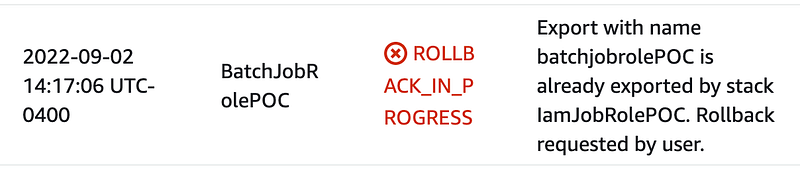
The error above is telling me that I have two CloudFormation stacks trying to use the same export the same name.
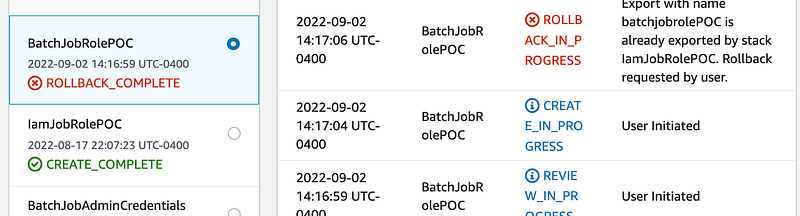
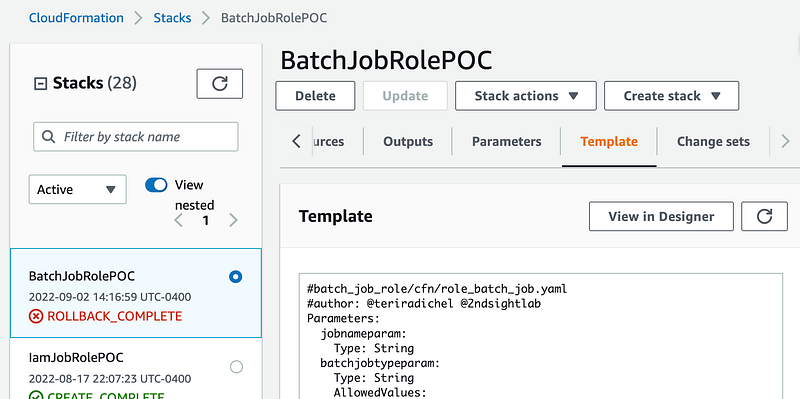
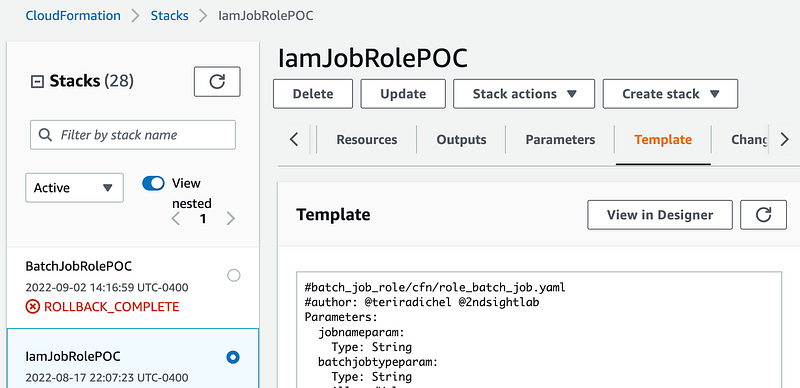
If I look at the details of both those stacks I can see that they are using the same template:
Let’s say you wrote your outputs to look like this:

Outputs:
  batchjobroleoutput:
    Value: !Ref BatchJobRole
    Export:
     Name: batchjobrole
  batchjobrolearnoutput:
    Value: !GetAtt BatchJobRole.Arn
    Export:
     Name: batchjobrolearn

Which every template is run first will succeed and create your outputs. The second will fail.

In my case I had created a parameter and was correctly using it in the output to create a unique name for each template, and that’s how you can fix this problem. I tried to post the code here but apparently Medium has an issue with my code at the moment so here’s are a couple of screenshots.

The parameter gives the role a unique name:

The outputs use that name to create a unique export name:
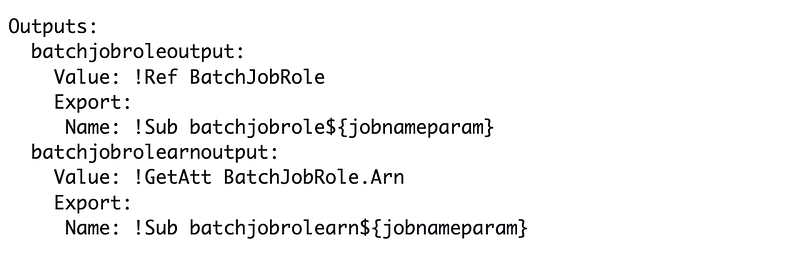
My bug was that I failed added another parameter that needs to be added to the export name now to ensure it is unique. Alternatively I could change the name I am passing into the templates. I used POC for the job name in both cases.

Here’s another tip. When you need to deploy the same resources in multiple regions, use the AWS::Region pseudo parameter in the name to keep the names the same with the exception of current region where the resource gets deployed.

Follow for updates.

Teri Radichel | © 2nd Sight Lab 2022

About Teri Radichel:
~~~~~~~~~~~~~~~~~~~~
⭐️ Author: Cybersecurity Books
⭐️ Presentations: Presentations by Teri Radichel
⭐️ Recognition: SANS Award, AWS Security Hero, IANS Faculty
⭐️ Certifications: SANS ~ GSE 240
⭐️ Education: BA Business, Master of Software Engineering, Master of Infosec
⭐️ Company: Penetration Tests, Assessments, Phone Consulting ~ 2nd Sight Lab
Need Help With Cybersecurity, Cloud, or Application Security?
~~~~~~~~~~~~~~~~~~~~~~~~~~~~~~~~~~~~~~~~~~~~~~~~~~~~~~~~~~~~~
🔒 Request a penetration test or security assessment
🔒 Schedule a consulting call
🔒 Cybersecurity Speaker for Presentation
Follow for more stories like this:
~~~~~~~~~~~~~~~~~~~~~~~~~~~~~~~~~~~~~~~~~~~~~~~~~~~~~~~~~~~~~ 
❤️ Sign Up my Medium Email List
❤️ Twitter: @teriradichel
❤️ LinkedIn: https://www.linkedin.com/in/teriradichel
❤️ Mastodon: @teriradichel@infosec.exchange
❤️ Facebook: 2nd Sight Lab
❤️ YouTube: @2ndsightlab

Cloudformation
AWS
Export
Error Message
Parameter
Recommended from ReadMedium