avatarJIN

Free AI web copilot to create summaries, insights and extended knowledge, download it at here

16005

Abstract

nt services.</li><li>Banks that may have multiple microservices handle different aspects such as account management, transaction processing, and fraud detection.</li></ul><p id="53e4"><b>Challenges</b></p><ul><li>1) <b>Message format</b> — Messages should be formatted in a way that is compatible with all the services that will be exchanging messages. This may require some standardization across services.</li><li><b>2) Message size </b>— Messages should be kept small to reduce the processing time and the likelihood of errors occurring during transmission.</li><li><b>3) Error handling </b>— It handles errors that occur during message transmission or processing. For example, retrying failed messages or taking other corrective actions.</li><li><b>4) Real-time processing </b>— This pattern may not be suitable for scenarios where real-time processing is required, as there may be some delay between sending and receiving messages.</li></ul><p id="a8a0"><b>Outbox Pattern</b></p><figure id="2500"><img src="https://cdn-images-1.readmedium.com/v2/resize:fit:800/0*1CaldquIMi2ESRbK.png"><figcaption>Image Credit: <a href="https://debezium.io/blog/2019/02/19/reliable-microservices-data-exchange-with-the-outbox-pattern/"><b><i>Gunnar Morling</i></b></a></figcaption></figure><figure id="e794"><img src="https://cdn-images-1.readmedium.com/v2/resize:fit:800/0*ePuG914hWNntpSp5.png"><figcaption>Image Credit: <a href="https://microservices.io/patterns/data/transactional-outbox.html"><b>Microservices</b></a></figcaption></figure><ul><li>It is a message-oriented pattern that helps in achieving transactional consistency between services</li><li>Ensure that messages are delivered exactly once and that they remain in a consistent state even in the event of failures or errors</li><li>The are some steps:</li><li>1) A service receives a request from a client or another service</li><li>2) When a request is received, the service writes the data that needs to be sent to other services to an Outbox table in its own database. The Outbox table contains all the necessary information that the receiving service needs to process the request</li><li>3) After writing to the Outbox table, the service commits the database transaction to ensure the data is safely stored in the database.</li><li>4) An Outbox processor is a background process that runs periodically and reads the Outbox table in the database to check for new messages that need to be sent</li><li>5) If the Outbox processor detects a new message in the Outbox table, it retrieves the message from the database and sends it to the appropriate message broker.</li><li>6) Once the message is received by the message broker, it is sent to the receivers. The receivers can be other services or downstream systems.</li><li>7) After the message is successfully delivered to the receivers, the message broker sends an acknowledgment back to the Outbox processor to mark the message as successfully sent.</li><li>8) Once the Outbox processor receives an acknowledgment from the message broker, it deletes the message from the Outbox table to prevent it from being sent again.</li></ul><div id="773e"><pre><span class="hljs-keyword">import</span> json <span class="hljs-keyword">import</span> pika <span class="hljs-keyword">from</span> sqlalchemy <span class="hljs-keyword">import</span> create_engine, Table, Column, Integer, String, MetaData, DateTime

<span class="hljs-comment"># Create SQLAlchemy engine and metadata</span> engine = create_engine(<span class="hljs-string">'postgresql://user:password@localhost:5432/db'</span>) metadata = MetaData()

<span class="hljs-comment"># Define the Outbox table schema</span> outbox_table = Table(<span class="hljs-string">'outbox'</span>, metadata, Column(<span class="hljs-string">'id'</span>, Integer, primary_key=<span class="hljs-literal">True</span>), Column(<span class="hljs-string">'event_type'</span>, String), Column(<span class="hljs-string">'payload'</span>, String), Column(<span class="hljs-string">'created_at'</span>, DateTime) )

<span class="hljs-comment"># Define RabbitMQ connection parameters</span> rabbitmq_params = pika.ConnectionParameters(host=<span class="hljs-string">'localhost'</span>, port=<span class="hljs-number">5672</span>)

<span class="hljs-comment"># Define RabbitMQ queue name</span> queue_name = <span class="hljs-string">'outbox'</span>

<span class="hljs-comment"># Connect to RabbitMQ</span> connection = pika.BlockingConnection(rabbitmq_params) channel = connection.channel()

<span class="hljs-comment"># Declare the queue</span> channel.queue_declare(queue=queue_name, durable=<span class="hljs-literal">True</span>)

<span class="hljs-comment"># Define function to publish messages to RabbitMQ</span> <span class="hljs-keyword">def</span> <span class="hljs-title function_">publish_message</span>(<span class="hljs-params">message</span>): channel.basic_publish(exchange=<span class="hljs-string">''</span>, routing_key=queue_name, body=message, properties=pika.BasicProperties( delivery_mode=<span class="hljs-number">2</span>, <span class="hljs-comment"># Make messages persistent</span> ))

<span class="hljs-comment"># Define function to read messages from the Outbox table and publish them to RabbitMQ</span> <span class="hljs-keyword">def</span> <span class="hljs-title function_">process_outbox</span>(): <span class="hljs-keyword">with</span> engine.connect() <span class="hljs-keyword">as</span> conn: result = conn.execute(outbox_table.select().order_by(outbox_table.c.<span class="hljs-built_in">id</span>)) <span class="hljs-keyword">for</span> row <span class="hljs-keyword">in</span> result: <span class="hljs-comment"># Create message payload as a dictionary</span> payload = { <span class="hljs-string">'event_type'</span>: row[<span class="hljs-string">'event_type'</span>], <span class="hljs-string">'data'</span>: json.loads(row[<span class="hljs-string">'payload'</span>]) } <span class="hljs-comment"># Convert payload to JSON string</span> message = json.dumps(payload) <span class="hljs-comment"># Publish message to RabbitMQ</span> publish_message(message) <span class="hljs-comment"># Delete message from Outbox table</span> conn.execute(outbox_table.delete().where(outbox_table.c.<span class="hljs-built_in">id</span> == row[<span class="hljs-string">'id'</span>]))

<span class="hljs-comment"># Define function to write data to the Outbox table</span> <span class="hljs-keyword">def</span> <span class="hljs-title function_">write_to_outbox</span>(<span class="hljs-params">event_type, data</span>): <span class="hljs-keyword">with</span> engine.connect() <span class="hljs-keyword">as</span> conn: <span class="hljs-comment"># Convert data to JSON string</span> payload = json.dumps(data) <span class="hljs-comment"># Insert data into Outbox table</span> conn.execute(outbox_table.insert().values( event_type=event_type, payload=payload, created_at=datetime.now() ))

<span class="hljs-comment"># Example usage:</span> write_to_outbox(<span class="hljs-string">'user_created'</span>, {<span class="hljs-string">'user_id'</span>: <span class="hljs-number">123</span>, <span class="hljs-string">'name'</span>: <span class="hljs-string">'John Doe'</span>}) process_outbox()</pre></div><ul><li>Implement by using SQLAlchemy and RabbitMQ</li><li>Use SQLAlchemy to connect to a PostgreSQL database and defines an Outbox table schema.</li><li>Use Pika to connect to a RabbitMQ message broker and defines a queue name.</li><li>The <code>write_to_outbox</code> function — write data to the Outbox table</li><li>The <code>process_outbox</code> function — read messages from the Outbox table and publishes them to RabbitMQ</li><li>The <code>publish_message</code> function — Publishe a message to RabbitMQ.</li></ul><p id="09d3"><b>Advantages</b></p><ul><li>All events are published to the message broker even if the database transaction fails</li><li>Decouple the publishing of events from the main application code</li><li>Allows for efficient batch processing of events</li></ul><p id="bf9b"><b>Disadvantages</b></p><ul><li>Require additional development effort to implement the Outbox table and the background worker to publish events to the message broker</li><li>Introduce additional complexity to the system architecture</li><li>Require careful management of database transactions to ensure that messages are only published if the transaction succeeds</li></ul><p id="22de"><b>When to use</b></p><ul><li>When a microservice needs to publish events to multiple subscribers, such as in a publish/subscribe messaging scenario and ensure that all database updates are captured in the message stream.</li><li>An e-commerce platform publishes events about new orders, updated order status, and customer feedback to multiple subscribers, including order fulfillment systems, customer service, and marketing</li><li>A financial services platform needs to capture all financial transactions in the message stream for auditing and compliance purposes.</li></ul><p id="ee50"><b>Challenges</b></p><ul><li>Ensuring that the background worker responsible for publishing events is highly available and fault-tolerant.</li><li>Managing database transactions to ensure that messages are only published if the associated database transaction succeeds</li><li>Handling errors and retries when publishing events to the message broker</li></ul><p id="5bff"><b>Considerations</b></p><ul><li><b>1) Message format </b>— Use a JSON or Protobuf message format to represent the events to be published. The format will depend on the requirements of the specific application, but it must be compatible with the message broker being used.</li><li><b>2) Message size</b> — Depends on the size and complexity of the events being published. Ensure that the message size does not exceed the limits of the message broker being used. Large messages can cause performance issues and may need to be split into smaller messages for efficient processing.</li><li><b>3) Error handling </b>— If an error occurs during the publishing of an event, handle the error and retry the operation. Retries should be performed with a back-off strategy to avoid overwhelming the message broker or causing a denial-of-service attack. If there is an error occurred during inserting events into the outbox table, the event should not be published to the message broker to avoid data inconsistencies.</li></ul><p id="b8e3"><b>Similarities</b></p><ul><li>Both patterns use a message table to store messages that need to be exchanged between services</li><li>Both patterns allow services to continue processing other tasks while messages are being exchanged in the background</li><li>Both patterns provide a microservice to exchange messages between another microservice</li></ul><p id="544b"><b>Differences</b></p><ul><li><b>1) Database</b> — The Outbox pattern uses a single database to store all the messages that need to be exchanged, while the Local Message Table pattern uses a message table for each service that needs to exchange messages.</li><li><b>2) Implementation </b>— The background worker or a separate process reads messages from the Outbox table and sends them to the message broker such as RabbitMQ or Kafka. The background worker or a separate process monitors the message table for new messages and sends them to the receiving service by using any messaging mechanism such as direct HTTP requests or message brokers.</li><li><b>3) Use Cases </b>— The Outbox pattern is particularly useful in scenarios where a microservice needs to publish events to multiple subscribers. The Local Message Table pattern is useful when multiple services need to exchange messages with each other, but not all services need to receive every message.</li><li><b>4) Challenges</b> — The Outbox pattern requires careful handling of database transactions to ensure that messages are only published if the associated database transaction succeeds. The Local Message Table pattern may require more complex error handling, as messages may need to be retried or resent if they fail to reach their destination.</li></ul><p id="1d4e"><b>Message Queuing (MQ) Transaction</b></p><figure id="cc36"><img src="https://cdn-images-1.readmedium.com/v2/resize:fit:800/0*wBxk5Wo5wp3fo26D.jpeg"><figcaption>Image Credit: <a href="https://learn.microsoft.com/en-us/previous-versions/windows/desktop/msmq/ms699870%28v=vs.85%29"><b>Microsoft</b></a></figcaption></figure><ul><li>A sequence of multiple message operations is grouped together as a single unit of work.</li><li>The transaction ensures that either all the operations are completed successfully or none of them are. This ensures that the system remains in a consistent state even in the event of failures or errors.</li><li>Messages are processed in a way that ensures atomicity, consistency, isolation, and durability (ACID).</li><li>The transaction ensures that either all the operations are completed successfully or none of them are. This ensures that the system remains in a consistent state even in the event of failures or errors.</li><li>There are some steps:</li><li>1) Establish a connection to the message broker by specifying the connection settings such as the broker URL, username, and password</li><li>2) Once the connection is established, the transaction is initiated by calling the <code>begin</code> method. This method notifies the message broker that a transaction has started and all subsequent message operations should be grouped together as part of the transaction.</li><li>3) Perform the message operations that need to be grouped together as part of the transaction by sending messages to a queue or topic.</li><li>4) Once all the message operations have been performed successfully, the transaction is committed by calling the <code>commit</code> method. This method notifies the message broker that all the message operations performed as part of the transaction have been completed successfully.</li><li>5) If any errors occur during the transaction, the transaction is rolled back by calling the <code>rollback</code> method. This method notifies the message broker that the transaction has failed and all the message operations performed as part of the transaction should be undone.</li><li>A transaction is a sequence of message operations that are grouped together as a single unit of work.</li><li>The transaction ensures that either all the operations are completed successfully or none of them are. This ensures that the system remains in a consistent state even in the event of failures or errors.</li><li>Messages are processed in a way that ensures atomicity, consistency, isolation, and durability (ACID).</li></ul><div id="fb69"><pre><span class="hljs-keyword">import</span> stomp

<span class="hljs-keyword">class</span> <span class="hljs-title class_">MyListener</span>(stomp.ConnectionListener):

<span class="hljs-keyword">def</span> <span class="hljs-title function_">__init__</span>(<span class="hljs-params">self, conn</span>):
    self.conn = conn

<span class="hljs-keyword">def</span> <span class="hljs-title function_">on_message</span>(<span class="hljs-params">self, headers, message</span>):
    <span class="hljs-comment"># Process the message</span>
    <span class="hljs-built_in">print</span>(<span class="hljs-string">"Received message:"</span>, message)
    <span class="hljs-comment"># Acknowledge the message</span>
    self.conn.ack(<span class="hljs-built_in">id</span>=heade

Options

rs[<span class="hljs-string">'message-id'</span>], subscription=headers[<span class="hljs-string">'subscription'</span>])

<span class="hljs-keyword">def</span> <span class="hljs-title function_">on_error</span>(<span class="hljs-params">self, headers, message</span>):
    <span class="hljs-built_in">print</span>(<span class="hljs-string">'Received an error "{}": {}'</span>.<span class="hljs-built_in">format</span>(headers, message))

<span class="hljs-keyword">def</span> <span class="hljs-title function_">on_disconnected</span>(<span class="hljs-params">self</span>):
    <span class="hljs-built_in">print</span>(<span class="hljs-string">'Disconnected from the message broker.'</span>)

<span class="hljs-comment"># Define the message broker connection settings</span> broker_url = <span class="hljs-string">"tcp://localhost:61613"</span> username = <span class="hljs-string">"myusername"</span> password = <span class="hljs-string">"mypassword"</span> queue_name = <span class="hljs-string">"/queue/myqueue"</span>

<span class="hljs-comment"># Establish a connection to the message broker</span> conn = stomp.Connection([(broker_url, <span class="hljs-number">61613</span>)]) conn.set_listener(<span class="hljs-string">''</span>, MyListener(conn)) conn.start() conn.connect(username, password)

<span class="hljs-keyword">try</span>: <span class="hljs-comment"># Begin the transaction</span> conn.begin() <span class="hljs-comment"># Send the first message</span> conn.send(body=<span class="hljs-string">"Message 1"</span>, destination=queue_name) <span class="hljs-comment"># Send the second message</span> conn.send(body=<span class="hljs-string">"Message 2"</span>, destination=queue_name) <span class="hljs-comment"># Commit the transaction</span> conn.commit() <span class="hljs-keyword">except</span> Exception <span class="hljs-keyword">as</span> ex: <span class="hljs-comment"># Rollback the transaction in case of errors</span> conn.rollback() <span class="hljs-built_in">print</span>(<span class="hljs-string">"Error sending messages:"</span>, <span class="hljs-built_in">str</span>(ex))

<span class="hljs-comment"># Disconnect from the message broker</span> conn.disconnect()</pre></div><ul><li>Implement using the Apache ActiveMQ library</li><li>The <code>begin</code>, <code>send</code>, and <code>commit</code> methods are used to group the sending of two messages as a single transaction.</li><li>If an error occurs during the transaction, the <code>rollback</code> method is called to ensure that none of the messages are processed.</li><li>Not all message brokers support transactions and the exact implementation may vary depending on the specific message broker and library being used.</li></ul><p id="c808"><b>Advantages</b></p><ul><li>Ensure that messages are delivered to their intended recipients, even in the event of network failures or other disruptions</li><li>A group of message operations is treated as a single unit of work. Either all of the messages in the transaction are processed or none of them are processed.</li><li>It can handle large volumes of messages and can be scaled horizontally as needed.</li><li>It can be used across different platforms and programming languages, making them a versatile solution for message exchange.</li></ul><p id="7625"><b>Disadvantages</b></p><ul><li>Implementing MQ transactions can be complex</li><li>Add overhead to message processing, which can impact system performance.</li><li>Require licensing fees and hardware costs, making it potentially expensive to implement</li></ul><p id="ea57"><b>When to use</b></p><ul><li>When handling high volumes of messages and requiring atomicity</li><li>Exchange messages related to financial transactions, such as stock trades or online payments</li><li>Exchange messages related to supply chain management, such as tracking inventory levels or coordinating deliveries</li><li>Exchange messages related to online ordering systems, such as processing orders and tracking shipments</li></ul><p id="f384"><b>Considerations</b></p><ul><li><b>1) Message Format</b> — Depends on the specific implementation being used. Generally, messages are formatted as a payload of data, along with additional metadata such as message headers and properties. The payload can be in a variety of formats, such as XML, JSON, or binary data.</li><li><b>2) Message Size</b> — The maximum message size depends on the specific implementation being used. Large messages may need to be split into smaller chunks for processing.</li><li><b>3) Error Handling </b>— When errors occur, ensure that message processing is not disrupted and errors are properly handled. So, implement appropriate retry mechanisms and error reporting. For example, the MQ transaction system returns an error message to the sender and the sender can resend the message or notify an administrator. There are some error-handling strategies to implement such as setting up a dedicated error-handling process, implementing retry mechanisms, or using logging and monitoring tools to track errors and performance metrics.</li></ul><p id="bc77"><b>References</b></p><div id="0e02" class="link-block"> <a href="https://learn.microsoft.com/en-us/previous-versions/windows/desktop/msmq/ms699870%28v=vs.85%29"> <div> <div> <h2>Message Queuing Transactions</h2> <div><h3>Applies To: Windows 10, Windows 7, Windows 8, Windows 8.1, Windows Server 2008, Windows Server 2008 R2, Windows Server…</h3></div> <div><p>learn.microsoft.com</p></div> </div> <div> <div style="background-image: url(https://miro.readmedium.com/v2/resize:fit:320/0*sgFzZmV0DHHYX7mE)"></div> </div> </div> </a> </div><div id="e576" class="link-block"> <a href="https://docs.mulesoft.com/ibm-mq-connector/1.6/ibm-mq-transactions"> <div> <div> <h2>Handling Transactions in IBM MQ</h2> <div><h3>Transactional connections in IBM MQ allow you to execute a series of operations that are actually performed only when…</h3></div> <div><p>docs.mulesoft.com</p></div> </div> <div> <div style="background-image: url(https://miro.readmedium.com/v2/resize:fit:320/0*U8P_0IpgGSPXkoyH)"></div> </div> </div> </a> </div><div id="537a" class="link-block"> <a href="https://www.cockroachlabs.com/blog/message-queuing-database-kafka/"> <div> <div> <h2>Message queuing and the database: Solving the dual write problem</h2> <div><h3>Developing a modern application means developing for the cloud, with uptime, scalability, geographic distribution, and…</h3></div> <div><p>www.cockroachlabs.com</p></div> </div> <div> <div style="background-image: url(https://miro.readmedium.com/v2/resize:fit:320/0*u3SdheeqZw0TdAyd)"></div> </div> </div> </a> </div><div id="97a8" class="link-block"> <a href="https://www.ibm.com/topics/message-queues"> <div> <div> <h2>Message Queues: An Introduction | IBM</h2> <div><h3>A message queue is a component of messaging middleware that makes it easier to develop resilient connections between…</h3></div> <div><p>www.ibm.com</p></div> </div> <div> <div style="background-image: url(https://miro.readmedium.com/v2/resize:fit:320/0*Bs_svYKL2AxsqHt2)"></div> </div> </div> </a> </div><div id="a4c1" class="link-block"> <a href="https://www.simpleorientedarchitecture.com/msmq-basics/"> <div> <div> <h2>MSMQ Basics: Queues, Messages, Transactions - Simple-Oriented Architecture</h2> <div><h3>Microsoft Message Queue Server (MSMQ) is a Message Oriented Middleware that allows applications to communicate among…</h3></div> <div><p>www.simpleorientedarchitecture.com</p></div> </div> <div> <div style="background-image: url(https://miro.readmedium.com/v2/resize:fit:320/0*OcVFwA8nr5DNUhSj)"></div> </div> </div> </a> </div><div id="48ac" class="link-block"> <a href="https://debezium.io/blog/2019/02/19/reliable-microservices-data-exchange-with-the-outbox-pattern/"> <div> <div> <h2>Reliable Microservices Data Exchange With the Outbox Pattern</h2> <div><h3>Debezium is an open-source distributed platform for change data capture. Start it up, point it at your databases, and…</h3></div> <div><p>debezium.io</p></div> </div> <div> <div style="background-image: url(https://miro.readmedium.com/v2/resize:fit:320/0*q_kFVW52QZ6UXTjY)"></div> </div> </div> </a> </div><div id="6cfa" class="link-block"> <a href="https://microservices.io/patterns/data/transactional-outbox.html"> <div> <div> <h2>Microservices Pattern: Transactional outbox</h2> <div><h3>Application events A service command typically needs to update the database and send messages/events. For example, a…</h3></div> <div><p>microservices.io</p></div> </div> <div> <div style="background-image: url(https://miro.readmedium.com/v2/resize:fit:320/0*91CL7Of23tpPbleO)"></div> </div> </div> </a> </div><div id="5cd3" class="link-block"> <a href="https://www.kamilgrzybek.com/blog/posts/the-outbox-pattern"> <div> <div> <h2>The Outbox Pattern</h2> <div><h3>Sometimes, when processing a business operation, you need to communicate with an external component in the…</h3></div> <div><p>www.kamilgrzybek.com</p></div> </div> <div> <div style="background-image: url(https://miro.readmedium.com/v2/resize:fit:320/0*toZfgLLBkirDlDYy)"></div> </div> </div> </a> </div><div id="f83d" class="link-block"> <a href="https://readmedium.com/outbox-pattern-for-microservices-architectures-1b8648dfaa27"> <div> <div> <h2>Outbox Pattern for Microservices Architectures</h2> <div><h3>In this article, we are going to talk about the Design Patterns of Microservices architecture which is The Outbox Pattern…</h3></div> <div><p>medium.com</p></div> </div> <div> <div style="background-image: url(https://miro.readmedium.com/v2/resize:fit:320/0*WUdjvJ6zsVqaKo8p.png)"></div> </div> </div> </a> </div><div id="51bd" class="link-block"> <a href="https://softwaremill.com/microservices-101/"> <div> <div> <h2>Microservices 101: Transactional Outbox and Inbox</h2> <div><h3>One of the fundamental aspects of microservice architecture is data ownership. Encapsulation of the data and logic…</h3></div> <div><p>softwaremill.com</p></div> </div> <div> <div style="background-image: url(https://miro.readmedium.com/v2/resize:fit:320/0*xUUi6yiZ5kGPccjq)"></div> </div> </div> </a> </div><div id="244f" class="link-block"> <a href="https://towardsdatascience.com/distributed-transactions-cdc-event-sourcing-outbox-cqrs-patterns-ee0cf70339b1"> <div> <div> <h2>Design Patterns for Distributed Transactions</h2> <div><h3>Understanding Event Sourcing, Command Query Responsibility Segregation (CQRS), Change Data Capture (CDC), and the…</h3></div> <div><p>towardsdatascience.com</p></div> </div> <div> <div style="background-image: url(https://miro.readmedium.com/v2/resize:fit:320/0*XPVJK6od_Oldq3l2)"></div> </div> </div> </a> </div><div id="8945" class="link-block"> <a href="https://blogs.oracle.com/database/post/making-try-confirmcancel-easy-with-microtx"> <div> <div> <h2>Making Try-Confirm/Cancel Easy with MicroTx</h2> <div><h3>In my last post on MicroTx transaction protocols, I explained how the Oracle Transaction Manager for Microservices (…</h3></div> <div><p>blogs.oracle.com</p></div> </div> <div> <div style="background-image: url(https://miro.readmedium.com/v2/resize:fit:320/0*Z7JmHb3yhVoCx1Lw)"></div> </div> </div> </a> </div><div id="a146" class="link-block"> <a href="https://github.com/topics/distributed-transaction"> <div> <div> <h2>Build software better, together</h2> <div><h3>GitHub is where people build software. More than 100 million people use GitHub to discover, fork, and contribute to…</h3></div> <div><p>github.com</p></div> </div> <div> <div style="background-image: url(https://miro.readmedium.com/v2/resize:fit:320/0*H8zYPXPXuyH8dr14)"></div> </div> </div> </a> </div><div id="0c48" class="link-block"> <a href="https://www.alibabacloud.com/blog/an-in-depth-analysis-of-distributed-transaction-solutions_597232"> <div> <div> <h2>An In-Depth Analysis of Distributed Transaction Solutions</h2> <div><h3>Stone Doyle January 28, 2021, 12,000 This article summarizes five distributed transaction solutions and analyzes their…</h3></div> <div><p>www.alibabacloud.com</p></div> </div> <div> <div style="background-image: url(https://miro.readmedium.com/v2/resize:fit:320/0*w2ZbnPK9AOu_z3rO)"></div> </div> </div> </a> </div><p id="015b"><b><i>If you’ve found any of my articles helpful or useful then please consider throwing a coffee my way to help support my work or give me patronage😊, by using</i></b></p><p id="63cf"><a href="https://www.patreon.com/jinlowmedium"><b>Patreon</b></a></p><p id="13b0"><a href="https://ko-fi.com/jinlowmedium"><b>Ko-fi.com</b></a></p><p id="2a00"><a href="https://www.buymeacoffee.com/jinlowmedium"><b>buymeacoffee</b></a></p><p id="dedd"><i>Last but not least, if you are not a Medium Member yet and plan to become one, I kindly ask you to do so using the following link. I will receive a portion of your membership fee at no additional cost to you.</i></p><div id="642e" class="link-block"> <a href="https://jinlow.medium.com/membership"> <div> <div> <h2>Join Medium with my referral link — JIN</h2> <div><h3>As a Medium member, a portion of your membership fee goes to writers you read, and you get full access to every story…</h3></div> <div><p>jinlow.medium.com</p></div> </div> <div> <div style="background-image: url(https://miro.readmedium.com/v2/resize:fit:320/0*jLJ0HNErg4baV7B4)"></div> </div> </div> </a> </div></article></body>

Photo by Nathan Dumlao on Unsplash

Exploring Solutions for Distributed Transactions (2)

A Comprehensive Overview of Techniques, Patterns, and Algorithms for Maintaining Data Consistency in Distributed Systems.

Thank you for being a part of this journey with me, and I hope to continue providing value to you for years to come! Giving tips by supporting me.

Hello friend, I hope you’re doing well! I’m writing to you today because I am truly passionate about sharing my knowledge and helping others learn. If you’ve found my articles to be valuable and they’ve made a positive impact on your life, I would be overjoyed if you could support me as a referred member. Your support not only helps me financially but also motivates me to continue creating content that makes a difference in people’s lives. Thank you from the bottom of my heart for considering supporting me. It means the world to me to have your support on this journey.

In different business scenarios, the solutions will be different, and the common methods are:

  1. Blocking Retry
  2. Two-Phase Commit (2PC) and Three-Phase Commit (3PC)
  3. Using Queues to Process Asynchronously in the Background
  4. TCC Compensation Matters
  5. Local Message Table (Asynchronously Ensured)/Outbox Pattern
  6. MQ Transaction
  7. Saga Pattern
  8. Event Sourcing
  9. CQRS
  10. Atomic Commitment
  11. Parallel Commits
  12. Transactional Replication
  13. Consensus Algorithms
  14. Timestamp Ordering
  15. Optimistic Concurrency Control
  16. Byzantine Fault Tolerance (BFT)
  17. Distributed Locking
  18. Sharding
  19. Multi-Version Concurrency Control (MVCC)
  20. Distributed Snapshots
  21. Leader-Follower Replication

4. Try-Confirm-Cancel (TCC) Compensation Matters
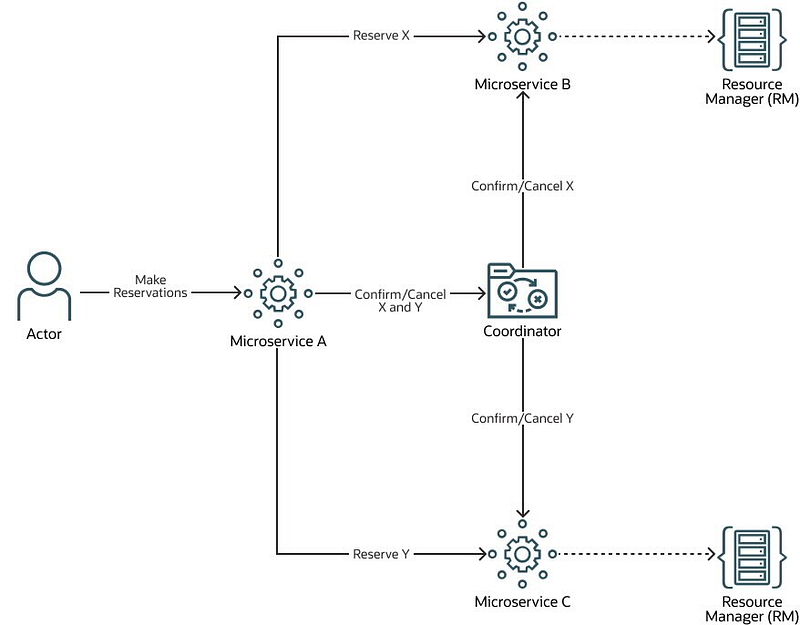
Image Credit: Todd Little
  • It is used to handle long-lived transactions across multiple services.
  • It involves breaking down a complex transaction into multiple steps, where each step is a separate service call or database operation. Each step in the transaction has 3 phases: try, confirm, and cancel.
  • Try phase — The service tries to perform the operation. It performs a series of checks to ensure that it is safe to perform the operation. If all checks pass, the operation is performed, and the state is saved in temporary storage.
  • Confirm phase — The service confirms that the operation was successful. It validates the state of the transaction and ensures that all dependencies are satisfied. If everything is valid, the temporary state is committed to the main database.
  • Cancel phase — If something goes wrong during the try phase or confirm phase, the cancel phase is initiated. The service undoes the changes made in the try phase. It restores the state to the point before the transaction started.
import requests

class OrderService:
    def __init__(self):
        self.session = requests.Session()

    def create_order(self, order_data):
        try:
            # Step 1: Reserve stock
            res = self.session.post('http://inventory-service/reserve-stock', json=order_data)
            res.raise_for_status()

            # Step 2: Charge payment
            res = self.session.post('http://payment-service/charge-payment', json=order_data)
            res.raise_for_status()

            # Step 3: Confirm order
            res = self.session.post('http://order-service/confirm-order', json=order_data)
            res.raise_for_status()
        except requests.exceptions.RequestException as e:
            # Step 4: Cancel order
            self.session.post('http://order-service/cancel-order', json=order_data)
            self.session.post('http://payment-service/refund-payment', json=order_data)
            self.session.post('http://inventory-service/release-stock', json=order_data)
            raise e

Class OrderService — Creates an order by following the Try-Confirm-Cancel (TCC) pattern

The order creation process involves 3 steps

  1. Reserve stock
  2. Charge payment
  3. Confirm order

If any of these steps fail, cancel the order and undo any changes that were made. This is done in the exception handler, which rolls back any database changes made during the execution of the try block.

In the reserve_stock() method, check if there is enough stock available for the product. If there is, reserve the stock by decrementing the available stock count in the database. If there is not enough stock available, raise an exception and roll back any changes made so far.

In the charge_payment() method, check if the customer has enough funds to pay for the order. If they do, we charge their account by deducting the order amount from their balance. If they do not have enough funds, raise an exception and roll back any changes made so far.

In the confirm_order() method, update the order status to “confirmed” in the database. If there is an exception during this step, cancel the order and roll back any changes made so far.

Advantages

  • Avoid locking resources for long periods of time
  • Handle compensation matters in case of transaction failure or incompleteness
  • Handle distributed transactions in systems where 2PC is not practical

Disadvantages

  • Require additional effort to implement compensating transactions for each transaction
  • No atomicity guarantees

When to use

  • Handling long-live transactions in systems

Challenges

  • Implementing compensating transactions can be complex
  • Coordinating multiple services in a distributed environment can be challenging

5. Local Message Table (Asynchronously Ensured)/Outbox Pattern

  • It is a messaging pattern used in a microservices architecture.
  • It allows microservices to exchange messages asynchronously using a local message table as an intermediate buffer.
  • Each microservice that needs to exchange messages with other microservices has its own message table.
  • When a microservice needs to send a message to another microservice, it adds the message to its own message table. The message contains all the necessary information that the receiving microservice needs to process the request.
  • Once the message is added to the table, the sending microservice can continue processing other tasks. Meanwhile, a background worker or a separate process continuously monitors the message table for new messages.
  • When a new message is detected, the worker retrieves the message and sends it to the receiving microservice.
  • Once the receiving microservice has processed the message, it sends an acknowledgment to the sending microservice indicating that the message has been successfully processed. The acknowledgment may also include any results or data that the sending microservice needs.
  • If the acknowledgment is not received within a certain timeframe, the sending microservice can assume that the message was not processed successfully and can take appropriate action, such as resending the message or canceling the request.
import psycopg2
from psycopg2 import sql
from psycopg2.extras import DictCursor
import json
import threading
import time

# Define the message schema
message_schema = {
    "id": "",
    "data": {},
    "status": ""
}

# Connect to the PostgreSQL database
conn = psycopg2.connect(
    dbname="my_database",
    user="my_username",
    password="my_password",
    host="localhost",
    port="5432"
)

# Create the messages table if it doesn't exist
with conn.cursor() as cur:
    cur.execute("""
        CREATE TABLE IF NOT EXISTS messages (
            id UUID PRIMARY KEY,
            data JSONB NOT NULL,
            status TEXT NOT NULL
        )
    """)
    conn.commit()

# Define the message producer
def send_message(data):
    with conn.cursor() as cur:
        # Create the message using the schema
        message = message_schema.copy()
        message["id"] = str(uuid.uuid4())
        message["data"] = data
        message["status"] = "new"
        
        # Insert the message into the messages table
        cur.execute("""
            INSERT INTO messages (id, data, status)
            VALUES (%s, %s, %s)
        """, (message["id"], json.dumps(message["data"]), message["status"]))
        conn.commit()

# Define the message consumer
def message_consumer():
    while True:
        with conn.cursor(cursor_factory=DictCursor) as cur:
            # Select the oldest message from the messages table that has a status of "new"
            cur.execute("""
                SELECT *
                FROM messages
                WHERE status = 'new'
                ORDER BY id
                LIMIT 1
                FOR UPDATE SKIP LOCKED
            """)
            row = cur.fetchone()
            if row:
                message = dict(row)
                # Update the message status to "processing"
                cur.execute("""
                    UPDATE messages
                    SET status = 'processing'
                    WHERE id = %s
                """, (message["id"],))
                conn.commit()
                # Process the message
                process_message(message)
                # Update the message status to "processed"
                cur.execute("""
                    UPDATE messages
                    SET status = 'processed'
                    WHERE id = %s
                """, (message["id"],))
                conn.commit()
        time.sleep(1)

# Start the message consumer in a separate thread
consumer_thread = threading.Thread(target=message_consumer)
consumer_thread.start()
  • Use PostgreSQL as the database and psycopg2 library for interacting with the database.
  • The send_message function — create a new message and insert it into the PostgreSQL database
  • The message_consumer function — continuously polling the database for new messages with a "new" status, processing them, and updating their status to "processed".
  • The actual implementation of the Local Message Table pattern may vary depending on the specific requirements and the database solution that is chosen.

Advantages

  • Messages are not lost or processed more than once
  • The sending microservice continues processing other tasks while messages are being exchanged in the background.
  • Microservices are decoupled from each other and can be developed and deployed independently
  • It allows for the addition of new microservices without affecting the existing system

Disadvantages

  • It can be complex by considering some factors such as message format, message size, and error handling
  • It may not suitable for scenarios where real-time processing is required as there may be some delay between sending and receiving microservices
  • It requires additional infrastructure such as a message queue or a database to store and manage messages

When to use

  • An E-commerce website that has multiple microservices handles different aspects such as inventory management, order processing, and payment processing
  • A healthcare system can be used to share electronic medical records and medical billing between different services.
  • Banks that may have multiple microservices handle different aspects such as account management, transaction processing, and fraud detection.

Challenges

  • 1) Message format — Messages should be formatted in a way that is compatible with all the services that will be exchanging messages. This may require some standardization across services.
  • 2) Message size — Messages should be kept small to reduce the processing time and the likelihood of errors occurring during transmission.
  • 3) Error handling — It handles errors that occur during message transmission or processing. For example, retrying failed messages or taking other corrective actions.
  • 4) Real-time processing — This pattern may not be suitable for scenarios where real-time processing is required, as there may be some delay between sending and receiving messages.

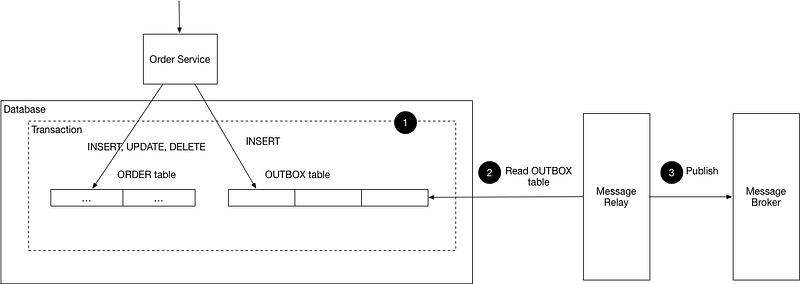
Outbox Pattern
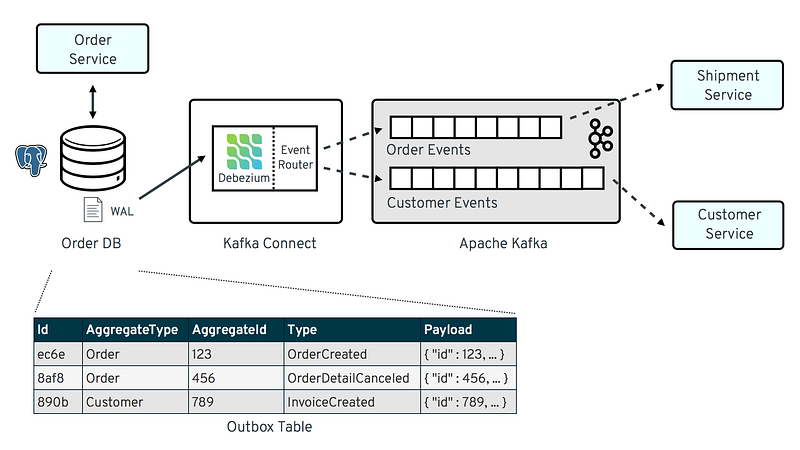
Image Credit: Gunnar Morling
Image Credit: Microservices
  • It is a message-oriented pattern that helps in achieving transactional consistency between services
  • Ensure that messages are delivered exactly once and that they remain in a consistent state even in the event of failures or errors
  • The are some steps:
  • 1) A service receives a request from a client or another service
  • 2) When a request is received, the service writes the data that needs to be sent to other services to an Outbox table in its own database. The Outbox table contains all the necessary information that the receiving service needs to process the request
  • 3) After writing to the Outbox table, the service commits the database transaction to ensure the data is safely stored in the database.
  • 4) An Outbox processor is a background process that runs periodically and reads the Outbox table in the database to check for new messages that need to be sent
  • 5) If the Outbox processor detects a new message in the Outbox table, it retrieves the message from the database and sends it to the appropriate message broker.
  • 6) Once the message is received by the message broker, it is sent to the receivers. The receivers can be other services or downstream systems.
  • 7) After the message is successfully delivered to the receivers, the message broker sends an acknowledgment back to the Outbox processor to mark the message as successfully sent.
  • 8) Once the Outbox processor receives an acknowledgment from the message broker, it deletes the message from the Outbox table to prevent it from being sent again.
import json
import pika
from sqlalchemy import create_engine, Table, Column, Integer, String, MetaData, DateTime

# Create SQLAlchemy engine and metadata
engine = create_engine('postgresql://user:password@localhost:5432/db')
metadata = MetaData()

# Define the Outbox table schema
outbox_table = Table('outbox', metadata,
                     Column('id', Integer, primary_key=True),
                     Column('event_type', String),
                     Column('payload', String),
                     Column('created_at', DateTime)
                    )

# Define RabbitMQ connection parameters
rabbitmq_params = pika.ConnectionParameters(host='localhost', port=5672)

# Define RabbitMQ queue name
queue_name = 'outbox'

# Connect to RabbitMQ
connection = pika.BlockingConnection(rabbitmq_params)
channel = connection.channel()

# Declare the queue
channel.queue_declare(queue=queue_name, durable=True)

# Define function to publish messages to RabbitMQ
def publish_message(message):
    channel.basic_publish(exchange='',
                          routing_key=queue_name,
                          body=message,
                          properties=pika.BasicProperties(
                              delivery_mode=2,  # Make messages persistent
                          ))

# Define function to read messages from the Outbox table and publish them to RabbitMQ
def process_outbox():
    with engine.connect() as conn:
        result = conn.execute(outbox_table.select().order_by(outbox_table.c.id))
        for row in result:
            # Create message payload as a dictionary
            payload = {
                'event_type': row['event_type'],
                'data': json.loads(row['payload'])
            }
            # Convert payload to JSON string
            message = json.dumps(payload)
            # Publish message to RabbitMQ
            publish_message(message)
            # Delete message from Outbox table
            conn.execute(outbox_table.delete().where(outbox_table.c.id == row['id']))

# Define function to write data to the Outbox table
def write_to_outbox(event_type, data):
    with engine.connect() as conn:
        # Convert data to JSON string
        payload = json.dumps(data)
        # Insert data into Outbox table
        conn.execute(outbox_table.insert().values(
            event_type=event_type,
            payload=payload,
            created_at=datetime.now()
        ))

# Example usage:
write_to_outbox('user_created', {'user_id': 123, 'name': 'John Doe'})
process_outbox()
  • Implement by using SQLAlchemy and RabbitMQ
  • Use SQLAlchemy to connect to a PostgreSQL database and defines an Outbox table schema.
  • Use Pika to connect to a RabbitMQ message broker and defines a queue name.
  • The write_to_outbox function — write data to the Outbox table
  • The process_outbox function — read messages from the Outbox table and publishes them to RabbitMQ
  • The publish_message function — Publishe a message to RabbitMQ.

Advantages

  • All events are published to the message broker even if the database transaction fails
  • Decouple the publishing of events from the main application code
  • Allows for efficient batch processing of events

Disadvantages

  • Require additional development effort to implement the Outbox table and the background worker to publish events to the message broker
  • Introduce additional complexity to the system architecture
  • Require careful management of database transactions to ensure that messages are only published if the transaction succeeds

When to use

  • When a microservice needs to publish events to multiple subscribers, such as in a publish/subscribe messaging scenario and ensure that all database updates are captured in the message stream.
  • An e-commerce platform publishes events about new orders, updated order status, and customer feedback to multiple subscribers, including order fulfillment systems, customer service, and marketing
  • A financial services platform needs to capture all financial transactions in the message stream for auditing and compliance purposes.

Challenges

  • Ensuring that the background worker responsible for publishing events is highly available and fault-tolerant.
  • Managing database transactions to ensure that messages are only published if the associated database transaction succeeds
  • Handling errors and retries when publishing events to the message broker

Considerations

  • 1) Message format — Use a JSON or Protobuf message format to represent the events to be published. The format will depend on the requirements of the specific application, but it must be compatible with the message broker being used.
  • 2) Message size — Depends on the size and complexity of the events being published. Ensure that the message size does not exceed the limits of the message broker being used. Large messages can cause performance issues and may need to be split into smaller messages for efficient processing.
  • 3) Error handling — If an error occurs during the publishing of an event, handle the error and retry the operation. Retries should be performed with a back-off strategy to avoid overwhelming the message broker or causing a denial-of-service attack. If there is an error occurred during inserting events into the outbox table, the event should not be published to the message broker to avoid data inconsistencies.

Similarities

  • Both patterns use a message table to store messages that need to be exchanged between services
  • Both patterns allow services to continue processing other tasks while messages are being exchanged in the background
  • Both patterns provide a microservice to exchange messages between another microservice

Differences

  • 1) Database — The Outbox pattern uses a single database to store all the messages that need to be exchanged, while the Local Message Table pattern uses a message table for each service that needs to exchange messages.
  • 2) Implementation — The background worker or a separate process reads messages from the Outbox table and sends them to the message broker such as RabbitMQ or Kafka. The background worker or a separate process monitors the message table for new messages and sends them to the receiving service by using any messaging mechanism such as direct HTTP requests or message brokers.
  • 3) Use Cases — The Outbox pattern is particularly useful in scenarios where a microservice needs to publish events to multiple subscribers. The Local Message Table pattern is useful when multiple services need to exchange messages with each other, but not all services need to receive every message.
  • 4) Challenges — The Outbox pattern requires careful handling of database transactions to ensure that messages are only published if the associated database transaction succeeds. The Local Message Table pattern may require more complex error handling, as messages may need to be retried or resent if they fail to reach their destination.

Message Queuing (MQ) Transaction
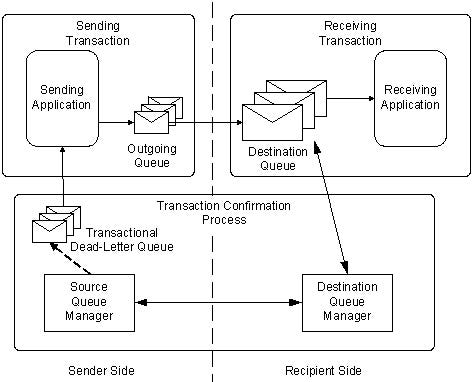
Image Credit: Microsoft
  • A sequence of multiple message operations is grouped together as a single unit of work.
  • The transaction ensures that either all the operations are completed successfully or none of them are. This ensures that the system remains in a consistent state even in the event of failures or errors.
  • Messages are processed in a way that ensures atomicity, consistency, isolation, and durability (ACID).
  • The transaction ensures that either all the operations are completed successfully or none of them are. This ensures that the system remains in a consistent state even in the event of failures or errors.
  • There are some steps:
  • 1) Establish a connection to the message broker by specifying the connection settings such as the broker URL, username, and password
  • 2) Once the connection is established, the transaction is initiated by calling the begin method. This method notifies the message broker that a transaction has started and all subsequent message operations should be grouped together as part of the transaction.
  • 3) Perform the message operations that need to be grouped together as part of the transaction by sending messages to a queue or topic.
  • 4) Once all the message operations have been performed successfully, the transaction is committed by calling the commit method. This method notifies the message broker that all the message operations performed as part of the transaction have been completed successfully.
  • 5) If any errors occur during the transaction, the transaction is rolled back by calling the rollback method. This method notifies the message broker that the transaction has failed and all the message operations performed as part of the transaction should be undone.
  • A transaction is a sequence of message operations that are grouped together as a single unit of work.
  • The transaction ensures that either all the operations are completed successfully or none of them are. This ensures that the system remains in a consistent state even in the event of failures or errors.
  • Messages are processed in a way that ensures atomicity, consistency, isolation, and durability (ACID).
import stomp

class MyListener(stomp.ConnectionListener):

    def __init__(self, conn):
        self.conn = conn

    def on_message(self, headers, message):
        # Process the message
        print("Received message:", message)
        # Acknowledge the message
        self.conn.ack(id=headers['message-id'], subscription=headers['subscription'])

    def on_error(self, headers, message):
        print('Received an error "{}": {}'.format(headers, message))
    
    def on_disconnected(self):
        print('Disconnected from the message broker.')

# Define the message broker connection settings
broker_url = "tcp://localhost:61613"
username = "myusername"
password = "mypassword"
queue_name = "/queue/myqueue"

# Establish a connection to the message broker
conn = stomp.Connection([(broker_url, 61613)])
conn.set_listener('', MyListener(conn))
conn.start()
conn.connect(username, password)

try:
    # Begin the transaction
    conn.begin()
    # Send the first message
    conn.send(body="Message 1", destination=queue_name)
    # Send the second message
    conn.send(body="Message 2", destination=queue_name)
    # Commit the transaction
    conn.commit()
except Exception as ex:
    # Rollback the transaction in case of errors
    conn.rollback()
    print("Error sending messages:", str(ex))

# Disconnect from the message broker
conn.disconnect()
  • Implement using the Apache ActiveMQ library
  • The begin, send, and commit methods are used to group the sending of two messages as a single transaction.
  • If an error occurs during the transaction, the rollback method is called to ensure that none of the messages are processed.
  • Not all message brokers support transactions and the exact implementation may vary depending on the specific message broker and library being used.

Advantages

  • Ensure that messages are delivered to their intended recipients, even in the event of network failures or other disruptions
  • A group of message operations is treated as a single unit of work. Either all of the messages in the transaction are processed or none of them are processed.
  • It can handle large volumes of messages and can be scaled horizontally as needed.
  • It can be used across different platforms and programming languages, making them a versatile solution for message exchange.

Disadvantages

  • Implementing MQ transactions can be complex
  • Add overhead to message processing, which can impact system performance.
  • Require licensing fees and hardware costs, making it potentially expensive to implement

When to use

  • When handling high volumes of messages and requiring atomicity
  • Exchange messages related to financial transactions, such as stock trades or online payments
  • Exchange messages related to supply chain management, such as tracking inventory levels or coordinating deliveries
  • Exchange messages related to online ordering systems, such as processing orders and tracking shipments

Considerations

  • 1) Message Format — Depends on the specific implementation being used. Generally, messages are formatted as a payload of data, along with additional metadata such as message headers and properties. The payload can be in a variety of formats, such as XML, JSON, or binary data.
  • 2) Message Size — The maximum message size depends on the specific implementation being used. Large messages may need to be split into smaller chunks for processing.
  • 3) Error Handling — When errors occur, ensure that message processing is not disrupted and errors are properly handled. So, implement appropriate retry mechanisms and error reporting. For example, the MQ transaction system returns an error message to the sender and the sender can resend the message or notify an administrator. There are some error-handling strategies to implement such as setting up a dedicated error-handling process, implementing retry mechanisms, or using logging and monitoring tools to track errors and performance metrics.

References

If you’ve found any of my articles helpful or useful then please consider throwing a coffee my way to help support my work or give me patronage😊, by using

Patreon

Ko-fi.com

buymeacoffee

Last but not least, if you are not a Medium Member yet and plan to become one, I kindly ask you to do so using the following link. I will receive a portion of your membership fee at no additional cost to you.

Distributed Transaction
Distributed Systems
System Design Interview
Solutions
Data
Recommended from ReadMedium