
Exploring React-Colorful: The Most Popular React Color Picker
An introduction on how to use Image by author
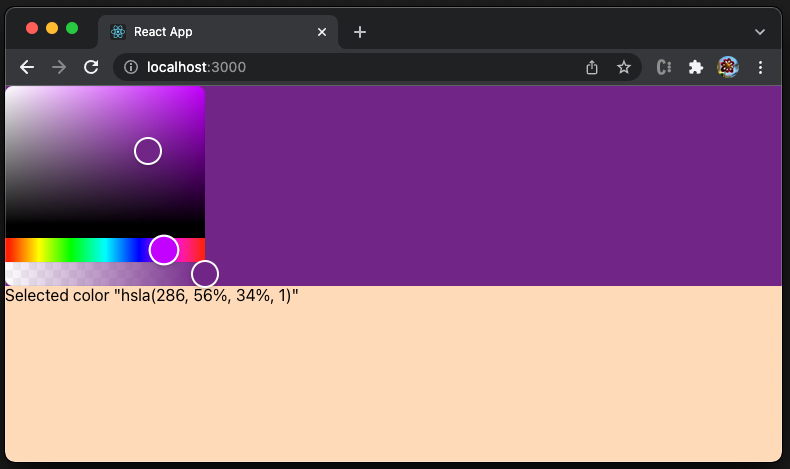
Do you know the color, red?
Yes, it is color red.
Can you tell the color, #00ff00?
Probably yes, if you understand that a hexadecimal color value is specified by #rgb, where r (red), g (green), and b(blue) are color intensities between 00 and ff. Therefore, it is color green.
How about the color, hsla(286, 56%, 34%, 1)?
Hm… It gets difficult for human cognition.
For usability, a color picker is needed. It is a user interface with visual representation of colors, as well as the capability to choose colors. The above image is a color picker, which tells us that hsla(286, 56%, 34%, 1) is sort of purple.
What is the most popular React color picker?
Since the middle of 2021, react-colorful has surpassed react-color to be the most popular React color picker.
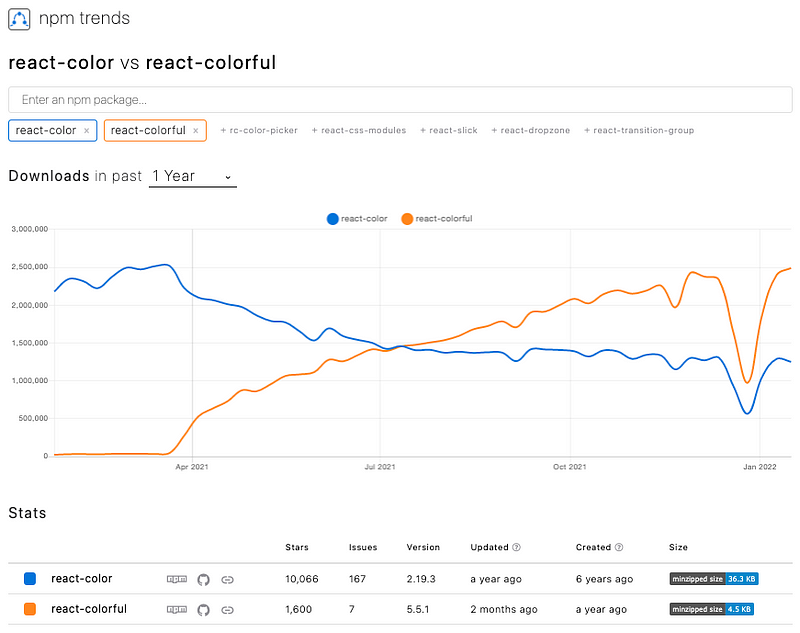
Let’s see how to use react-colorful.
Set Up Color Picker in Create React App
We use Create React App as a base to explore react-colorful. The following command creates a React project:
% npx create-react-app my-app
% cd my-app
Set up react-colorful:
% npm i react-colorfulreact-colorful becomes part of dependencies in package.json:
react-colorful provides 13 color models. Among them, HexColorPicker is the most common one, which uses a hexadecimal color value.
Copy the following code into src/App.js:
It sets up a user interface with the peachPuff background (line 9), which takes the height of the whole viewport (line 10).
There are two items on the user interface:
- The color picker (lines 13–19), which is placed on a div with the selected color (line 15). Line 18 is the color picker component.
- The selected color’s string representation (line 20).
Execute the code by npm start. Pick the selected color, #891e5b, which is used for the top half background.
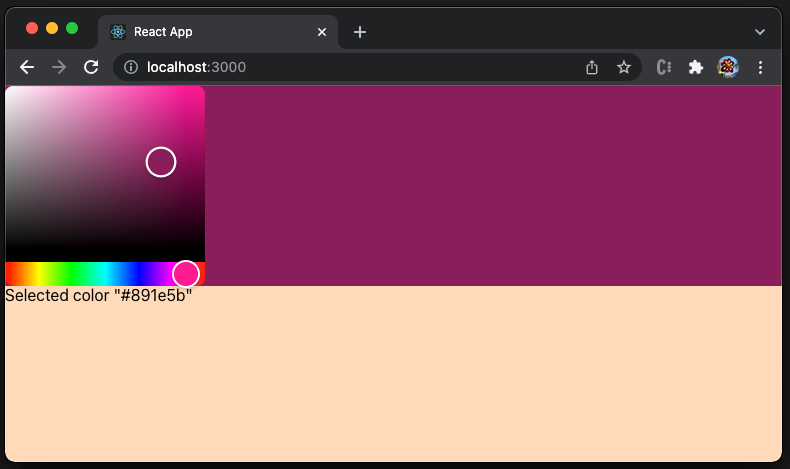
The following video shows how the color picker changes the color of the top half background.
Different Color Models
As we have mentioned, there are 13 color models that support different color representations.
HexColorPicker, such as"#ffffff"RgbColorPicker, such as{ r: 255, g: 255, b: 255 }RgbaColorPicker, such as{ r: 255, g: 255, b: 255, a: 1}RgbStringColorPicker, such as"rgb(255, 255, 255)"RgbaStringColorPicker, such as"rgba(255, 255, 255, 1)"HslColorPicker, such as{ h: 0, s: 0, l: 100 }HslaColorPicker, such as{ h: 0, s: 0, l: 100, a: 1 }HslStringColorPicker, such as"hsl(0, 0%, 100%)"HslaStringColorPicker, such as"hsla(0, 0%, 100%, 1)"HsvColorPicker, such as{ h: 0, s: 0, v: 100 }HsvaColorPicker, such as{ h: 0, s: 0, v: 100, a: 1 }HsvStringColorPicker, such as"hsv(0, 0%, 100%)"HsvaStringColorPicker, such as"hsva(0, 0%, 100%, 1)"
There are 4 ways to describe a color:
- Hex: A hexadecimal color value is specified by
#rgb, where r (red), g (green), and b(blue) are color intensities between00andff."#000000"is black,"#ff0000"is red,"#00ff00"is green,"#0000ff"is blue, and"#ffffff"is white. - RGB: RGB is an object with three keys, where
ris red value,gis green value, andbis blue value. Each value specifies the color intensity between0and255.{ r: 0, g: 0, b: 0 }is black,{ r: 255, g: 0, b: 0 }is red,{ r: 0, g: 255, b: 0 }is green,{ r: 0 g: 0, b: 255 }is blue, and{ r: 255, g: 255, b: 255 }is white. - HSL: HSL stands for hue, saturation, and lightness. Hue is a degree on the color wheel from 0 to 360. 0 is red, 120 is green, and 240 is blue. Saturation is a percentage value, where
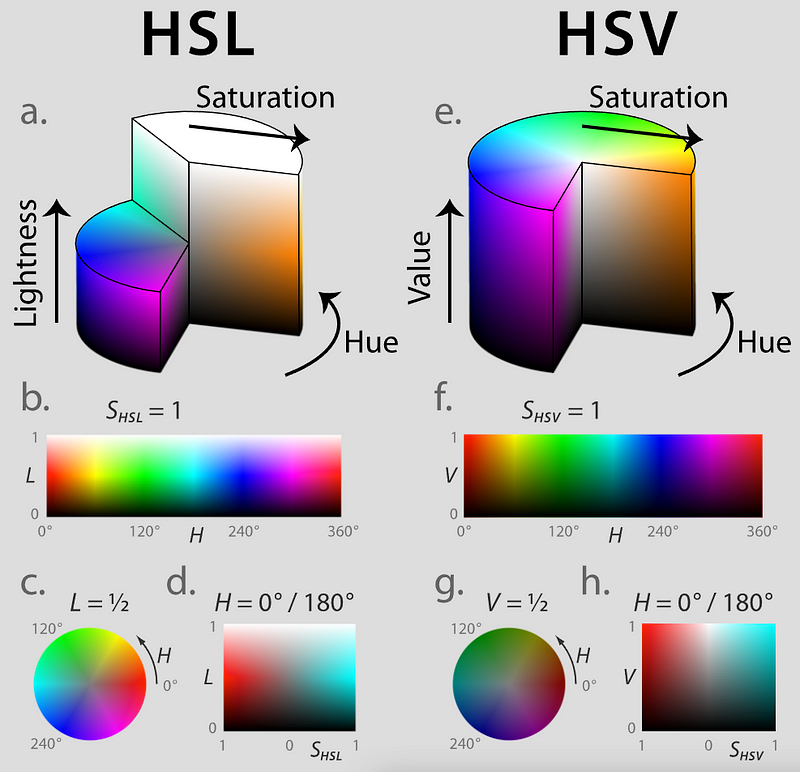
0%is a shade of gray, and100%is the full color. Lightness specifies the brightness, where0%is black,50%is “normal”, and100%is white.{ h: 0, s: 0, l: 100 }is white. - HSV: HSV stands for hue, saturation, and value. It is also known as HSB (hue, saturation, and brightness). The difference between HSL and HSV is that a color with
100%lightness in HSL is pure white, but100%value in HSV only shines a white light on a colored object.{ h: 0, s: 0, v: 100 }is black.
The following diagram shows the differences of HSL and HSV, while the lightness variates with saturation.
For each color representation, there is another optional variable, a (alpha), which specifies the degree of opacity. It is a value between 0 and 1, where 0 is transparent, and 1 is opaque.
react-colorful supports alpha channel for all models except the Hex, whose support is in progress.
Use Different Color Pickers
Let’s try a different color picker. Using RgbColorPicker as an example, we change the import statement in src/App.js to be the following:
import { RgbColorPicker as Picker } from 'react-colorful';Execute the code by npm start. Pick the selected color, { r: 28, g: 38, b: 129 }. However, the color of the top half background remains black.
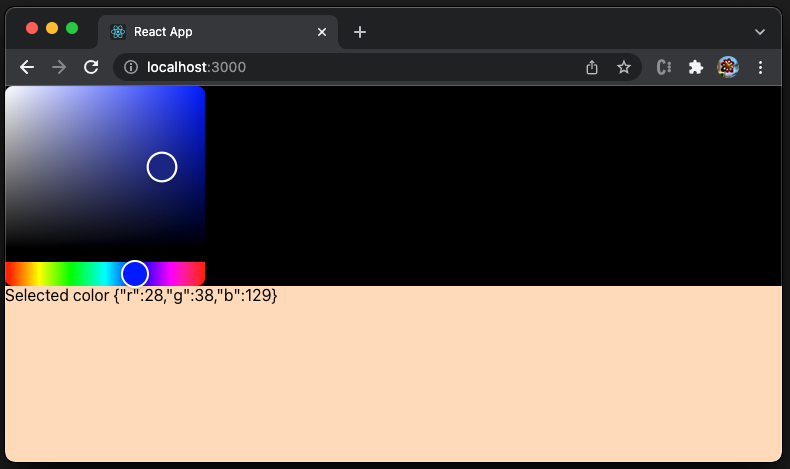
What happened?
The color picker works as expected, since the printed color string is correct. The issue is how to set the CSS color. Although CSS color takes RGB/HSL value, it is in different format, i.e. rgb(r, g, b[, a])/hsl(h, s, l[, a]).
There is another tool called colord that can solve the issue, since it has the functionality to manipulate and convert colors.
Set up colord:
% npm i colordcolord is included in package.json, along with react-colorful.
We import colord in src/App.js:
Line 16 uses colord to convert the color to an hexadecimal value. Now RgbColorPicker works.
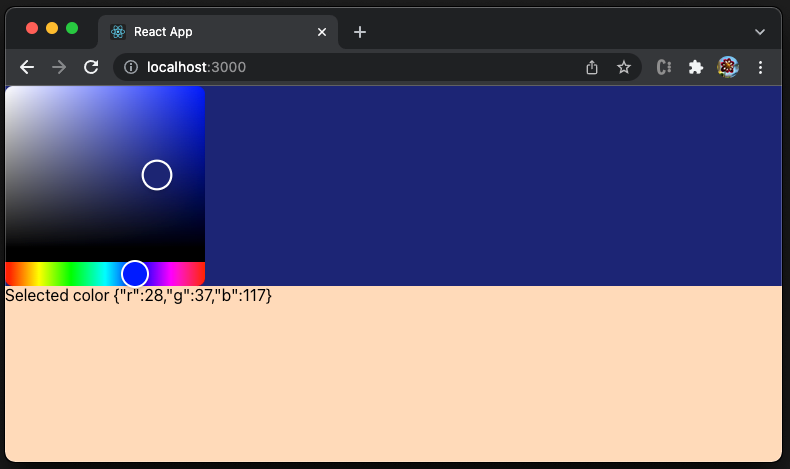
Let’s try another color picker, HslaColorPicker. Simply change the import statement in src/App.js to be the following:
import { HslaColorPicker as Picker } from 'react-colorful';It works perfectly with color selection along with the opaque setting.
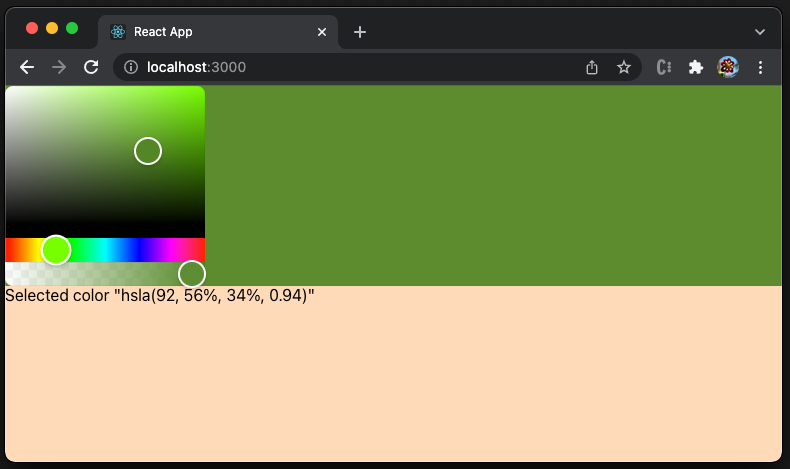
The following video shows how the color picker changes the color of the top half background.
The above example changes the color opacity. We have set the UI background to be peachPuff. When the alpha value is low, we can see the shade of peachPuff blended in.
React-Colorful Features
react-colorful has the following features that stand out from other color pickers.
- Small: It is just 2.8 KB gzipped.
- Tree-shakeable: Only the used parts will be imported into the app bundle.
- Fast: It is built with hooks and functional components only.
- Bulletproof: It is written in strict TypeScript and has 100% test coverage.
- Typed: The package is shipped with types included.
- Simple: The interface is straightforward and easy to use.
- Cross-browser: It works out-of-the-box for most browsers, regardless of version.
- Mobile-friendly: It supports mobile devices and touch screens.
- Accessible: It follows the WAI-ARIA guidelines to support users of assistive technologies.
- No dependencies: It does not have dependencies in
package.json, and it is only peer dependent onreact andreact-dom, with minimal version of16.8.0.
Conclusion
react-colorful is a tiny color picker component for React applications. It is the most popular React color picker, with 13 color models. It is fast, well-tested, dependency-free, mobile-friendly, and accessible. We have shown how easy it is to use in a React app.
If you are fine with the builtin UI, react-colorful is a great choice. However, if you want to have a different looking color picker, you may want to take a look at react-color.
Thanks for reading. I hope this was helpful. If you are interested, check out my other Medium articles.


