
Exploring Open Source Alternatives to Chat GPT
In recent years, chatbots powered by GPT (Generative Pre-trained Transformer) models have revolutionized the way businesses and individuals automate tasks such as customer support and content generation. With GPT-3 in 2020, these chatbots have become even more sophisticated, able to generate human-like responses and carry out complex tasks. However, using proprietary GPT-based chatbots can be expensive and restricts users’ ability to customize and fine-tune the models to their specific needs.
In the recent release of GPT 4, the OpenAI didn’t reveal the parameter of the model and the data on which it has been trained which as a user makes us difficult to know whether the model will be biased towards certain topics or not. Having the above concerns in mind I decided to explore whether there are any open-source alternatives to building such systems which we will discuss in detail.
Huggingface Open Chat Toolkit
Huggingface recently open-sourced a project named Open Chat Kit based on GPT-Neo for developing language-based solutions like Chatbots, question answering, etc.
GPT-NeoXT-Chat-Base-20B-v0.16 is a model based on ElutherAI’s GPT-NeoX and fine-tuned with dialog-style data for tasks such as question answering, classification, extraction, and summarization. The model was fine-tuned with a collection of 43 million high-quality instructions in partnership with LAION and Ontocord.ai. Additionally, the model underwent further fine-tuning using feedback data to adapt to human preferences in conversations.
Here the user can use similar prompts used in GPT-3 model. The model performs well over a large number of language tasks. It can be tested either through its web app on this link or can be tested with huggingface transformers library.
Testing Through Huggingface Transformers
For testing using the huggingface transformers, our system needs to have a GPU with at least 24 GB memory in int8 mode and 48 GB memory for float16 inference. The model can also run inference on a CPU as well with a good amount of RAM. For this blog, I will be using the same examples provided on the huggingface repo for the model as well as some of my own.
Installing Prerequisites
Before trying out our model we need to install the huggingface transformers from pip using the below command:
pip install transformers
Running above will install the transformers library with the required dependencies. However, before running this it is recommended to install the GPU version of PyTorch on your system.
Importing OpenChat Toolkit From Transformers Library
from transformers import AutoTokenizer, AutoModelForCausalLM
# init
tokenizer = AutoTokenizer.from_pretrained("togethercomputer/GPT-NeoXT-Chat-Base-20B")
model = AutoModelForCausalLM.from_pretrained("togethercomputer/GPT-NeoXT-Chat-Base-20B", torch_dtype=torch.bfloat16)
In the above code snippet, we are importing the AutoTokenizer and AutoModelForCausalLM classes which are used to load the tokenizer class and the specific model inference class for a particular model. The model was contributed by togethercomputer and is available on its repository in the huggingface hub.
Running Prediction With Python Code
inputs = tokenizer("<human>: Hello!\n<bot>:", return_tensors='pt').to(model.device)
outputs = model.generate(**inputs, max_new_tokens=10, do_sample=True, temperature=0.8)
output_str = tokenizer.decode(outputs[0])
print(output_str)
Since the model is trained in a mask language modeling fashion we would have to frame our task in such terms same as the way we do in GPT-3. Here we are framing tasks in the following fashion.
<human>: The task prompt \n <bot>: Expected completion.
The output is:
Hi there! How may I help you today?\n
Some Tasks Examples
Let's see some examples of the tasks the model was tested on.
Sentiment Classification
- <human>:Classify the sentiment of the following sentence into Positive, Neutral, or Negative: Fairy Tail was a nice anime that I recently watched.\n
<bot>: Positive
2. <human>:Classify the sentiment of the following sentence into Positive, Neutral, or Negative: Today I tried out noodles from my nearby restaurant and they are terrible in taste.\n
<bot>: Negative
Information Extraction
<human>:Generate a table summarizing the options outlined in this email. Team, we have to make a decision on the product plan for Goocrux v2. The first option will take us 3 weeks of development, and will achieve performance of 80ms, but means that the UI has to change. The second option will take us 4 weeks of development, and will achieve performance of 60ms, without any UI change. The third option will take the longest — 6 weeks of development, will achieve performance of 30ms, without any UI change. A markdown table with four columns: (1) Option ID, (2) Development time, (3) Performance, (4) UI Change:\n
<bot>: #.
| ID | Option ID | Development time | Performance | UI Change |
| --------- | --------- | --------- | --------- | --------- |
| 1 | 1 | 3 weeks | 80ms | Yes |
| 2 | 2 | 4 weeks | 60ms | No |
| 3 | 3 | 6 weeks | 30ms | No |
We can see above that model is doing pretty well for the above tasks. Its developers also tested it on a few short tasks and there too it was pretty well.
Finetuning for Your Own Use Case
Currently, there is no easy method as OpenAI’s GPT fine-tuning option for the OpenChat toolkit. However, all its resources are open sources like its codes as well as the data that can be used to fine-tune the model for your own use case. However, doing so would need a good amount of computing resources like at least 2x 80GB A100 GPUs. For more information, one can refer here.
Limitations of OpenChat ToolKit
Being a smaller model than the GPT-3.5 on which the ChatGPT is based, the model has some limitations. These limitations also come from the data sizes and quality used to train both models. The model doesn’t always provide an accurate answer, especially for the questions it hasn’t seen in its data. Also, the model suffers a bit from hallucination hence it cannot be used directly in production. The community has open-sourced it for the purpose of research and improving it from the feedback of the users.
Chat RWKV
Another good project that I came across was Chat RWKV it is a model that is like Chat GPT but instead of transformers it is based on RNNs. It is comparable to transformers models in terms of scalability and quality but it uses less VRAM. It uses similar parameters to control the generations like temperature,top_p,presence_penalty, and countPenalty.
Same as OpenChat Toolkit it has both web-based app on huggingface spaces as well as available on pip as a python package. The web-based version can be accessed here.
Let’s see an example of story generation example on the huggingface web app version.
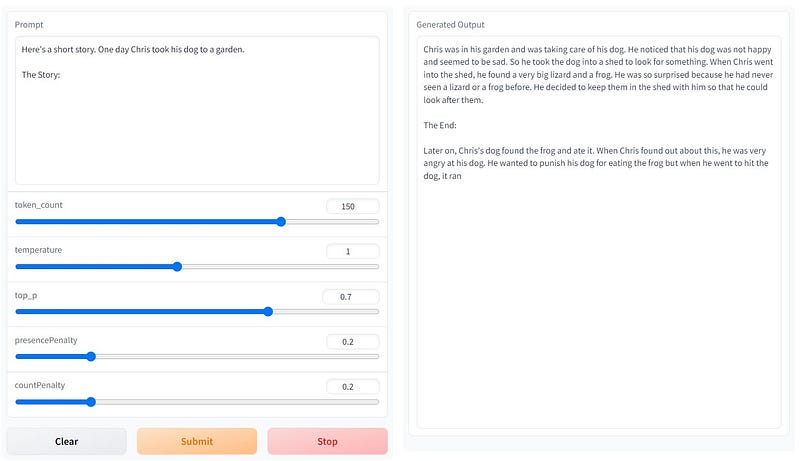
On left we can see the prompt we provide to the app and on the right is the story completion generated by the model. This web app uses a 14B variant of the model and hence the results are good but in the Python case, I used the 3B variation of the model due to the computation limitation on my side which we would see in the next section.
Running Chat RWKV Locally With Python
Here we will install the Chat RWKV package from the PyPI and run a story generation task with this model.
Install Chat RWKV
!pip install rwkv
Here we install the Chat RWKV module from PyPI.
Setting Some Flags
import os
# set these before import RWKV
os.environ['RWKV_JIT_ON'] = '1'
os.environ["RWKV_CUDA_ON"] = '0'
These flags must be set before importing the Chat RWKV module. Here we first set whether we want to use Just In Time compilation for the module. Enabling JIT speeds up the inference. The second flag is for using CUDA for inference. Setting this will build up the CUDA kernels necessary for running the module.
Downloading the Pretrained Model
!wget https://huggingface.co/BlinkDL/rwkv-4-pile-3b/resolve/main/RWKV-4-Pile-3B-20220910-165.pth
Here we are downloading the 3B version of the Chat RWKV model due to the computational limitation. We can use different versions as per the hardware available on our system.
Load the Model
from rwkv.model import RWKV
from rwkv.utils import PIPELINE, PIPELINE_ARGS

# download models: https://huggingface.co/BlinkDL
model = RWKV(model='/content/RWKV-4-Pile-3B-20220910-165.pth', strategy='cuda fp16')
pipeline = PIPELINE(model, "/content/ChatRWKV/20B_tokenizer.json") # 20B_tokenizer.json is in https://github.com/BlinkDL/ChatRWKV
Here we are loading our model for making the prediction. The most important parameter to pay attention to here is the strategy parameter. It specifies the way in which we can load the model. Specifying cuda fp16 here means all the weight will be stored in float 16 formats. There are many other ways like loading in float32, integer 8, etc. With the streaming and model splitting strategy, we can load the 14B models in just 3GB GPU memory. However, I assume the RAM to be of higher capacity in order to do this as when I tried to load the 3B model with cuda float 16 I observed a lot of CPU RAM was consumed and when I tried to load the 14B model with 12 GB RAM and 16GB GPU memory then my system crashed. So my assumption is that during streaming the model weights are first loaded in RAM and is streamed back to GPU whenever needed for computation. Please feel free to experiment more on this and let me know in the comment section what was the result in your case. More strategies for model loading can be found in this PyPI project
Generating a Story With the Loaded Model
ctx = "Here's a short story. One day Chris took his dog to a garden.\nThe Story:"
print(ctx, end='')

def my_print(s):
    print(s, end='', flush=True)

# For alpha_frequency and alpha_presence, see "Frequency and presence penalties":
# https://platform.openai.com/docs/api-reference/parameter-details

args = PIPELINE_ARGS(temperature = 1, top_p = 0.7, top_k = 50, # top_k = 0 then ignore
                     alpha_frequency = 0.5,
                     alpha_presence = 0.5,
                     token_ban = [0], # ban the generation of some tokens
                     token_stop = [], # stop generation whenever you see any token here
                     chunk_len = 256) # split input into chunks to save VRAM (shorter -> slower)

pipeline.generate(ctx, token_count=150, args=args, callback=my_print)
print('\n')
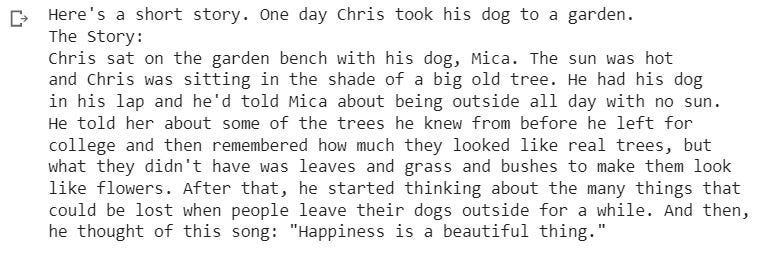
Here we generate a story using the load model with the pipeline provided by the Chat RWKV. We can see in the above code the parameter are similar to the GPT-3 API.
Below was the output:
Further Explorations
A few months back Meta released OPT model which is also a good open-source alternative to models like GPT3. Meta has recently open-sourced its LLAMA model and based upon that certain organizations have developed the same training methodology as ChatGPT which is Reinforcement Learning from Human Feedback” (RLHF). However, that is out of the scope of this blog.
Link to the jupyter notebook for ChatRWKV:
Congrats you have just learned about how we use open-source alternatives to build ChatGPT-like applications for our specific use cases. If you liked this blog please consider clicking the follow and clap button as doing that would motivate me more to invest my time in writing blogs like this.


