
Exploring Java 8 Features: Why, What, and How to Use Them
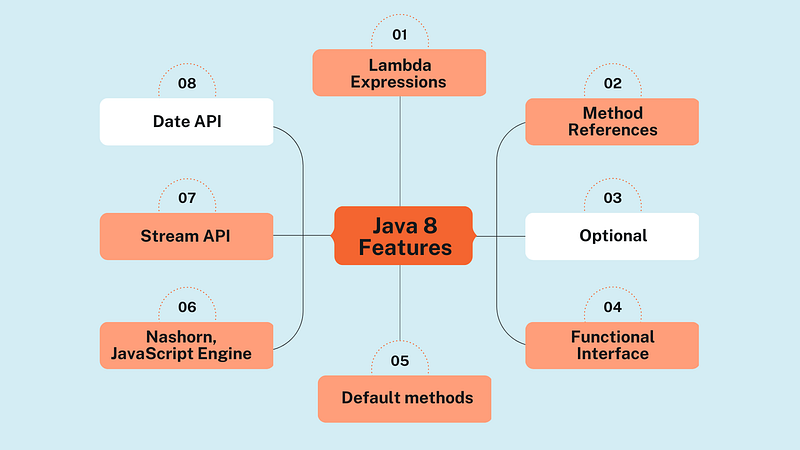
Java 8 was a game-changer for the Java programming language. Released in March 2014, it introduced many powerful features that made coding more efficient and expressive. In this post, I’ll walk you through the key Java 8 features, explain why they were introduced, where you can use them, and provide simple examples for each.
1. Lambda Expressions
Why were they introduced?
Before Java 8, writing small blocks of code (like event handlers, comparators, or small tasks) often required verbose inner classes or interfaces. Lambdas make it easier to write concise code by allowing us to pass functionality (behavior) as an argument to a method.
What is it?
A Lambda Expression is essentially an anonymous function — a shorter way to implement an interface method using a clean and readable syntax.
Where to use it?
Use Lambda Expressions when you want to implement functional interfaces (interfaces with only one abstract method, such as Runnable, Comparator, etc.).
Example:
Before Java 8:
import java.util.*;

class Employee {
    private String name;
    private double salary;

    public Employee(String name, double salary) {
        this.name = name;
        this.salary = salary;
    }

    public String getName() {
        return name;
    }

    public double getSalary() {
        return salary;
    }

    @Override
    public String toString() {
        return name + ": $" + salary;
    }
}

public class LambdaBefore {
    public static void main(String[] args) {
        List<Employee> employees = Arrays.asList(
            new Employee("John", 50000),
            new Employee("Jane", 60000),
            new Employee("Max", 55000),
            new Employee("Emily", 70000)
        );

        // Sort by salary
        Collections.sort(employees, new Comparator<Employee>() {
            @Override
            public int compare(Employee e1, Employee e2) {
                return Double.compare(e1.getSalary(), e2.getSalary());
            }
        });

        System.out.println("Sorted Employees by Salary:");
        for (Employee employee : employees) {
            System.out.println(employee);
        }

        // Filter employees with salary greater than 55000
        List<Employee> filteredEmployees = new ArrayList<>();
        for (Employee employee : employees) {
            if (employee.getSalary() > 55000) {
                filteredEmployees.add(employee);
            }
        }

        System.out.println("\nEmployees with salary above 55000:");
        for (Employee employee : filteredEmployees) {
            System.out.println(employee);
        }
    }
}
With Lambda Expression:
import java.util.*;

class Employee {
    private String name;
    private double salary;

    public Employee(String name, double salary) {
        this.name = name;
        this.salary = salary;
    }

    public String getName() {
        return name;
    }

    public double getSalary() {
        return salary;
    }

    @Override
    public String toString() {
        return name + ": $" + salary;
    }
}

public class LambdaAfter {
    public static void main(String[] args) {
        List<Employee> employees = Arrays.asList(
            new Employee("John", 50000),
            new Employee("Jane", 60000),
            new Employee("Max", 55000),
            new Employee("Emily", 70000)
        );

        // Sort by salary using Lambda
        employees.sort((e1, e2) -> Double.compare(e1.getSalary(), e2.getSalary()));

        System.out.println("Sorted Employees by Salary:");
        employees.forEach(System.out::println);

        // Filter employees with salary greater than 55000 using Lambda and Streams
        System.out.println("\nEmployees with salary above 55000:");
        employees.stream()
                 .filter(e -> e.getSalary() > 55000)
                 .forEach(System.out::println);
    }
}
As you can see, it makes the code cleaner and easier to read.
2. Functional Interfaces
Why were they introduced?
Java 8 introduced Lambda Expressions but needed a way to tie them to methods. That’s where Functional Interfaces come in. They act as a contract for Lambda Expressions, ensuring that the lambda has a matching method signature.
What is it?
A Functional Interface is an interface with only one abstract method, like Runnable or Callable.
Where to use it?
Use Functional Interfaces to enable lambda expressions. Some built-in functional interfaces are Predicate, Function, Consumer, and Supplier.
Example:
@FunctionalInterface
interface MathOperation {
    int operate(int a, int b);
}

public class FunctionalInterfaceAfter {
    public static void main(String[] args) {

        // Addition operation using Lambda Expression
        MathOperation add = (a, b) -> a + b;

        // Multiplication operation using Lambda Expression
        MathOperation multiply = (a, b) -> a * b;

        System.out.println("Addition of 5 and 10: " + add.operate(5, 10));
        System.out.println("Multiplication of 5 and 10: " + multiply.operate(5, 10));
    }
}
3. Streams API
Why was it introduced?
Before Java 8, processing collections (like filtering or transforming data) involved writing a lot of boilerplate code. The Streams API simplifies these operations by allowing you to process data in a declarative way, focusing more on what you want to do rather than how to do it.
What is it?
The Streams API allows you to work with sequences of data (like lists or sets) and perform operations such as filtering, mapping, and reducing.
Where to use it?
Use streams when you need to process large datasets (like filtering or transforming) without modifying the original collection.
Example:
Before Java 8:
import java.util.*;

class Transaction {
    private String id;
    private double amount;

    public Transaction(String id, double amount) {
        this.id = id;
        this.amount = amount;
    }

    public String getId() {
        return id;
    }

    public double getAmount() {
        return amount;
    }

    @Override
    public String toString() {
        return "Transaction ID: " + id + ", Amount: $" + amount;
    }
}

public class StreamsBefore {
    public static void main(String[] args) {
        List<Transaction> transactions = Arrays.asList(
            new Transaction("TXN001", 500),
            new Transaction("TXN002", 1500),
            new Transaction("TXN003", 2500),
            new Transaction("TXN004", 800)
        );

        // Filtering and sorting manually
        List<Transaction> highValueTransactions = new ArrayList<>();
        for (Transaction t : transactions) {
            if (t.getAmount() > 1000) {
                highValueTransactions.add(t);
            }
        }

        Collections.sort(highValueTransactions, new Comparator<Transaction>() {
            @Override
            public int compare(Transaction t1, Transaction t2) {
                return Double.compare(t2.getAmount(), t1.getAmount());
            }
        });

        for (Transaction t : highValueTransactions) {
            System.out.println(t);
        }
    }
}
With Streams API:
import java.util.*;
import java.util.stream.Collectors;

class Transaction {
    private String id;
    private double amount;

    public Transaction(String id, double amount) {
        this.id = id;
        this.amount = amount;
    }

    public String getId() {
        return id;
    }

    public double getAmount() {
        return amount;
    }

    @Override
    public String toString() {
        return "Transaction ID: " + id + ", Amount: $" + amount;
    }
}

public class StreamsAfter {
    public static void main(String[] args) {

        List<Transaction> transactions = Arrays.asList(
            new Transaction("TXN001", 500),
            new Transaction("TXN002", 1500),
            new Transaction("TXN003", 2500),
            new Transaction("TXN004", 800)
        );

        // Using Streams API to filter and sort
        List<Transaction> highValueTransactions = transactions.stream()
            .filter(t -> t.getAmount() > 1000)
            .sorted((t1, t2) -> Double.compare(t2.getAmount(), t1.getAmount()))
            .collect(Collectors.toList());

        highValueTransactions.forEach(System.out::println);
    }
}
With the Streams API, the code becomes more readable and expressive.
4. Default Methods in Interfaces
Why were they introduced?
Before Java 8, any changes to an interface would force all implementing classes to update their code, which was cumbersome. Default Methods allow you to add new functionality to interfaces without breaking existing implementations.
What is it?
A Default Method is a method with a body inside an interface, allowing you to provide a default implementation.
Where to use it?
Use default methods to add new methods to interfaces without forcing the implementing classes to override them.
Example:
interface Vehicle {
    default void start() {
        System.out.println("Vehicle is starting");
    }

    void drive();
}

class Car implements Vehicle {
    @Override
    public void drive() {
        System.out.println("Car is driving");
    }
}

public class DefaultMethodsAfter {
    public static void main(String[] args) {
        Vehicle car = new Car();
        car.start();  // Uses default method
        car.drive();
    }
}
5. Method References
Why were they introduced?
Sometimes Lambda Expressions can become verbose even though they’re just calling a method directly. Method References provide a shorter, more readable way to refer to methods without repeating the method logic.
What is it?
A Method Reference is a shorthand for a lambda expression that calls a specific method.
Where to use it?
Use method references when your lambda expression is just calling an existing method.
Example:
Using Lambda Expression:
import java.util.Arrays;
import java.util.List;

public class MethodReferenceBefore {
    public static void main(String[] args) {

        List<String> names = Arrays.asList("John", "Jane", "Max", "Emily");

        // Printing names using a loop
        for (String name : names) {
            System.out.println(name);
        }

        // Sorting names using anonymous inner class
        names.sort((s1, s2) -> s1.compareTo(s2));
        System.out.println("Sorted Names: " + names);
    }
}
Using Method Reference:
import java.util.Arrays;
import java.util.List;

public class MethodReferenceAfter {
    public static void main(String[] args) {

        List<String> names = Arrays.asList("John", "Jane", "Max", "Emily");

        // Printing names using Method Reference
        names.forEach(System.out::println);

        // Sorting names using Method Reference
        names.sort(String::compareTo);
        System.out.println("Sorted Names: " + names);
    }
}
6. Optional
Why was it introduced?
Before Java 8, handling null values often led to NullPointerExceptions (NPEs). The Optional class helps avoid these exceptions by providing a way to represent values that may or may not be present.
What is it?
Optional is a container object which may or may not contain a non-null value. It provides methods to check and handle values safely.
Where to use it?
Use Optional to avoid NullPointerExceptions and to handle potentially null values more gracefully.
Example:
Without Optional:
class User {
    private String name;

    public User(String name) {
        this.name = name;
    }

    public String getName() {
        return name;
    }
}

public class OptionalBefore {
    public static void main(String[] args) {

        User user = null;  // Simulate a null user

        // Manually checking for null to avoid NullPointerException
        if (user != null) {
            System.out.println("User's name is: " + user.getName());
        } else {
            System.out.println("User is null!");
        }
    }
}
With Optional:
import java.util.Optional;

class User {
    private String name;

    public User(String name) {
        this.name = name;
    }

    public String getName() {
        return name;
    }
}

public class OptionalAfter {
    public static void main(String[] args) {
        User user = null;  // Simulate a null user
        Optional<User> optionalUser = Optional.ofNullable(user);

        // Using Optional to avoid NullPointerException
        optionalUser.ifPresentOrElse(
            u -> System.out.println("User's name is: " + u.getName()),
            () -> System.out.println("User is null!")
        );
    }
}
7. Date and Time API
Why was it introduced?
The old java.util.Date and java.util.Calender classes were confusing and error-prone. Java 8 introduced a new Date and Time API to make date-time operations easier and less error-prone.
What is it?
The Date and Time API is a set of classes under the java.time package that provides better support for handling dates, times, and time zones.
Where to use it?
Use the new Date and Time API whenever you need to work with dates and times in your application.
Example:
Before Java 8:
import java.util.Date;
import java.util.Calendar;

public class DateTimeBefore {
    public static void main(String[] args) {

        // Get current date and time
        Date currentDate = new Date();
        System.out.println("Current Date: " + currentDate);

        // Calculate next week date using Calendar
        Calendar calendar = Calendar.getInstance();
        calendar.setTime(currentDate);
        calendar.add(Calendar.WEEK_OF_YEAR, 1);

        Date nextWeekDate = calendar.getTime();
        System.out.println("Next Week Date: " + nextWeekDate);
    }
}
With Java 8’s Date and Time API:
import java.time.LocalDate;
import java.time.LocalDateTime;
import java.time.format.DateTimeFormatter;

public class DateTimeAfter {
    public static void main(String[] args) {

        // Get current date and time
        LocalDate currentDate = LocalDate.now();
        System.out.println("Current Date: " + currentDate);

        // Calculate next week date
        LocalDate nextWeekDate = currentDate.plusWeeks(1);
        System.out.println("Next Week Date: " + nextWeekDate);

        // Get current date and time in a specific format
        LocalDateTime currentDateTime = LocalDateTime.now();
        DateTimeFormatter formatter = DateTimeFormatter.ofPattern("dd-MM-yyyy HH:mm:ss");

        String formattedDateTime = currentDateTime.format(formatter);
        System.out.println("Formatted Current DateTime: " + formattedDateTime);
    }
}
Conclusion
Java 8 brought a wave of innovation to the language. Features like Lambda Expressions, Streams, and Optional allow for cleaner, more concise code, making it easier to work with complex data and avoid common pitfalls like NullPointerException. Understanding these features will help you write better Java code, making your applications more efficient and maintainable. Happy coding!
If you found this post helpful, follow me for more such content!
For those interested in connecting or seeking guidance, feel free to reach out to me on LinkedIn:Amit Singh. & Instagram: amit_singhh10.
If you enjoyed this post or found it helpful, don’t forget to clap!👏
Stackademic 🎓
Thank you for reading until the end. Before you go:
- Please consider clapping and following the writer! 👏
- Follow us X | LinkedIn | YouTube | Discord
- Visit our other platforms: In Plain English | CoFeed | Differ
- More content at Stackademic.com


