
Asyncpg: Asynchronous Alternative to Psycopg
Blocking libraries won’t work seamlessly with coroutines. To run queries concurrently against a database, we’ll need to use an asyncio-friendly library that uses non-blocking sockets. To do this, we’ll use a library called asyncpg, which will let us asynchronously connect to Postgres databases and run queries against them.

Supabase
We will use Supabase. You can set up your db with almost no effort. It can do much more, but we need just a db for our purposes.
Below are three steps we need to get started with the DB.
Creating a database
Copy the password, we will need it later.

Getting the credentials
From this page, you can get the credentials for the DB connection.

That’s it. Good job! In a few steps, we have the database ready.
Install dependencies
pip install asyncpg
Connecting to a Postgres database
We’ve connected! But nothing is currently stored in our database. We used credentials from Supabase to our Postgres instance.
import asyncpg
import asyncio


async def main():
    connection = await asyncpg.connect(host="db.fygynsqqzskzevaplkjz.supabase.co",
                                       port=5432,
                                       user="postgres",
                                       database="postgres",
                                       password="xW3OEGMQot6xvB7l")

    version = connection.get_server_version()
    print(f"Connected! Postgres version is {version}")
    await connection.close()


asyncio.run(main())

# Connected! Postgres version is ServerVersion(major=15, minor=0, micro=1, releaselevel='final', serial=0)
Defining a database schema
Using asyncpg, we’ll execute the statement to create our users table.
import asyncpg
import asyncio

CREATE_USERS_TABLE = (
    """
    CREATE TABLE IF NOT EXISTS users (
        user_id SERIAL PRIMARY KEY,
        first_name TEXT NOT NULL,
        last_name TEXT NOT NULL
    );"""
)


async def main():
    connection = await asyncpg.connect(host="db.fygynsqqzskzevaplkjz.supabase.co",
                                       port=5432,
                                       user="postgres",
                                       database="postgres",
                                       password="xW3OEGMQot6xvB7l")

    status = await connection.execute(CREATE_USERS_TABLE)
    print(status)  # CREATE TABLE

    await connection.close()


asyncio.run(main())
Result
You can check in Supabase that the table was created.

Inserting data into the database
Note that execute is a coroutine, so to run our SQL we need to await the call.
import asyncpg
import asyncio


async def main():
    connection = await asyncpg.connect(host="db.fygynsqqzskzevaplkjz.supabase.co",
                                       port=5432,
                                       user="postgres",
                                       database="postgres",
                                       password="xW3OEGMQot6xvB7l")

    await connection.execute("INSERT INTO users VALUES(DEFAULT, 'Tomas', 'Svojanovsky')")
    await connection.execute("INSERT INTO users VALUES(DEFAULT, 'John', 'Doe')")

    await connection.close()


asyncio.run(main())
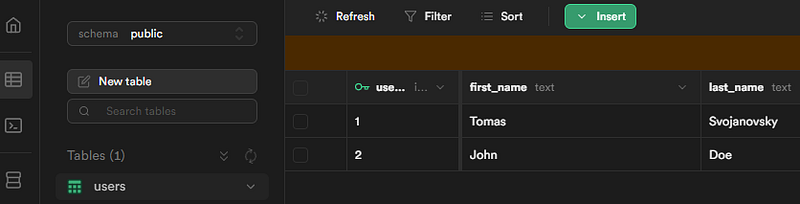
Result
Hooray! We have our data in the DB.
Fetching data from the database
If we wanted to fetch a single result, we could call connection.fetchrow(), which will return a single record from the query. The default asyncpg connection will pull all results from our query into memory, so for the time being there is no performance difference between fetchrow and fetch.
import asyncpg
import asyncio
from asyncpg import Record


async def main():
    connection = await asyncpg.connect(host="db.fygynsqqzskzevaplkjz.supabase.co",
                                       port=5432,
                                       user="postgres",
                                       database="postgres",
                                       password="xW3OEGMQot6xvB7l")

    result: list[Record] = await connection.fetch("SELECT user_id, first_name, last_name FROM users")

    for row in result:
        print(*row)

    await connection.close()


asyncio.run(main())

# 1 Tomas Svojanovsky
# 2 John Doe
Multiple queries
Oops. We get an error.
We have only one connection. One connection means one socket connection to our database. Since we have only one connection and we’re trying to read the results of multiple queries concurrently, we experience an error.
We can resolve this by creating multiple connections to our database and executing one query per connection. Since creating connections is resource-expensive, we will cache them and we can access them when needed makes sense.
We will need a connection pool to resolve this issue.
import asyncpg
import asyncio
from asyncpg import Record


async def main():
    connection = await asyncpg.connect(host="db.fygynsqqzskzevaplkjz.supabase.co",
                                       port=5432,
                                       user="postgres",
                                       database="postgres",
                                       password="xW3OEGMQot6xvB7l")

    query = "SELECT user_id, first_name, last_name FROM users"

    queries = [
        connection.execute(query),
        connection.execute(query),
    ]

    result: tuple[Record] = await asyncio.gather(*queries)

    for row in result:
        print(*row)

    await connection.close()


asyncio.run(main())

# asyncpg.exceptions._base.InterfaceError: cannot perform operation: another operation is in progress
# Task was destroyed but it is pending!
Connection pool
We first acquire a connection from the pool with pool.acquire(). This coroutine will then suspend running until a connection is available from the connection pool. We do this in an async with block; this will ensure that once we leave the block, the connection will be returned to the pool.
import asyncpg
import asyncio
from asyncpg import Record


async def fetch_user(pool, query, id):
    async with pool.acquire() as connection:
        return await connection.fetchrow(query, id)


async def main():
    async with asyncpg.create_pool(host="db.fygynsqqzskzevaplkjz.supabase.co",
                                   port=5432,
                                   user="postgres",
                                   database="postgres",
                                   password="xW3OEGMQot6xvB7l",
                                   max_size=10,
                                   min_size=10,
                                   ) as pool:

        query = "SELECT user_id, first_name, last_name FROM users WHERE user_id = $1"

        queries = [
            fetch_user(pool, query, 1),
            fetch_user(pool, query, 2),
        ]

        result: tuple[Record] = await asyncio.gather(*queries)

        for row in result:
            print(*row)


asyncio.run(main())

# 1 Tomas Svojanovsky
# 2 John Doe
Transactions
Assuming our transaction is committed successfully, we should see the data. This example assumes zero errors running the statement, and everything was committed successfully.
import asyncpg
import asyncio
from asyncpg import Record


async def main():
    connection = await asyncpg.connect(host="db.fygynsqqzskzevaplkjz.supabase.co",
                                       port=5432,
                                       user="postgres",
                                       database="postgres",
                                       password="xW3OEGMQot6xvB7l")

    async with connection.transaction():
        result: list[Record] = await connection.fetch("SELECT user_id, first_name, last_name FROM users")

        for row in result:
            print(*row)

    await connection.close()

asyncio.run(main())
Transaction with rollback
Because we attempted to insert a duplicate key and then see that the result of our select statement was empty, indicating that we successfully rolled back the transaction.
import asyncpg
import asyncio


async def main():
    connection = await asyncpg.connect(host="db.fygynsqqzskzevaplkjz.supabase.co",
                                       port=5432,
                                       user="postgres",
                                       database="postgres",
                                       password="xW3OEGMQot6xvB7l")

    try:
        async with connection.transaction():
            await connection.execute("INSERT INTO users VALUES(1, 'tomas', 'svojanovsky')")
    except Exception as e:
        print(e)
    finally:
        await connection.close()


asyncio.run(main())

# duplicate key value violates unique constraint "users_pkey"
# DETAIL:  Key (user_id)=(1) already exists.
Thanks for reading my article!
If you enjoyed the read and want to be part of our growing community, hit the follow button, and let’s embark on a knowledge journey together.
Your feedback and comments are always welcome, so don’t hold back!
In Plain English
Thank you for being a part of our community! Before you go:
- Be sure to clap and follow the writer! 👏
- You can find even more content at PlainEnglish.io 🚀
- Sign up for our free weekly newsletter. 🗞️
- Follow us on Twitter(X), LinkedIn, YouTube, and Discord.


