avatarEiki Takeuchi

Free AI web copilot to create summaries, insights and extended knowledge, download it at here

4786

Abstract

b9"><pre>opcodes: Operation codes <span class="hljs-keyword">that</span> are human-readable low-level instructions.</pre></div><div id="47d0"><pre>sourceMap: ource map is <span class="hljs-built_in">to</span> match <span class="hljs-keyword">each</span> contract instruction <span class="hljs-built_in">to</span> <span class="hljs-keyword">the</span> section <span class="hljs-keyword">of</span> <span class="hljs-keyword">the</span> source code <span class="hljs-built_in">from</span> which <span class="hljs-keyword">it</span> was generated.</pre></div><h1 id="05f7">Contract ABI</h1><p id="2ca2">In computer science, ABI(Application Binary Interface) is an interface between two program modules, often between an operating system and user programs. In Ethereum, Contract ABI is an interface that defines a standard scheme of how to call functions in a smart contract and get data back. Contract ABI is designed for external use to enable application-to-contract and contract-to-contract interaction. For example, if you want to call an intelligent contract function from your dApp, you call via Contract ABI. Contract ABI is represented in JSON format like below.</p><p id="ee0a">Contract ABI defines function names and argument data types. It is used to encode contract calls for the EVM and to read data out of transactions. There is a precise specification of how to encode and decode Contract ABI. I will use the below function to describe the example of encoding.</p><div id="e739"><pre><span class="hljs-keyword">function</span> <span class="hljs-title">withdraw</span>(uint <span class="hljs-keyword">with</span>draw_amount) public {}</pre></div><p id="b2ab">First, the “withdraw” function will be encoded with keccak256, and the first 4 bytes will be used as a selector. The selector is a mark to identify which function to call.</p><div id="0750"><pre><span class="hljs-comment">// Encode function with keccak256.</span> > web3<span class="hljs-selector-class">.utils</span><span class="hljs-selector-class">.sha3</span>(“<span class="hljs-built_in">withdraw</span>(uint256)”) <span class="hljs-number">0</span>x2e1a7d4d13322e7b96f9a57413e1525c250fb7a9021cf91d1540d5b69f16a49f</pre></div><div id="31af"><pre>// <span class="hljs-keyword">Extract</span> <span class="hljs-built_in">first</span> <span class="hljs-number">4</span> bytes. <span class="hljs-number">0x2c1a7d4d</span></pre></div><p id="0faf">Next, the argument will be encoded in hex decimal and appended to the encoded “withdraw” function with 32 bytes of padding.</p><div id="3709"><pre><span class="hljs-comment">// Convert from ETH to Wei.</span> > withdraw_amount = web3.utils.toWei(“<span class="hljs-number">0.01</span><span class="hljs-string">", “ether”);</span> <span class="hljs-number">10000000000000000</span></pre></div><div id="a9fa"><pre><span class="hljs-comment">// Convert Wei with hexdecimal.</span> > withdraw_amount_hex = web3.<span class="hljs-built_in">toHex</span>(withdraw_mount); <span class="hljs-number">0x2386f26fc10000</span></pre></div><div id="4666"><pre>// Left padding. <span class="hljs-meta prompt_">></span> <span class="language-javascript">withdraw_amount_padleft = web3.<span class="hljs-property">utils</span>.<span class="hljs-title function_">leftPad</span>(withdraw_amount_hex, <span class="hljs-number">32</span>);</span> 0x0000000000000000002386f26fc10000</pre></div><div id="a85d"><pre><span class="hljs-regexp">//</span> Append to selector(encoded <span class="hljs-keyword">function</span>). “<span class="hljs-number">0</span>x2c1a7d4d” + withdraw_amount_padleft</pre></div><div id="cb30"><pre><span class="hljs-comment">// Final encoded ABI.</span> <span class="hljs-number">0</span>x2c1a7d4d0x0000000000000000002386f26fc10000</pre></div><p id="c7a3">The data invokes the withdraw function and requests 0.01 as the argument. If you want details about ABI encoding/decoding specifications, please refer to Contract ABI Specification.</p><p id="4eec">When interacting with the contract, you can use web3.js like the one below. First, contract with Contract ABI, and next, create an instance with the EVM bytecode. This code is generated by Solidity REMIX when compiling is successful.</p><h1 id="edd2">Commands with “sold.”</h1><p id="f5a9">Let’s generate Contract ABI and EVM bytecode with the’solc’ command. Solc command is one of the most popularly used compilers. Let’s install it with an npm package manager.</p><p id="cbdf">Install</p><div id="addd"><pre> npm <span class="hljs-keyword">install</span> -g solc</pre></div><p id="e1c7">We will use this sample source code. The filename is SampleToken.sol.</p><p id="8525">Output EVM Bytecode</p><div id="115e"><pre> solc --bin SampleToken.sol > <span class="hljs-operator">=</span><span clas

Options

s="hljs-operator">=</span><span class="hljs-operator">=</span><span class="hljs-operator">=</span><span class="hljs-operator">=</span><span class="hljs-operator">=</span><span class="hljs-operator">=</span> SampleContract.sol:SampleContract <span class="hljs-operator">=</span><span class="hljs-operator">=</span><span class="hljs-operator">=</span><span class="hljs-operator">=</span><span class="hljs-operator">=</span><span class="hljs-operator">=</span><span class="hljs-operator">=</span> Binary: <span class="hljs-number">6080604052348015600</span>f<span class="hljs-number">57600080</span>fd<span class="hljs-number">5</span>b<span class="hljs-number">5060878061001e6000396000</span>f<span class="hljs-number">3</span>fe<span class="hljs-number">6080604052348015600</span>f<span class="hljs-number">57600080</span>fd<span class="hljs-number">5</span>b<span class="hljs-number">506004361060285760003560e01</span><span class="hljs-keyword">c</span><span class="hljs-number">8063037</span>a<span class="hljs-number">417</span><span class="hljs-keyword">c</span><span class="hljs-number">14602</span>d<span class="hljs-number">575</span>b<span class="hljs-number">600080</span>fd<span class="hljs-number">5</span>b<span class="hljs-number">60336049565</span>b<span class="hljs-number">6040518082815260200191505060405180910390</span>f<span class="hljs-number">35</span>b<span class="hljs-number">6000600190509056</span>fea<span class="hljs-number">265627</span>a<span class="hljs-number">7</span>a<span class="hljs-number">7230582050</span>d<span class="hljs-number">33093e20</span>eb<span class="hljs-number">388</span>eec<span class="hljs-number">760</span>ca<span class="hljs-number">84</span>ba<span class="hljs-number">30</span>ec<span class="hljs-number">42</span>dadbdeb<span class="hljs-number">8</span>edf<span class="hljs-number">5</span>cd<span class="hljs-number">8</span>b<span class="hljs-number">261e89</span>b<span class="hljs-number">8</span>d<span class="hljs-number">4279264736</span>f<span class="hljs-number">6</span><span class="hljs-keyword">c</span><span class="hljs-number">634300050</span>a<span class="hljs-number">0032</span></pre></div><p id="3643">Output Contract ABI</p><div id="0048"><pre><span class="hljs-variable"> </span>sold —abi <span class="hljs-title class_">SampleToken</span>.sol &gt; ======= <span class="hljs-symbol">SampleContract.sol:</span><span class="hljs-title class_">SampleContract</span> ======= <span class="hljs-title class_">Contract</span> <span class="hljs-title class_">JSON</span> <span class="hljs-title class_">ABI</span> [{<span class="hljs-string">"constant"</span><span class="hljs-symbol">:true</span>,<span class="hljs-string">"inputs"</span><span class="hljs-symbol">:[]</span>,<span class="hljs-string">"name"</span><span class="hljs-symbol">:<span class="hljs-string">"testFunc"</span></span>,<span class="hljs-string">"outputs"</span><span class="hljs-symbol">:</span>[{<span class="hljs-string">"name"</span><span class="hljs-symbol">:<span class="hljs-string">""</span></span>,<span class="hljs-string">"type"</span><span class="hljs-symbol">:<span class="hljs-string">"int256"</span></span>}],<span class="hljs-string">"payable"</span><span class="hljs-symbol">:false</span>,<span class="hljs-string">"stateMutability"</span><span class="hljs-symbol">:<span class="hljs-string">"pure"</span></span>,<span class="hljs-string">"type"</span><span class="hljs-symbol">:<span class="hljs-string">"function"</span></span>}]</pre></div><p id="9ad9">If you want to output to a specific directory, you can set it with the “-o” option. (you cannot set the output file name).</p><div id="e54c"><pre><span class="hljs-meta prompt_"> </span><span class="language-bash"><span class="hljs-built_in">mkdir</span> build</span> <span class="hljs-meta prompt_"> </span><span class="language-bash">solc --abi -o build SampleToken.sol</span></pre></div><p id="5d99">When you re-compile, set the “ — overwrite” option.</p><div id="6e2a"><pre> solc <span class="hljs-comment">--abi -o build —overwrite SampleToken.sol</span></pre></div><p id="5151">Get Help</p><div id="23b7"><pre><span class="hljs-meta prompt_">$ </span><span class="language-bash">solc --<span class="hljs-built_in">help</span></span></pre></div><h1 id="d5be">Conclusion</h1><p id="8009">The article explained Contract ABI and EMV Bytecode. EVM Bytecode is a compiled source code from the high-level programming language, and Contract ABI is an interface to interact with the EVM bytecode. Both can be compiled with the’ sold’ command line, mainly used in Ethereum development. I hope the article helps you understand Contract ABI and the EVM bytecode practically. If you have any questions or comments, they are always welcome. Thank you.</p></article></body>

Explaining Ethereum Contract ABI & EVM Bytecode

Explaining Ethereum Contract ABI and EVM Bytecode with theory and command-line practice

Introduction

This article explains Contract ABI & EVM bytecode in Ethereum. As Ethereum uses EVM(Ethereum Virtual Machine) as the heart of the system, smart contract code written in high-level languages needs to be compiled into EVM bytecode and Contract ABI to be run. It is necessary to understand them when you interact with the smart contract.

What you can get from this article

  • Understanding what Contract ABI and EVM bytecode are and their relations.
  • How to generate Contract ABI & EVM bytecode with the sole command line

Not explained

  • Details of Contract ABI Specification(encode/decode).
  • How to write a smart contract
  • The basic explanation of Ethereum and blockchain

*Readers are expected to have basic knowledge of Ethereum and blockchain.

Bytecode & ABI

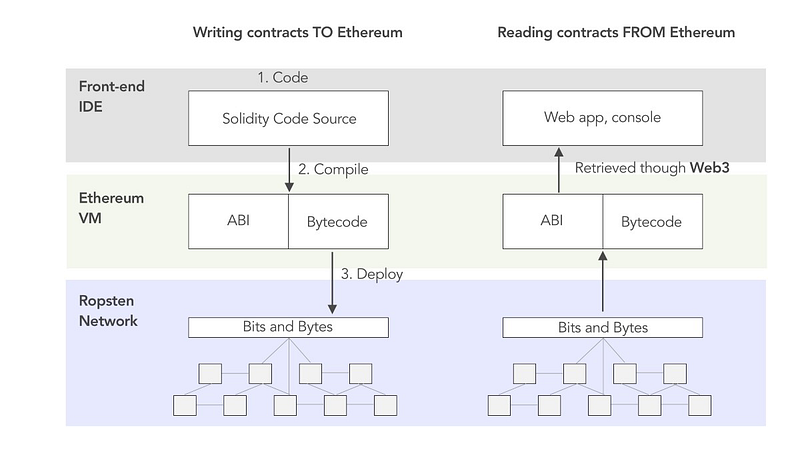
As Ethereum uses EVM(Ethereum Virtual Machine) as a core component of the network, smart contract code written in high-level languages needs to be compiled into EVM bytecode to be run. EMV Bytecode is an executable code on EVM, and Contract ABI is an interface to interact with EVM bytecode. For example, suppose you want to call a function in a smart contract with your JavaScript code. In that case, ABI is an intermediary between your JavaScript code and EVM bytecode to interact with each other. The diagram below shows the architecture of Contract ABI, EVM bytecode, and outside components(dApp and network). The left side is a process of compiling and the right side interacts.
EVM bytecode(Bytecode)

EVM bytecode is a low-level programming language compiled from a high-level programming language such as solidity. EVM is a virtual machine between the OS and application layer to mitigate OS dependency. Thankfully, to EVM, the Ethereum smart contract can be run on almost any computer. As a Java developer, you can think of JVM(Java Virtual Machine) as the exact mechanism. EVM bytecode looks like below. It is not human-readable but readable for the machine.

6080604052348015600f57600080fd5b5060878061001e6000396000f3fe6080604052348015600f57600080fd5b506004361060285760003560e01c8063037a417c14602d575b600080fd5b60336049565b6040518082815260200191505060405180910390f35b6000600190509056fea265627a7a7230582050d33093e20eb388eec760ca84ba30ec42dadbdeb8edf5cd8b261e89b8d4279264736f6c634300050a0032

More profoundly, when compiling on Remix IDE, you see four fields below. They represent more details of bytecode such as link reference, opcodes, and source Map. ‘object’ is an EVM bytecode.

linkReference: deployed address of address of other smart contracts on which the current smart contract has a dependency.
object: Current smart contract bytecode
opcodes: Operation codes that are human-readable low-level instructions.
sourceMap: ource map is to match each contract instruction to the section of the source code from which it was generated.

Contract ABI

In computer science, ABI(Application Binary Interface) is an interface between two program modules, often between an operating system and user programs. In Ethereum, Contract ABI is an interface that defines a standard scheme of how to call functions in a smart contract and get data back. Contract ABI is designed for external use to enable application-to-contract and contract-to-contract interaction. For example, if you want to call an intelligent contract function from your dApp, you call via Contract ABI. Contract ABI is represented in JSON format like below.

Contract ABI defines function names and argument data types. It is used to encode contract calls for the EVM and to read data out of transactions. There is a precise specification of how to encode and decode Contract ABI. I will use the below function to describe the example of encoding.

function withdraw(uint withdraw_amount) public {}

First, the “withdraw” function will be encoded with keccak256, and the first 4 bytes will be used as a selector. The selector is a mark to identify which function to call.

// Encode function with keccak256.
> web3.utils.sha3(“withdraw(uint256)”)
0x2e1a7d4d13322e7b96f9a57413e1525c250fb7a9021cf91d1540d5b69f16a49f
// Extract first 4 bytes.
0x2c1a7d4d

Next, the argument will be encoded in hex decimal and appended to the encoded “withdraw” function with 32 bytes of padding.

// Convert from ETH to Wei.
> withdraw_amount = web3.utils.toWei(“0.01", “ether”);
10000000000000000
// Convert Wei with hexdecimal.
> withdraw_amount_hex = web3.toHex(withdraw_mount);
0x2386f26fc10000
// Left padding.
> withdraw_amount_padleft = web3.utils.leftPad(withdraw_amount_hex, 32);
0x0000000000000000002386f26fc10000
// Append to selector(encoded function).
“0x2c1a7d4d” + withdraw_amount_padleft
// Final encoded ABI.
0x2c1a7d4d0x0000000000000000002386f26fc10000

The data invokes the withdraw function and requests 0.01 as the argument. If you want details about ABI encoding/decoding specifications, please refer to Contract ABI Specification.

When interacting with the contract, you can use web3.js like the one below. First, contract with Contract ABI, and next, create an instance with the EVM bytecode. This code is generated by Solidity REMIX when compiling is successful.

Commands with “sold.”

Let’s generate Contract ABI and EVM bytecode with the’solc’ command. Solc command is one of the most popularly used compilers. Let’s install it with an npm package manager.

Install

$ npm install -g solc

We will use this sample source code. The filename is SampleToken.sol.

Output EVM Bytecode

$ solc --bin SampleToken.sol
> ======= SampleContract.sol:SampleContract =======
Binary:
6080604052348015600f57600080fd5b5060878061001e6000396000f3fe6080604052348015600f57600080fd5b506004361060285760003560e01c8063037a417c14602d575b600080fd5b60336049565b6040518082815260200191505060405180910390f35b6000600190509056fea265627a7a7230582050d33093e20eb388eec760ca84ba30ec42dadbdeb8edf5cd8b261e89b8d4279264736f6c634300050a0032

Output Contract ABI

$ sold —abi SampleToken.sol
> ======= SampleContract.sol:SampleContract =======
Contract JSON ABI 
[{"constant":true,"inputs":[],"name":"testFunc","outputs":[{"name":"","type":"int256"}],"payable":false,"stateMutability":"pure","type":"function"}]

If you want to output to a specific directory, you can set it with the “-o” option. (you cannot set the output file name).

$ mkdir build
$ solc --abi -o build SampleToken.sol

When you re-compile, set the “ — overwrite” option.

$ solc --abi -o build —overwrite SampleToken.sol

Get Help

$ solc --help

Conclusion

The article explained Contract ABI and EMV Bytecode. EVM Bytecode is a compiled source code from the high-level programming language, and Contract ABI is an interface to interact with the EVM bytecode. Both can be compiled with the’ sold’ command line, mainly used in Ethereum development. I hope the article helps you understand Contract ABI and the EVM bytecode practically. If you have any questions or comments, they are always welcome. Thank you.

Ethereum
Abi
Smart Contract Blockchain
Evm
Bytecode
Recommended from ReadMedium