
How bits and bytes store numbers, letters, colors and images
You might have heard about bits and bytes and that they are related to computers. In this article I will try my best to explain what bits and bytes are and how they are used by computers.
This article contains:
- What is a bit?
- What do bits have to do with computers?
- A single bit versus multiple bits
- What is a byte?
- How are bits used to represent numbers?
- How are bits and bytes used to represent letters?
- How are bits and bytes used to represent colors and images?
What is a bit?
Bit stands for binary digit. A digit is a number from 0 to 9.
But what is a binary digit? When something is binary it relates to 2 things. So a binary digit relates to 2 things.
What 2 things does a binary digit relate to? The values it can have: either 0 or 1. A binary digit (bit) is a number from 0 to 1.
What do bits have to do with computers?
Many parts of a computer have a binary functionality. For example, computer chips have huge amounts of transistors that can switch an electric current on or off. And hard discs have enormous amounts of tiny spots that can be either magnetized or demagnetized.
How each of these parts work exactly can be hard to imagine. But the important part is that they have a binary system: On or off, magnetized or demagnetized, yes or no…
So a computer has access to a lot of binary ‘things’, the state of these ‘things’ can be detected and changed. A computer can detect whether an electric current is on or off. Or, for example, change a magnetized spot into a demagnetized spot. The states of these ‘things’ can be expressed by assigning either a 0 or 1 to it. For example, off is 0 and on is 1.
The main point it that the computer is managing an enormous collection of 0’s and 1’s.

A single bit versus multiple bits
Bits are used to represent something. When you have only one bit the possibilities might not be very big. For example, we could use a bit to store whether it is Monday. We will make the bit store 1 when it is, and 0 when it is not Monday.
Well, if the bit is 1 we know it is Monday, but if the bit is 0 we do not know which day it is. So why don’t we take 7 bits, one bit for every day of the week. If we know which bit represents each day, all we have to day is find the bit that is 1 and we know which day it is.
As you can see, the more bits, the more possibilities. A collection of bits can be used to represent things like numbers, letters, colors and images.
What is a byte?
A byte is a collection of multiple bits, typically a byte has 8 bits.
How are bits used to represent numbers?
Numbers are usually expressed using the decimal numeral system. In this system numbers consist of digits from 0–9. The number 146 is represented by the three digits 1, 4 and 6. The 1 stands for 1 * 100, the 4 stands for 4 * 10 and the 6 stands for 6 * 1. Together they are the number 146.
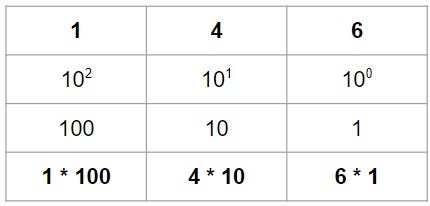
In the table above, the example of the number 146 is illustrated. We could say, the further to the left you go, the more a digit is worth. In the decimal numeral system, each digit is worth 10 times more than the digit to its right, with the most right digit being worth 1.
Since a computer has bits instead of digits, it uses the binary numeral system instead of the decimal numeral system. In the binary numeral system, each digit is worth 2 times more than the digit to its right, with the most right digit being worth 1.
1 bit can be either 0 or 1. 2 bits can be 00, 01, 10 or 11. 3 bits can be 000, 001, 010, 011, 100, 101, 110 or 111.
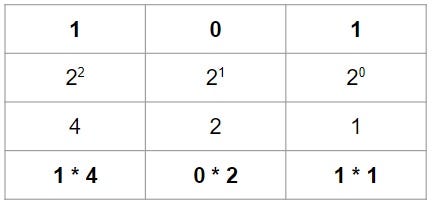
Let’s look at what the binary number 101 stands for. The first bit (1) stands for 1 * 4, the second bit (0) stands for 0 * 2, and the third bit (1) stands for 1 * 1. Together, the bits in the binary number 101 represent the (decimal) number 5.
As a summary, bits can form binary numbers. And by using calculations these binary numbers can be transformed into the decimal versions of numbers that humans are used to.
Now we know how bits can represent numbers, we can also see that the maximum value of a number depends on the number of available bits.
With 1 bit, the maximum value is 1. (1) With 2 bits, the maximum value is 3. (11) With 3 bits, the maximum value is 7. (111) With 4 bits, the maximum value is 15. (1111) With 8 bits, the maximum value is 255 (11111111)
How are bits and bytes used to represent letters?
How can bits be translated into letters and other characters that exist in texts?
For textual characters, including letters, the trick is that each character gets assigned a numeric value. We could, for instance, use the numbers 1 to 26 for the lowercase letters a to z. And assign the numbers 27 to 52 to uppercase letters A to Z. The assignment of characters to numbers is called character encoding.
There exist many different character encodings. And they all have their own rules for which characters are being represented by what numbers.
Let’s think about typing for a while. For example, when I am writing in a text-file and I press the letter B on my keyboard, what happens? The text, in this case ‘B’, gets encoded into a number. And this number is stored by giving bits 0 and 1 values that together form a binary number.
When it is time for the computer to display a text on the screen, the numeric value is determined by reading the bits. This numeric value then gets translated to a character, this translation is called decoding. To which character a numeric value gets translated is of course based on what encoding system is being used.
How are bits and bytes used to represent colors and images?
We just discussed that when text is displayed on a screen, numeric values are decoded into characters. But how do these characters appear on the screen?
Well, how are characters and letters made? A letter consists of lines in a certain color that is different from the background color so that we can see it. So by controlling the colors shown on a computer screen we might be able to make letters appear.
Luckily, a computer screen is a grid with lots of pixels. Pixels are tiny squares that each can be given a color. By coloring pixels on a screen the right way you can indeed make things appear on the screen: letters, images and videos (which consist of many different images, or frames, per second).
As an example, take a look at this pixelart. It is a 10x10 grid, meaning it has 10 rows each containing 10 pixels. Computer screens have way more and way smaller pixels, but using this example it is easier to explain how images are made.

If we have our grid with 10x10 pixels, we can give each pixel a coordinate. One of the coordinates is (row 2, column 3), this is a black pixel. The pixel to the right of it is yellow (row 2, column 4).
We can now say: An image is a collection of coordinates with a color per coordinate.
But how are colors represented by bits and bytes? This can be done by using RGB values. RGB stands for Red, Green and Blue. By mixing these colors in various proportions any color can be made. The proportion of each color is noted with a number from 0 to 255. The number of 255 is not random, it is the maximum value a binary number with 8 bits can make. (11111111 in binary is 255 in decimal) And a set of 8 bits is a byte. So exactly 1 byte is used to store the value of red, 1 byte is used for green and 1 byte is used for blue.
So a color can be represented by its RGB values stored in 3 bytes. And images can be represented by a collection of the RGB values of every pixel.
Thank you for reading!
I hope you now have a better understanding of bits and bytes.
- A bit is a binary digit either 0 or 1. And a byte is typically a set of 8 bits.
- Computers work a lot with binary systems, which is why bits are used to represent data.
- A set of bits can form a binary number and a binary number can be transformed into a decimal number using a calculation.
- With character encoding, numbers are assigned to certain characters, which makes storing letters, and thus text, possible.
- By mixing amounts of red, green and blue any color can be made. The proportions of these colors are expressed with a value from 0 to 255. A RGB value consists of 3 bytes and expresses a color.
- By coloring pixels images can be made to appear on a computer screen.
You can get full access to all my posts by joining Medium. Your membership fee directly supports me and other writers you read. You’ll also get full access to every story on Medium: