Explain the KUBERNETES to 5 years old.
In this article, you will gain whole information about Kubernetes and why we need it? You will be aware of almost each fundamental technical term which is extremely easily explained with real-life examples.

Imagine there are no Kubernetes and world rounds. Why this term has entered our daily life?
First of all, suppose you are a system administrator at a company. Besides you, there are a lot of programmers, testers, analytics, etc. Therefore development teams create various features and test them in their local environment. If they don't face any bugs or errors they pass the updated project to you to be deployed. When you have finished the deployment process, all the customers may see the new features on their devices.
Imagine your company has countless customers who use the company’s countless applications. These applications are having 500 services (microservices). Micro-services are isolated services are utilized inside of the whole application. For example, an amazon.com user sees the project as a whole, but in the background, there can be various separated services like purchase_microservice, user-management-microservice, inventory-microservices, and so on. In such a case, the company needs a group of sys-admins to maintain these microservices. Let's visualize the standard day of a sys-admin in a company in which there is no term like Kubernetes.
YOU ARE THE SYSTEM ADMIN BUT YOU HAVE A PARTY!
It's Friday, almost 6 pm and you are preparing to go home. You checked all the servers, and things. Nothing prevents you to hang out with friends at the party.
At night.

You have just come home from a party, had a very good night, and fallen asleep like a baby. And at 3 o’clock some unstopping disturbing alerts/sounds make you jump from the bed. You are checking your phone immediately — 34 missed calls, 64 messages, and so many Facebook messages with lots of screens.
You try to understand what is happening. Reading messages. Messages are full of customer complaints/comments on Facebook about your company. They say — the whole application is not working. They even cannot enter the application and cannot use your service. Some of them are even losing money.
So you should forget about your hangover and contact workmates, connect the server, and see what is the problem. Oh what you see, the application has stopped for some reason and remained killed. Similar to you, everyone was sleeping from the sysadmin team. You have done some fixing and made the application run. But all the fun side of Friday night has flown away.
Now let's see the situation where Kubernetes and some other staff have set up a company.
You just came home after the party. Slept. Morning — you just wake up with no urgent calls. At night the same has happened again. The application has stopped or even the server has crashed. but not all customers have felt it. It was seemed by few customers and for the majority of customers, business went well. Why?— because the system has started itself without any help from humans. Your company has not to lose its reputation!
It is so rough example. There are so many arguments hidden and there is an exaggeration. But it mainly gives you an idea of Kubernetes availability. Kubernetes has a power much more than this.
ONE MORE EXAMPLE
You have 4 nodes. NODE-1,NODE-2, NODE-3, NODE-4 . Node is just a server where all services are run. You have 15 applications in each Node. And for some reason, Node-2 has crashed, and apparently, all services went down. Before reading forward just try to answer yourself :
What would YOU do? Imagine the world has no idea about kubernetes. No technical view is needed you to answer the main idea. Would be happy to see your to-do list on comments section for such a situation.

I hope you had some ideas. Let's dig into them.
You need a journal, paper, excel sheet, or good brain memory :)
- You would check which services were running on Node-2 just before crashing.
- You list the names of services on an excel sheet or store them somewhere.
- What was the situation/state for services just before the crash? What actions happened just before the crash on services. Write down the tasks that were unfinished by each service.
- Now you have elementary information about the dead nodes and their services. But the main goal here is to recover and make them all run again. Which node should be chosen for services to rerun? You should look up each service one by one. Do you need to create a new node or already running nodes are enough for such a load?
Now another question arises. How to decide the questions for 4? To find an ideal solution for recovering apps you need some input.
- You check that excel sheet. How much RAM, CPU, and other specs had been consumed by dead services?
- Then you check your current running nodes. How much power(specs) do the running nodes have and are they able to carry this amount of load? Let's say NO.
- Ok, you gonna rise a new node. The new question arises, how much power is needed for the new node. You cannot just pomp the power to the node. You need to utilize the resources properly.
- Then you rerun the services
- You try to complete the unfinished tasks.
- etc
Let's say the company has more than 1000 services. And this node crash happens for some reason frequently. Can you imagine the repeated workload of a sysadmin?
To eliminate these issues described above there are superman-Kubernetes. Kubernetes just automates the work process and reduces personal involvement.
Again, see yourself as a System admin.
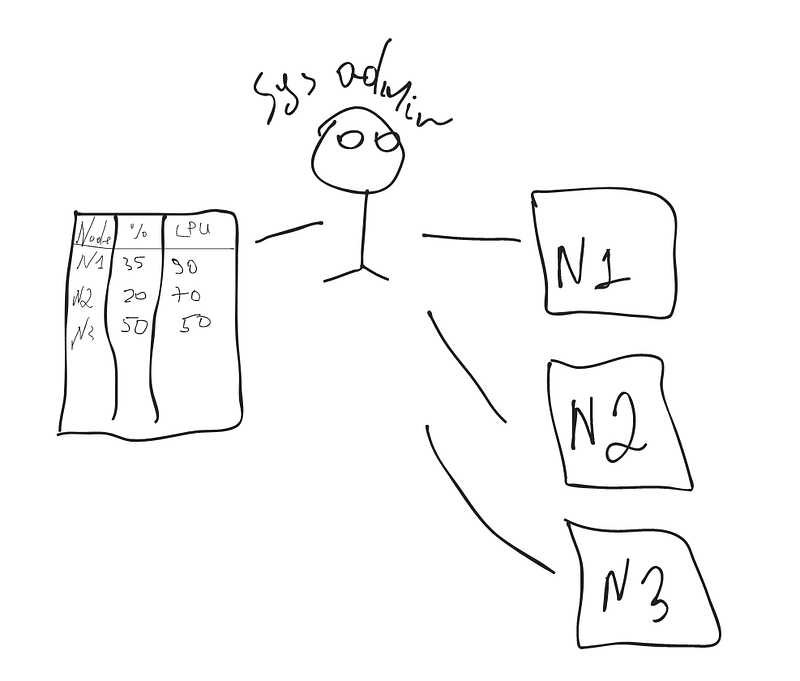
- We have already said, to handle the overall process you have a huge amount of data somewhere to store. Data like information about nodes, percentages, usages, serving sizes, capacities, etc. To store these all you need so huge amount of excel sheets or journals. Illustration 1
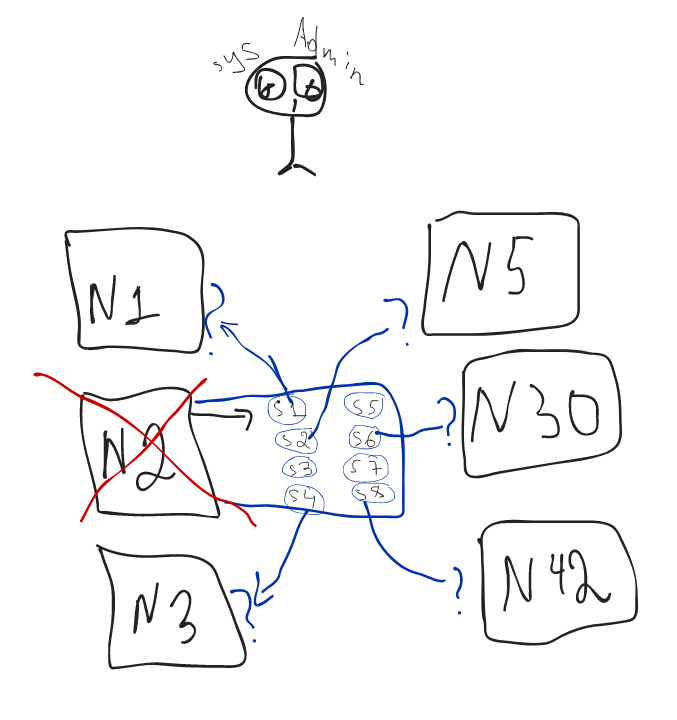
- Let's say, In your company, there are 100 nodes. Understand the Node as a server. Each node contains 100 microservices. Totally there are about 10 000. Let's assume NODE 2 has crashed which had the services like payments-ms, transfers-ms, accounts-ms (s1,s2,s3,s.., s8 below). So Where to transfer the services? How do you decide? Should s1 should go to N1(node-1), s6 should be transferred to Node 30 or N45? How to do it? How to analyze it? Or maybe we need to create a new node and transfer all of them there? If we create a new node what has to be the power? As the same as N2? maybe the N2 node has been crashed because of capacity lack? If yes, then how much extra power do we need to add? Hmm, we need some logic. Illustration 2
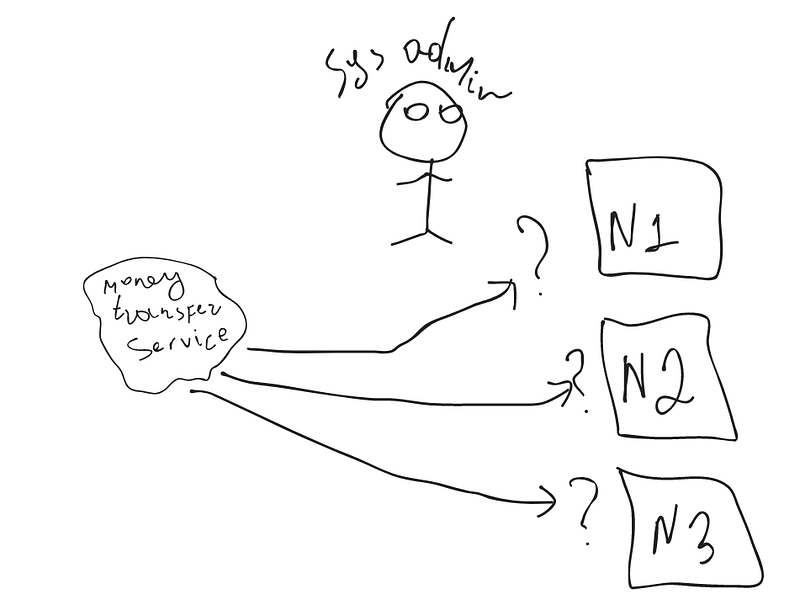
2. Let's say, you have a request that a new money-transfer microservice should be deployed (Deploy means running the project(service) on the main server and customers have access to it). But there are so many nodes. How to define which is the most relevant for the newcomer service? We need to monitor the capacity and limits of each node. Illustration 3
3. If there are 100 nodes and each node has 100 containers, there are lot of work to be done. The company pays a large amount of money for a group of sys-admins who are mainly engaged in repetitive tasks.
Kubernetes does all of these staff and more.
Let's move on terms.
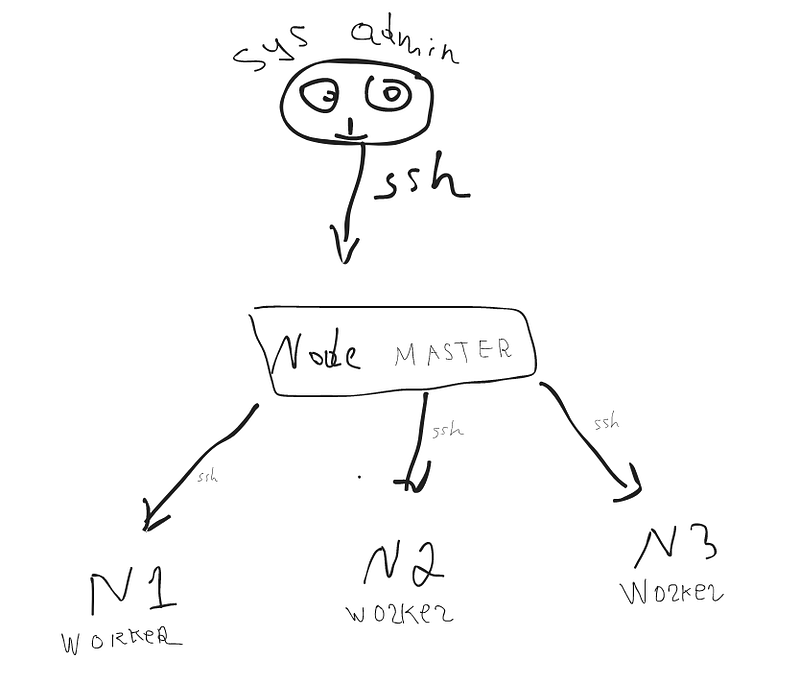
Feel like a sys-admin and assume there are only 3 nodes to maintain. Usually, we connect the nodes via ssh, do some work, and disconnect. Illustration 4
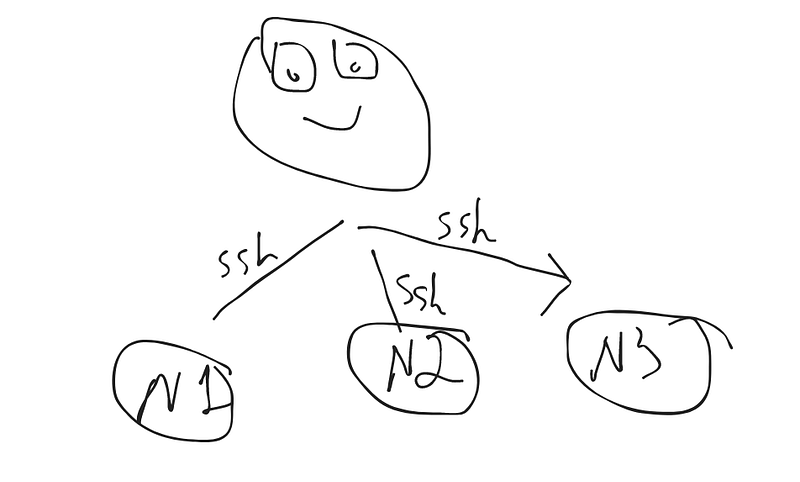
But for Kubernetes, we need much more and we don't need to connect the nodes manually. We can control all of them from a single node.
There are 2 types of nodes in Kubernetes.
- Worker node — Where all the services are run/deployed
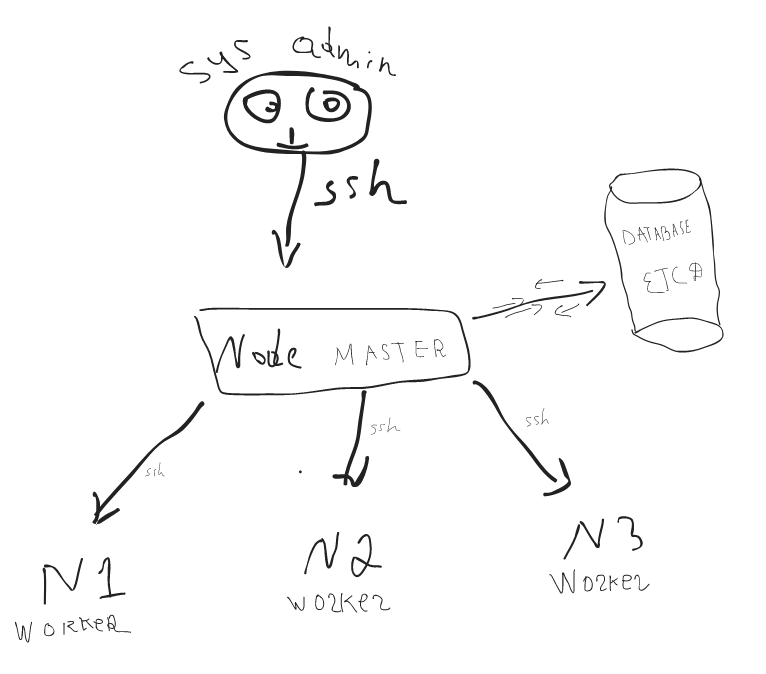
- Apart from this, we need at least one Master node. There is no difference in terms of specification. They are both virtual servers. The difference is no microservices are run on the master node. All maintaining, controlling staff is sone on the master node. The sys-admin also doesn't need all the worker nodes one by one. He/she connects to the master node to control all the worker nodes.
So master node has access to each node. But we still need a place to store all data about nodes and services. At this moment, we can delete all excel sheets and burn journals because there is a simple NoSQL database called ETCD. All the information is stored in one place and easy to retrieve.
Worker nodes unstoppably send data (heartbeat) about themselves to the master node and master nodes store all of this information on ETCD. It can be memory usage, power capabilities, loads — basically everything. Illustration 6
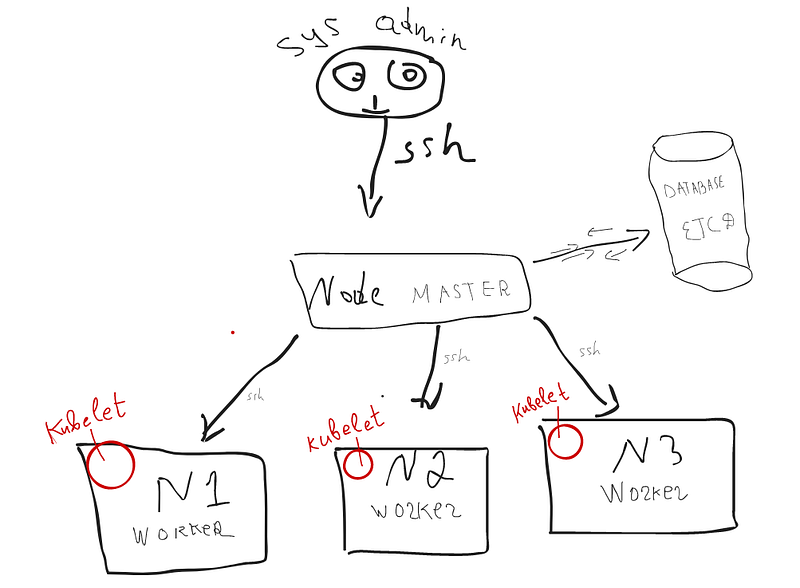
If you paid attention the word used “unstoppably sending its data”. But what exactly makes this process happen?
There is a service on each worker node named KUBELET. Kubelet is a just process that has the role of sending the information continuously to the master and vice verca.
The master node has access to each data with help of this service. But how master node knows that node has been crashed? Assume you already answered — it unstoppably listens for the data from workers. If it doesn’t receive data about some node it understands as a crashed node. Illustration 7
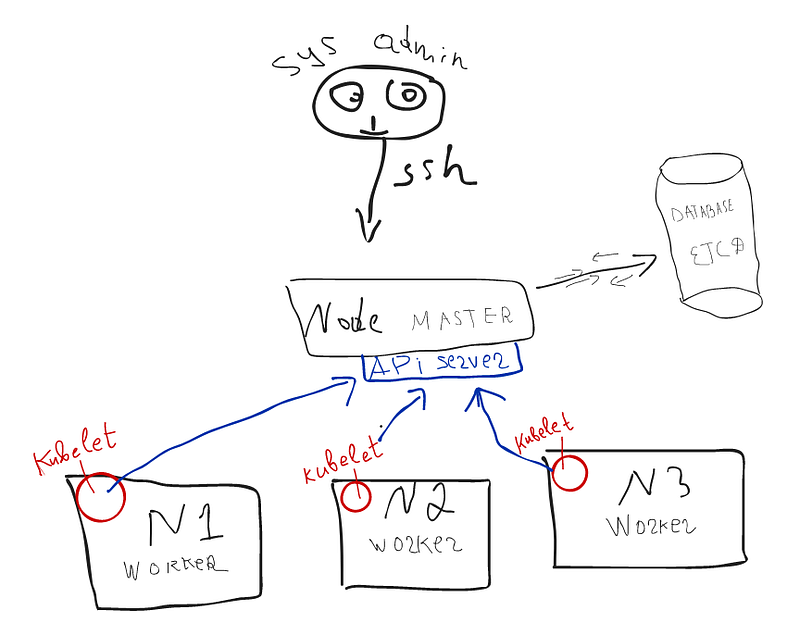
Kubelet is a process that sends data. But what is data transfer? Which address do the do nodes send their data via kubelet? Very simple. There is an API SERVER on Master Node. Every data transfer is just API calls. All calls come to the master node, especially to its API server. Illustration 8
A new microservice comes to be deployed. How to do it the way of Kubernetes?
So easy.
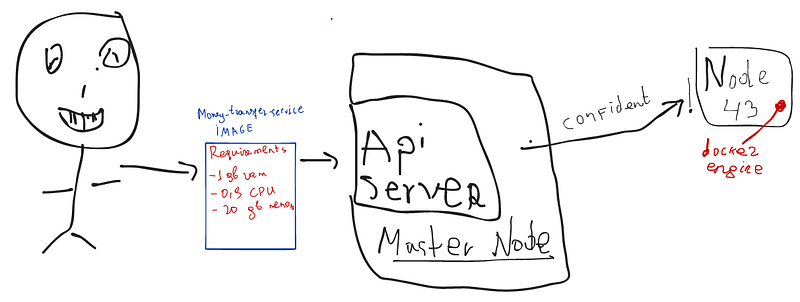
Dev-team has created an image that is waiting to be deployed. So this image is a bit capricious. However, it needs at least 1 GB ram, or any amount of CPU, 20 GB Memory, and so on. We send these details to the API server. Now Master node understands that it should deploy a service. Now it tries to find an appropriate node for newcomer service. Illustration 10
We know that all information about nodes is still on ETCD which the master node has an access to it. So it seeks a very relevant place for a new microservice with the data grabbed from ETCD. Master analyzes and says the final word! Go and run/be deployed on 43rd Node. This is your place.
Deep note about docker
So be sure that all worker nodes have docker-engine. The deployment is nothing but just the containerization of the image.
Scheduler, Kube-controller, and monitoring
MASTER NODE DOES NON-STOP MONITORING!
If it seems that one node has some overload, immediately transfer the services to other places and lighten the node. The master node may destroy the node and re-run services on a totally new node also. We don't poke our nose into his duty.
Let's meet with real heroes who care about these staff.
A scheduler — is a service on a master node —which decides the best node for the microservice to run. It has the logic to define it. It is the only decider. He doesn't send a command to run the image.
Controller manager — It controls the process which kubelet sends a command to the node (which Scheduler already defined) to run the image. Basically, when deploy the microservice, the scheduler decides, Controller manager controls, kubelet sends command to node, docker engine on worker node runs the image.
Kube Proxy and Pod.
To understand the Proxy we need to start from POD.
Let's recall the docker. We had images on docker. Then we containerized the images and got the running containers. All containers had different IPs. Because they all are run by like different virtual machines.
But Let's say that, we want to run 2 docker images to run together anytime and we would want both containers would take the same IP. Let's say container-1 is dependent on container-2 and it must wait for container-2 to be run before running. To solve this issue there is one abstraction layer named POD. POD may have multiple containers which get the same IP.
Pod can do much more than this but we will see it on implementation reading series.
See the illustration below to understand the proxy:
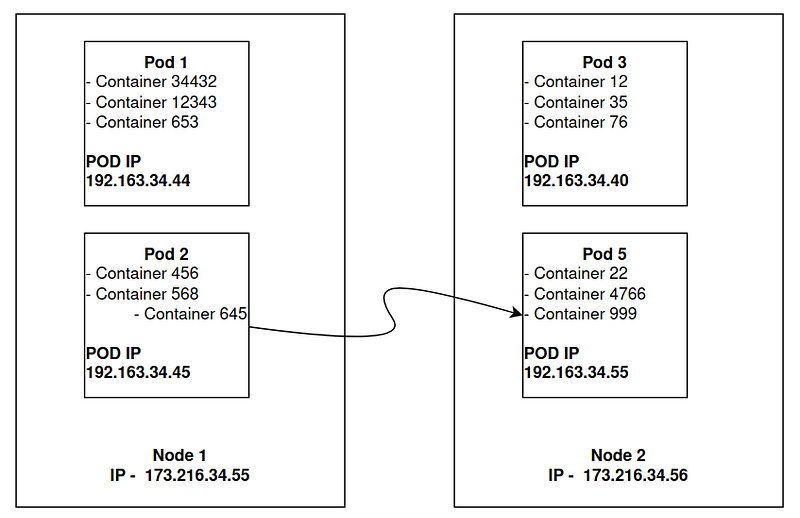
Container_645 (645 is just id) needs to call Container_999. How it can be possible — The container_645 firstly should call the node to reach the desired Container. Hmm. The desired container is on Node 2. Aha. Then Container_645 calls 173.216.34.56 (Node 2) firstly. OK called and reached. But then? We aim to reach the container but the container is in the pod which has its own different IP. What about calling directly to 192.163.34.55? Illustration 11.
But it is not even a node, it's Pod. How to call a Pod without calling its node? Because it's inside the node.
POSSIBLE.
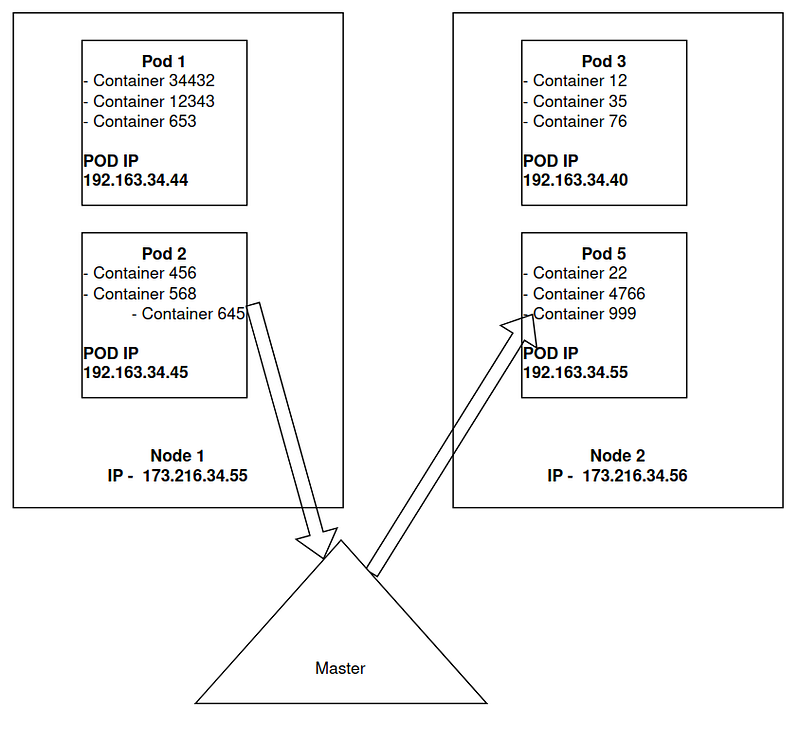
So the magic here is Kube-proxy. When container_645 makes the call — Kubeproxy sends the ping to the master. And we told master node has all information about workers. However, it understands the desired destination and directs the request to directly pod_999. Because kubelet in Node 2 has already sent its data to master which included the pods with their IPs. Master is already aware that there is a pod whose id is container_999 and its IP is 192.168.34.55. Look at illustration 12 below and find these IPs to understand clearly.
Kubectl, Kube-config
As we described that master node has an API server and it accepts all the commands through APIs. The same is for Kubernetes users. The CLI name Kube-config is needed to connect the Kubernetes cluster and do there some work. Kube-config is nothing but a config file that allows us to access the cluster via kubectl CLI.
Self-study
All components described above are part of one single Kubernetes cluster. It may vary by size and logic. If you get the main idea the other concepts and implementation will be so smooth.
Illustration 13 below is about a simple Kubernetes cluster. We passed all the details of it. Now, please look at the illustration below and try to explain to yourself all the components.
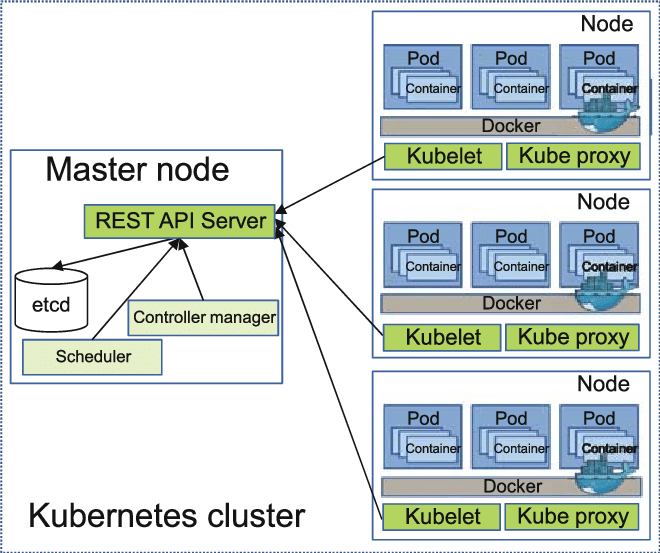
See you again my lover!
Throughout the article, care has been taken to explain all the fundamental subjects in full and in detail. Of course, Kubernetes includes more comprehensive narration and difficult mechanisms. However, this article has conveyed more to you as an introduction to those topics.