avatarDr. Jason L. Benskin

Free AI web copilot to create summaries, insights and extended knowledge, download it at here

1848

Abstract

oxes like Roku, Fire TV, and Apple TV, the feature has now been rolled out to the mobile world.</p><h1 id="f074">Benefits of Multiview</h1><p id="e0b2">What does multiview mean for you? Picture this — you’re now capable of watching and keeping up with multiple games at once right on your phone or tablet. The feature divides your screen into four sections, enabling you to follow up to four games simultaneously. It’s a sport enthusiast’s dream come true.</p><figure id="cf7f"><img src="https://cdn-images-1.readmedium.com/v2/resize:fit:800/1*3hX-m9RohUesJWWkpdq4sg.jpeg"><figcaption>Photo credit: <a href="https://www.androidauthority.com/youtube-tv-multiview-ios-3427323/">https://www.androidauthority.com/youtube-tv-multiview-ios-3427323/</a></figcaption></figure><h1 id="1488">Setting Up Multiview on iPhones and iPads</h1><p id="93cb">Getting on board the multiview train is pretty straightforward. To begin, start watching a stream on your YouTube TV app. Then, press down on your screen and select the multiview button that pops up at the bottom left corner. Remember, though, you’ll need to update your YouTube TV app to version 8.11 for the feature to work.</p><h1 id="ebb4">March Madness and Multiview</h1><p id="83df">What better time to launch this feature than right before March Madness? For the uninitiated, March Madness is an annual college basketball tournament featuring 68 teams. With so many games happening at once, multiview couldn’t be more perfect to catch all the action.</p><figure id="cb39"><img src="https://cdn-images-1.readmedium.com/v2/resize:fit:800/1*ANTcmKS9dL4ApL5zRzhqqA.jpeg"><figcaption>Photo Credit: <a href="https://9to5google.com/2024/03/20/youtube-tv-multiview-iphone-ipad-android/">https://9to5google.com/2024/03/20/youtube-tv-multiview-iphone-ipad-android/</a></figcaption></figure><h1 id="9348">The Fu

Options

ture of Multiview</h1><p id="9847">This roll-out to iPhones and iPads marks a first step into the wider world of mobile devices. Expect to see more adjustments and expansions, making your multiview experience even better as time goes on.</p><figure id="a5b3"><img src="https://cdn-images-1.readmedium.com/v2/resize:fit:800/1*RVtmhPfeCosWb2Zs6MzdBw.jpeg"><figcaption></figcaption></figure><h1 id="912b">Conclusion</h1><p id="3ce2">With YouTube TV’s multiview, you no longer need to be a slave to scheduling or miss a moment of action from your favorite games. The future for sports fans is here, and it’s multi-view.</p><h1 id="48b6">A Personal reflection from Jason</h1><figure id="5533"><img src="https://cdn-images-1.readmedium.com/v2/resize:fit:800/1*qhfjUYK-XwW4PScPSIJivA.jpeg"><figcaption></figcaption></figure><blockquote id="c811"><p>You know that feeling when you’re trying to keep up with numerous live events at once, and your screen feels too crowded, or you’re constantly tabbing between different streams? We’ve all been there. During big sporting events like March Madness, keeping up with all the action can feel like a Herculean task. But not anymore, thanks to YouTube TV’s new multiview feature on iPhones and iPads.</p></blockquote><blockquote id="a546"><p>Remember when we used to flip channels to catch every moment of our favorite games, or fortuitously found ourselves with a handful of remote controls just to keep things streamlined? Those days are now behind us.</p></blockquote><blockquote id="496c"><p>With the introduction of multiview, you can watch multiple streams at once, without ever missing a beat. Whether you’re following different teams or want to catch all angles of a single game, this feature will help you stay in the thick of the action, right from your iPhone or iPad.</p></blockquote></article></body>

YouTube’s New Multiview Feature

Experience March Madness Better: YouTube TV’s Multiview Feature Now Available on iPhones and iPads

March Madness on Your Apple Device: Using YouTube TV’s New Multiview Feature
Photo Credit: https://www.theverge.com/2024/3/20/24106859/youtube-tv-multiview-now-available-ios-ipados

Knowing the road ahead can be a handy tool when reading an article. In light of this, we’ve put together a comprehensive table of contents to guide you through our detailed look at YouTube TV’s multiview feature for iPhones and iPads, timely released for March Madness. Refer to this as you make your way through the piece.

The journey of a thousand miles begins with one step, and with our table of contents, each step will guide you to the knowledge you seek.

Table of Contents

  • Introduction: YouTube TV’s Multiview Feature
  • Benefits of Multiview
  • Setting Up Multiview on iPhones and iPads
  • March Madness and Multiview
  • The Future of Multiview
  • Conclusion
  • A Personal reflection from Jason

Introduction: YouTube TV’s Multiview Feature

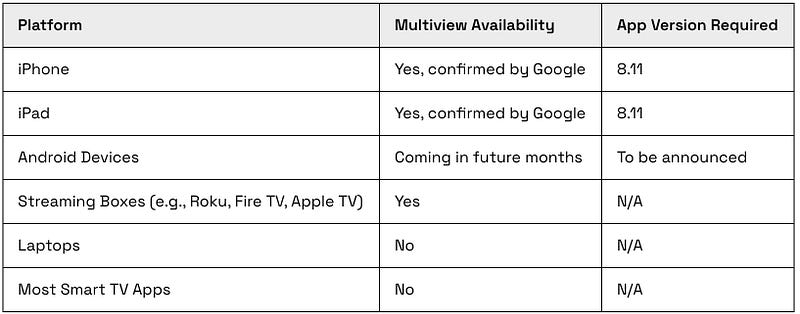
Are you often torn between two, three, or even four sports games, all happening at the same time? YouTube TV literally now has you in view with its newly launched multiview feature for iPhones and iPads. Initially available only on streaming boxes like Roku, Fire TV, and Apple TV, the feature has now been rolled out to the mobile world.

Benefits of Multiview

What does multiview mean for you? Picture this — you’re now capable of watching and keeping up with multiple games at once right on your phone or tablet. The feature divides your screen into four sections, enabling you to follow up to four games simultaneously. It’s a sport enthusiast’s dream come true.
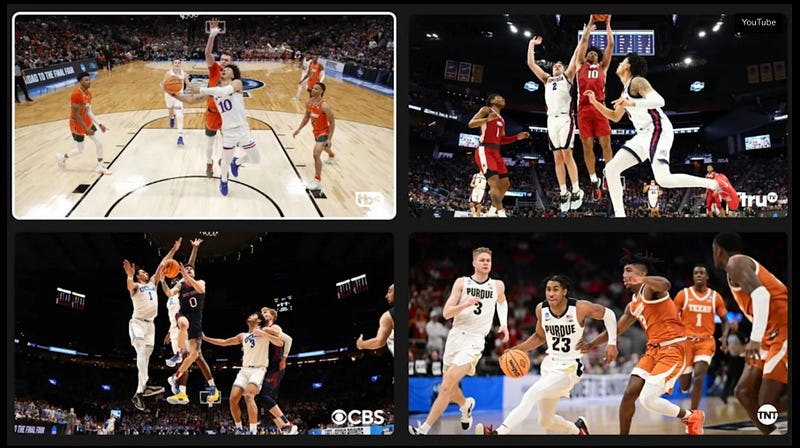
Photo credit: https://www.androidauthority.com/youtube-tv-multiview-ios-3427323/

Setting Up Multiview on iPhones and iPads

Getting on board the multiview train is pretty straightforward. To begin, start watching a stream on your YouTube TV app. Then, press down on your screen and select the multiview button that pops up at the bottom left corner. Remember, though, you’ll need to update your YouTube TV app to version 8.11 for the feature to work.

March Madness and Multiview

What better time to launch this feature than right before March Madness? For the uninitiated, March Madness is an annual college basketball tournament featuring 68 teams. With so many games happening at once, multiview couldn’t be more perfect to catch all the action.
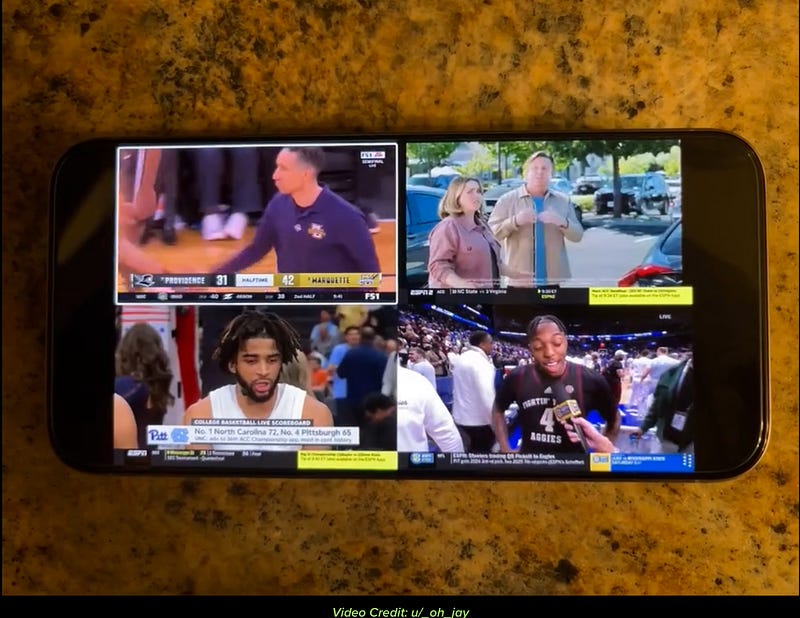
Photo Credit: https://9to5google.com/2024/03/20/youtube-tv-multiview-iphone-ipad-android/

The Future of Multiview

This roll-out to iPhones and iPads marks a first step into the wider world of mobile devices. Expect to see more adjustments and expansions, making your multiview experience even better as time goes on.
Conclusion

With YouTube TV’s multiview, you no longer need to be a slave to scheduling or miss a moment of action from your favorite games. The future for sports fans is here, and it’s multi-view.

A Personal reflection from Jason

You know that feeling when you’re trying to keep up with numerous live events at once, and your screen feels too crowded, or you’re constantly tabbing between different streams? We’ve all been there. During big sporting events like March Madness, keeping up with all the action can feel like a Herculean task. But not anymore, thanks to YouTube TV’s new multiview feature on iPhones and iPads.

Remember when we used to flip channels to catch every moment of our favorite games, or fortuitously found ourselves with a handful of remote controls just to keep things streamlined? Those days are now behind us.

With the introduction of multiview, you can watch multiple streams at once, without ever missing a beat. Whether you’re following different teams or want to catch all angles of a single game, this feature will help you stay in the thick of the action, right from your iPhone or iPad.

Technews
Technology
YouTube
Apple
Android
Recommended from ReadMedium