
Expanded Validation Functions to Prevent Malicious Characters
ACM.326 Preventing attacks by validating values as specifically as possible
~~~~~~~~~~~~~~~~~~~~~~~~~~~~~~~~~~~~~~~~~~~~~~~~~~~~~~~
⚙️ Check out my series on Automating Cybersecurity Metrics | Code.
🔒 Related Stories: Application Security | Secure Code | IAM
💻 Free Content on Jobs in Cybersecurity | ✉️ Sign up for the Email List
~~~~~~~~~~~~~~~~~~~~~~~~~~~~~~~~~~~~~~~~~~~~~~~~~~~~~~~
In the last post, I wrote about parsing values out of Lambda function parameters in an event and environment variables. I also showed you how I created a validation.sh file for common validation functions.
In this post, I am going to add to those functions to help prevent unwanted malicious characters from reaching my code.
I wrote about how malicious submissions to your Lambda functions can lead to cross site scripting attacks here:
Injection, escaping, and encoding
In my container, I’m using Bash, which could easily lead to other types of code injection attacks to run commands inside my container. There are a few ways to combat this.
First, I could try to escape all the bad characters by putting a backslash in front of them. Let’s say someone enters a quote into a parameter like this:
repo='dev.rainierrhododendron's.com'That would basically crash the program. But let’s say I want to prevent that.
I could try to find all the single quotes and rewrite the string to put a backslash in front of it like this which is a common approach developers take — and doesn’t work for the most part:
replace any single quotes with \' = dev.rainierrhodoendron\'s.comDon’t do that. Or insert ampersands for HTML or something similar. Here’s why. An attacker can just “double escape” what they enter to avoid your mitigation. As an attacker I’m going to enter this:
repo='dev.rainierrhododendron\'s.com'What is the result after you replace the characters?
repo='dev.rainierrhododendron\\'s.com'How does that get processed? It’s going to escape the slash and process the single quote as if it were not escaped.
Now that command above doesn’t do much it would again just break the program. But an attacker will likely be able to find a way to execute a command if you don’t carefully handle your inputs.
The same goes for encoding. If you encode something, it might be double encoded to get around your protections if not handled properly.
Encoding is when you convert a value to a format that will not be viewed as executable code by the program and then you convert the value back to what was entered to display it, for example. If you really want to understand encoding check out this series on cybersecurity math. I explain how characters are converted from hexadecimal in network packets to a decimal number that relates to some character in whatever character set you are using. But there are many other forms of encoding values.
Encoding is also used to bypass validation checks. Depending on what language you are using, an attacker will simply encode values to hide them from your checks and then decode them when they need to execute or a program like a browser will do it for them.
Let’s say you are checking for a single or double quote in a value. The attacker encodes that in some manner that the current processing language cannot understand as a quote, but when the value reaches a browser, the browser translates it to a quote somehow. It can get very tricky — so you really need to understand how and where your values are used to truly prevent such attacks.
There are many other resources on these topics because there are so, so many to inject malicious code I can’t possibly cover them all in one post. You can read more at the OWASP or PortSwigger websites.
On that note, be careful with simply pulling an XSS “protection” library off the web. Some of them use the aforementioned approaches and they do not work. On some penetration tests I was able to get an XSS attack because of a vulnerability in an XSS library! That’s not really helpful now is it?
The best way to thwart all these attacks is to only allow the specific characters and values you need. The more specific you can be, the better. For example, I don’t need to allow quotes in any of my values so far, so I can just reject anything that has a quote in it.
That would not be the case if I were accepting names as input on a web form such as O’Reilly and I had to support the single quote. If you need to do that, look into properly encoding that data according to best practices. Understand how a single can be encoded or hidden or processed as executable code as it flows through the different components in your system.
Potential attacks specific to your execution environment
You need to understand the attack paths and encoding options for whatever language and systems you use to deploy your application. I used different attacks to encode data on a .NET versus a Ruby penetration test, for example.
In this case, we’re using Bash. Lambda may be using Java (guessing) under the hood. We need to think about all the ways someone could insert an executable command. So many possibilities.
We’d like to presume that AWS is protecting things on their side, and that is their responsibility, but we can still disallow invalid characters were possible to reduce risk, even if those values are being sent to Lambda or AWS services where they will ultimately be stored, end up in logs, or get processed later as stored injection attacks such as the one I demonstrated in this talk at RSA 2020.
Let’s say that I want to try to execute a Bash command by passing a malicious value into the repo variable. What if I could somehow end the current string with a quote, insert a semicolon, and then another executable string?
Whether or not that would run depends on how the code that executes the command is written.
Let’s say I enter this:
dev.rainierrhododendrons.com";pwd;test="trueMy code my look like this:
repo="$repo"What does that turn out to be when you insert the value above I’m passing in as the repo?
repo="dev.rainierrhododendrons.com";pwd;test="true"Does that work? I’m not going to actually test and demonstrate that because my focus here is defending not breaking. But if we do not validate values some variation of that is ultimately going to work.
The easiest way to prevent that is to disallow the characters that make it possible.
Be specific as possible when validating data
When I’m testing values, I want to be as specific as possible. I’m going to only allow exactly what I require for each value and throw an error if something unwanted gets submitted. I already showed you how to do that in the last post.
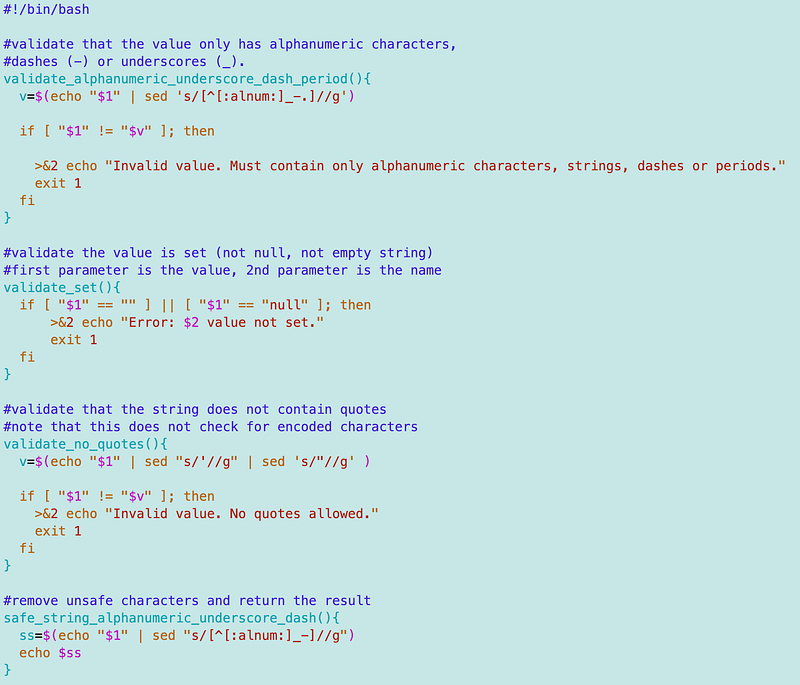
What I’m going to do now is add a few more functions to my validation.sh file. As noted, I haven’t thoroughly tested this code and am making some assumptions (which is never good). So I’ll come back around and test this more thoroughly later, but presuming these bash and sed commands work as advertised these functions should work.
Disallow values that have anything but alphanumeric characters, underscores, or periods
The first function I had only allowed alpha characters, underscores, and periods. I changed that to also allow numeric characters.
Check that a value is set
The second function checks to see that a value was even set. This check can also help improve the performance of a Lambda function. When my repository variable was not set, the repository was set to “null” somehow by Lambda and it took a very long time to timeout. When I explicitly checked to see if the repository value was set and threw an error if it wasn’t, my Lambda function returned immediately. So checking that values are set can reduce the times functions run, improve performance, and save you money too!
Validate that a value has no quotes
The next function rejects a value that has any single or double quotes in it. Now mind you, I am worried about execution in Bash at the moment. I’m not checking for encoded values here so those would still get through. For example, you can encode quotes and other values that would get translated to html characters as shown here:
This page shows how values may be encoded that end up in URLS — like the one we are creating for our repository value:
Here’s a page on different encoding types supported in certain Java classes.
I created this function for the values coming out of AWS Secrets Manager for now. A password may have special characters in it but I’m not going to allow quotes. Removing quotes may not be enough in all cases but sometimes when you have a password or something that requires special characters, it’s a start. I will probably want to be more specific later.
Remove unsafe characters
In some cases, I need the value. I can’t just reject it. I noted that although we’d like to just trust whatever comes from AWS systems, somehow the function name was getting back to me with extraneous quotes or something else in it from the local Lambda Runtime Interface Emulator (RIE). Perhaps the same would occur on Lambda. I’m not sure because I just strip out whatever is unexpected in the last function.
I’ve had similar issues with AWS CLI commands returning quotes in ways that break my bash functions. The returning of values with and without quotes does not seem to be consistent and if you have a common function that uses either double quotes or single quotes and values back from AWS inconsistently pass one or the other in values returned, things can break. Whatever the case, I’m not going to spend time parsing out what was returned. I’m just going to remove any special characters I don’t need for my use case and be done with it.
Updated validate.js file
Here’s my updated validate.js file. I’m sure I’ll be enhancing and adding to this in the future as I find new issues. I could perform my own penetration testing on my code in the future but this is a start. I could also be even more specific when validating a repository name — which should only be in the format of a valid URL.
I want to get things going so I’m moving on for now, but you should do those things if you are using this code in production.
Follow for updates.
Teri Radichel | © 2nd Sight Lab 2023
About Teri Radichel:
~~~~~~~~~~~~~~~~~~~~
⭐️ Author: Cybersecurity Books
⭐️ Presentations: Presentations by Teri Radichel
⭐️ Recognition: SANS Award, AWS Security Hero, IANS Faculty
⭐️ Certifications: SANS ~ GSE 240
⭐️ Education: BA Business, Master of Software Engineering, Master of Infosec
⭐️ Company: Penetration Tests, Assessments, Phone Consulting ~ 2nd Sight Lab
Need Help With Cybersecurity, Cloud, or Application Security?
~~~~~~~~~~~~~~~~~~~~~~~~~~~~~~~~~~~~~~~~~~~~~~~~~~~~~~~~~~~~~
🔒 Request a penetration test or security assessment
🔒 Schedule a consulting call
🔒 Cybersecurity Speaker for PresentationFollow for more stories like this:
~~~~~~~~~~~~~~~~~~~~~~~~~~~~~~~~~~~~~~~~~~~~~~~~~~~~~~~~~~~~~
❤️ Sign Up my Medium Email List
❤️ Twitter: @teriradichel
❤️ LinkedIn: https://www.linkedin.com/in/teriradichel
❤️ Mastodon: @teriradichel@infosec.exchange
❤️ Facebook: 2nd Sight Lab
❤️ YouTube: @2ndsightlab


