
Exactly What is WiFi?
… or a wingle… or a dongle?
It’s Winter here “Down Under” in Australia, and it happens to be either freezing in our house during the colder season, or boiling hot during the warmer season. But these experiences are the least of my worries at the moment.
Many areas of Australia will be getting NBN or the National Broadcasting Network access, and I think this means something to do with faster bandwidths. Anyhow, in the end, we will all be on NBN.
We’ve come a way since the bulky and loud but soothing dial-up modems.
So because our telecommunications company may cut off our internet access for a while, pending whatever they do to hook us up to the NBN network; I cleverly decided to buy a 4-G USB WiFi Modem.
Mind you, I disregarded the part about it being “WiFi” although I did read the text on the packet to find it works with Windows 7, 8 and XP.
At home, I was “having kittens” to use the phrase that means I was pretty worried, as I waved the lovely looking thing around. “Oh no,” I said to my partner, “my laptop has Windows 10.”
“Let me have a look at that,” he said, and solemnly advised me that he thought it would work with Windows 10 but at the time the item was packaged, Win 10 wasn’t out then, hence its absence on the information panel.
Then I got bewildered, as he explained to me that he wouldn’t be able to use it on his personal computer, or I on mine. I have a desktop PC as well as a laptop.
“I shouldn’t have got a USB stick type,” I wailed, but to my surprise, he responded, “No that’s not it, it’s because it uses WiFi.”
“I thought all computers use WiFi,” I said incredulously.
“Well,” he explained, “…our modem can be connected to the computer either wirelessly — which is through WiFi — or by cables, and ours is by cable.”
“My computer needs a wireless card to be able to connect to the modem wirelessly,” he informed me.
This was startling news to me, and I had to take the time to mull over it. So WiFi didn’t mean bits and bytes zipping through the atmosphere, however a computing device was connected to the er contraption that um somehow gets other bytes and bits from goodness knows where?
I searched my memory banks and came up with a memory when my partner acquired a wireless router. I demanded more information from him, clarifying that my laptop and our TV and PS3 all had “wireless network adapter cards” and yes, our router had the capability to be connected to either wirelessly (to the aforementioned) OR by cable/wire.
I thought that because one could stick the USB stick into a computer’s USB port, that would be that, at least that would activate an internet connection.
I hadn’t thought that the computer might not be clever enough to connect to the um router.
Isn’t this thing a dongle, I thought, and turned to the trusty internet to research the device that I had bought.
One of the search results mentioned a wingle, similar to the dongle, but I persevered to find the following webpage about the USB Modem that I had bought so hopefully.
I also found out that an internet dongle is usually a USB-sized gadget, that plugs into the USB port on your laptop or computer for when you need easy mobile broadband access. Basically, a dongle is a tiny, unpowered modem that uses your computer’s power to access the internet.
The only problem with this definition is that it doesn’t mention that the computer that the dongle connects with must have a wireless network adapter card.
I really wish that with the power of the internet and computers, that great responsibility also came with it, in this case, the complete process for using a USB Modem is not defined above.
How do I know that for mobile broadband access, one’s computer has to have a wireless network card, and that not all computers have such a card?
Well, after still wrestling with the idea of WiFi and mobile broadband, and their place among, or relationship with all of the hardware available, whether tiny like a USB Modem cum Dongle, or even like a Wingle, which is defined as a network access terminal product that is connected with a Laptop/PC or USB port and used to access internet on WiFi-enabled devices, I forgot why I had got the 4-G USB Modem in the first place.
Luckily, Mere Male (my partner) was happy with my purchase, saying it was a good buy at half price, and when I showed him the webpage linked above, he was pleased that the device can use an SD micro-card.
I know that the little cards that one pushes into the slots on something or other, are handy for storing files on. 😃
Grabbing at straws, I decided that what I was happiest about regarding our new dongle/modem was that it seemed to be a pre-paid device thingy.
Hopefully, what the lass at the Australia Post Shop said, is true, that we can just recharge it as we need the connectivity.
No 24-month lock-in plans, for me, thanks! I need to spend money on learning how computers work, I think. Just joking!
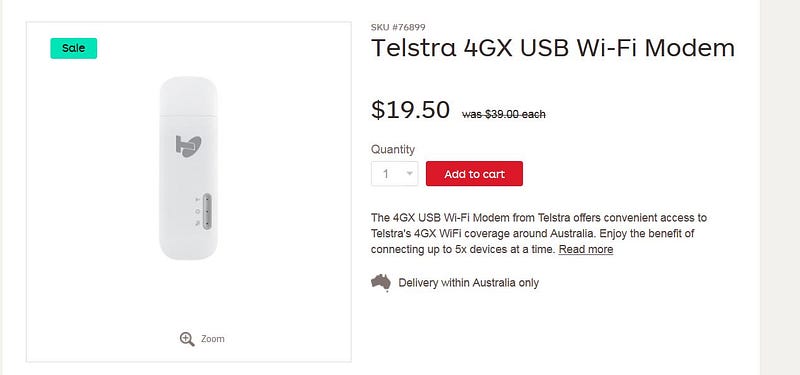
Then there’s this from the internet:
A Wingle you would say is a grown up version of the USB dongle. It’s a USB dongle but with abilities to share internet with 5 other users. It’s a little, light and sleek device that connects to and is powered by USB port of you PC.
For heaven’s sake, why isn’t my Telstra 4-G USB WiFi Modem called a Wingle, in that case? It’s much easier to talk about a Wingle!
About the Author
Celine Lai was born in Malaya (not Malaysia) and is the oldest inter-country adopted person in Australia. She loves reading and writing, and runs WordPress blogs and writes technical documents. She blogs mainly on Fascinating Animals.
Subscribe to my weekly email newsletter to be notified of my new Stories


