

Evolution of Low-Code Platforms in Modern Software Development
A Comprehensive Exploration of Low-Code Development, Historical Milestones, and Applications for Efficient and Collaborative Development
Thank you for being a part of this journey with me, and I hope to continue providing value to you for years to come! Giving tips by supporting me.
I would be overjoyed if you could support me as a referred member. However, the income I’ve received from my contributions on this platform has not proven sufficient to sustain the frequency of updates I’d hoped for. Facing this reality, I’ve made a difficult decision — to explore new income avenues. However, this isn’t the end; rather, it’s an exciting new beginning. I am thrilled to announce my upcoming Substack newsletter, where I’ll delve into my investing system, harnessing the immense potential of IT technology and embracing a system-thinking approach to investment strategies. Rest assured, I will still be posting when inspiration strikes.
In 2014, Forrester introduced low-code development platforms, transforming application development by emphasizing visual methods and reducing reliance on traditional coding. These platforms use visual interfaces for drag-and-drop application design, speeding up development and minimizing hand-crafted code. The primary goal is to enhance efficiency, foster collaboration, and reduce code complexity for faster development cycles. Low-code platforms empower individuals with varying technical expertise, enabling citizen developers to create functional applications without extensive coding knowledge.
Low-code platforms come in various forms:
- Online IDEs and Editors offer visual interfaces but require additional development.
- Provide end-to-end services, including continuous integration, deployment, and maintenance.
- Allows interface creation without JavaScript coding.
- Enables online design of data structures with functions like addition, deletion, modification, and querying.
- Fully simplifies both front-end and back-end development, prioritizing visual editing but potentially sacrificing flexibility. Sub-categories include BPM, OA system, and APP development.
- Enhances mature products like CRM or ERP, offering tailored development features for customization needs.
Conway’s Law: “The architecture of a design system is governed by the communication structure of the organization that produces the designs.”
The abundance of low-code platform types in the market arises due to diverse needs, leading to varied solutions. This diversity significantly impacts the selection of low-code platforms based on team positioning.
- Front-end Teams — Focus on Type 1 because the team members are skilled in JavaScript, and they don’t need to develop a product that doesn’t require JavaScript. They might not consider type 4 since it is not their responsibility.
- Back-end Teams — Prefer Type 4 as they are solely responsible for back-end development. Their expertise lies in creating server-side logic and managing databases.
- Software Engineering Teams — They oversee the overall development environment and may choose Type 2 because Type 2 involves more customization and relies on internal infrastructure, making it suitable for internal use within the company.
- Start-up Companies — They might opt for Type 5, simplifying the encapsulation of both front and back end for external presentation. But, it might overly prioritize “no code’, sacrificing flexibility and suitability for only basic applications.
- Mature Products Companies — They tend to choose Type 6 because it involves building around the existing product, leveraging its strengths, and expanding functionalities in a way that complements the existing offering.
- Teams with limited JavaScript coding expertise— Marketing and sales teams tend to use Type 3. They can benefit from basic HTML and CSS skills to enhance their digital advertising and marketing efforts.
History of Low-Code Platforms
Before the term low-code, precursor platforms boosted development efficiency. Key examples:
- FileMaker
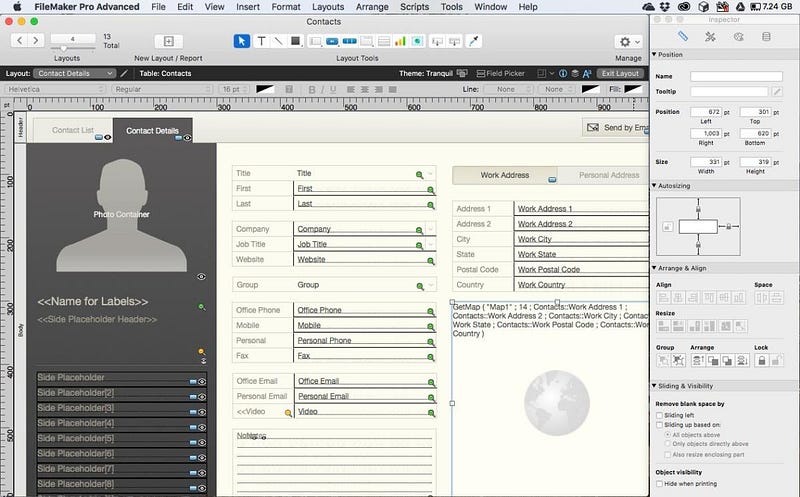
Filemaker, initially released in 1985, has evolved significantly over the years, adapting to changing technologies and user needs. While it began as a DOS program, it transitioned to a graphical user interface (GUI) and expanded its capabilities. FileMaker evolved from a database tool to support broader application development functions. This expansion enables developers to create applications using FileMaker.
- FileMaker 15 (2016) — Enhanced support for iBeacons and connectivity with various web services.
- FileMaker 18 (2019) — It was rebranded as Claris, focusing on workplace innovation beyond traditional database solutions.
- FileMaker 19 (2020) — focused on improving app creation features, with enhancements in scripting, UI design, and support for JavaScript integrations.
2. Microsoft Access
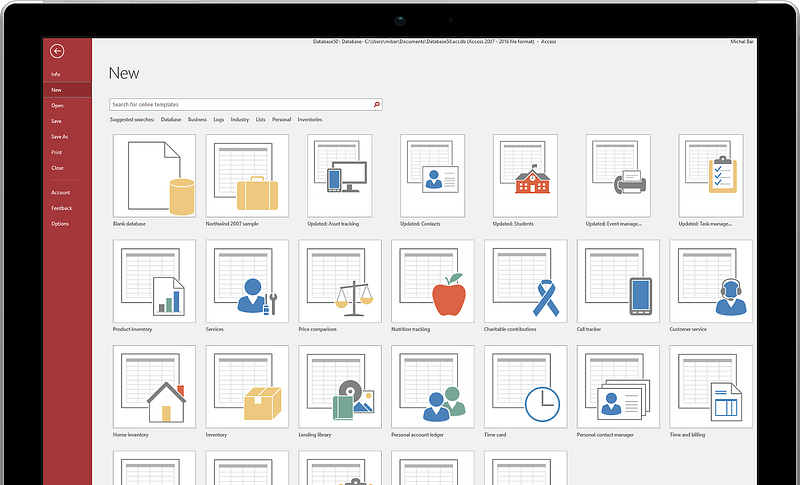
Released in 1992, Microsoft Access is a non-traditional low-code relational database management system (DBMS) by Microsoft. Its user-friendly interface and graphical user interface (GUI) simplify designing tables, queries, forms, and reports. As a relational DBMS, it supports table relationships, ensures data integrity, and allows users to utilize SQL for efficient data handling. While not exclusively a low-code platform, Access aids application development through the creation of custom forms, reports, and interfaces for seamless data management and presentation.
3. Oracle APEX (2004)
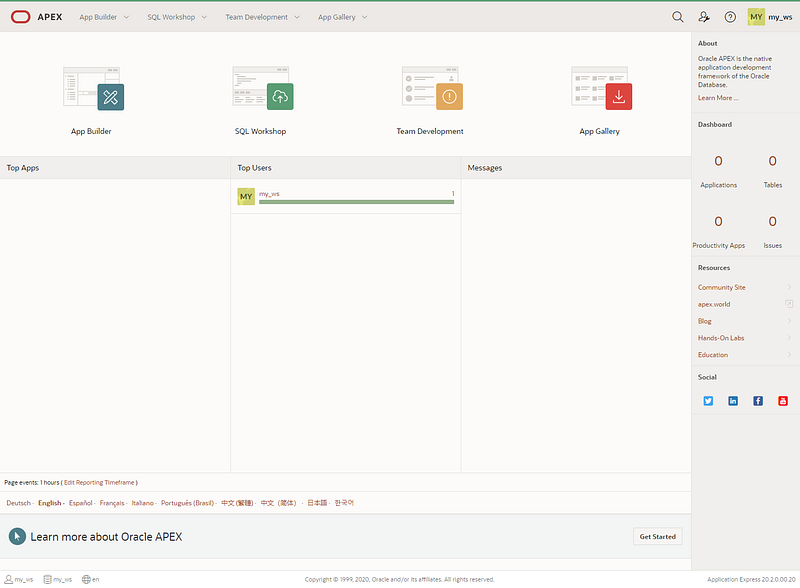
Oracle Application Express (APEX) is an enterprise low-code application development platform introduced by Oracle Corporation in 2004. APEX allows developers to create web and mobile applications with reduced manual coding, utilizing a wizard-based approach for template page generation. This feature streamlines development but comes with some limitations in terms of flexibility, as the wizard-driven templates may have predefined structures and options, limiting customization
4. Visual Basic 6.0
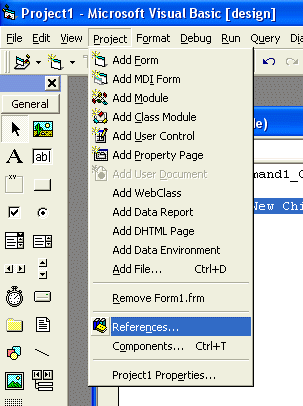
Microsoft Visual Basic 6.0, introduced in 1998 and integrated into Visual Studio, marked an important moment in programming. It empowered developers to create diverse applications, including web-based ones, with advanced capabilities. Despite its official end-of-life in 2008, Visual Basic 6.0’s enduring impact on application development is recognized for its robustness and contribution to programming evolution.
5. Salesforce
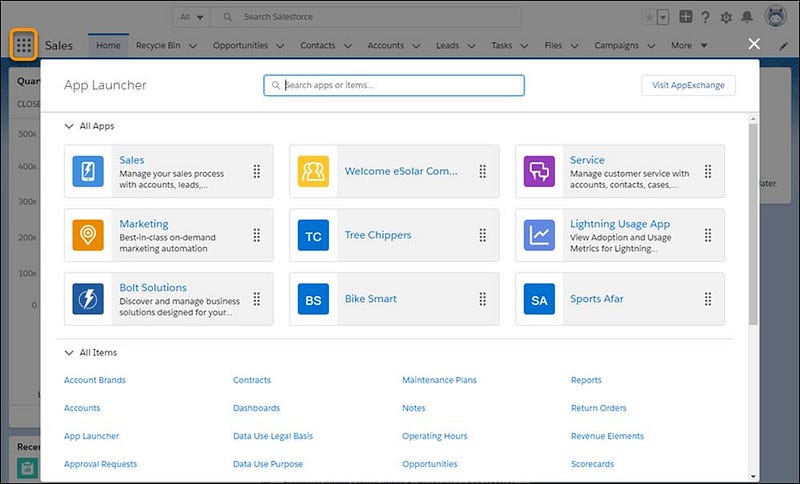
Salesforce is a cloud-based CRM platform offering a low-code development environment for creating applications and workflows without extensive coding. It features a user-friendly interface with drag-and-drop components, pre-built templates on AppExchange, and simplified workflow automation through point-and-click triggers. The platform supports seamless integration with external services to connect applications with various data sources. Emphasizing security, Salesforce ensures compliance with standards, enabling users to build secure solutions without deep security expertise. The low-code platform is designed with scalability in mind, allowing organizations to start small and expand applications gradually as business needs evolve.
Over the past decade, numerous commercial products, with histories spanning more than ten years, have undergone a recent rebranding as low-code platforms. These tools, initially developed for diverse purposes, have adapted to the evolving landscape of software development.
6. Django
Django developed between 2003 and 2005 for World Online’s intensive web applications, played an early role in addressing complex web development needs, showcasing a precursor to low-code principles. Its influence is exemplified by the Django admin plugin, introducing a form of low-code through automatic backend page generation based on configuration.
from django.db import models

class YourModel(models.Model):
    your_field = models.CharField(max_length=200)
    your_date_field = models.DateTimeField('date published')
While impactful, Django’s limitations, like the lack of front-end and back-end separation, have spurred the development of commercial low-code platforms over the last decade. These platforms, often with more than ten years of industry history, have rebranded and evolved, drawing inspiration from Django’s approach to define data model fields for background pages, shaping the trajectory of low-code development.
What Can Low-Code Platforms Solve?
Low-code platforms offer solutions to various challenges. Professional developers might dismiss them as inadequate tools, while novices might view them as shortcuts to application development. However, these perspectives overlook the platform’s true potential.
In “The Mythical Man-Month,” software development is categorized into two tasks:
- the primary task involves creating complex conceptual structures representing abstract software entities,
- the secondary task involves expressing these entities using a programming language and mapping them into machine language, adhering to space and time constraints.
The term “fundamental task” refers to a core aspect of a problem that cannot be simplified or reduced in complexity, regardless of how it is approached. For example, in developing payroll software, calculating income tax is a fundamental task because its complexity cannot be mitigated, regardless of the programming language or algorithm used. Conversely, “secondary tasks” involve aspects that are ancillary to the core problem and can vary in implementation and complexity. For example, deciding which programming language to use or how to structure the algorithm are secondary tasks that do not alter the fundamental complexity of the problem, such as the number of tax brackets requiring individual handling.
The “fundamental task” remains unsolvable as it constitutes the demand itself; the only viable solution is demand reduction.
In contrast, low-code platforms focus on addressing “secondary tasks” by simplifying the achievement of the same function. Low-code platforms simplify “secondary tasks” by offering streamlined approaches for achieving similar functions.
- simplified DSL resembling Excel formulas
- a graphical code editor (e.g., Unreal Engine’s “Blueprint” or Blockly/Scratch’s puzzle method),
- support for coding, or utilizing external APIs
- provide built-in implementations, like the example of calculating personal income tax mentioned earlier.
Notably, the DSL method suits simpler scenarios due to its lack of complex logic control and defined functions. For more advanced functionalities, it is recommended to employ mature languages like JavaScript or Lua instead of expanding DSL capabilities.
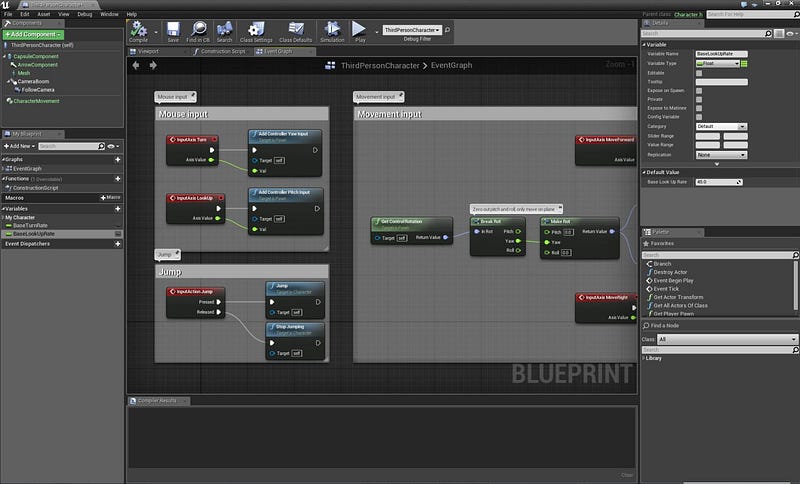
Many low-code platforms adopt a graphical code editor, as seen in Unreal Engine 4’s Blueprint Editor. This method aligns closely with the definition of a low-code platform and represents a highly advanced visual coding paradigm.
The UE4 Blueprint Editor provides benefits such as real-time preview, streamlined shader writing with instant output visibility, simplified parameter adjustment through node attributes, and smooth real-time debugging.
Notably, the editor’s visual interface reduces errors through enforced type matching in a controlled environment, enhancing user-friendliness compared to traditional code.
The effectiveness of Blueprint is evident in its simplicity, contrasting with languages such as C++, reducing the need for extensive experience and simplifying personnel recruitment. Unlike graphical programming limited to specific domains like 3D design, Blueprint distinguishes itself with its universal applicability and user-friendly nature, providing a versatile solution for diverse development requirements.
Graphical programming has excelled in 3D design with tools like Blender, Grasshopper, Houdini, NUKE, and Substance Designer, leveraging node programming for enhanced flexibility. However, these tools are specialized and lack universality across programming areas.
The favored approach involves extending functions through code, a practice embraced by prominent low-code platforms such as Salesforce and ServiceNow. ServiceNow, employing JavaScript on both front and back ends using the Rhino engine, serves as a prime example of this method.
Alternatively, for commonly encountered needs, the fourth method involves choosing low-code platforms optimized for specific industries. These platforms integrate industry-specific functions, significantly reducing costs by addressing fundamental tasks common to companies within that sector. For instance, Amazon serves as a “low-code” platform in e-commerce, streamlining various e-commerce functions and offering store decoration features for personalized design.
The Application of Low-Code Platforms
Low-code platforms find optimal use in scenarios such as B2E applications within enterprises. They excel in streamlining internal systems and platforms, significantly reducing development and maintenance costs.
While some low-code platforms cater to external applications, especially mobile apps, their adoption tends to be more prevalent among smaller companies.
For larger enterprises reliant on external applications as their core business, the need for extensive customization and control poses challenges. The limitations of reusing components in low-code platforms, combined with the requirement for substantial custom code, may favor self-development as a more viable solution.
The Challenges the Users Face When Using Low-Code Platforms
While low-code platforms enhance efficiency, they bring challenges such as scalability issues, complexity in handling advanced scenarios, and performance concerns.
- The platform uses its internal frameworks, leading to additional learning costs.
- The opaque nature of these platforms poses challenges in understanding internal implementations, seeking bug support, and awaiting upgrades.
- Meeting certain requirements often requires waiting for scheduled platform upgrades. The scattered nature of information across interfaces makes global searches less convenient than local coding.
- Collaboration is hindered by platforms offering limited environments, posing challenges in complex branch management.
- Uncertainties surround the future development of platforms, raising concerns about potential shutdowns, as seen in the case of Google App Maker, which closed without an export feature, leaving users to recreate their projects independently.
Low-code platforms face two primary reasons for not being open source.
- Achieving low-code functionality requires hiding complex details, some dependent on the platform’s underlying framework and editor. These integral components of low-code technology cannot be open-sourced.
- A commercial contradiction arises; making the platform easily exportable for user modification and deployment anywhere would shift it towards an offline development tool. This scenario undermines commercial viability, as a single account could generate countless applications, hindering effective commercialization.
The Contradiction Between Usability and Flexibility
Achieving a balance between ease of use and flexibility is a central challenge in low-code platforms, particularly evident in visual page editors. When considering page layout methods, three main approaches exist:
- Flexbox/Float Method — Offers high flexibility but demands CSS knowledge, making it less user-friendly.
- Absolute Positioning — Provides ease of use but sacrifices flexibility, requiring separate edits for different resolutions and struggling to expand automatically based on content.
- Horizontal/Vertical Column Containers — A compromise between flexibility and ease of use, suitable for mobile or background pages but lacking outstanding features in both aspects.
The question of supporting custom classes raises concerns about flexibility and potential usability issues. Not supporting custom classes limits flexibility, causing changes to propagate uniformly. However, enabling support for custom classes may introduce usability challenges, as users unfamiliar with CSS could unintentionally impact other elements. This might necessitate creating new classes and result in a learning curve.
The Low-Code in Front-End Development
The primary tasks in front-end development encompass crafting interfaces, managing interactions, and implementing business logic. Visual editing tools like FrontPage and Dreamweaver attempted this two decades ago, but the code they generated was often subpar compared to manual coding. Subsequently, as front-end refactoring gained popularity, developers reverted to hand-coding for improved control and efficiency in creating web pages.
Visual editing tools are primarily utilized for creating static prototypes, official websites, and landing pages. They are less common in pages requiring extensive front-end and back-end interaction due to challenges in displaying dynamic data.
Consequently, enhancing interface development efficiency relies on UI component libraries that have been existing for over a decade.
UI Component Libraries
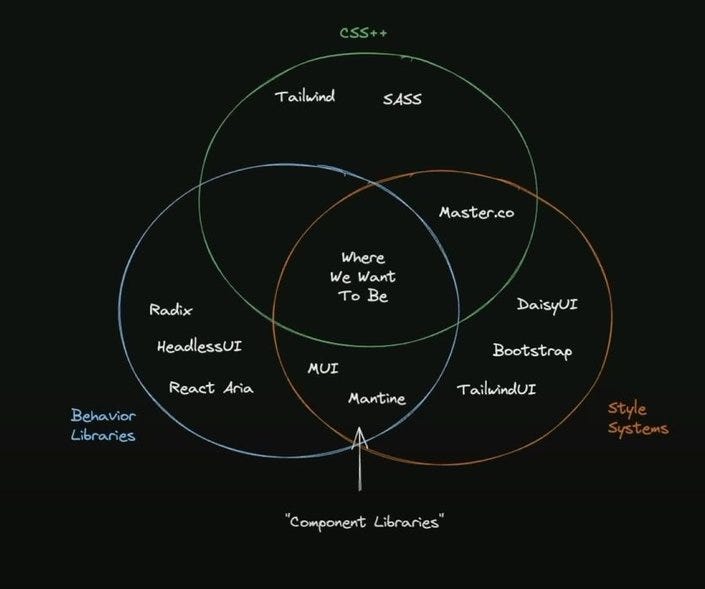
- Extensions of CSS: Sass, Less, Tailwind, CSS Modules, to make stuff look a certain way on your own.
- Behavior libraries / Headless: HeadlessUI, Radix, React Aria, for how things behave, not style.
- Style systems: TailwindUI, DaisyUI, for a baked-in look and behavior that is up to the developer.
- Component libraries: MUI, Ant Design, Mantine, are their own thing. You need to learn how to work with them. (ChakraUI, in Theo’s opinion, is a different beast, sitting somewhere close to “where we want to be”.)
Due to the inflexibility of low-code front-end development, it is not suitable for B2C software products.
But, it is different in enterprise applications. Their focus is on functionality rather than personalized presentation. Common pages, such as a chat window, typically involve tables with columns for time, user name, and text. Despite diverse presentations, the core function remains consistent.
However, traditional UI component libraries are not low-code solutions, heavily relying on development.
To address this, defining UI elements through structured JSON reduces the need for extensive coding. The visual editor complements this approach, providing an intuitive interface for designing and customizing UI components without the need for complex code modifications. However, proficiency in JavaScript remains essential for developers to effectively utilize these tools because the developers must use code to connect various functions like data loading and event processing.
The Low-Code in Back-End Development
There are common issues in system development
- Login, account/role, and permission management
- Handle page routing and navigation
- Handle external system integration
- Connect various data sources
- Manage data operations — Addition, Deletion, Modification, and Query
- Support process management
- Support a development-friendly operating environment
To implement the basic CRUD operations (Adding, Deleting, Modifying, Querying) in application development, three common methods are:
- Form-Based Approach
- Advantage: Simple to use, requiring only form design.
- Disadvantage: Less flexibility and challenging to support complex relationships.
2. Data Model Approach
- Advantage: High flexibility by defining a data model.
- Disadvantages: Poor ease of use, requiring knowledge of the data model, and non-developer costs.
3. BaaS Services (e.g., Parse)
- Advantage: Provides friendly APIs for user management and data access.
- Disadvantage: Requires backend code but highly flexible.
References
If you’ve found any of my articles helpful or useful then please consider throwing a coffee my way to help support my work or give me patronage😊, by using
Last but not least, if you are not a Medium Member yet and plan to become one, I kindly ask you to do so using the following link. I will receive a portion of your membership fee at no additional cost to you.
It is my first affiliate program, if you like to further enhance your system knowledge, you can click the links and buy the course. Honestly speaking, I will receive 20% of your course fees at no additional cost to you. You will have unlimited access to our courses. There is no time expiry and you will have access to all future updates free of cost.