avatarBk Lim

Free AI web copilot to create summaries, insights and extended knowledge, download it at here

3960

Abstract

lication that uses the Python / Nodejs client library to create the task in the task queue.</p><p id="bdcd"><b>Python</b></p><div id="d5ab"><pre><span class="hljs-keyword">import</span> <span class="hljs-type">json</span> <span class="hljs-keyword">from</span> google.cloud <span class="hljs-keyword">import</span> tasks_v2beta3 <span class="hljs-keyword">from</span> google.protobuf.timestamp_pb2 <span class="hljs-keyword">import</span> <span class="hljs-type">Timestamp</span></pre></div><div id="e99e"><pre><span class="hljs-comment"># <span class="hljs-doctag">TODO:</span> UPDATE WITH YOUR OWN CONFIG BELOW</span> CONFIG = { <span class="hljs-string">'CLOUD_TASKS'</span>: { <span class="hljs-string">'QUEUE'</span>: <span class="hljs-string">''</span>, <span class="hljs-comment"># queue name</span> <span class="hljs-string">'FUNCTION_URL'</span>: <span class="hljs-string">''</span>, <span class="hljs-comment"># Cloud function URL</span> <span class="hljs-string">'SERVICE_ACCOUNT_EMAIL'</span>: <span class="hljs-string">''</span>, <span class="hljs-comment"># SA created in point 2</span> }, <span class="hljs-string">'GCP_CONFIG'</span>: { <span class="hljs-string">'PROJECT'</span>: <span class="hljs-string">''</span>, <span class="hljs-string">'LOCATION'</span>: <span class="hljs-string">''</span> } }</pre></div><div id="0d9d"><pre>def create_http_task_with_token( payload, payload_date ): <span class="hljs-built_in"> client </span>= tasks_v2beta3.CloudTasksClient() parent = client.queue_path( <span class="hljs-attribute">project</span>=CONFIG[<span class="hljs-string">'GCP_CONFIG'</span>][<span class="hljs-string">'PROJECT'</span>], <span class="hljs-attribute">location</span>=CONFIG[<span class="hljs-string">'GCP_CONFIG'</span>][<span class="hljs-string">'LOCATION'</span>], <span class="hljs-attribute">queue</span>=CONFIG[<span class="hljs-string">'CLOUD_TASKS'</span>][<span class="hljs-string">'QUEUE'</span>], ) timestamp = Timestamp() timestamp.FromDatetime(payload_date) task = { <span class="hljs-string">'http_request'</span>: { <span class="hljs-string">'http_method'</span>: <span class="hljs-string">'POST'</span>, <span class="hljs-string">'url'</span>: CONFIG[<span class="hljs-string">'CLOUD_TASKS'</span>][<span class="hljs-string">'FUNCTION_URL'</span>], <span class="hljs-string">'oidc_token'</span>: { <span class="hljs-string">'service_account_email'</span>: CONFIG[<span class="hljs-string">'CLOUD_TASKS'</span>][<span class="hljs-string">'SERVICE_ACCOUNT_EMAIL'</span>], }, <span class="hljs-string">'headers'</span>: { <span class="hljs-string">'Content-Type'</span>: <span class="hljs-string">'application/json'</span> }, <span class="hljs-string">'body'</span>: json.dumps(payload).encode() }, <span class="hljs-string">'schedule_time'</span>: timestamp } response = client.create_task(<span class="hljs-attribute">parent</span>=parent, <span class="hljs-attribute">task</span>=task) return response</pre></div><h2 id="005b">Node</h2><div id="e95a"><pre><span class="hljs-keyword">const</span> events = <span class="hljs-built_in">require</span>(<span class="hljs-string">'events'</span>); <span class="hljs-keyword">const</span> { <span class="hljs-title class_">CloudTasksClient</span> } = <span class="hljs-built_in">require</span>(<span class="hljs-string">'@google-cloud/tasks'</span>);</pre></div><div id="3c39"><pre>// TODO: UPDATE WITH YOUR OWN CONFIG BELOW const config = { CLOUD_TASKS: { QUEUE: <span class="hljs-string">''</span>, FUNCTION_URL: <span class="hljs-string">''</span>, SERVICE_ACCOUNT_EMAIL: <span class="hljs-string">''</span>, }, GCP_CONFIG: { PROJECT: <span class="hljs-string">''</span>,

Options

LOCATION: <span class="hljs-string">''</span>, }, };</pre></div><div id="cc8a"><pre><span class="hljs-type">const</span> em = <span class="hljs-keyword">new</span> events.<span class="hljs-built_in">EventEmitter</span>(); <span class="hljs-type">const</span> client = <span class="hljs-keyword">new</span> <span class="hljs-built_in">CloudTasksClient</span>(); <span class="hljs-type">const</span> parent = client.<span class="hljs-built_in">queuePath</span>( config.GCP_CONFIG.PROJECT, config.GCP_CONFIG.LOCATION, config.CLOUD_TASKS.QUEUE, );</pre></div><div id="4151"><pre>em.<span class="hljs-title function_">on</span>(<span class="hljs-string">'SomeEvent'</span>, <span class="hljs-keyword">async</span> (val) => { <span class="hljs-keyword">const</span> payload = <span class="hljs-title class_">JSON</span>.<span class="hljs-title function_">stringify</span>({ <span class="hljs-attr">key</span>: val });

<span class="hljs-keyword">const</span> body = <span class="hljs-title class_">Buffer</span>.<span class="hljs-title function_">from</span>(payload).<span class="hljs-title function_">toString</span>(<span class="hljs-string">'base64'</span>); <span class="hljs-keyword">const</span> task = { <span class="hljs-attr">httpRequest</span>: { <span class="hljs-attr">httpMethod</span>: <span class="hljs-string">'POST'</span>, <span class="hljs-attr">url</span>: config.<span class="hljs-property">CLOUD_TASKS</span>.<span class="hljs-property">FUNCTION_URL</span>, <span class="hljs-attr">oidcToken</span>: { <span class="hljs-attr">serviceAccountEmail</span>: config.<span class="hljs-property">CLOUD_TASKS</span>.<span class="hljs-property">SERVICE_ACCOUNT_EMAIL</span>, }, <span class="hljs-attr">headers</span>: { <span class="hljs-string">'Content-Type'</span>: <span class="hljs-string">'application/json'</span>, }, body, }, <span class="hljs-attr">scheduleTime</span>: { <span class="hljs-attr">seconds</span>: <span class="hljs-title class_">Date</span>.<span class="hljs-title function_">now</span>() / <span class="hljs-number">1000</span> + <span class="hljs-number">86400</span>, <span class="hljs-comment">// 1 day later</span> }, };

<span class="hljs-keyword">try</span> { <span class="hljs-keyword">await</span> client.<span class="hljs-title function_">createTask</span>({ parent, task }); } <span class="hljs-keyword">catch</span> (err) { winston.<span class="hljs-title function_">error</span>(<span class="hljs-string">Error in creating task: <span class="hljs-subst">${err}</span></span>); } });</pre></div><div id="f52b"><pre><span class="hljs-comment">// you can then emit the event above in the application flow</span></pre></div><p id="ac85">3 things we noticed:</p><ul><li>For Python, we have to convert Python datetime using Google Protobuf Timestamp class before passing in for the schedule_time parameter. Node on the other hand can use Javascript native Date object.</li><li>For task deduplication, you can use the “name” key in the task object to create the task with the specified name. The name has to be in the following format: <code>projects/{PROJECT_NAME}/locations/{LOCATION}/queues/{QUEUE_ID}/tasks/{TASK_NAME}</code></li><li>As per the language best practices, Python will be using <code>snake_case</code> while Javascript will be using <code>camelCase</code> for the task object.</li></ul><h1 id="a94c">Summary</h1><p id="96f8">We use Google Cloud Tasks to support the queueing of event-driven scheduled tasks. Another potential use case could include scheduling a reminder/notification to a trial user couple of days before the subscription expired (vs. scan the entire user base to see which user account expiring in X number of days). The event-driven nature of this solution allows us to be more efficient and only consume the resources we need for a given task.</p></article></body>

Event-Driven Scheduled Jobs Using GCP Cloud Tasks
Google Cloud Platform — Cloud Tasks

In our company Interviewer.AI, we have been using a lot of AWS Lambda / GCP Cloud Function for scheduled tasks. For example, a daily event scheduled via AWS Cloudwatch Event to Lambda in order to send out daily insights / reports for our users.
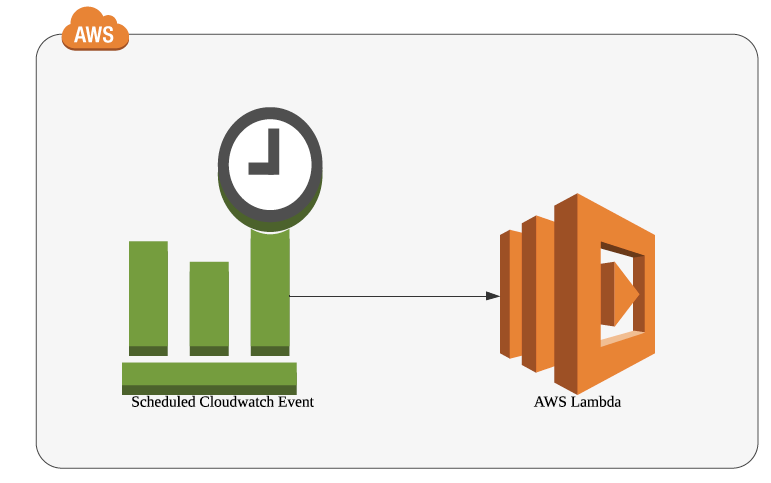
Scheduled Cloudwatch Event as a trigger to AWS Lambda

So far the setup works for us pretty well.

Recently, we started to work on a product feature where we wanted to send out email reminders for our candidate at a specified future time (think of it as X hours after the candidate applied for a job). While the original workflow with scheduled cron timing still works to a certain extent, there will be unnecessary scanning of DB and processing for information that might not be needed.
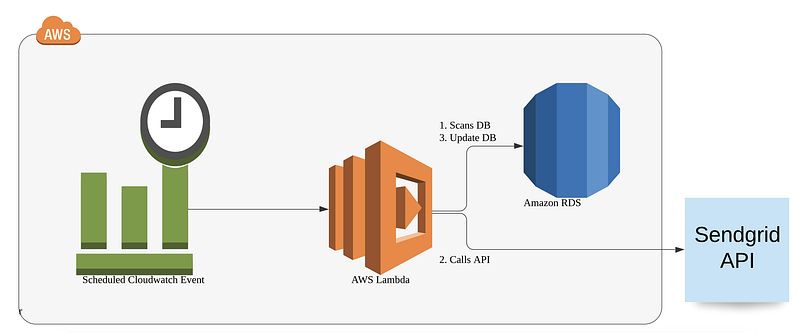
Potential Solution?

Since each email to be sent is tied to an “event” when a candidate entry is being created, this is a good use case to use an event-driven + asynchronous architecture. We started thinking about using some sort of queueing service, however, we quickly realized there is a downside of normal queueing or publisher/subscriber service such as AWS SQS or SNS as the services usually don’t have a “temporal” element of it. Unless you publish the message to the queue say 48 hours down the road, the message will be consumed straight away by the downstream services.

This is when we were introduced to GCP Cloud Tasks by a Google Customer Engineer. In a nutshell, it’s a task queue service that comes with the feature we need the most in this problem statement, i.e. scheduling. Aside from that, other benefits that come along include task de-duplication, configurable downstream rate-limiting, and can store messages in the queue for up to 30 days.

Summary of the implementation as below:
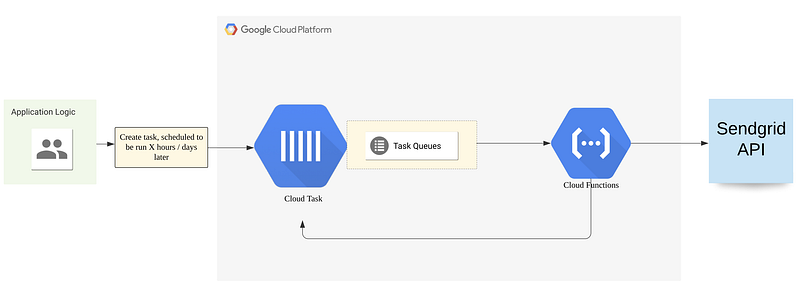
Cloud Tasks implementation overview

1. Create a Cloud Function with HTTP handler to handle the task.

I will skip showing the function logic, in our case, it does 2 things:

  • Send out reminder email via Sendgrid API
  • Once processed, create a new scheduled task and put back in the same queue for 2nd reminder

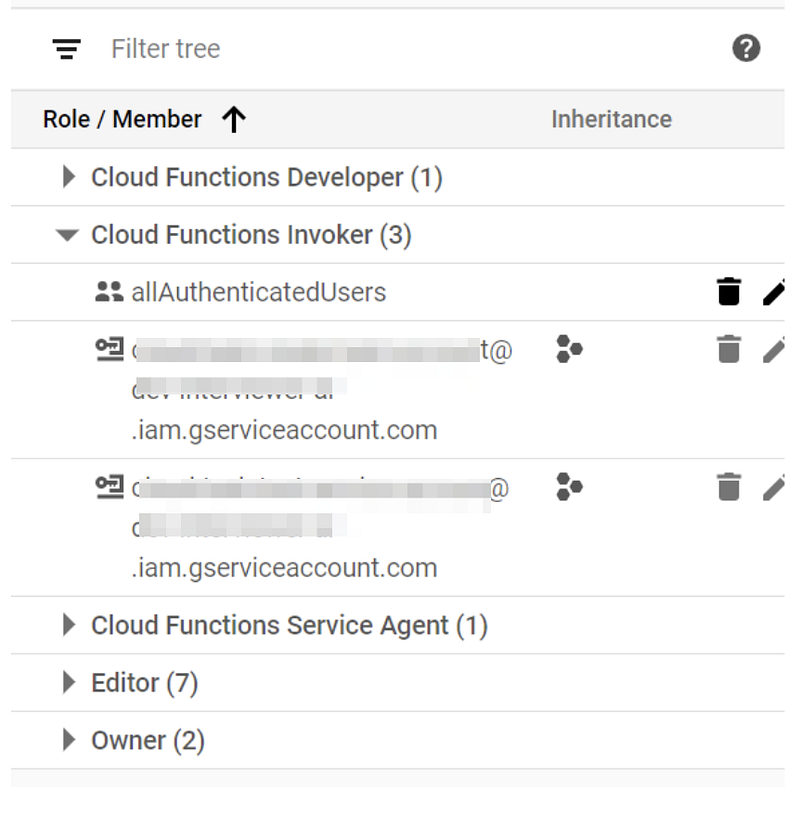
2. At the same time, 2 things we can do to further secure the Cloud Function from an unauthorized call.

  • Remove allUsers from Cloud Function Invoker permission
  • Create a service account and grant it the Cloud Function Invoker call, this service account email address will be used as one parameter in subsequent task creation

Here’s how it looks like in the permission panel of our Cloud Function:
3. Creating a task queue in GCP

gcloud tasks queues create sample-queue

(you can supply additional parameters like max-dispatches-per-seconds to control the rate of message dispatching)

4. In the application logic, create (“enqueue”) the task in the task queue specified in point 3.

Here’s 2 snippet from our application that uses the Python / Nodejs client library to create the task in the task queue.

Python

import json
from google.cloud import tasks_v2beta3
from google.protobuf.timestamp_pb2 import Timestamp
# TODO: UPDATE WITH YOUR OWN CONFIG BELOW
CONFIG = {
    'CLOUD_TASKS': {
        'QUEUE': '',  # queue name
        'FUNCTION_URL': '',  # Cloud function URL
        'SERVICE_ACCOUNT_EMAIL': '',  # SA created in point 2
    },
    'GCP_CONFIG': {
        'PROJECT': '',
        'LOCATION': ''
    }
}
def create_http_task_with_token(
    payload,
    payload_date
):
    client = tasks_v2beta3.CloudTasksClient()
    parent = client.queue_path(
        project=CONFIG['GCP_CONFIG']['PROJECT'],
        location=CONFIG['GCP_CONFIG']['LOCATION'],
        queue=CONFIG['CLOUD_TASKS']['QUEUE'],
    )
    timestamp = Timestamp()
    timestamp.FromDatetime(payload_date)
    task = {
        'http_request': {
            'http_method': 'POST',
            'url': CONFIG['CLOUD_TASKS']['FUNCTION_URL'],
            'oidc_token': {
                'service_account_email': CONFIG['CLOUD_TASKS']['SERVICE_ACCOUNT_EMAIL'],
            },
            'headers': {
                'Content-Type': 'application/json'
            },
            'body': json.dumps(payload).encode()
        },
        'schedule_time': timestamp
    }
    response = client.create_task(parent=parent, task=task)
    return response

Node

const events = require('events');
const { CloudTasksClient } = require('@google-cloud/tasks');
// TODO: UPDATE WITH YOUR OWN CONFIG BELOW
const config = {
  CLOUD_TASKS: {
    QUEUE: '',
    FUNCTION_URL: '',
    SERVICE_ACCOUNT_EMAIL: '',
  },
  GCP_CONFIG: {
    PROJECT: '',
    LOCATION: '',
  },
};
const em = new events.EventEmitter();
const client = new CloudTasksClient();
const parent = client.queuePath(
  config.GCP_CONFIG.PROJECT,
  config.GCP_CONFIG.LOCATION,
  config.CLOUD_TASKS.QUEUE,
);
em.on('SomeEvent', async (val) => {
  const payload = JSON.stringify({
    key: val
  });

  const body = Buffer.from(payload).toString('base64');
  const task = {
    httpRequest: {
      httpMethod: 'POST',
      url: config.CLOUD_TASKS.FUNCTION_URL,
      oidcToken: {
        serviceAccountEmail: config.CLOUD_TASKS.SERVICE_ACCOUNT_EMAIL,
      },
      headers: {
        'Content-Type': 'application/json',
      },
      body,
    },
    scheduleTime: {
      seconds: Date.now() / 1000 + 86400, // 1 day later
    },
  };

  try {
    await client.createTask({ parent, task });
  } catch (err) {
    winston.error(`Error in creating task: ${err}`);
  }
});
// you can then emit the event above in the application flow

3 things we noticed:

  • For Python, we have to convert Python datetime using Google Protobuf Timestamp class before passing in for the schedule_time parameter. Node on the other hand can use Javascript native Date object.
  • For task deduplication, you can use the “name” key in the task object to create the task with the specified name. The name has to be in the following format: projects/{PROJECT_NAME}/locations/{LOCATION}/queues/{QUEUE_ID}/tasks/{TASK_NAME}
  • As per the language best practices, Python will be using snake_case while Javascript will be using camelCase for the task object.

Summary

We use Google Cloud Tasks to support the queueing of event-driven scheduled tasks. Another potential use case could include scheduling a reminder/notification to a trial user couple of days before the subscription expired (vs. scan the entire user base to see which user account expiring in X number of days). The event-driven nature of this solution allows us to be more efficient and only consume the resources we need for a given task.

Google Cloud Platform
Cloud Tasks
Gcp
Cloud Functions
Google Cloud Functions
Recommended from ReadMedium