
Event-Driven Programming with Dapr
Deep Dive with Spring Boot Microservices

Dapr, Distributed APplication Runtime, is an open source project of Microsoft Azure’s internal innovation incubation team. It was designed to solve some common problems in the microservice application development process. Dapr is a portable, event-driven runtime that makes it easier for enterprise developers to use various languages and frameworks to build flexible, stateless and stateful microservice applications.
Messaging is an important technique to enable flexible communication patterns among loosely coupled microservices. As a distributed runtime, Dapr provides built-in messaging support for developers to design event-driven microservices applications. We will focus on building Spring Boot microservices with event driven model using Dapr pub/sub in this story.
Dapr Pub/Sub Main Features
- Cloud Events message format: Dapr uses the CloudEvents 1.0 specification as its message format. Any message sent by an application to a topic using Dapr is automatically “wrapped” in a Cloud Events envelope.
- Message subscription: Dapr applications can subscribe to published topics. Dapr allows applications subscribe to topics by either Declarative method or Programmatic method.
- Message Delivery: Dapr considers message successfully delivered when the subscriber responds with a non-error response (HTTP response code 204) after processing the message. Dapr guarantees “At-Least-Once” semantics for message delivery.
- Topic Scoping: enables you to say which topics an application is allowed to publish to and which topics an application is allowed to subscribed to.
- Message Time-to-Live (TTL): A message that has been in the queue for longer than the configured TTL is said to be dead. This is to prevent the build up of messages that are not read.
Dapr Pub/Sub Building Blocks
Let’s use two microservices, customer-service and order-service, as examples to demonstrate how Dapr can be used for event driven implementation in Spring Boot microservices. In this example, a new customer created event is published from customer-service, order-service subscribes to the topic the customer created event is published to, and it consumes that event.
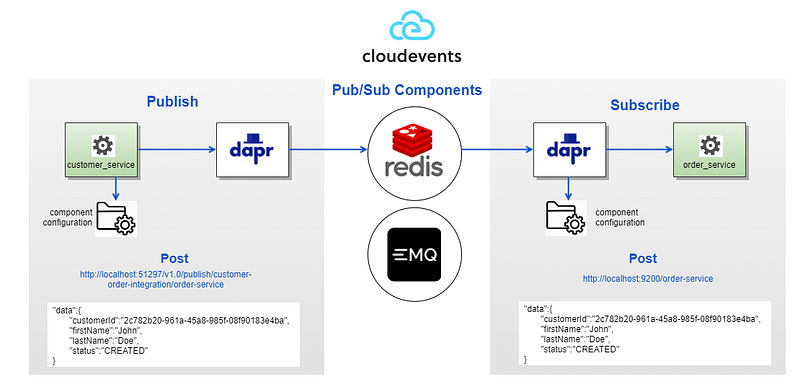
To implement event driven architecture using Dapr for your Spring Boot microservices, the following steps are to be followed.
Step 0: Add Dapr dependency to pom
Add the following Dapr dependency to your project pom:
<dependency>
   <groupId>io.dapr</groupId>
   <artifactId>dapr-sdk</artifactId>
   <version>${dapr-sdk.version}</version>
</dependency>
<dependency>
   <groupId>io.dapr</groupId>
   <artifactId>dapr-sdk-springboot</artifactId>
   <version>${dapr-sdk.version}</version>
</dependency>
Step 1: Set up Pub/Sub Component
Redis stream is the default pub/sub component when running dapr init. Save the content below in a Custom Resources Definition (CRD) file named pubsub-redis.yaml, and place it under your app’s component directory, such as under submodule “dapr-components”. Don’t forget to use the flag — components-path pointing to the component directory when you run dapr run CLI command. This will tell Dapr where to look for the pub/sub component configuration file.
apiVersion: dapr.io/v1alpha1
kind: Component
metadata:
  name: customer-order-integration
spec:
  type: pubsub.redis
  version: v1
  metadata:
    - name: redisHost
      value: redis:6379
    - name: redisPassword
      value: ""
    - name: ttlInSeconds
      value: 60
NOTE: metadata name can only consist of lower case alphanumeric characters, ‘-’ or ‘.’, and must start and end with an alphanumeric character. Regex used for validation is ‘a-z0–9?(.a-z0–9?)*’. If invalid characters are contained in the component metadata name, when deploying your microservices to Azure Kubernetes Services (AKS), it will throw error.
One major benefit of using Dapr for event driven programming is that it’s very easy to switch your pub/sub component to a different component, such as changing from Redis stream to MQTT. No need for any code change, all you need to do is to change the content of the above component file to your desired component configuration, such as the example below for MQTT public message broker. With Dapr, the infrastructure code is dramatically simplified. It doesn’t need to distinguish between the different message brokers. Dapr provides this abstraction for you. And if needed, you can easily swap out message brokers or configure multiple message broker components. For other pub/sub message brokers, you can refer to the component template documentation on Dapr pub/sub component.
apiVersion: dapr.io/v1alpha1
kind: Component
metadata:
  name: customer-order-integration
  namespace: default
spec:
  type: pubsub.mqtt
  version: v1
  metadata:
    - name: url
      value: "tcp://broker.emqx.io:1883"
    - name: qos
      value: 1
    - name: retain
      value: "false"
    - name: cleanSession
      value: "false"
Note: the same component definition should exist within the pub/sub component directory of the app which publishes events as well as the app which consumes events.
Step 2: Subscribe to Topics
You can subscribe to a topic declaratively using the following Custom Resources Definition. Create a file named subscription.yaml under the component directory mentioned above in step 1, and paste the following as an example:
apiVersion: dapr.io/v1alpha1
kind: Subscription
metadata:
  name: customer-order-integration
spec:
  topic: order-service
  route: /customer-operations
  pubsubname: customer-order-integration
scopes:
- order-service
The example above shows an event subscription to topic order-service, for the pub/sub component customer-order-integration.
- The route field tells Dapr to send all
order-servicetopic messages to the/customer-operationsendpoint in the app. - The scopes field enables this subscription for app with ID
order-service. You can add multiple app IDs if you intend for those apps to subscribe to the topic.
Step 3: Create a SubscriberController to Consume the Events
Within order-service, create a SubscriberController, with the following method (sample only).
Notice the following line is commented out because we used declarative subscribe method by utilizing the pub/sub configuration in subscription.yaml file as mentioned above. If you choose not to use yaml file declaratively (remove subscription.yaml), you can programmatically subscribe to a topic by specifying the topic and pubsubname, and the POST path above the method to consume events, same effect as the declarative way of yaml config:
@Topic(name = "order-service", pubsubName = "customer-order-integration")
@PostMapping(path = "/customer-operations")
Also notice that we share the same topic for multiple events related to customer. It’s generally a good practice to publish events belonging to the same entity to the same topic.
Step 4: Change in the Spring Boot Application Class
The class annotated with @SpringBootApplication registers the SubscriberController, which exposes the message retrieval as a POST request. Dapr’s sidecar performs the actual call to the controller. The main method passes in the port of the subscriber app running on, telling Dapr which port to call that app.
In the rest controller submodule’s Dockerfile, be sure to pass in the port the subscriber app runs on, so Dapr is informed:
ENTRYPOINT ["java","-jar","/order-service-exec.jar", "-p", "9200"]Step 5: Publish Events to a Topic
There are two ways to invoke Dapr to publish events: through API, or through SDK. I prefer the SDK way due to its higher level of abstraction over the API calls. We can use Dapr HTTP Client, DaprClient (from dapr-sdk), to publish events to a topic. We only need to pass in pubsub name, topic, event, and any metadata in a singleton map to publish the event. Code snippet below comes from PublisherController in customer-service app.
Step 6: Ensure docker-compose.yml is properly configured
Dapr sidecar needs to be configured as a separate service from its main service in docker-compose.yml, as it runs in its own container. One particular thing to note is that we need to mount the volume in the container for the directory where the dapr components file(s) are located, such as line 10–11 below. The mounted volume is then referenced on line 7 and 9 as Dapr’s “components-path”. Without this step, Dapr won’t work in container even if it works perfectly locally by launching “dapr run…”.
Application Launch
The github repository links for the two sample microservices are as follows. https://github.com/wenqiglantz/customer-service.git and https://github.com/wenqiglantz/order-service.git
Follow the instructions in the README file in those two repos to build and launch those two microservices.
customer-service: http://localhost:9100/swagger-ui.html
order-service: http://localhost:9200/swagger-ui.html
Trigger a customer created event by creating a new customer in customer-service, observe the console logs:
customer-service:

order-service:

As seen from the logs, the CustomerWasCreated event got successfully published by customer-service and consumed by order-service.
===
Reference:


