avatarKonstantin Rink

Free AI web copilot to create summaries, insights and extended knowledge, download it at here

4857

Abstract

o <i>ChatOpenAI</i>.</p><p id="58f8">After that, we can create our example application by writing the following code</p><div id="30cc"><pre><span class="hljs-comment"># imports from LangChain to build app</span> <span class="hljs-keyword">from</span> langchain <span class="hljs-keyword">import</span> PromptTemplate <span class="hljs-keyword">from</span> langchain.chains <span class="hljs-keyword">import</span> LLMChain <span class="hljs-keyword">from</span> langchain.chat_models <span class="hljs-keyword">import</span> ChatOpenAI <span class="hljs-keyword">from</span> langchain.prompts.chat <span class="hljs-keyword">import</span> (ChatPromptTemplate, HumanMessagePromptTemplate) <span class="hljs-keyword">from</span> langchain <span class="hljs-keyword">import</span> HuggingFaceHub

<span class="hljs-comment"># create LLM chain</span> full_prompt = HumanMessagePromptTemplate( prompt=PromptTemplate( template=<span class="hljs-string">"You are a tourist guide and gourmet to provide"</span>
<span class="hljs-string">"helpful information about the following question: {prompt}"</span>
<span class="hljs-string">"Name at least 2 restaurants and the dishes they are famous for."</span>, input_variables=[<span class="hljs-string">"prompt"</span>], ) ) chat_prompt_template = ChatPromptTemplate.from_messages([full_prompt])

<span class="hljs-comment"># You can choose between gpt-3.5-turbo and google/flan-t5-xxl</span> google = HuggingFaceHub(repo_id=<span class="hljs-string">"google/flan-t5-xxl"</span>, model_kwargs={<span class="hljs-string">"temperature"</span>:<span class="hljs-number">0.9</span>})

chat = ChatOpenAI(model_name=<span class="hljs-string">'gpt-3.5-turbo'</span>, temperature=<span class="hljs-number">0.9</span>)

<span class="hljs-comment"># Provide here as a parameter value for llm the model you'd like to use</span> chain = LLMChain(llm=google, prompt=chat_prompt_template)</pre></div><p id="ce80">First, we create a suitable <i>PromptTemplate</i> where we provide additional contextual information about the agent’s (aka model’s) role and our expectations (such as restaurants and the dishes they are famous for).</p><p id="937c">Then we can <b>either</b> go with a <i>Text2Text Generation</i> model from HuggingFaceHub or with the classic <i>ChatOpenAI</i> model.</p><blockquote id="f2e3"><p><b>Please note:</b> <i>Question Answering</i> models <a href="https://github.com/hwchase17/langchain/issues/2224">are not yet supported</a> by LangChain. That’s why we are using Text2Text Generation models. An overview of possible models can be found <a href="https://huggingface.co/models?pipeline_tag=text2text-generation">here</a>.</p></blockquote><h2 id="29ce">Define feedback functions</h2><p id="47af">As mentioned, we will create two feedback functions: one to check if the language of the answer matches that of the question, and another one to detect toxicity.</p><div id="48aa"><pre><span class="hljs-keyword">from</span> trulens_eval <span class="hljs-keyword">import</span> Feedback, Huggingface, Query

<span class="hljs-comment"># Initialize HuggingFace-based feedback function collection class:</span> hugs = Huggingface() <span class="hljs-comment"># Define a language match feedback function using HuggingFace.</span> f_lang_match = Feedback(hugs.language_match).on( text1=Query.RecordInput, text2=Query.RecordOutput ) <span class="hljs-comment"># Check if model's answer is toxic</span> f_toxity = Feedback(hugs.not_toxic).on(text=Query.RecordOutput)</pre></div><h2 id="6885">Wrap the LLM app with TruLens</h2><p id="969c">To log and evaluate each interaction with our created chain or LLM app, we have to wrap it within a TruChain object.</p><div id="c7eb"><pre><span class="hljs-keyword">from</span> trulens_eval <span class="hljs-keyword">import</span> TruChain

truchain = TruChain( chain, app_id=<span class="hljs-string">'TestApp-ABC'</span>, feedbacks=[f_lang_match, f_toxity] )</pre></div><p id="6a98">A <i>default.sqlite</i> file should now have been created in the directory of the Python file containing this code.</p><h2 id="63a4">Start interacting</h2><p id="49dd">To interact now with the LLM app, we can run the following command</p><div id="c106"><pre>truchain(<span class="hljs-string">"Where can I find the best tapas in Barcelona?"</span>)</pre></div><blockquote id="ec5d"><p><b>Please note</b>: In case you get the following error message <code><i>App raised an exception <empty message></i></code> please check if your API keys/tokens are working and set correctly.</p></blockquote><p id="8d8b">You will get the model’s or app answers as well as the notification that the record and feedback have been stored in the sqlite file.</p><h1 id="6774">Explo

Options

re your records and test results</h1><p id="3c62">To explore your records now, you can initiate the TruLens dashboard by executing the following code snippet:</p><div id="987d"><pre><span class="hljs-keyword">from</span> trulens_eval <span class="hljs-keyword">import</span> Tru tru = Tru() tru.start_dashboard()</pre></div><blockquote id="2b4f"><p><b>Please note:</b> I faced a toml/decoder error when I executed the <code><i>.start_dashboard()</i></code> method. The solution was to remove the<code><i>config.toml</i></code> file. More information can be found <a href="https://discuss.streamlit.io/t/cant-run-streamlit-toml-decoder-error/2282/2">here</a>.</p></blockquote><p id="2747">You can stop the dashboard any time by executing the <code>tru.stop_dashboard()</code> method.</p><p id="e684">Now you can open the dashboard by clicking on the local URL.</p><figure id="db8f"><img src="https://cdn-images-1.readmedium.com/v2/resize:fit:800/1*h6rfYSCzDzTbY3JkcHwOXg.png"><figcaption>Figure 1. App Leaderboard (image by author).</figcaption></figure><p id="2985">The App Leaderboard provides an overview of your LLM applications. In our example, you can view the number of existing records, the generated costs and tokens, as well as information from our two feedback functions: <code>not_toxic</code> and <code>language_match</code>.</p><p id="1178">We can get more detailed information (figure 2) by clicking on the <code>Select App</code> button.</p><figure id="0000"><img src="https://cdn-images-1.readmedium.com/v2/resize:fit:800/1*e6rim2pxWT5YHVeCa4fyfQ.png"><figcaption>Figure 2. Detailed information about the logged experiments with our LLM app (image by author).</figcaption></figure><p id="c103">This view also shows us the <b>generated costs per record </b>(if you are using ChatGPT).</p><p id="e113">If we select a row, we can access additional metadata about our app. Figure 3 shows an excerpt of the available metadata.</p><figure id="8faa"><img src="https://cdn-images-1.readmedium.com/v2/resize:fit:800/1*[email protected]"><figcaption>Figure 3. Excerpt of app metadata view.</figcaption></figure><h1 id="5bbc">Conclusion</h1><p id="64c9">TruLens is a great solution for enhancing the management and analysis of experiments with your LLM application. Although the package lacked detailed documentation and code examples in the git repository at the time of writing this article, it is reasonable to expect that the developers are actively addressing these areas. Moreover, an additional valuable feature to consider would be the inclusion of session information for tracking or logging purposes, particularly when multiple users are testing your model and differentiation between them is desired.</p><p id="0cc2">The example code can be found <b>👉<a href="https://github.com/darinkist/article_track_monitor_llms/blob/main/ColabDemo_Medium_Article_Evaluate_Monitor_LLMs.ipynb">here</a>.</b></p><h1 id="8039">Resources</h1><div id="38e2" class="link-block"> <a href="https://www.trulens.org/"> <div> <div> <h2>TruLens</h2> <div><h3>TruLens: Explainability for Neural Networks</h3></div> <div><p>www.trulens.org</p></div> </div> <div> <div style="background-image: url(https://miro.readmedium.com/v2/resize:fit:320/0*8DESXR9okCsW-f51)"></div> </div> </div> </a> </div><div id="8583" class="link-block"> <a href="https://github.com/truera/trulens"> <div> <div> <h2>GitHub — truera/trulens: Evaluation and Tracking for LLM Experiments</h2> <div><h3>Evaluation and Tracking for LLM Experiments. Contribute to truera/trulens development by creating an account on GitHub.</h3></div> <div><p>github.com</p></div> </div> <div> <div style="background-image: url(https://miro.readmedium.com/v2/resize:fit:320/0*PwOh-VBU1PbYROV1)"></div> </div> </div> </a> </div><div id="7b3a" class="link-block"> <a href="https://readmedium.com/evaluate-and-track-your-llm-experiments-introducing-trulens-86028fe9b59a"> <div> <div> <h2>Evaluate and Track your LLM Experiments: Introducing TruLens</h2> <div><h3>Today, we are excited to announce TruLens for LLM Applications — the first open source software to evaluate and track…</h3></div> <div><p>medium.com</p></div> </div> <div> <div style="background-image: url(https://miro.readmedium.com/v2/resize:fit:320/0*xdRZEiZGixtk5rWi.jpg)"></div> </div> </div> </a> </div></article></body>

Evaluate and Monitor the Experiments With Your LLM App

Evaluation and tracking of your LLM experiments with TruLens

Photo by Jonathan Diemel on Unsplash

The development of a Large Language Model application involves many iterations of experimentation. As a developer, your objective is to ensure that the model’s answers align with your specific requirements like informativeness and appropriateness. This process of retesting and evaluation can be quite time-consuming.

This article will show you step-by-step how to automate such a process using TruLens. TruLens is a Python package that contains a set of tools for evaluating your LLM applications.

A colab notebook containing all the example code can be found 👉here.

Workflow

TruLens workflow comprises five steps:

  1. Build your LLM application (i.e., with LangChain and ChatGPT or any other LLM)
  2. Connect your LLM app to TrueLens and start logging the records or interactions between your users and your app. All logs are stored in sqlite db.
  3. Add feedback functions to log and evaluate your LLM app’s quality (optional)
  4. Explore records, and evaluation results in TruLens dashboard based on streamlit
  5. Iterate and select the best LLM chain (version)

Before we start

  • The following example creates a simple LLM application using LangChain, ChatGPT, and an alternative LLM from HuggingFace.
  • TruLens offers the integration of feedback functions to evaluate the quality of our LLM app.
  • In this example, we are also using HuggingFace to check if the answer is in the same language as the question and to detect any toxicity in the answer. However, this step is optional and it is also possible to write your own feedback functions.

Prerequisites

Before we can start creating our LLM application, we need to fulfill the following requirements.

Installing packages

Run the following command to install the required packages:

pip install trulens-eval langchain -q

Please note: I had an old version of langchain already installed but received some errors when using it in combination with TruLens. Therefore, I installed the (latest) version 0.0.201 .

Get API keys

The OpenAI key can be created under this link and then by clicking on the + Create new secret key button.

Please note: If you prefer not to spend money, you can skip this step and solely utilize the alternative LLM from HuggingFaceHub.

For HuggingFace, Access Token can be created in the user settings under Access Tokens.

Example LLM application

We start creating our example LLM application by setting our API keys as environment variables.

import os
os.environ["OPENAI_API_KEY"] = "<ADD KEY HERE>"
os.environ["HUGGINGFACE_API_KEY"] = "<ADD KEY HERE>"
os.environ["HUGGINGFACEHUB_API_TOKEN"] = "<ADD KEY HERE>"

The API key and token for Hugging Face are the same. The difference is that the HUGGINGFACE_API_KEY is used by TrueLens for leveraging Hugging Face’s feedback functions, while the HUGGINGFACEHUB_API_TOKEN is later used by HuggingFaceHubto get a Text2Text Generation model as an alternative to ChatOpenAI.

After that, we can create our example application by writing the following code

# imports from LangChain to build app
from langchain import PromptTemplate
from langchain.chains import LLMChain
from langchain.chat_models import ChatOpenAI
from langchain.prompts.chat import (ChatPromptTemplate, 
                                    HumanMessagePromptTemplate)
from langchain import HuggingFaceHub

# create LLM chain
full_prompt = HumanMessagePromptTemplate(
    prompt=PromptTemplate(
        template="You are a tourist guide and gourmet to provide" \
        "helpful information about the following question: {prompt}"\
        "Name at least 2 restaurants and the dishes they are famous for.",
            input_variables=["prompt"],
        )
    )
chat_prompt_template = ChatPromptTemplate.from_messages([full_prompt])

# You can choose between gpt-3.5-turbo and google/flan-t5-xxl
google = HuggingFaceHub(repo_id="google/flan-t5-xxl", 
                     model_kwargs={"temperature":0.9})

chat = ChatOpenAI(model_name='gpt-3.5-turbo', temperature=0.9)

# Provide here as a parameter value for llm the model you'd like to use
chain = LLMChain(llm=google, prompt=chat_prompt_template)

First, we create a suitable PromptTemplate where we provide additional contextual information about the agent’s (aka model’s) role and our expectations (such as restaurants and the dishes they are famous for).

Then we can either go with a Text2Text Generation model from HuggingFaceHub or with the classic ChatOpenAI model.

Please note: Question Answering models are not yet supported by LangChain. That’s why we are using Text2Text Generation models. An overview of possible models can be found here.

Define feedback functions

As mentioned, we will create two feedback functions: one to check if the language of the answer matches that of the question, and another one to detect toxicity.

from trulens_eval import Feedback, Huggingface, Query

# Initialize HuggingFace-based feedback function collection class:
hugs = Huggingface()
# Define a language match feedback function using HuggingFace.
f_lang_match = Feedback(hugs.language_match).on(
    text1=Query.RecordInput, text2=Query.RecordOutput
)
# Check if model's answer is toxic
f_toxity = Feedback(hugs.not_toxic).on(text=Query.RecordOutput)

Wrap the LLM app with TruLens

To log and evaluate each interaction with our created chain or LLM app, we have to wrap it within a TruChain object.

from trulens_eval import TruChain

truchain = TruChain(
    chain,
    app_id='TestApp-ABC',
    feedbacks=[f_lang_match, f_toxity]
)

A default.sqlite file should now have been created in the directory of the Python file containing this code.

Start interacting

To interact now with the LLM app, we can run the following command

truchain("Where can I find the best tapas in Barcelona?")

Please note: In case you get the following error message App raised an exception <empty message> please check if your API keys/tokens are working and set correctly.

You will get the model’s or app answers as well as the notification that the record and feedback have been stored in the sqlite file.

Explore your records and test results

To explore your records now, you can initiate the TruLens dashboard by executing the following code snippet:

from trulens_eval import Tru
tru = Tru()
tru.start_dashboard()

Please note: I faced a toml/decoder error when I executed the .start_dashboard() method. The solution was to remove theconfig.toml file. More information can be found here.

You can stop the dashboard any time by executing the tru.stop_dashboard() method.

Now you can open the dashboard by clicking on the local URL.
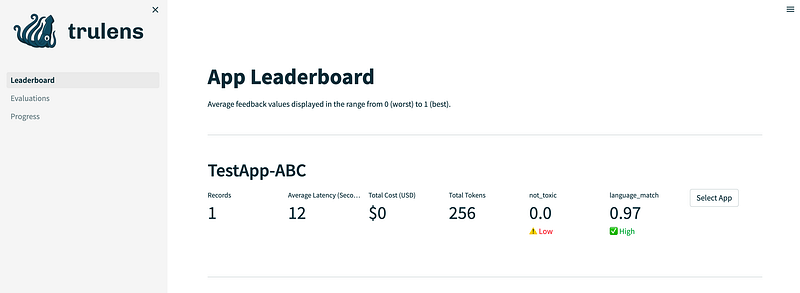
Figure 1. App Leaderboard (image by author).

The App Leaderboard provides an overview of your LLM applications. In our example, you can view the number of existing records, the generated costs and tokens, as well as information from our two feedback functions: not_toxic and language_match.

We can get more detailed information (figure 2) by clicking on the Select App button.
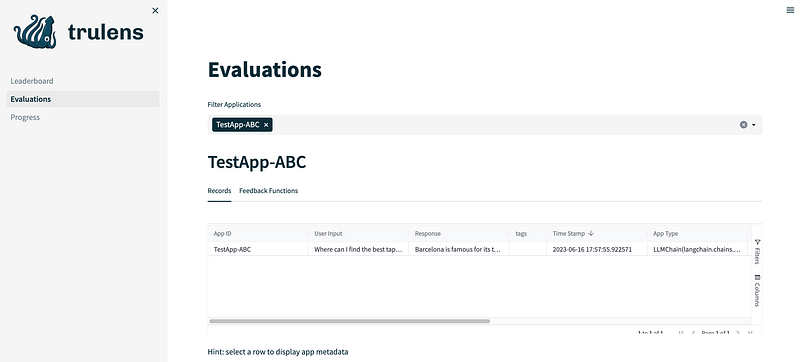
Figure 2. Detailed information about the logged experiments with our LLM app (image by author).

This view also shows us the generated costs per record (if you are using ChatGPT).

If we select a row, we can access additional metadata about our app. Figure 3 shows an excerpt of the available metadata.
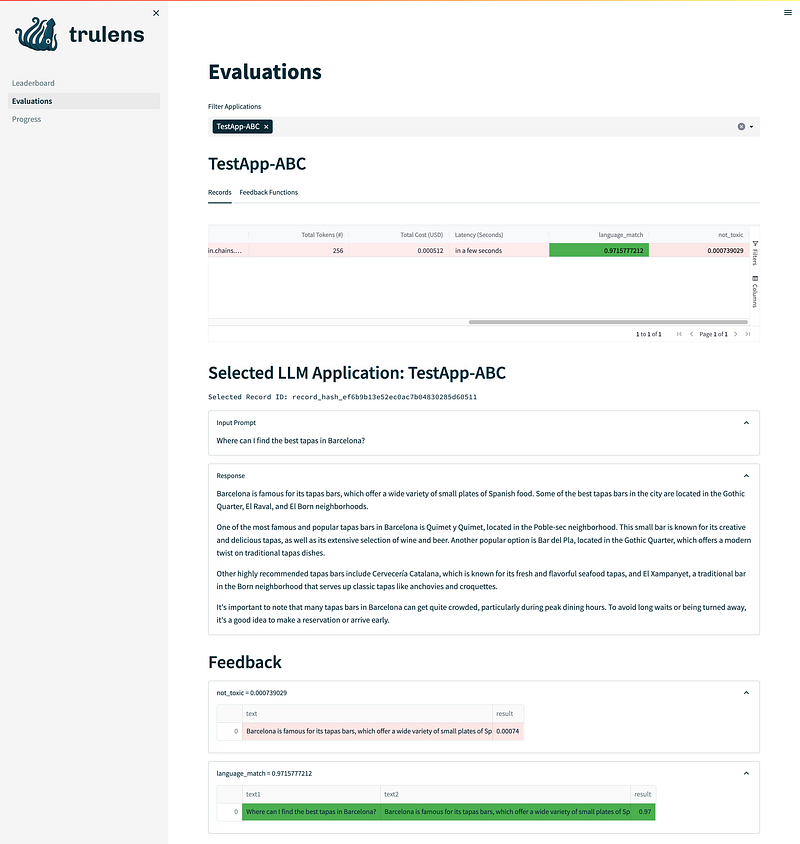
Figure 3. Excerpt of app metadata view.

Conclusion

TruLens is a great solution for enhancing the management and analysis of experiments with your LLM application. Although the package lacked detailed documentation and code examples in the git repository at the time of writing this article, it is reasonable to expect that the developers are actively addressing these areas. Moreover, an additional valuable feature to consider would be the inclusion of session information for tracking or logging purposes, particularly when multiple users are testing your model and differentiation between them is desired.

The example code can be found 👉here.

Resources

Data Science
ChatGPT
Machine Learning
NLP
Large Language Models
Recommended from ReadMedium