avatarKeno Leon

Free AI web copilot to create summaries, insights and extended knowledge, download it at here

5195

Abstract

"hljs-number">1</span>,<span class="hljs-number">000,000</span>,<span class="hljs-number">000,000</span>,<span class="hljs-number">000,000</span>,<span class="hljs-number">000</span>
| mether | <span class="hljs-number">1</span>,<span class="hljs-number">000,000</span>,<span class="hljs-number">000,000</span>,<span class="hljs-number">000,000</span>,<span class="hljs-number">000,000</span>
| gether | <span class="hljs-number">1</span>,<span class="hljs-number">000,000</span>,<span class="hljs-number">000,000</span>,<span class="hljs-number">000,000</span>,<span class="hljs-number">000,000</span>,<span class="hljs-number">000</span>
| tether | <span class="hljs-number">1</span>,<span class="hljs-number">000,000</span>,<span class="hljs-number">000,000</span>,<span class="hljs-number">000,000</span>,<span class="hljs-number">000,000</span>,<span class="hljs-number">000,000</span> </pre></div><p id="14e8"><b>Sending ether from one account to another one:</b></p><div id="8a48"><pre>web3<span class="hljs-selector-class">.eth</span><span class="hljs-selector-class">.sendTransaction</span>({from:web3<span class="hljs-selector-class">.eth</span><span class="hljs-selector-class">.accounts</span><span class="hljs-selector-attr">[0]</span>, to:web3<span class="hljs-selector-class">.eth</span><span class="hljs-selector-class">.accounts</span><span class="hljs-selector-attr">[1]</span>, value: web3<span class="hljs-selector-class">.toWei</span>(<span class="hljs-number">1</span>, <span class="hljs-string">"ether"</span>)})</pre></div><p id="08b5">At this point paritys web3 console crashed my browser 😐 , but upon reloading it presented a confimation/signing screen and the transaction went through !</p><p id="14b4">Besides this I found the console rather limited and running one line commands is probably not ideal anyways, so I chose to move to Atom, node and web3. I spent a few days ! figuring out how to make it work, but finally I got it to run:</p><ul><li><a href="https://nodejs.org/en/download/package-manager/">Install Node.js</a></li><li><a href="http://blog.npmjs.org/post/85484771375/how-to-install-npm">Install NPM</a></li><li>Install web3:</li></ul><div id="8877"><pre><span class="hljs-attribute">npm</span> install web3@<span class="hljs-number">0</span>.<span class="hljs-number">20</span>.<span class="hljs-number">2</span></pre></div><div id="3cb0"><pre>NOTE: This drove me crazy, npm at first installed version 1.0.0<span class="hljs-built_in"> and </span>caused issues like<span class="hljs-built_in"> not </span>being able to connect<span class="hljs-built_in"> and </span>other things, as tooling evolves, be sure to<span class="hljs-built_in"> check </span>for the correct versions, in the future you might simply do<span class="hljs-keyword"> :</span></pre></div><div id="3061"><pre>npm <span class="hljs-keyword">install</span> web3</pre></div><div id="1be4"><pre>Also, <span class="hljs-keyword">if</span> you need <span class="hljs-keyword">to</span> see <span class="hljs-literal">all</span> the versions available you can <span class="hljs-keyword">do</span> so <span class="hljs-keyword">by</span>:</pre></div><div id="5ee7"><pre><span class="hljs-built_in">npm</span> view web3 versions</pre></div><ul><li>In Atom you have a couple of options for running node. I tried <a href="https://atom.io/packages/script">script</a> and <a href="https://blog.leonhassan.co.uk/2016/05/13/running-node-js-in-atom/">atom-runner</a>, they both work fine.</li></ul><p id="d087">With this setup you can now work within atom and connect to your parity node. ( we’ll try expanding this to work on solidty in the next post ).</p><ol><li>Start and connect parity (to a testnet) :</li></ol><div id="b4c6"><pre>$ parity <span class="hljs-comment">--chain kovan</span></pre></div><div id="73d1"><pre><span class="hljs-comment">// ui is optional at this point</span></pre></div><p id="3c94">2. In Atom make a file ( <i>test.js</i> ) and start the connection ( I am just asking for my accounts right now ):</p><div id="861c"><pre><span class="hljs-keyword">var</span> Web3 = require(<span class="hljs-string">'web3'</span>); <span class="hljs-keyword">var</span> web3 = <span class="hljs-keyword">new</span> Web3(<span class="hljs-keyword">new</span> Web3.providers.HttpProvider(<span class="hljs-string">"http://localhost:8545"</span>)); <span class="hljs-built_in">console</span>.<span class="hljs-built_in">log</span>(web3.eth.accounts);</pre></div><div id="971f"><pre><span class="hljs-number">3.</span> Use Atom runner <span class="hljs-keyword">or</span> <span class="hljs-keyword">script</span> <span class="hljs-keyword">to</span> <span class="hljs-built_in">run</span> <span class="hljs-keyword">it</span>, you should <span class="hljs-keyword">get</span>:</pre></div><div id="db42"><pre><span class="hljs-comment">// [ '0x001301ad1556fd419cf8970b174fe9af34267eb8',</span> '0x00ce6c<span class="hljs-number">9285</span>6a<span class="hljs-number">657979</span>e<span class="hljs-number">772800</span>5dbc9acd002eb09' ]</pre></div><p id="fc3b">Let’s now try sending a transaction (<i>we do n

Options

eed the UI when starting Parity for now</i>) :</p><div id="ad49"><pre><span class="hljs-keyword">var</span> Web3 = require(<span class="hljs-string">'web3'</span>); <span class="hljs-keyword">var</span> web3 = <span class="hljs-keyword">new</span> <span class="hljs-type">Web3</span>(<span class="hljs-keyword">new</span> <span class="hljs-type">Web3</span>.providers.HttpProvider(<span class="hljs-string">"http://localhost:8545"</span>));</pre></div><div id="a6b9"><pre>web3.eth.sendTransaction( {<span class="hljs-attr">from</span>:web3.eth.accounts[<span class="hljs-number">0</span>], <span class="hljs-attr">to</span>:web3.eth.accounts[<span class="hljs-number">1</span>], <span class="hljs-attr">value</span>: web3.toWei(<span class="hljs-number">1</span>, <span class="hljs-string">"ether"</span>)}, <span class="hljs-keyword">function</span>(<span class="hljs-params">err, transactionHash</span>) { <span class="hljs-comment">// Notice the callback. </span> <span class="hljs-keyword">if</span> (!err) <span class="hljs-built_in">console</span>.<span class="hljs-built_in">log</span>(transactionHash); });</pre></div><p id="0135">My Atom setup in case you were wondering:</p><figure id="da67"><img src="https://cdn-images-1.readmedium.com/v2/resize:fit:800/1*VcGnwhYr3C6ysabHWRokJA.jpeg"><figcaption></figcaption></figure><p id="927d">Since my wallet is locked, I still need to unlock it via parity on the browser:</p><figure id="23a6"><img src="https://cdn-images-1.readmedium.com/v2/resize:fit:800/1*cKJquw7MaSIAqi0Ahbzyvw.jpeg"><figcaption></figcaption></figure><p id="4fea">And once that is done I get a Transaction Hash ( or <b>Tx</b>) in Atom:</p><div id="c388"><pre><span class="hljs-number">0</span>x9537b1c26a2eeccf5825e8f2ed5698391b3e0dbc5852068fff24789cf<span class="hljs-number">91494e6</span></pre></div><p id="01da">As mentioned before, you can check transactions ( even on test nets) on a block explorer : <a href="https://kovan.etherscan.io/">https://kovan.etherscan.io/</a> the above Tx thus would give us :</p><figure id="ed86"><img src="https://cdn-images-1.readmedium.com/v2/resize:fit:800/1*deThekcdw4mCdhgxzvN3eQ.jpeg"><figcaption></figcaption></figure><h2 id="ca93">No Browser:</h2><p id="7b45">And how about if we don’t want to use a browser to unlock the wallet ?, you will need to start parity with the personal api enabled:</p><div id="6e55"><pre><span class="hljs-string">parity</span> <span class="hljs-built_in">--chain</span> <span class="hljs-string">kovan</span> <span class="hljs-string">ui</span> <span class="hljs-built_in">--jsonrpc-apis</span> <span class="hljs-string">"eth,net,web3,personal"</span></pre></div><p id="0e2a">and in your node.js file use it to unlock your wallet:</p><div id="89cb"><pre>var <span class="hljs-built_in">pass</span> = <span class="hljs-string">"passphrase"</span>; web3.personal.unlockAccount(web3.eth.coinbase, <span class="hljs-built_in">pass</span>); web3.eth.sendTransaction({<span class="hljs-keyword">from</span>:web3.eth.accounts[<span class="hljs-number">0</span>], <span class="hljs-keyword">to</span>:web3.eth.accounts[<span class="hljs-number">1</span>], value: web3.<span class="hljs-keyword">to</span>Wei(<span class="hljs-number">1</span>, <span class="hljs-string">"ether"</span>)}, function(err, transactionHash) { if (!err) console.<span class="hljs-keyword">log</span>(transactionHash); });</pre></div><div id="624b"><pre><span class="hljs-comment">//0x13ce8a96ea3a03a63ad2c5add9c5cec33ac9400bb6ec07bf6e2d7650bc0c6f1f</span></pre></div><p id="6ed3">For other api operations check: <a href="https://github.com/paritytech/parity/wiki/JSONRPC">https://github.com/paritytech/parity/wiki/JSONRPC</a></p><p id="1216"><b>What’s next ?: </b>There is still some ground to cover before issuing smart contracts and tokens, I’ll be going over the basics of Solidity in the next part, but for now we have a basic setup and local development environment for interacting with the ethereum blockchain which should set you on the right path.</p><figure id="289d"><img src="https://cdn-images-1.readmedium.com/v2/resize:fit:800/1*mtIpI9lIZdbye5giXJKB5Q.jpeg"><figcaption></figcaption></figure><div id="b2f2"><pre>Perhaps you <span class="hljs-keyword">like</span> <span class="hljs-keyword">to</span> <span class="hljs-keyword">read</span> these notes <span class="hljs-keyword">in</span> book Form ?</pre></div><div id="8249"><pre>If you are looking for an introduction <span class="hljs-selector-tag">to</span> Ethereum, Solidity and Smart Contracts these notes were edited and <span class="hljs-attribute">content</span> added <span class="hljs-selector-tag">to</span> work in book <span class="hljs-selector-tag">form</span> :</pre></div><div id="1cc8"><pre>https:<span class="hljs-regexp">//</span>www.amazon.com<span class="hljs-regexp">/dp/</span>B078CQ8L7V </pre></div><p id="68a6">Cheers !</p><p id="2735">Keno</p><p id="c98a"><b>About the Author :</b></p><p id="14ec"><i>Born Eugenio Noyola Leon (Keno) I am a Designer,Web Developer/programmer, Artist and Inventor, currently living in Mexico City, you can find me at <a href="http://www.k3no.com">www.k3no.com</a></i></p></article></body>

Ethereum, tokens & smart contracts.

Notes on getting started Part 2. web3.js

So once you have a wallet, are on a test net and have some ether ( read part 1. if any of this is not clear ) where to go next ?

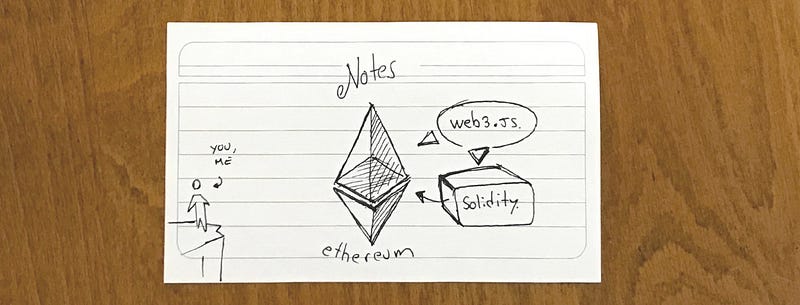
Let’s start coding, web3.js and Solidity seem to be the entry points for interacting with the blockchain programmatically and making contracts & tokens, web3.js I think is a nice prequel to working with solidity, so let’s check it out first:

web3.js :

Docs

web3.js is the javascript API for interacting with the Ethereum blockchain, the easiest way to explain it is through a couple of basic examples. A cool and simple way to test some basic commands is via the parity/web3 console:
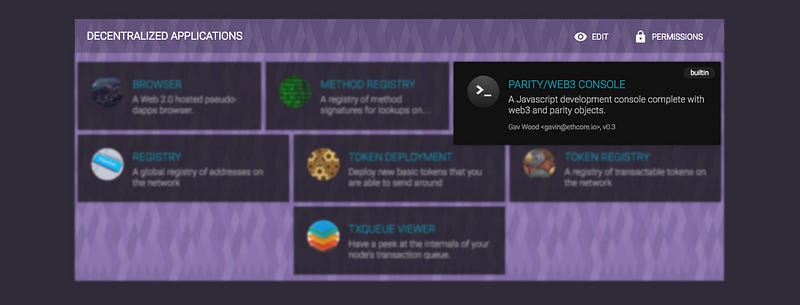
Let’s start by requesting my balance:

web3.eth.getBalance("0x001301AD1556fD419Cf8970B174fE9AF34267eB8")
// 3000000000000000000

Importantly the balance is displayed in wei, not ether, but conveniently there is a function in the api that converts to ether (or other denominations)

web3.fromWei(web3.eth.getBalance("0x001301AD1556fD419Cf8970B174fE9AF34267eB8"), 'ether')
// 3

Speaking of denominations, here they are in ether:

| wei                   | 0.000000000000000001 
| kwei - ada            | 0.000000000000001    
| mwei - babbage        | 0.000000000001       
| gwei -shannon         | 0.000000001          
| szabo                 | 0.000001             
| finney                | 0.001                
| ether                 | 1                    
| kether-grand-einstein | 1000                 
| mether                | 1,000,000            
| gether                | 1,000,000,000        
| tether                | 1,000,000,000,000    

And in wei:

| wei                   | 1                                         
| kwei - ada            | 1,000                                     
| mwei - babbage        | 1,000,000                                 
| gwei -shannon         | 1,000,000,000                             
| szabo                 | 1,000,000,000,000                         
| finney                | 1,000,000,000,000,000                     
| ether                 | 1,000,000,000,000,000,000                 
| kether-grand-einstein | 1,000,000,000,000,000,000,000             
| mether                | 1,000,000,000,000,000,000,000,000         
| gether                | 1,000,000,000,000,000,000,000,000,000     
| tether                | 1,000,000,000,000,000,000,000,000,000,000 

Sending ether from one account to another one:

web3.eth.sendTransaction({from:web3.eth.accounts[0], to:web3.eth.accounts[1], value: web3.toWei(1, "ether")})

At this point paritys web3 console crashed my browser 😐 , but upon reloading it presented a confimation/signing screen and the transaction went through !

Besides this I found the console rather limited and running one line commands is probably not ideal anyways, so I chose to move to Atom, node and web3. I spent a few days ! figuring out how to make it work, but finally I got it to run:

npm install web3@0.20.2
NOTE: This drove me crazy, npm at first installed version 1.0.0 and caused issues like not being able to connect and other things, as tooling evolves, be sure to check for the correct versions, in the future you might simply do :
npm install web3
Also, if you need to see all the versions available you can do so by:
npm view web3 versions
  • In Atom you have a couple of options for running node. I tried script and atom-runner, they both work fine.

With this setup you can now work within atom and connect to your parity node. ( we’ll try expanding this to work on solidty in the next post ).

  1. Start and connect parity (to a testnet) :
$ parity --chain kovan
// ui is optional at this point

2. In Atom make a file ( test.js ) and start the connection ( I am just asking for my accounts right now ):

var Web3 = require('web3');
var web3 = new Web3(new Web3.providers.HttpProvider("http://localhost:8545"));
console.log(web3.eth.accounts);
3. Use Atom runner or script to run it, you should get:
// [ '0x001301ad1556fd419cf8970b174fe9af34267eb8',
  '0x00ce6c92856a657979e7728005dbc9acd002eb09' ]

Let’s now try sending a transaction (we do need the UI when starting Parity for now) :

var Web3 = require('web3');
var web3 = new Web3(new Web3.providers.HttpProvider("http://localhost:8545"));
web3.eth.sendTransaction(
{from:web3.eth.accounts[0], 
 to:web3.eth.accounts[1], 
 value: web3.toWei(1, "ether")},
 function(err, transactionHash) { // Notice the callback. 
  if (!err)
    console.log(transactionHash); 
});

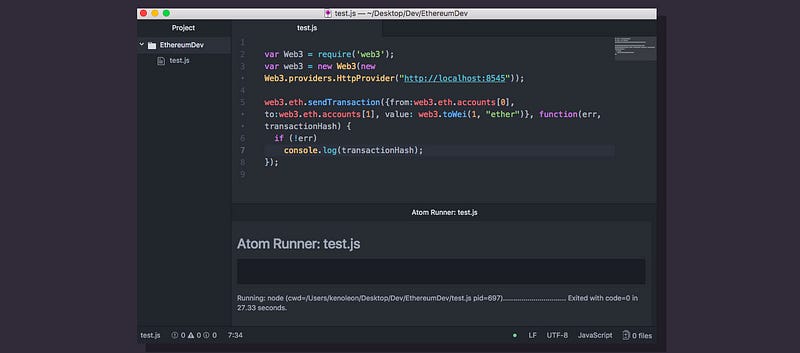
My Atom setup in case you were wondering:
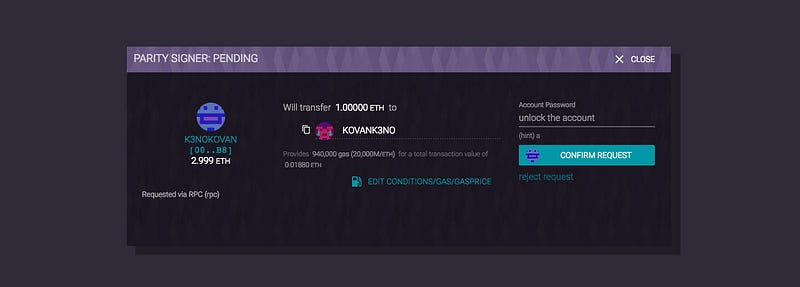
Since my wallet is locked, I still need to unlock it via parity on the browser:
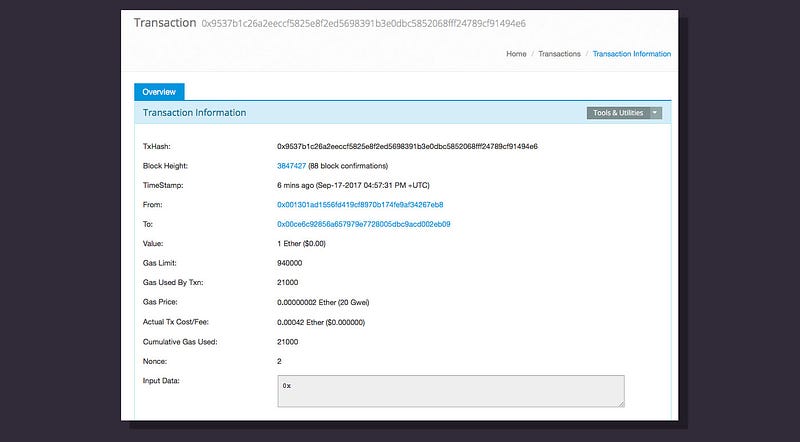
And once that is done I get a Transaction Hash ( or Tx) in Atom:

0x9537b1c26a2eeccf5825e8f2ed5698391b3e0dbc5852068fff24789cf91494e6

As mentioned before, you can check transactions ( even on test nets) on a block explorer : https://kovan.etherscan.io/ the above Tx thus would give us :
No Browser:

And how about if we don’t want to use a browser to unlock the wallet ?, you will need to start parity with the personal api enabled:

parity --chain kovan ui --jsonrpc-apis "eth,net,web3,personal"

and in your node.js file use it to unlock your wallet:

var pass = "passphrase";
web3.personal.unlockAccount(web3.eth.coinbase, pass);
web3.eth.sendTransaction({from:web3.eth.accounts[0], to:web3.eth.accounts[1], value: web3.toWei(1, "ether")}, function(err, transactionHash) {
  if (!err)
    console.log(transactionHash);
});
//0x13ce8a96ea3a03a63ad2c5add9c5cec33ac9400bb6ec07bf6e2d7650bc0c6f1f

For other api operations check: https://github.com/paritytech/parity/wiki/JSONRPC

What’s next ?: There is still some ground to cover before issuing smart contracts and tokens, I’ll be going over the basics of Solidity in the next part, but for now we have a basic setup and local development environment for interacting with the ethereum blockchain which should set you on the right path.
Perhaps you like to read these notes in book Form ?
If you are looking for an introduction to Ethereum, Solidity and Smart Contracts these notes were edited and content added to work in book form :
https://www.amazon.com/dp/B078CQ8L7V

Cheers !

Keno

About the Author :

Born Eugenio Noyola Leon (Keno) I am a Designer,Web Developer/programmer, Artist and Inventor, currently living in Mexico City, you can find me at www.k3no.com

Ethereum
Cryptocurrency
Web3
Parity
Blockchain
Recommended from ReadMedium