avatarAlex Roan

Free AI web copilot to create summaries, insights and extended knowledge, download it at here

2295

Abstract

lesuite.com/ganache">Ganache</a>).</p> <figure id="35c7"> <div> <div> <img class="ratio" src="http://placehold.it/16x9"> <iframe class="" src="https://cdn.embedly.com/widgets/media.html?src=https%3A%2F%2Fwww.youtube.com%2Fembed%2F62Jk72GaX1c%3Ffeature%3Doembed&amp;display_name=YouTube&amp;url=https%3A%2F%2Fwww.youtube.com%2Fwatch%3Fv%3D62Jk72GaX1c&amp;image=https%3A%2F%2Fi.ytimg.com%2Fvi%2F62Jk72GaX1c%2Fhqdefault.jpg&amp;key=a19fcc184b9711e1b4764040d3dc5c07&amp;type=text%2Fhtml&amp;schema=youtube" allowfullscreen="" frameborder="0" height="480" width="854"> </div> </div> </figure></iframe></div></div></figure><p id="213b">Several things happened here:</p><ul><li>When the page loads, Web3 is not loaded</li><li><b>Blockchain</b> — The user clicks “Connect Blockchain” to connect the webpage to their chosen blockchain in MetaMask</li><li><b>Account</b> — Once loaded, the application provides a second button to connect their wallet</li><li><b>Interaction</b> — The user is now able to interact with the DApp</li></ul><h2 id="0cbd">Connecting the blockchain</h2><figure id="88cc"><img src="https://cdn-images-1.readmedium.com/v2/resize:fit:800/1*ScdFl10ksSDpJvU1vVcCFw.png"><figcaption>Figure 1: React rendering of the “Connect Blockchain” button</figcaption></figure><p id="b08c">Using <a href="https://getbootstrap.com/">Bootstrap</a>, we can give visual feedback to the user as to whether their chosen blockchain is connected. In Figure 1, the <code>className</code> includes <code>btn-danger</code> when it’s yet to be loaded and <code>btn-success</code> and <code>disabled</code> classes when it is. Web3 represents a Redux state selector.</p><p id="feef">In Figure 1, the <code>connectBlockchain</code> <code>onSubmit</code> action grabs the Web3 instance with an interaction, which is displayed in Figure 2. It dispatches the <code>web3Loaded(web3)</code> reducer, which saves the Web3 instance to the state.</p><figure id="28eb"><img src="https://cdn-images-1.readmedium.com/v2/resize:fit:800/1*qTVk68xDgYpDGaxVAyIj_g.png"><figcaption>Figure 2: Loading Web3 into the state</figcaption></figure><h2 id="29e1">Connecting the account</h2><figure id="4326"><img src="https://cdn-imag

Options

es-1.readmedium.com/v2/resize:fit:800/1*1t8paUkU9C_5yc8infw1rQ.png"><figcaption>Figure 3: Connecting the wallet</figcaption></figure><p id="8715">Figure 3 shows a similar rendering, where we apply similar rules to the “Connect Wallet” button depending on if an account has been loaded already. This time, however, if Web3 is loaded, we apply an extra condition on whether or not an account is loaded:</p><div id="c658"><pre>(account !== <span class="hljs-keyword">null</span>) ? “btn-success” : “btn-<span class="hljs-keyword">warning</span></pre></div><p id="cab9">The <code>connectWallet</code> <code>onSubmit</code> action is a function that calls an interaction called <code>loadBlockchainData()</code>, as seen in Figure 4.</p><figure id="249b"><img src="https://cdn-images-1.readmedium.com/v2/resize:fit:800/1*hNtZA0w-Nen8xlJFwJaBIA.png"><figcaption>Figure 4: Loading the blockchain data</figcaption></figure><p id="a72a">Figure 4 shows <code>loadBlockchainData()</code>, which in turn calls <code>loadAccount()</code> on its first line. This function gets the account provided by MetaMask and dispatches an action called <code>accountLoaded()</code>, which stores the account in our state via a reducer.</p><p id="dc3d">Once these steps are complete, the rest of the interface is enabled, and the user is free to interact with the DApp.</p><h1 id="0b3d">Conclusion</h1><p id="c28a">Using MetaMask with DApps can be a jittery experience that could deter users from interacting with your DApp. Use simple flows like <code><i>Blockchain-Account-Interaction</i></code><b> </b>to build your DApps.</p><p id="c4aa">Thanks for reading!</p><div id="c64d" class="link-block"> <a href="https://readmedium.com/blockchain-development-resources-b44b752f3248"> <div> <div> <h2>Blockchain Development Resources To Follow Right Now</h2> <div><h3>A list of resources to learn Blockchain, Ethereum, and DApp development</h3></div> <div><p>medium.com</p></div> </div> <div> <div style="background-image: url(https://miro.readmedium.com/v2/resize:fit:320/1*GZlVe27SOc44fcIYztY5Qw.jpeg)"></div> </div> </div> </a> </div></article></body>

Ethereum DApps: How to Load the Blockchain

Practices for good user experiences using Truffle, React, Redux, Web3, and MetaMask
Image by Tumisu on Pixabay

Introduction

Prerequisites: Understanding of React, Redux, and basic blockchain/DApp concepts.

Truffle enables developers to create a full-stack application with a blockchain back end. In this example, I’m using Truffle to implement a React and Redux front end, with a blockchain back end.

There are no widely accepted standards pinned down for interacting with Web3 in the browser due to the infancy of the space and the small user base in comparison to overall web users. Here’s an easy way to make sure users have a good experience when using your Ethereum DApp.

Loading the Blockchain

The React Truffle box, by default, attempts to connect to Web3 as soon as the page loads. This stifles user experience if the user isn’t logged onto MetaMask or is configured to a blockchain on which the DApp isn’t deployed.

Proposal: Blockchain ➼ account ➼ interaction

Instead of loading everything at once, I propose the following pattern for loading your DApp: blockchain ➼ account ➼ interaction. Each step is distinct of the other, with explicit visual feedback for the user.

  • Step 1: Load the blockchain
  • Step 2: Load the account
  • Step 3: Enable interaction

In this example, there’s a single contract, and a DApp front end for that contract. Before the user can interact with the contract, they need to connect to the blockchain (I’m using a localhost blockchain here, provided by Ganache).

Several things happened here:

  • When the page loads, Web3 is not loaded
  • Blockchain — The user clicks “Connect Blockchain” to connect the webpage to their chosen blockchain in MetaMask
  • Account — Once loaded, the application provides a second button to connect their wallet
  • Interaction — The user is now able to interact with the DApp

Connecting the blockchain

Figure 1: React rendering of the “Connect Blockchain” button

Using Bootstrap, we can give visual feedback to the user as to whether their chosen blockchain is connected. In Figure 1, the className includes btn-danger when it’s yet to be loaded and btn-success and disabled classes when it is. Web3 represents a Redux state selector.

In Figure 1, the connectBlockchain onSubmit action grabs the Web3 instance with an interaction, which is displayed in Figure 2. It dispatches the web3Loaded(web3) reducer, which saves the Web3 instance to the state.
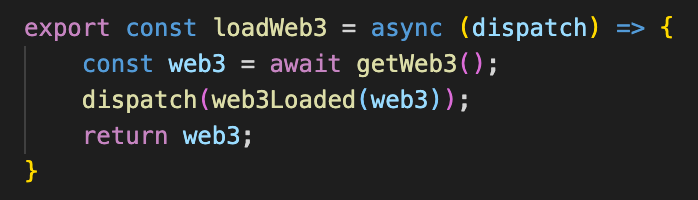
Figure 2: Loading Web3 into the state

Connecting the account

Figure 3: Connecting the wallet

Figure 3 shows a similar rendering, where we apply similar rules to the “Connect Wallet” button depending on if an account has been loaded already. This time, however, if Web3 is loaded, we apply an extra condition on whether or not an account is loaded:

(account !== null) ? “btn-success” : “btn-warning

The connectWallet onSubmit action is a function that calls an interaction called loadBlockchainData(), as seen in Figure 4.
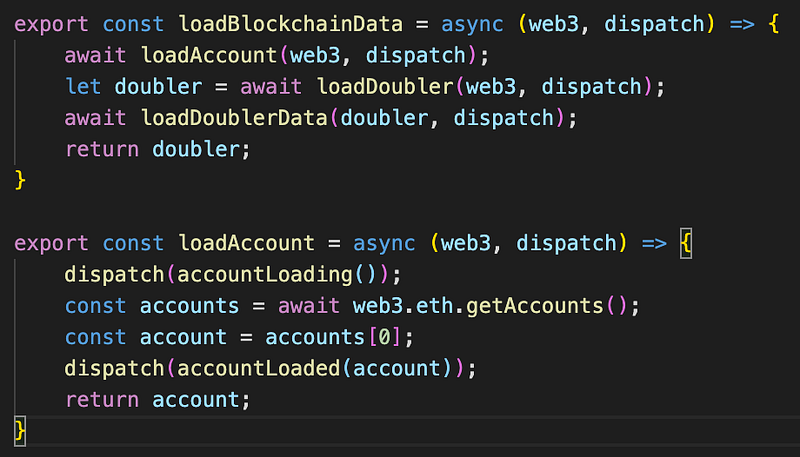
Figure 4: Loading the blockchain data

Figure 4 shows loadBlockchainData(), which in turn calls loadAccount() on its first line. This function gets the account provided by MetaMask and dispatches an action called accountLoaded(), which stores the account in our state via a reducer.

Once these steps are complete, the rest of the interface is enabled, and the user is free to interact with the DApp.

Conclusion

Using MetaMask with DApps can be a jittery experience that could deter users from interacting with your DApp. Use simple flows like Blockchain-Account-Interaction to build your DApps.

Thanks for reading!

Ethereum
Web3
React
Programming
Crypto
Recommended from ReadMedium
