
Kafka Overview with pictures
Right now event-driven architecture is getting more popular in modern development. One reason is that it allows us to build of a decoupled system and it’s an important feature for the microservice world.
- KafkaServer architectire
Kafka is a robust publish/subscribe system developed by LinkedIn and written in Java and Scala. Kafka may contain a bunch of Kafka Nodes (servers) which are called Brokers and it creates a cluster that is horizontally scalable. Kafka architecture also includes a lightweight Apache Zookeeper server which is responsible for storing all needed metadata about the cluster (cluster state, configuration and etc.)
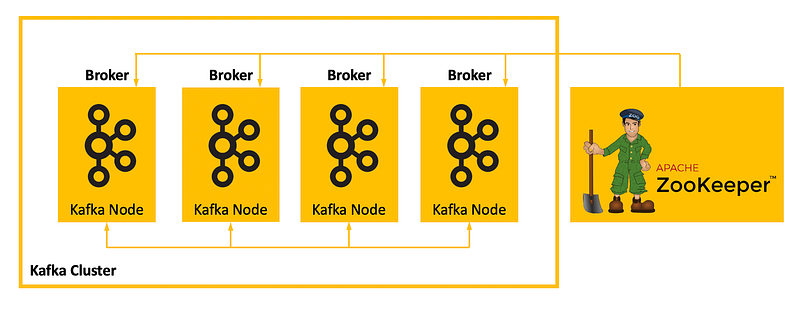
Kafka is a master-slave system and one of the brokers in the cluster is considered a Kafka Controller which ensures data consistency. Zookeeper participates in the election of Kafka Controller among alive Brokers in a cluster.
2. Producers, Consumers, Topics
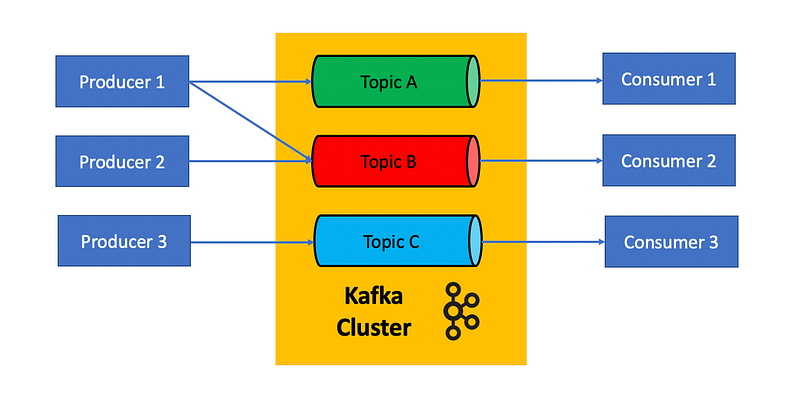
Kafka stores messages written by producers in topics, consumers subscribe to topics and contact Kafka to see if messages are available in those subscribed topics (figure 2). Here the crucial concept is that Kafka is an intermediary that brings together two parties (producer, consumer) that don’t necessarily know each other and allow to build effective distributes microservice architecture. Pay attention, since Producer and Consumer are decoupled, those parties are developing fully independently and may even use absolutely different stacks of technologies. For example, Procedure may be written in Java, Consumer in NodeJS.
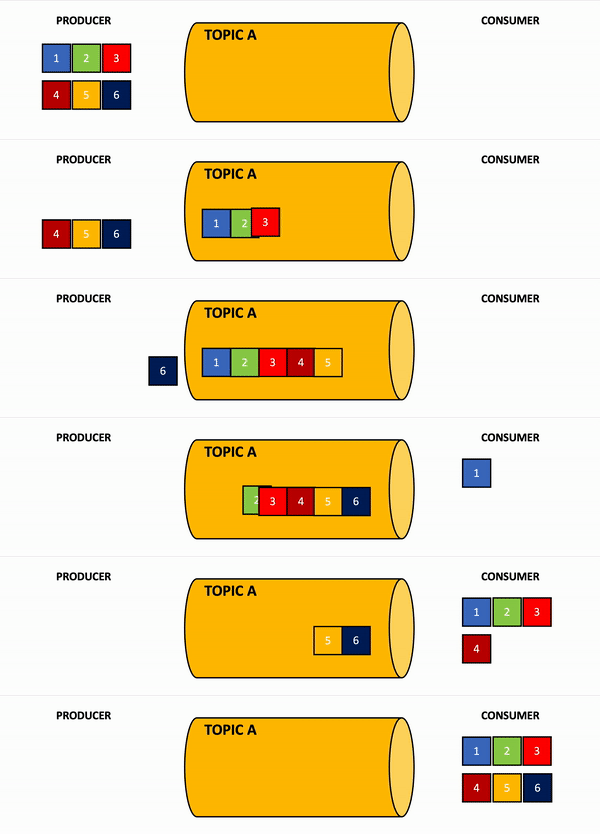
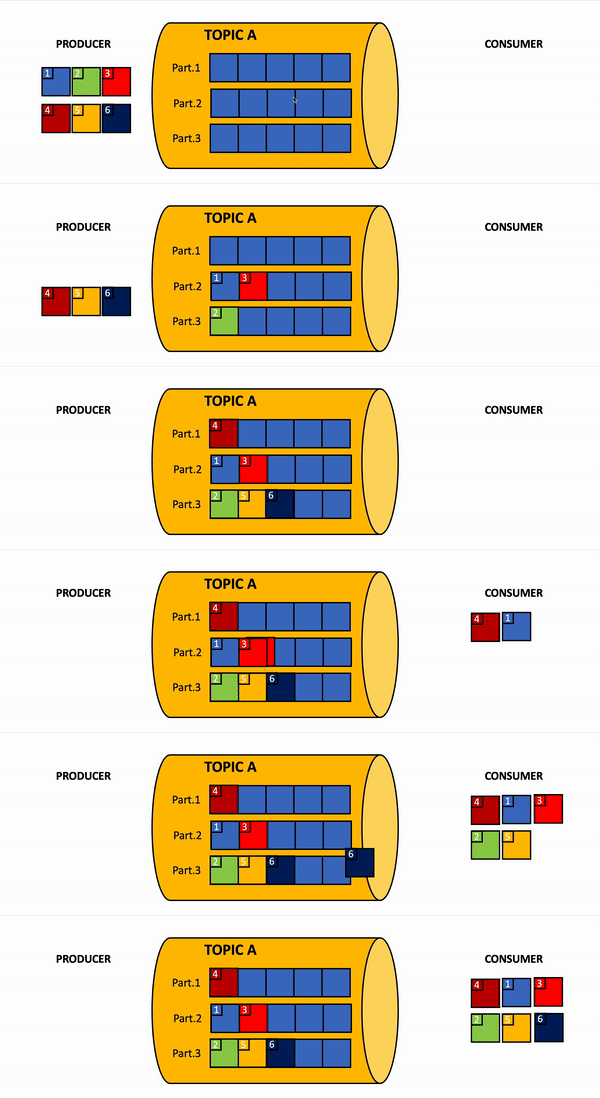
All messages in the topic are saved in the order they come in and it works as a FIFO queue (first input — first output). It means that the Consumer gets all messages in the same order as the Producer sends them to Kafka (figure 3).
3. Topic partitions
If you know that your app is supposed to have a high load, Kafka offers to sort it out by splitting a topic into partitions. Whenever you create a new topic you may set up how many partitions each topic should have. Each read/write operation for each partition happens in parallel.
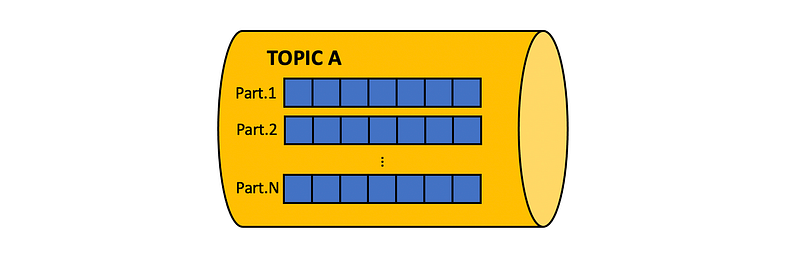
Well, the next question is how our messages may be distributed by partitions. There’re 3 available options:
- if you don’t assign any associated key with the sent message, Kafka distributes the message in a round-robin way
- you may explicitly set to which partition Kafka should send a message. For example, if you have 2 partitions and each message belongs to a particular client, you may divide all messages so that all clients whose surname starts from a letter belongs to the range A-M should go to the first portion, and clients whose surname starts from N-Z should go to the second partitions
- you may just assign a key associated with the message and Kafka distributes them according to key hash: hashCode(key) % N; where N— is a count of partitions
Pay attention, that if you have one consumer which needs to handle all messages from all partitions, the consumer does not necessarily consume messages in the order which producer sends them in Kafka, Kafka may guarantees the order of messages within one partition (FIFO per partition), figure 5.
4. Store messages in Kafka
All incoming messages from Producers Kafka stores in the log files. Topics in Kafka are logs that are segregated by topic name. You could almost think of as labeled logs. All logs store log data in a special directory, which may be configurable vi settings log.dir.
Each topic maps to a subdirectory under the specified log directory. There will be as many subdirectories as there’re topic partitions, Subdirectory name follows this pattern: topic-name_partition-number
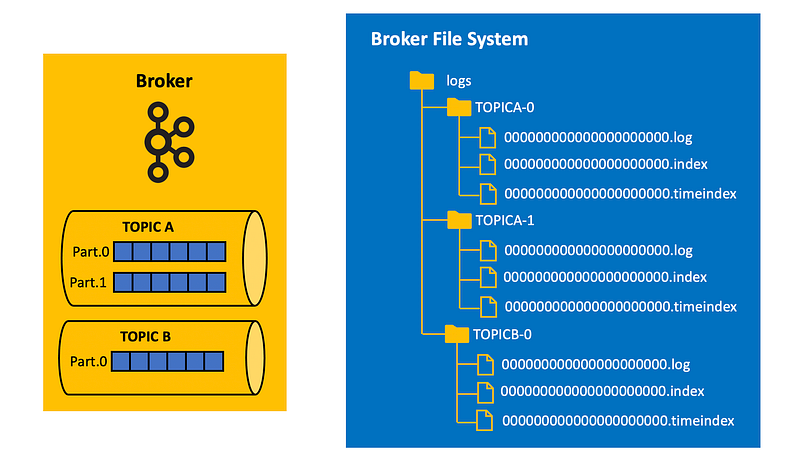
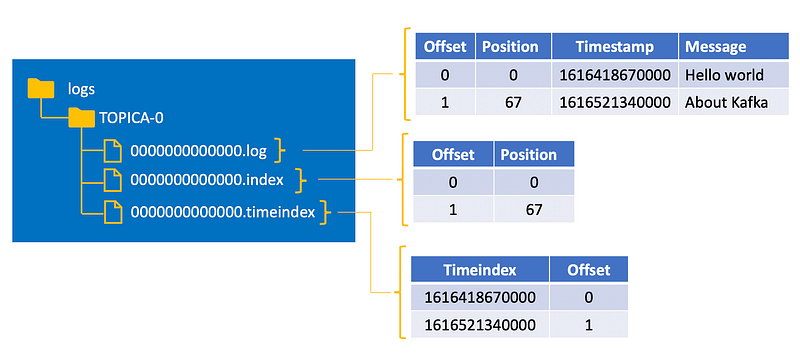
As you may see each topic-partition subfolder contains three files log, index, timeindex. Content all of them are briefly described in figure 7. This architecture allows very quickly to find messages by their offset (using index file) or for example sometimes we would like to get messages started from the particular date in this case Kafka uses mapping between timestamps and offsets (timeindex file). Pay your attention, Kafka allows you to set up message timestamps explicitly and you should be careful when any Producer may do it in a shuffled order mixing future and past timestamps, in this case, request messages from the particular date may return confusion results.
5. Data segments in file logs
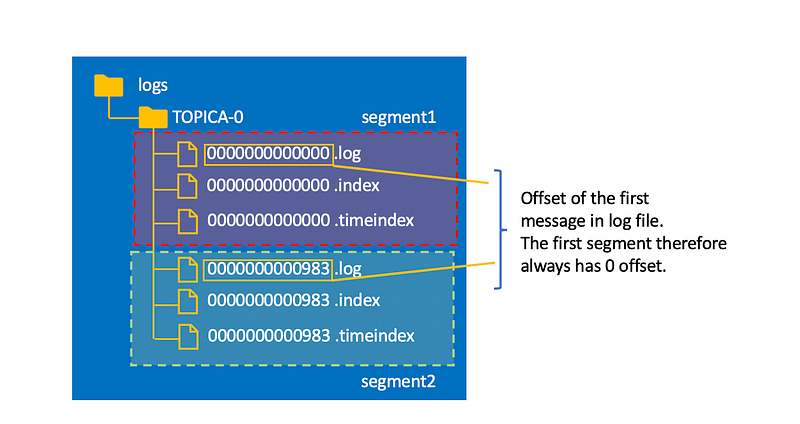
Of course, log files couldn't grow infinitely, as soon as log files exceed 1GB (it is a default setting) Kafka creates a new segment with new three files log, index, timeindex. The old segment is getting frozen and never used for write operation anymore. The name of segment files follows the particular pattern as well and it presents the offset of the first message of this file (figure 8).
6. Data removing from Kafka Topic
Kafka doesn’t support data deletion as an API operation. But it has automatic data deletion by TTL (Time To Live). Kafka deletes data by segments (see explanation below). Each segment has a segment timestamp — it’s a timestamp of the latest received message in the segment. As soon as a segment timestamp expired — this segment is deleted. It’s a very quick operation.
Here please keep in mind, for any testing purpose you may explicitly attach timestamps to messages. This timestamp may be far away from now and in this case segment timestamp will be equal to this value which supposes to expire in the future and prevent the segment from deletion. Please, try to avoid these cases.
7. Data replication
When you create a new topic and define a count of partitions you also need to set up replication-factor. Usually, it should be more than 1. For example, when we set up replication factor 2 — it means that Kafka cluster is going to have 2 copies of each partition (figure 9).
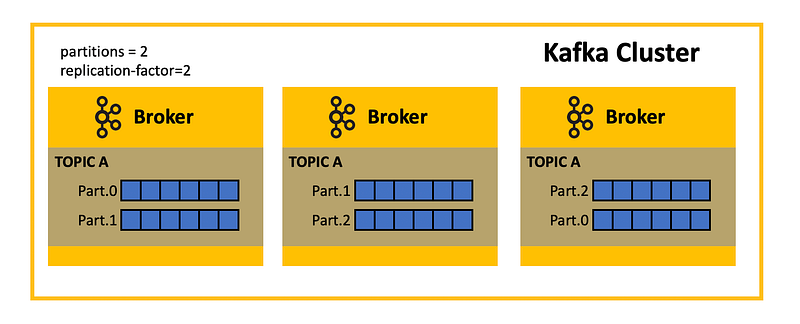
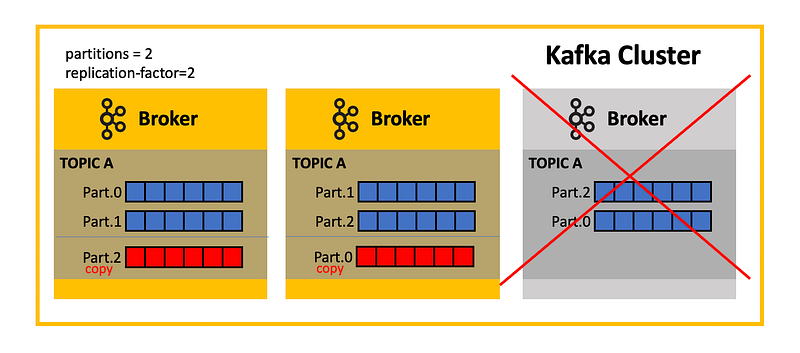
In this case, whenever any of the Kafka nodes fall down, we don’t lose any data. Moreover, Kafka add replicas in alive Brokers from Dead Broker (figure 10)
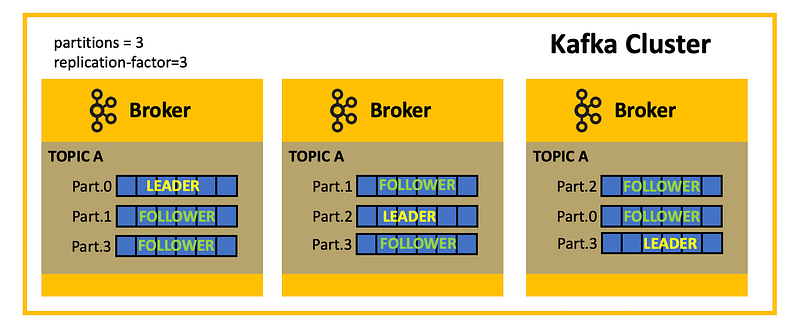
There may be 2 types of each partition: Leader and Follower. It resembles a master-slave system and there’s only one Leader in any time period for each partition and any other partitions are considered as Followers. Read/Write operations are carried out only through the Leader node (figure 11)
Remember that in Kafka Cluster one of the Kafka Node is considered as a Kafka Controller? Well, Kafka Controller is responsible for assigning the particular partitions as a Leader and others as Followers.
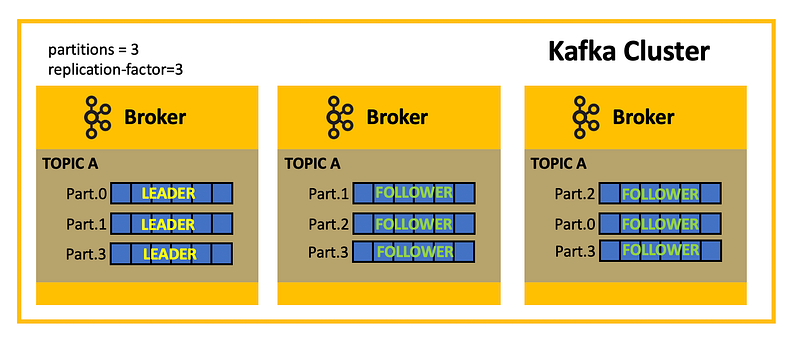
Here sometimes if we’re relying on automatic assigning Leader/Follower Partition we may come across a case when all Leader replicas are located in one Kafka Nodes. Since all read/write operations are carried out through Leader partitions, it means that only one machine will be busy and all others are idled (figure 12). In this case, it's better to help Kafka to distribute nodes and make this getting up configuration explicitly and not rely on automatic behavior.
8. Data sync between Leader/Follower
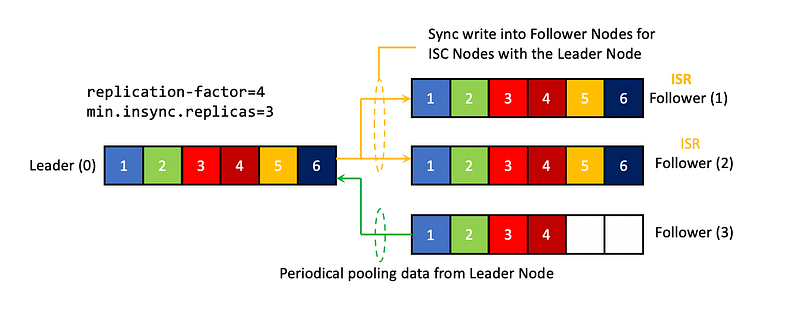
The simple way to sync data in Kafka, when Followers periodically polls new data from Leader. Despite that time of this trigger is pretty small it doesn’t exclude a case when Leader falls down and no of existed Follower content all data from Leader Node. It’s a pretty unsafe approach.
There’s another approach. We may set up for each Kafka Cluster a count of in-sync replicas for partitions (ISR) via settings min.insync.replicas. It means when we write data in Leader partition we synchronously write data for ALL ISR replicas as well (figure 13). As you may understand ISR followers are a good candidate to be elected as a Leader of existed Leader falls down for any reason, since we may be sure that all data in place. But we also should understand that the more number for ISR in the cluster the longer the write operation takes. In practice, the number of ISR is a replication factor minus one. If we have a replication factor is 4, then ISR = 4–1 = 2.
9. Messages
It’s the crucial component of the system and Kafka gets messages from Producers and sends them to Consumer. Each message may have the following attributes:
10. Producer
It’s an application that sends messages to Kafka. Here we just need to mention that Kafka allows us to send messages with special settings acks (acknowledge). There’re several possible options:
- acks = 0 — Producer just sends a message and isn’t waiting for confirmation of successful message delivery
- acks=1 — Producer sends a message and is waiting for confirmation of successful message delivery from Leader Partition
- acks=-1 (acks = all) — Producer sens a message and is waiting for confirmation of successful message delivery from Leader Partition and all in-sync replicas for partitions (ISR)
The most used setting is when acks = 1.
And as I already mentioned before during sending messages you may set up explicitly to which partitions message should belong — it’s optional parameters and if you don’t set it up, Kafka distributes messages on their own.
If you don’t set up the particular partition, but set up associated with message key, then Kafka distributes it based on: hashCode(key) % N, where N — count of partitions. Key is an optional parameter. The crucial point here is that all messages with the same key will always be sent in one partition.
If you don’t config partition and key, Kafka distributes messages in a round-robin way.
Only message content is a mandatory attribute.
11. Consumer
Consumer poll messages ONLY from Leader partitions. It gets messages in batches (not by a single message).
As we discussed earlier splitting the topic into the partition it’s one of the ways to increase performance for write/read operation inside of Kafka and complete all of them in parallel.
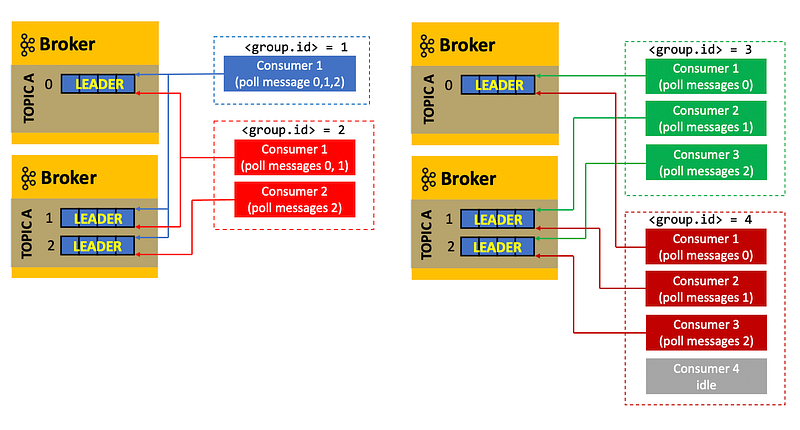
All messages may handle one instance of Consumer, but Kafka allows to create Consumer within the unique group id in a way that each instance of Consumer will be responsible for handling messages from one partition.
For example, if we have 3 partitions and 3 instances of Consumer assigned to one id group, it means that each Consumer will get messages from their own partition. If there’re 2 Consumers and 3 partitions, it means that one Consumer will be responsible for handling messages from two partitions, the other — from its own. If there’re 4 Consumers and 3 partitions, it means that 3 of the Consumers will get messages from their own partitions and the fourth Consumer instance will be idle (figure 15)
12. Message Offset
For each consumer group id we may store offset, otherwise, whenever we spin up a new Consumer instance we will get all messages from the earliest message in a queue. Offset stored in system topic in Kafka consumer_offset, where we separately store offset for each Consumer group. In this case whenever we spin up a new Consumer it will start getting messages from offset stored in this system file.
There’re some options for how we may config shifting offset.
- Auto commit, using property enable.auto.commit. In this case, Kafka shift offset as soon as send batched messages to Consumer and doesn’t take care of whether Consumer handled messages or not. It may lead to missing messages.
- Manual commit, here via Kafka API we may ask it to change offset explicitly as soon as we are sure that Consumer handles all income messages. Here we have another message, since we get messages batched — let's imagine that we got 3 messages and Consumer handle 2 of them and when was handling the last one it has fallen down without sending a command to shift offset into 2 steps forward. In this system, we may get duplicate messages, but if our Consumers handle all messages in an idempotent way it’s not an issue at all.
- Custom offset management — in this case, we don’t rely on choosing offset by Kafka, and whenever we spin up new consumers we explicitly on our own config from which offset we need to start reading messages


