Essential Guide to GitLab CI/CD Catalog Components
GitLab CI/CD (Continuous Integration and Continuous Deployment) is an integral part of the GitLab platform, providing automated pipelines for testing, building, and deploying code. CI/CD helps ensure that code changes are reliable and stable, automating repetitive tasks and facilitating faster releases.

Current Landscape of GitLab CI/CD
GitLab CI/CD is widely adopted in various industries due to its robust features and flexibility. One of the significant advantages of using GitLab CI/CD is the ability to write templates for the .gitlab-ci.yml file. This approach is particularly beneficial for large-scale projects where multiple repositories require consistent CI/CD configurations.
By using templates, you can streamline your workflows, reduce duplication, and accelerate development processes. Templates allow teams to define standard CI/CD practices and reuse them across different projects, ensuring consistency and efficiency. This means less time spent on writing and maintaining individual CI/CD configurations for each project, and more time focusing on development and innovation.
GitLab CI/CD Templates
GitLab CI/CD templates are pre-defined configurations for various programming languages and frameworks that can be easily integrated into your projects. These templates are designed to simplify the setup process and ensure best practices are followed. You can find templates for languages like Python, Java, Ruby, and frameworks like Django, Spring Boot, and many more.
Using these templates, you can quickly create a .gitlab-ci.yml file tailored to your specific needs, reducing the time required to set up CI/CD pipelines from scratch. This not only speeds up the initial setup but also helps maintain consistency across different projects within your organization.
Latest GitLab CI/CD Catalog
The latest GitLab CI/CD catalog introduces an organized way to manage and discover CI/CD components, such as job definitions, pipeline configurations, and reusable templates. This catalog is designed to help teams find and use pre-defined CI/CD components, promoting reuse and standardization across projects.
The GitLab CI/CD catalog includes various components like:
- Job Templates: Pre-defined jobs that can be included in your
.gitlab-ci.ymlfiles to perform specific tasks like code linting, testing, and deployment. - Pipeline Templates: Complete pipeline configurations that define a series of jobs and stages for complex CI/CD workflows.
- Reusable Templates: Components that can be used across different projects to ensure consistency and reduce maintenance overhead.
Using the CI/CD catalog, you can easily browse and integrate these components into your projects, improving efficiency and collaboration within your team.
Example Template Structure and File
Here is an example of a folder structure and a template file for GitLab CI/CD:
.
├── LICENSE
├── README.md
└── templates
    ├── test.yml
    └── build.yml
Example Template File: test.yml
spec:
  inputs:
    STAGE:
      default: test
      description: Defines the test stage
    DOCKER_VERSION:
      default: dind
      description: Specify the Docker version, use values from https://hub.docker.com/_/docker. Defaults to dind
    CI_ENVIRONMENT_NAME:
      default: $CI_ENVIRONMENT_NAME
      description: Environment name for the CI
    DOCKER_PLATFORM:
      default: $DOCKER_PLATFORM
      description: Docker platforms to build
    DOCKER_REGISTRY:
      default: $DOCKER_REGISTRY
      description: Docker registry URL- <$AWS_ACCOUNT_ID>.dkr.ecr.$AWS_DEFAULT_REGION.amazonaws.com/<$ECR_REPOSITORY_NAME>
    DOCKER_LOGIN:
      default: $DOCKER_LOGIN
      description: Docker login command- aws ecr get-login-password --region $AWS_DEFAULT_REGION | docker login --username AWS --password-stdin $DOCKER_REGISTRY
    DOCKER_FILE_IMAGE:
      default: $DOCKER_FILE_IMAGE
      description: Dockerfile image name
    DOCKER_ADDITIONAL_ARG:
      default: $DOCKER_ADDITIONAL_ARG
      description: Additional Docker arguments
    AWS_ACCESS_KEY_ID:
      default: $AWS_ACCESS_KEY_ID
      description: AWS Access Key ID
    AWS_SECRET_ACCESS_KEY:
      default: $AWS_SECRET_ACCESS_KEY
      description: AWS Secret Access Key
    AWS_DEFAULT_REGION:
      default: $AWS_DEFAULT_REGION
      description: AWS Default Region
---
services:
  - docker:dind

test-with-aws-ecr-private-$[[ inputs.DOCKER_VERSION ]]:
  stage: $[[ inputs.STAGE ]]
  script:
    - apk add bash curl aws-cli
    - ln -s $(which aws) /bin/aws-cli || true
    - curl -fsSL https://gitlab.com/opslabhq/shared/ci/template/raw/main/ecr-private/docker_buildx_ecr_private.sh | bash -s -- check_build_docker_buildx
    - curl -fsSL https://gitlab.com/opslabhq/shared/ci/template/raw/main/ecr-private/docker_buildx_ecr_private.sh | bash -s -- test_build_docker_buildx
  image: docker:$[[ inputs.DOCKER_VERSION ]]
Explanation
The
spec:block defines the inputs that can be used to parameterize the pipeline jobs.
spec:
STAGE: Specifies the build stage. The default value istest. This can be overridden to specify different stages of the pipeline.
inputs:
    STAGE:
      default: test
      description: Defines the test stage
DOCKER_VERSION: Specifies the Docker version to use. The default isdind(Docker-in-Docker). Users can specify a different version from the Docker Hub.
    DOCKER_VERSION:
      default: dind
      description: Specify the Docker version, use values from https://hub.docker.com/_/docker. Defaults to dind
CI_ENVIRONMENT_NAME: Sets the environment name for the CI based on the environment variable.
    CI_ENVIRONMENT_NAME:
      default: $CI_ENVIRONMENT_NAME
      description: Environment name for the CI
DOCKER_PLATFORM: Specifies the Docker platforms to build.
    DOCKER_PLATFORM:
      default: $DOCKER_PLATFORM
      description: Docker platforms to build
DOCKER_REGISTRY: Specifies the Docker registry URL, typically in the format<AWS_ACCOUNT_ID>.dkr.ecr.$AWS_DEFAULT_REGION.amazonaws.com/<ECR_REPOSITORY_NAME>.
    DOCKER_REGISTRY:
      default: $DOCKER_REGISTRY
      description: Docker registry URL- <$AWS_ACCOUNT_ID>.dkr.ecr.$AWS_DEFAULT_REGION.amazonaws.com/<$ECR_REPOSITORY_NAME>
DOCKER_LOGIN: Specifies the Docker login command using AWS ECR.
    DOCKER_LOGIN:
      default: $DOCKER_LOGIN
      description: Docker login command- aws ecr get-login-password --region $AWS_DEFAULT_REGION | docker login --username AWS --password-stdin $DOCKER_REGISTRY
DOCKER_FILE_IMAGE: Specifies the Dockerfile image name to use.
    DOCKER_FILE_IMAGE:
      default: $DOCKER_FILE_IMAGE
      description: Dockerfile image name
DOCKER_ADDITIONAL_ARG: Specifies additional Docker arguments.
    DOCKER_ADDITIONAL_ARG:
      default: $DOCKER_ADDITIONAL_ARG
      description: Additional Docker arguments
AWS_ACCESS_KEY_ID: Uses the AWS Access Key ID from the environment variables.
    AWS_ACCESS_KEY_ID:
      default: $AWS_ACCESS_KEY_ID
      description: AWS Access Key ID
AWS_SECRET_ACCESS_KEY: Uses the AWS Secret Access Key from the environment variables.
    AWS_SECRET_ACCESS_KEY:
      default: $AWS_SECRET_ACCESS_KEY
      description: AWS Secret Access Key
AWS_DEFAULT_REGION: Uses the AWS Default Region from the environment variables.
    AWS_DEFAULT_REGION:
      default: $AWS_DEFAULT_REGION
      description: AWS Default Region
services: Specifies that the job will use thedocker:dind(Docker-in-Docker) service, allowing Docker commands to be run within the CI job.
services:
  - docker:dind
stage: Specifies the stage of the job. This is dynamically set based on theSTAGEinput.
stage: $[[ inputs.STAGE ]]
script: Defines the commands to run in the job.
  script:
    - apk add bash curl aws-cli
    - ln -s $(which aws) /bin/aws-cli || true
    - curl -fsSL https://gitlab.com/opslabhq/shared/ci/template/raw/main/ecr-private/docker_buildx_ecr_private.sh | bash -s -- check_build_docker_buildx
    - curl -fsSL https://gitlab.com/opslabhq/shared/ci/template/raw/main/ecr-private/docker_buildx_ecr_private.sh | bash -s -- test_build_docker_buildx
apk add bash curl aws-cli: Installsbash,curl, andaws-cliwithout using the cache.ln -s $(which aws) /bin/aws-cli || true: Creates a symbolic link foraws-cli, ignoring errors if the link already exists.curl -fsSL https://gitlab.com/opslabhq/shared/ci/template/raw/main/ecr-private/docker_buildx_ecr_private.sh | bash -s -- check_build_docker_buildx: Downloads and runs a script to check the Docker Buildx setup.curl -fsSL https://gitlab.com/opslabhq/shared/ci/template/raw/main/ecr-private/docker_buildx_ecr_private.sh | bash -s -- test_build_docker_buildx: Downloads and runs a script to test the Docker Buildx setup.
image: Specifies the Docker image to use for the job. This is dynamically set to the Docker image version specified in theDOCKER_VERSIONinput.
image: docker:$[[ inputs.DOCKER_VERSION ]]Publishing GitLab Catalog with Semantic Versioning
Once you’ve created your GitLab CI/CD templates, it’s essential to manage their versions and publish them correctly to ensure consistency and reliability across projects. One effective way to achieve this is by using semantic versioning and GitLab tags. This section will guide you through the process of writing a .gitlab-ci.yml file to automate the release process and contribute your templates to the GitLab CI/CD catalog.
Finding the .gitlab-ci.yml file
https://gitlab.com/opslabhq/shared/ci/template/-/blob/main/gitlab-release/.gitlab-ci.yml
The .gitlab-ci.yml file below demonstrates how to automate the process of preparing release notes and creating releases using GitLab tags and semantic versioning. This setup ensures that your templates are versioned properly and published to the GitLab CI/CD catalog.
Explanation
- prepare_job: This job prepares the release notes by fetching the changelog for the specific tag and saving it to
release_notes.md. - It runs only if the commit is tagged with a semantic version (e.g.,
v1.0.0). - The job installs
curlandjqto handle HTTP requests and JSON parsing. - It uses the GitLab API to fetch the changelog and save the notes to
release_notes.md. - release_job: This job creates the release using the prepared release notes.
- It runs only if the commit is tagged with a semantic version.
- It installs
curlandjqto handle HTTP requests and JSON parsing. - It uses the GitLab API to create the release and the
release-clitool to publish it.
Enabling GitLab CI/CD Catalog
To contribute your templates to the GitLab CI/CD catalog, follow these steps:
- Navigate to your GitLab project.
- Go to Settings > General.
- Scroll down to Visibility, project features, permissions and enable the CI/CD Catalog project.
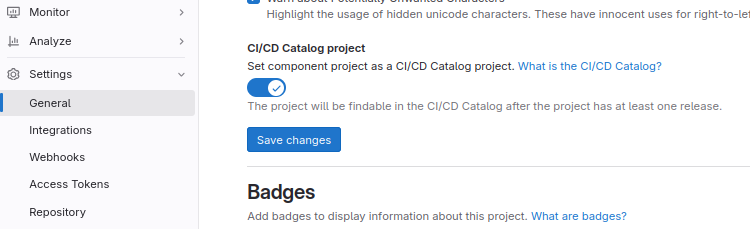
This allows your project to be listed in the GitLab CI/CD catalog, making your templates available for reuse across different projects.
You can check out the latest GitLab CI/CD catalog gallery here:
Once published, you can find your catalog listed:

Example Workflow
Here’s a workflow example that includes shared components and sets up your CI/CD environment for testing and building Docker images.
---
# ... in case you absolutely know what you are doing and are
# aware that this may introduce breaking changes, you may use the latest release:
include:
  - component: gitlab.com/opslabhq/shared/ci/aws-ecr-private/test@~latest
  - component: gitlab.com/opslabhq/shared/ci/aws-ecr-private/build@~latest

variables:
  CI_ENVIRONMENT_NAME: $CI_COMMIT_REF_NAME
  DOCKER_FILE_IMAGE: $CI_PROJECT_DIR/Dockerfile
  DOCKER_PLATFORM: linux/amd64,linux/arm64
  DOCKER_REGISTRY: <$AWS_ACCOUNT_ID>.dkr.ecr.$AWS_DEFAULT_REGION.amazonaws.com/<$ECR_REPOSITORY_NAME>
  DOCKER_LOGIN: aws ecr get-login-password --region $AWS_DEFAULT_REGION | docker login --username AWS --password-stdin $DOCKER_REGISTRY
  DOCKER_ADDITIONAL_ARG: ""

workflow:
  rules:
    - if: '$CI_MERGE_REQUEST_ID'
      when: never
    - when: always

before_script:
  - set -o errexit -o pipefail

stages: [test, build]
Conclusion
By following these steps, you can ensure that your GitLab CI/CD templates are properly versioned, published, and made available in the GitLab CI/CD catalog. This approach leverages semantic versioning and GitLab tags to automate the release process, enhancing consistency and efficiency in your CI/CD workflows. Whether you’re managing a small project or a large-scale CI/CD environment, this method provides the tools you need to maintain high standards and accelerate development.
Reference
- Catalog Announcement: Introducing the GitLab CI/CD Catalog Beta
- Catalog Documentation: GitLab CI/CD Components
- GitLab Catalog: Explore Catalog
- Release .gitlab-ci.yml File Example: GitLab Release Template
- Full Article Example: GitLab CI/CD Template
Feel free to explore these resources to better understand and implement versioned CI/CD templates in GitLab.
Author’s Note
For detailed instructions on setting up each tool and more advanced configurations, refer to the respective documentation. This guide provides a foundational approach and can be extended based on your specific use case.


