Free AI web copilot to create summaries, insights and extended knowledge, download it at here
2568
Abstract
</div></div></figure><h2 id="7afc">Code’s Description</h2><p id="3768">This program automatically chooses what node becomes root.
TO MAKE IT WORKS, We include the OLED library and set up all the links at
Directory C:\msys32\home\USER_PROFILE\esp\esp-idf\components;
To test disconnect one of the roots and in approximately 30 seconds a new root will be chosen. Return the node and you will see it associated with the new root. Nice & cool experiment!
Test with at least three ESP32 boards.
Enjoy /</p><h2 id="ef38">Commands:</h2><p id="8602">$ <b>make menuconfig</b> -> Set your project port, location, etc
$ <b>make erase_flash</b> -> To erase the flash; before taking the final two-digit MAC Address reported here ( as NODE_NAME)
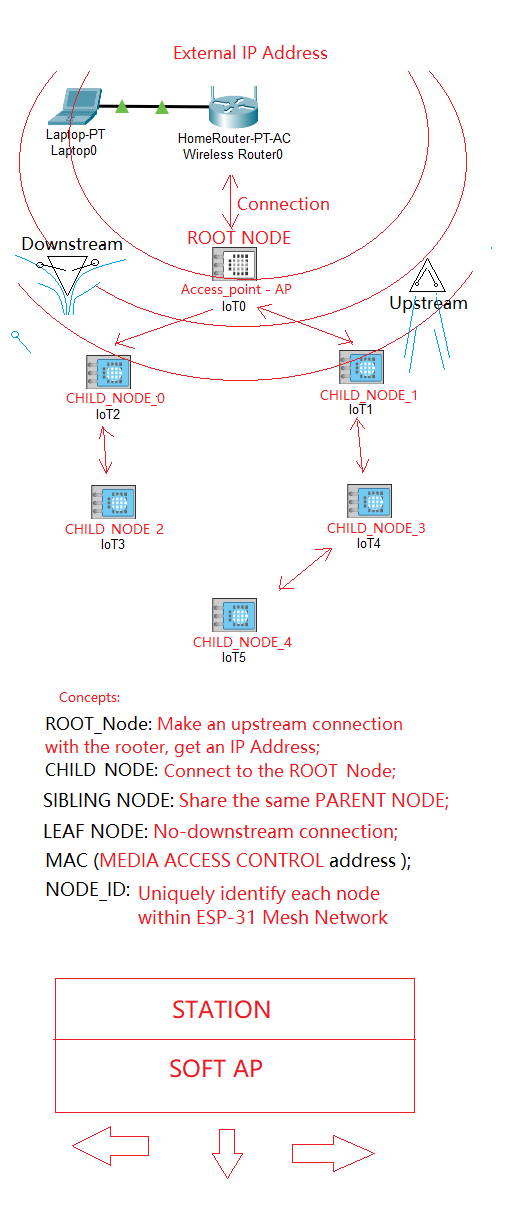
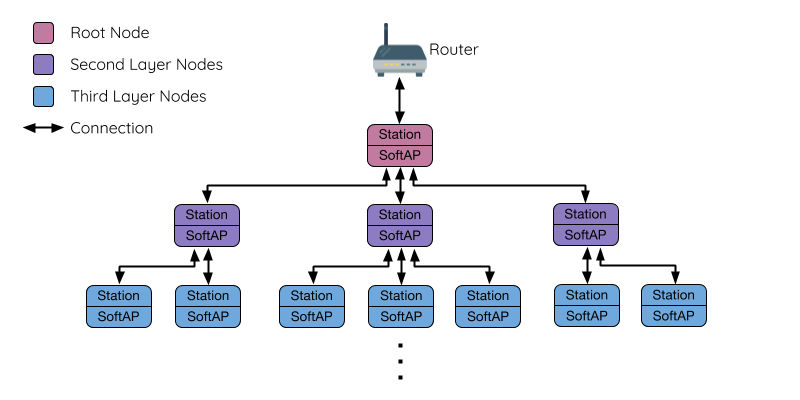
$<b> make flash -j5 monitor</b> -> Flash the ESP32 and run the Serial Monitor at the end :)</p><h2 id="211b">To Get started at Flashing ESP-32 Tutorial:</h2><p id="6105"><a href="https://readmedium.com/esp-idf-programming-guide-wifi-lora-32-v2-53f89e12c96e">https://readmedium.com/esp-idf-programming-guide-wifi-lora-32-v2-53f89e12c96e</a></p><h2 id="7616">What is ESP-MESH?</h2><p id="bfaa">ESP-MESH is a networking protocol built atop the Wi-Fi protocol.</p>
<figure id="c3b0">
<div>
<div>
            <iframe class="gist-iframe" src="/gist/giljr/75fab417ef19c8901bfec6369fb6489d.js" allowfullscreen="" frameborder="0" height="undefined" width="undefined">
          </div>
        </div>
    </figure></iframe></div></div></figure><figure id="6ad6"><img src="https://cdn-images-1.readmedium.com/v2/resize:fit:800/1*l1bVcQY8y9zEzGGkzzxrfw.png"><figcaption></figcaption></figure><h2 id="6fa1">Features:</h2><p id="fca2">Easy and Secure Setup;
Self-forming and Self-healing;
No Extra Gateways Required;
IP Connectivity;
Secure by Design;</p><h2 id="b24e">Applications:</h2><p id="7055">Smart Lighting: smart lights, lighting network;
Smart Home: smart switches, sockets, plugs, etc;
Automation: big parking lots, small factories, shared offices;</p><h2 id="60d8">Official Espressif & Heltec guide:</h2><p id="23d1"><a href="https://docs.espressif.com/projects/esp-idf/en/latest/esp32/api-guides/mesh.html">ESP32 Mesh</a>:
<a href="https://docs.espressif.com/projects/esp-idf/en/latest/esp32/api-reference/network/esp_mesh.html#mesh-api-reference">API Reference — ESP-MESH Programming Guide</a>
<a href="https://heltec-automation-docs.readthedocs.io/en/latest/esp32+arduino/quick_start.html">Quick Start</a>:</p><h2 id="0fd4">Installati
Options
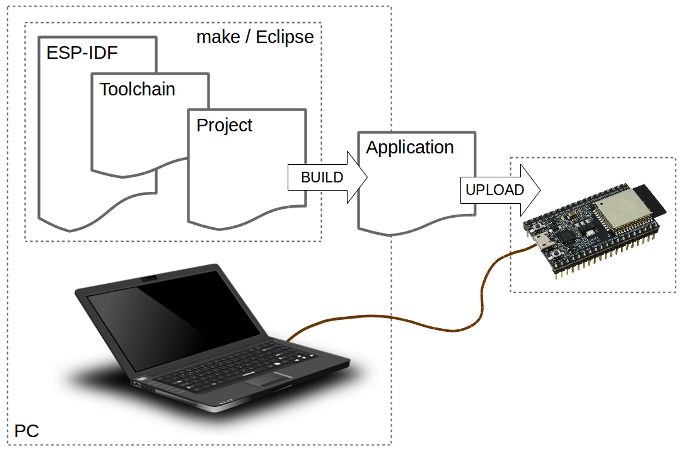
on Espressif ESP-IDF framework</h2><figure id="910a"><img src="https://cdn-images-1.readmedium.com/v2/resize:fit:800/0*0VLzuGXFRPQXya2w.png"><figcaption>Fig 1. From <a href="https://my-esp-idf.readthedocs.io/en/latest/get-started/index.html">https://my-esp-idf.readthedocs.io/en/latest/get-started/index.html</a> — As you can see we will need ESP-IDF framework installed on our PC, a Toolchain, a Project and finally build it and upload it with make utility prog into our <a href="https://heltec.org/project/wifi-lora-32/">WiFi LoRa 32</a> (v2) — Please, read more :)</figcaption></figure><h2 id="85af">Follow Some Note About This Experiment</h2><figure id="c9be"><img src="https://cdn-images-1.readmedium.com/v2/resize:fit:800/0*IDNd3rgBo1Edc4rx.png"><figcaption>From <a href="https://docs.espressif.com/projects/esp-idf/en/latest/esp32/api-guides/mesh.html">https://docs.espressif.com/projects/esp-idf/en/latest/esp32/api-guides/mesh.html</a></figcaption></figure><p id="5044">See you in the next esp32MeshSeries Episode o/</p><p id="bbf3">Gotta walk before you run.</p><p id="6410">Thank you for your support!</p><p id="63ff"><a href="https://drive.google.com/drive/folders/1so7QjEtBGJ3RTVEH5PEaDqi_3pnWCXR5?usp=sharing">Download All Files For This Project</a></p><h2 id="492c">Related Posts</h2><p id="e1d0">00 # Episode # esp32MeshSeries — Simple Mesh ESP32 Mesh Net — Expressif SDK-IDF (this one YET:/)</p><p id="4010">03#Episode # ESP_IDF_Series — ESP32-IDF — HelloWorld Get Started — How To Get Started</p><h2 id="84e4">Credits & References</h2><p id="2788"><a href="https://ead.microgenios.com.br/">Microgênios — Treinamento em Sistemas Embarcados — Microchip Regional Partner</a> Certified Training Courses a Simplício-owned enterprise \o/</p><p id="3851"><a href="https://heltec.org/project/wifi-lora-32/">WiFi LoRa 32 (V2)</a></p><p id="a882"><a href="https://docs.espressif.com/projects/esp-idf/en/latest/esp32/api-guides/mesh.html">ESP-MESH — OVERVIEW</a></p><figure id="c73a"><img src="https://cdn-images-1.readmedium.com/v2/resize:fit:800/1*5PDT4QXHLs8Ml4LiPZxMwA.jpeg"><figcaption>Day after: organizing everything…<a href="https://www.youtube.com/watch?v=g-OF7KGyDis">We Wish You a Merry Christmas</a>…The Beatles — <a href="https://youtu.be/KQetemT1sWc">Here Comes The Sun (2019 Mix)</a></figcaption></figure><figure id="f508"><img src="https://cdn-images-1.readmedium.com/v2/resize:fit:800/1*fn5P0Fndcz20KRpMuhJE7g.jpeg"><figcaption>Cockroach insects on my son kkkk art table… Here to tell you THANK YOU 0/</figcaption></figure></article></body>