
ES6 Cool Stuffs — A new JS string with template literals
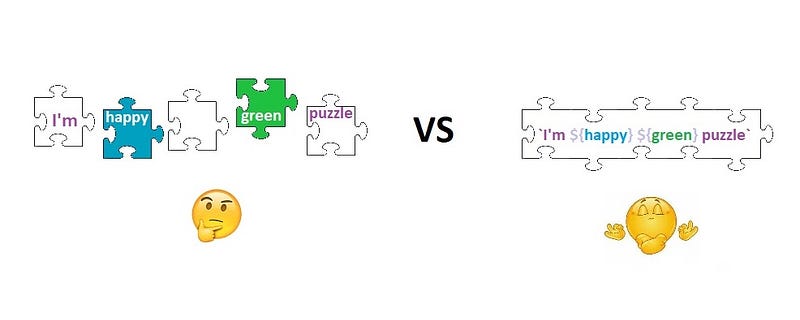
Well, strings support is one of nice features provided by modern languages for user interface. The question is to which supported level each language chooses to provide to strings’ functionalities — aka to what extend the language is willing to take in order to make our developer life easier.
So what’s up with JavaScript before ES6 and after ES6 on this matter?
Strings in JavaScript
Up until recent, JavaScript’s strings are provided and supported with only simple functionalities — such as:
- Creation: JavaScript’s strings are created simply using string literals or
String()global object directly.
let str1 = 'hello'; //single quote
let str2 = "world"; //double quote
let str3 = String('test me');- Modification:
str1.replace('ell', 'el'); //helostr1 += " " + str2; //helo world- Concatenation:
let name = "Maya",
    greetings = str1 + ", my name is " + name;
let greetings2 = [str1, ", my name is ", name].join('');Simple. But wait a minute, what about
- Long string (try to make it readable) ?
let longStr = "I'm a super long long long long long long\" +
" long long long long long long\" +
" long long long long long long\" +
" long long long long long long\" +
" text. Check me out!";- Interpolate using expression, in addition to variable ?
let isWorld = true;let printStr1 = "Hello " + isWorld ? "World" : "me";
console.log(printStr1); //World//Need to use () to wrap expression
let printStr2 = "Hello " + (isWorld ? "World" : "me");
console.log(printStr2); //Hello World- Multi-lines string ?
let rhyme = "Are you sleeping? Are you sleeping?\nBrother John, Brother John!\nMorning bells are ringing!\nMorning bells are ringing!\nDing, ding, dong.\nDing, ding, dong.";- HTML raw template ?
let person = {
    name: "Maya",
    hobbies: ["reading", "drawing", "traveling"],
    job: "Developer"
};
function personTemplate(person){
return "<article class='person'>" +
"<h3>" + person.name + "</h3>" +
"<p> Hobbies: " + person.hobbies + "</p>" +
"<p> Current job: " + person.job + "</p>" +
"</article>";
}document.write(personTemplate(person));- Or paragraph strings with indentation (or other special character)?
let paragraph = "Paragraph: \n" +
"\t1. Point 1:\n" +
"\t\t1.1 Sub-point 1:\n" +
"\t\t1.2 Sub-point 2:\n" +
"\t2. Point 2:\n" +
"\t\t2.1 Sub-point 1:\n" +
"\t\t2.2 Sub-point 2:\n" +
"\t3. Point 3:\n" +
"\t\t3.1 Sub-point 1:\n" +
"\t\t3.2 Sub-point 2:\n" +
"Conclusion: I'm exhausted! Did I miss anything?";console.log(paragraph);- Or just combine
‘single quote’and“double quote”in the same string?
let introduction = 'My name is "Maya Shavin", I' + "'m using single quote (') and double quote " + '(") here';Enough to start feeling pained and headache? I bet you did (I did, many times — by the way). If so, clap your hands strongly for our hero today — template literals.
What is template literals?
Template literals is a additional way to create and handle dynamic strings/string templates, thus easing our pain by providing simpler and better solutions for mentioned cases above.
To put it simple — Template literals are string literals allowing embedded expressions.
How does it work?
Basic Syntax
Forget about which to choose between ‘single quote’ and “double quote” — JavaScript doesn’t care which one you use anyway.
And say hi to `backticks` , now you can use both‘single quote’ and “double quote” in the same string without any problem!
let myStr = `my new string`;let introduction = `My name is "Maya Shavin", I'm using single quote (') and double quote (") here`;Expressions/Variables interpolation (of course)
Thank God now template literals can contain placeholders — which are indicated as${expression}. This syntax allows us to put any code expression in it — not just variable — evaluate that expression and produce the proper string value. Hence instead of
let welcome = "Hello " + (isWorld ? "World" : "me");Now it will simply be:
let welcome = `Hello ${isWorld ? "World" : "me"}!`;No more () to make sure the code result is correct.
And of course, say goodbye to ... + <variable> + " " + <variable> + ..., we no longer need + or " " to compute a dynamic string.
let meBe = {
firstName: "Maya",
lastName: "Shavin",
get welcome(){
return `Hi there, I'm ${this.firstName} ${this.lastName}`;
}
}console.log(meBe.welcome); //Hi there, I'm Maya ShavinCool, isn’t it? From now on, it’s up to us entirely to decide how much logic we want squeeze in the expression 😄.
Just bear in mind, don’t be too lazy (or greedy) and put too much logic inside it — think about other poor developers that may need to read your code one day. Readable comes first and foremost ✋!
Multi-lines strings and indented strings
This is probably one of the most awaiting feature for strings (at least for me, I’m sick of \n or \t , so unclean 😫)
So remember the tiring paragraph example above? It now can be re-write as:
let paragraph =
`Paragraph:
1. Point 1:
1.1 Sub-point 1:
1.2 Sub-point 2:
2. Point 2:
2.1 Sub-point 1:
2.2 Sub-point 2:
3. Point 3:
3.1 Sub-point 1:
3.2 Sub-point 2:
Conclusion: I'm exhausted! Did I miss anything?`;console.log(paragraph);What you see is what you get— that’s exactly how it works. Clean and clear as much as it can be! Bye bye 🐛
Note: Bear in mind — spacing does matter here. After all, what you see is what you get! 😉
What else?
HTML templates
With the help of multi-lines and indentation feature mentioned above, we finally can create neat, clean and understandable markup template without the help of 3rd party or making someone crazy just by looking at our code 😆
Like this example
function personTemplate(person){
    return "<article class='person'>" +
                "<h3>" + person.name + "</h3>" +
                "<p> Hobbies: " + person.hobbies +  "</p>" +
                "<p> Current job: " + person.job + "</p>" +
           "</article>";
}It can be:
function personTemplate({name, hobbies, job}){
   return `<article class="person">
   <h3>${name}</h3>
   <div>
       <div>Hobbies:</div>
       <ul>
           ${hobbies.map(hobby => `<li>${hobby}</li>`).join(" ")}
       </ul>
   </div>
   <p>Current job: ${job}</p>
</article>`;
}
Note here I use nesting template literal for hobbies list items with <li> tag. This enables the possibility to break your templates into neat and easy-to use sub-components, maintaining the readability we are aiming for. Don’t you agree?
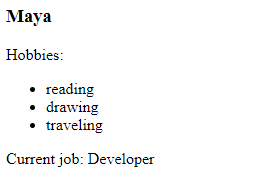
And the result will look like:
Feeling great so far? Good, because there is still more.
The above are the core features of template literals. However, despite the coolness, there are several limitations for template literals, as stated in the next section.
Limitations
No built-in syntax for looping
Think of when you need to print a list of dates
let days = ["Mon", "Tue", "Wed", "Thurs", "Fri", "Sat", Sun"];Template literals alone will not able to help you to achieve it. You will need the help of Array.prototype.map and Array.prototype.join to accomplish it
let table = `<ul>
   ${days.map(day => `<li>${day}</li>`).join(" ")}
</ul>`;
BUT this is not as efficient in performance compared to traditional direct concatenation += with loop, even though it does not look as good:
let table = "<ul>";
for (let i = 0; i < days.length; i++){
    table += `<li>${days[i]}</li>`;
}
table += "</ul>";No support for different languages and locales format
Template literals are not meant to handle multiple language-specific formatting of numbers, dates, etc..
Luckily (or not), in an effort to address these limitations, ES6 also brings new concept to us , a more advanced version of template literals — Tagged Template Literals. Let’s have a quick look!
Tagged template literals
Tagged templates— template literals methods — mean to allow parsing template literals passed to a function call into that function’s input parameters as:
- Template strings: array of static strings in passed template literals, separated by expressions — this is known in compile time
- Substitutions: any expression appeared in template literals — delimited by
${}— on their own variables and are known only at run-time.
For instance, this following template literal
`My name is ${name}, and I'm ${age} years old`when being passed to a function call, it will be parsed into the arguments:
["My name is", ", and I'm ", " years old"], <value of name>, <value of age>In which:
- Template strings:
[“My name is”, “, and I’m “, “ years old”] - Substitutions:
<value of name>, <value of age>
How do we pass it to function call?
Unlike normal, in order to pass a tagged template, we will use `backticks` and without () literal — which means:
func(`My name is ${name}, and I'm ${age} years old`); //Wrongfunc`My name is ${name}, and I'm ${age} years old`; //CorrectAnd it will be interpreted as equivalent as
func([“My name is”, “, and I’m “, “ years old”], <value of name>, <value of age>);Hence in this example:
let name = "Maya", age = "30";parseStr`My name is ${name}, and I'm ${age} years old`;function parseStr(templates, name, age){
console.log('Template: ', templates);
console.log('Param 1: ', name);
console.log('Param 2: ', age);
}The output will be:

Sound advanced but not very useful, doesn’t it? So what will it be good for?
Saw the “raw” in the template strings array? Yup, that raw is a special property, which allows user to access the raw strings, without processing all the special characters, i.e:
function getRaw(templates){
    console.log(templates.raw[0]);
}getRaw`One line\nTwo line\n`; //One line\nTwo line\n
console.log(`One line\nTwo line\n`);
//One line
//Two linegetRaw`Heading\n\tSub-Heading`; //Heading\n\tSub-Heading
console.log(`Heading\n\tSub-Heading`);
//Heading
// Sub-HeadingWhat else can it be useful for? Pretty everything we can think of or need tagged template for, such as creating re-usable HTML mark up template automatically, creating text localization (for supporting different languages and locales), etc… or even just get insane and become crazy with it 🚀!
Finally, after all the coolness, here comes the most important question — what about performance for template literals? Any specific performance improvement?
Performance
To be fair, template literals is meant to be an additional way of handling dynamic strings — which means it is aimed to fill in the missing string features JavaScript did not provide up to now and not to replace existing functionalities by any chance. As I always believe, everything exists for a reason 😉.
Hence any comparison will be relative, strictly depending on use cases. For example, I found an interesting benchmark testing on JSPerf between classical String concatenation VS template literals. The result is as below:
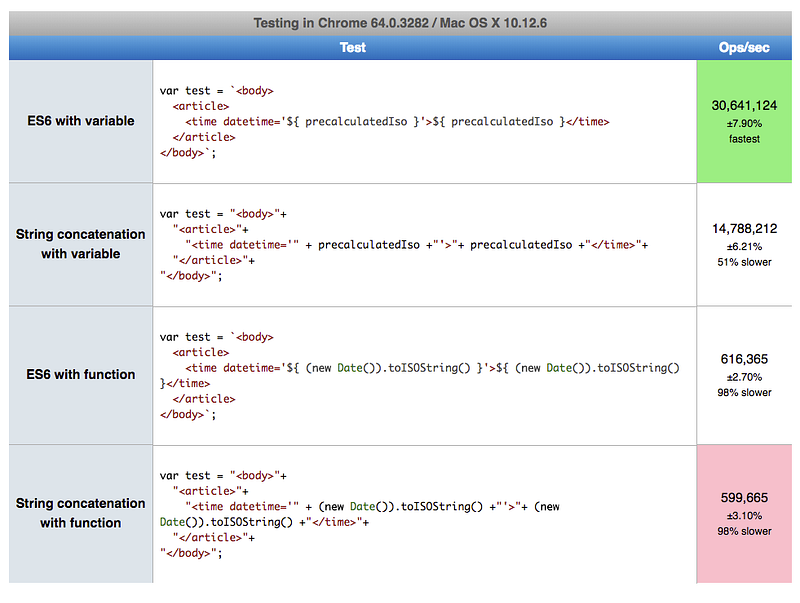
As seen here, template literals are faster in Chrome, but it can vary (depends on type of browser). To my opinion, while string concatenation can be a hit or a miss in performance in different browser, template literals performs quite more stable in multi-lines, concatenation and interpolation.
Conclusion
The truth is, personally I found template literals is simpler, more interesting and more useful than tagged template literals. Partially because I’m not a fan of unclear readability when using it (honestly, a function call without () ?).
I know there are much more complex use cases and I’m sure there is much deeper advantage in using tagged template literals. However, that requires more research in the future and actual usage exploration along the way.
For now, template literals rules for me, especially over the traditional way of multi-lining, concatenation and interpolation strings 🚀!
After all, who has the will and strength to go back to + and " " or \n days? I certainly don’t!
Finally, only one more little tiny wish for additional string feature — the same ability like StringBuilder.AppendFormat in C#. That will make my day 😜!
What do you think? Feel free to share your opinion. Sharing is caring, you know 😃
More on ES6:
- Set vs Array — What and when?
- Map vs Object — What and when?
- (…) syntax in depth
- var, let, const in depth
- Destructuring me, plz!
- Let’s divide our phones into Classes
More on Data Structures:
If you like this post, don’t forget to give me a 👏 below ⏬️ . It will surely motivate me a lot 😊
If you love to read more from me, feel free to check out my articles.
If you’d like to catch up with me sometimes, follow me on Twitter | Facebook or simply visit my portfolio website.


